Thank you! Your submission has been received!
Oops! Something went wrong while submitting the form.
MENU


TL;DR: To sell on Instagram, switch to a business account and set up a shop and catalog in Meta's Commerce Manager, then tag products in your posts, Reels and Stories. Since September 2025, shops on Facebook and Instagram use website checkout, so buyers browse on Instagram and pay on your website. Visual products like clothes, accessories, makeup, skincare, workout gear, art, food and furniture tend to sell best. Meta's Commerce Policies don't allow shops to list downloadable digital content or digital subscriptions, so courses and downloads sell through your bio link, Stories links and DMs instead.
If you’re looking to grow your business and add additional revenue streams, look no further than the popular photo-sharing social media platform Instagram. With Instagram’s shopping tools and 3 billion monthly users, you can show products to buyers where they already spend time, then send them to your own website to pay.
Throughout this article, learn more about the benefits of selling on Instagram, how to get started, and 10 ideas of what sells the most on Instagram.
Not sure why you should bother with Instagram? Trust us, there are quite a few benefits. Here are the top three you need to consider.
Instagram has 3 billion monthly active users, according to Meta CEO Mark Zuckerberg in September 2025. With a user base that large, you can bet your target audience is likely there.
If you have product photos or mockups, Instagram is the perfect platform to share those on. Due to its visual nature, product photos and videos fit right in, and sharing them can be a great way to reach an even wider audience of potential customers.
Because you can create an entire shop with Instagram, you’re able to turn the social platform into an entirely new revenue stream for your business. Buyers can browse your shop, collections and product pages inside the app. When they're ready to buy, Instagram sends them to your website to complete the purchase.
Many people browse Instagram to discover products, read comments and watch Reels before they buy. That means your audience might be shopping around for a product like yours while they scroll.
If you’re interested in selling physical products through an Instagram shop, there are just a few eligibility requirements to keep in mind.
If you meet these criteria, you can go ahead and start setting up your Instagram shop. Note that you’ll need to create a catalog in Commerce Manager before you can start linking products to your Instagram shop.
Want to start generating even more sales for your business? Let’s walk through the steps of getting your Instagram shop set up and how to let customers know you’re open for business.
Step one is actually setting up your Instagram shop. As mentioned, to do this, you’ll need to have an Instagram business account and a Commerce Manager account.
Once you’ve gotten that taken care of, follow these steps:
Once you’ve taken these steps, you can start promoting and selling your products on Instagram.
Now that your shop is set up, it’s time to start tagging products from your Instagram shop in your posts, stories, and reels. This way, when someone sees a photo of a product they love, all they have to do is tap it to view the product and head to your website to buy it.
Here’s an example of what this could look like on your Instagram posts:

Tag just a single product or tag several, depending on what’s pictured. It’s easy to do. When you’re creating a new post, the “Tag products” option will appear on the screen when you’re adding your caption and other final details before you publish. In Stories, use the product sticker instead.
You can feature and tag products in your regular Instagram posts, your reels, and your stories, so make sure you’re creating a wide variety of content and taking advantage of this feature.
Meet your audience where they are. Some go through stories of the accounts they follow, others scroll through reels, and others simply scroll through their feed or the explore page. Make sure you’re creating different types of content that features your products to give your audience an even bigger chance of discovering them.
Work with influencers in your industry to further promote your products and your brand. You can even give the specific accounts you work with permission to tag your products in their posts, creating a simple process for those introduced to your business via influencers to easily purchase your products.
If you’re lucky enough to have existing customers take photos and videos of your products, ask them if you can repurpose them onto your own feed. User-generated content (or UGC) helps create an authentic vibe that doesn’t feel like marketing content. Integrate as much UGC as you can into your strategy, and of course, don’t forget to tag your products in each one.
Finally, consider allocating some of your marketing budget towards Instagram ads. You can still tag products in these ads, but you can also create a call-to-action to your full Instagram shop, enabling ad viewers to start shopping around.
There are a number of different types of ads with various objectives. Play around with different ad types until you discover the ones that get you the best results.
The products that tend to sell best on Instagram are visual ones that look good in a photo or a Reel, such as clothes, accessories, makeup, skincare and workout gear. Digital products like courses and downloads sell too, but through a link to your own checkout rather than a shop.
You might already have an established business with products to sell. But if not, you may be looking for inspiration to get started. Here are 10 ideas of things you can sell with Instagram’s shopping tools and your own website.
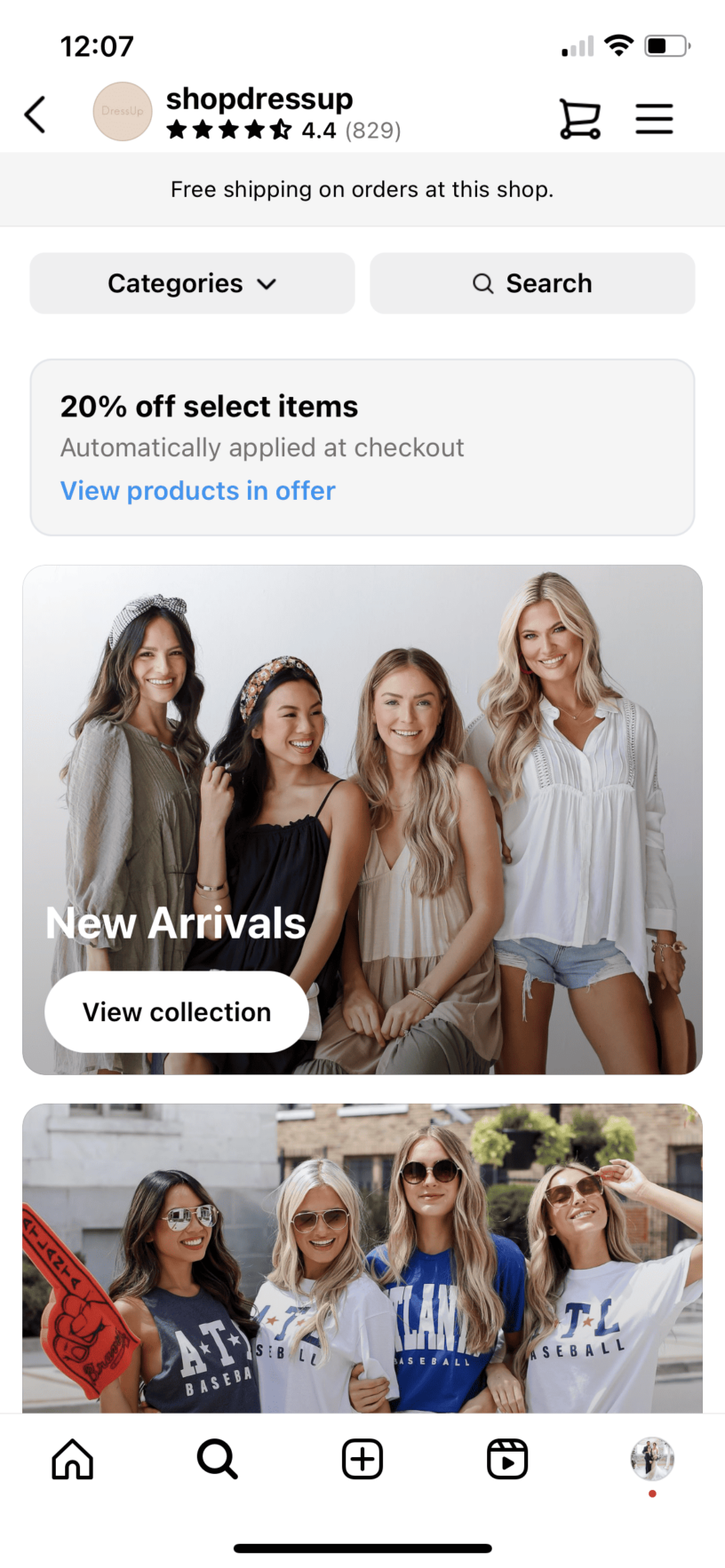
Clothes and apparel are a common product sold on Instagram. Tons of online boutiques take advantage of Instagram shopping to increase sales and reach a wider audience of customers.
Here’s an example of boutique Dress Up and its Instagram shop. The store is even offering a 20% discount on select products through Instagram and has categorized products to make it easier to shop on the app.
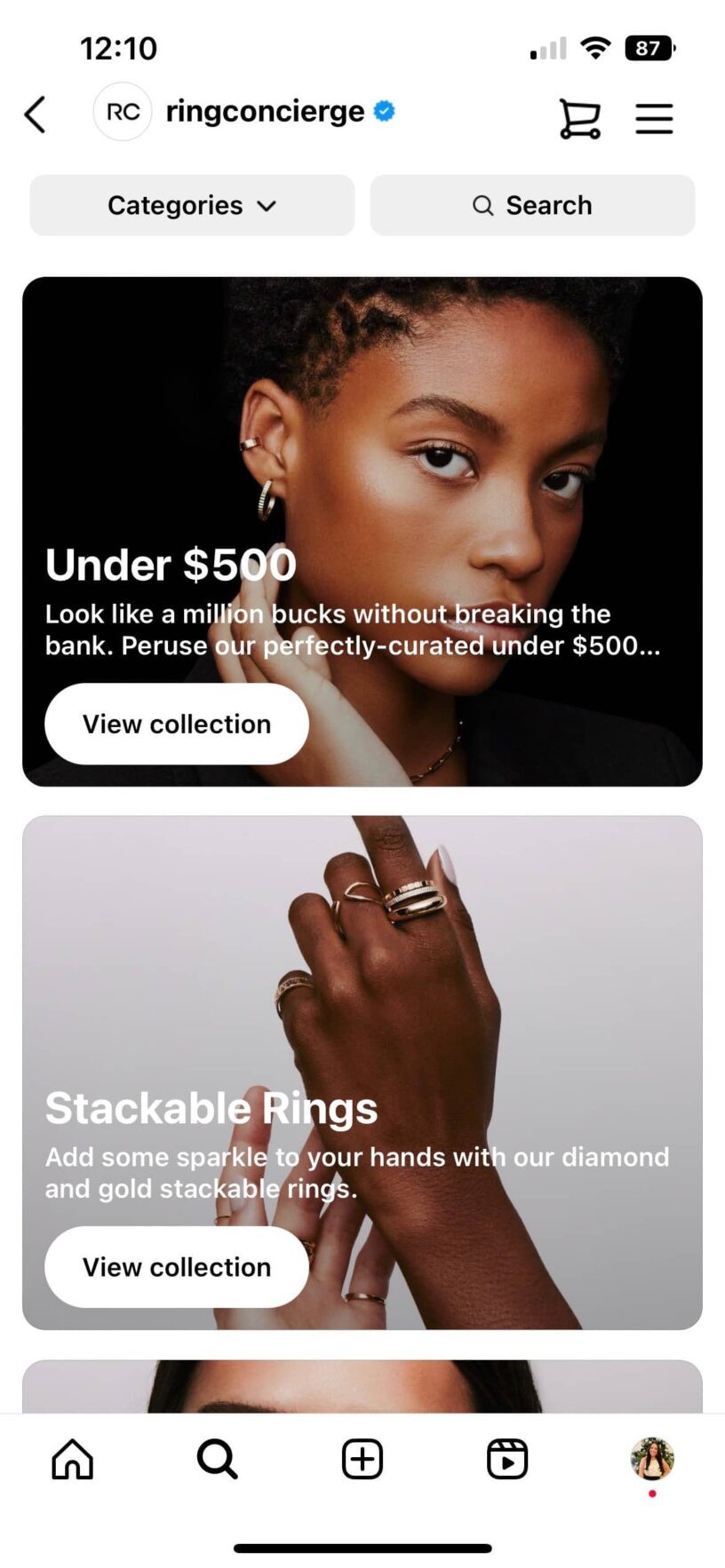
Accessories, jewelry, sunglasses, shoes, etc., is another great product to sell on Instagram. You can sell handmade jewelry. There are many polymer clay and metal working brands selling handmade jewelry on Instagram.
Or, you can go a more traditional route, like Ring Concierge below. The brand creates fine jewelry and sells it on their website, while also creating a shop on Instagram. This makes it easy for them to tag products directly in their content, increasing sales.
Instagram is a common place for people to look for makeup inspiration, learn more about how to better apply makeup, and, of course, purchase makeup products. This means selling your makeup products on Instagram can help bring in more sales, whether you have an established brand or want to create your own products.
Here’s an example of what your shop could look like from Tarte Cosmetics:

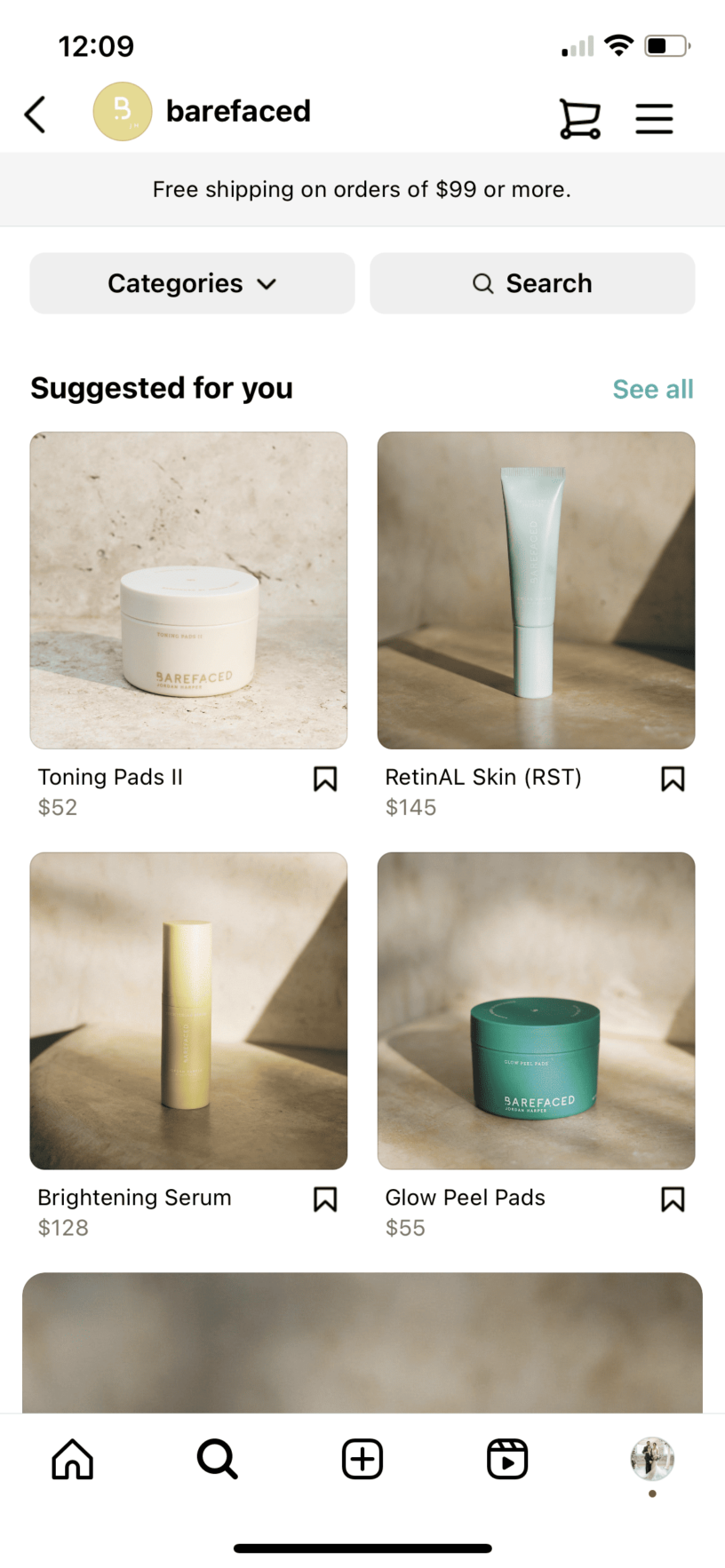
Skincare products cover a wide range of options: face masks, face washes, creams, moisturizers, and more. You can even include hair care products here if you’d like.
Here’s an example of a shop on Instagram selling skincare products:
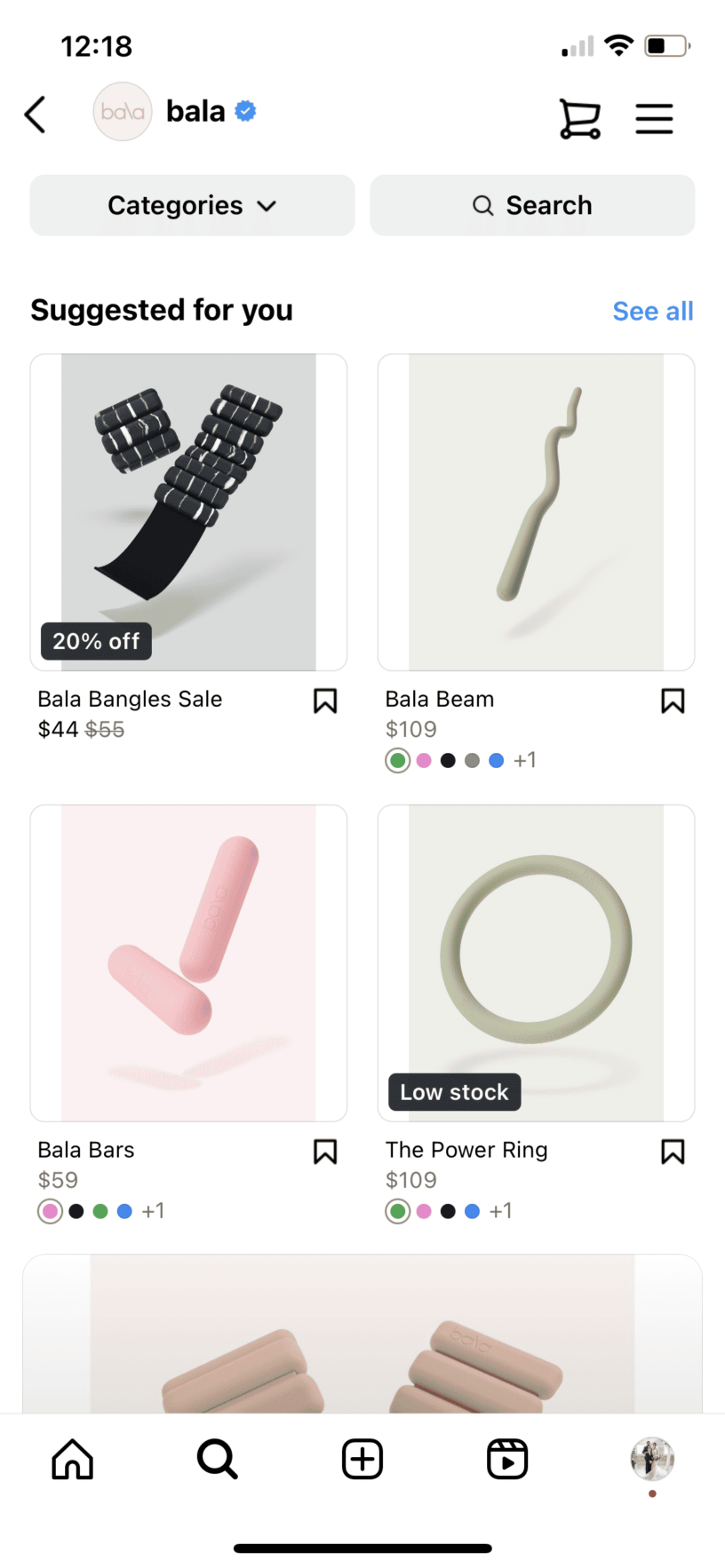
Workout gear, yoga mats, fitness clothes, fitness products, protein powder, etc., are all great products to sell on Instagram. Many users love to peruse the app for workout ideas and motivation, so putting your products in front of that audience can help build a larger customer base.
Here’s an example of fitness company Bala’s Instagram shop:
Are you an artist? While many artists have one-off drops, others have consistent products available. If you’re one of the latter, consider offering your regular products via Instagram’s shop.
Here’s an example of what this could look like from artist Ashley Longshore:

While the past few examples we’ve covered have all been physical products, you can sell digital products on Instagram, too! Instagram shops don't allow downloadable digital content or digital subscriptions, so you promote courses in your content and send followers to your course sales page. Put the link in your bio, add link stickers to Stories, and answer questions in DMs. Our guide to building an Instagram sales funnel walks through each step, and you can host the course itself on an online course platform.
Another digital product to sell is various types of digital downloads. Checklists, guides, workbooks, templates, etc. These are very popular products, and you can easily sell more of them by promoting them on Instagram and linking to a digital downloads checkout on your own site. For more ideas, see our list of digital products to sell.
Food can be a tricky product to sell online, but many bakeries and other companies have figured it out. Maybe you’re selling hot sauce, cereal, baked goods, or something else that can easily package and travel well. Consider offering your products via Instagram!
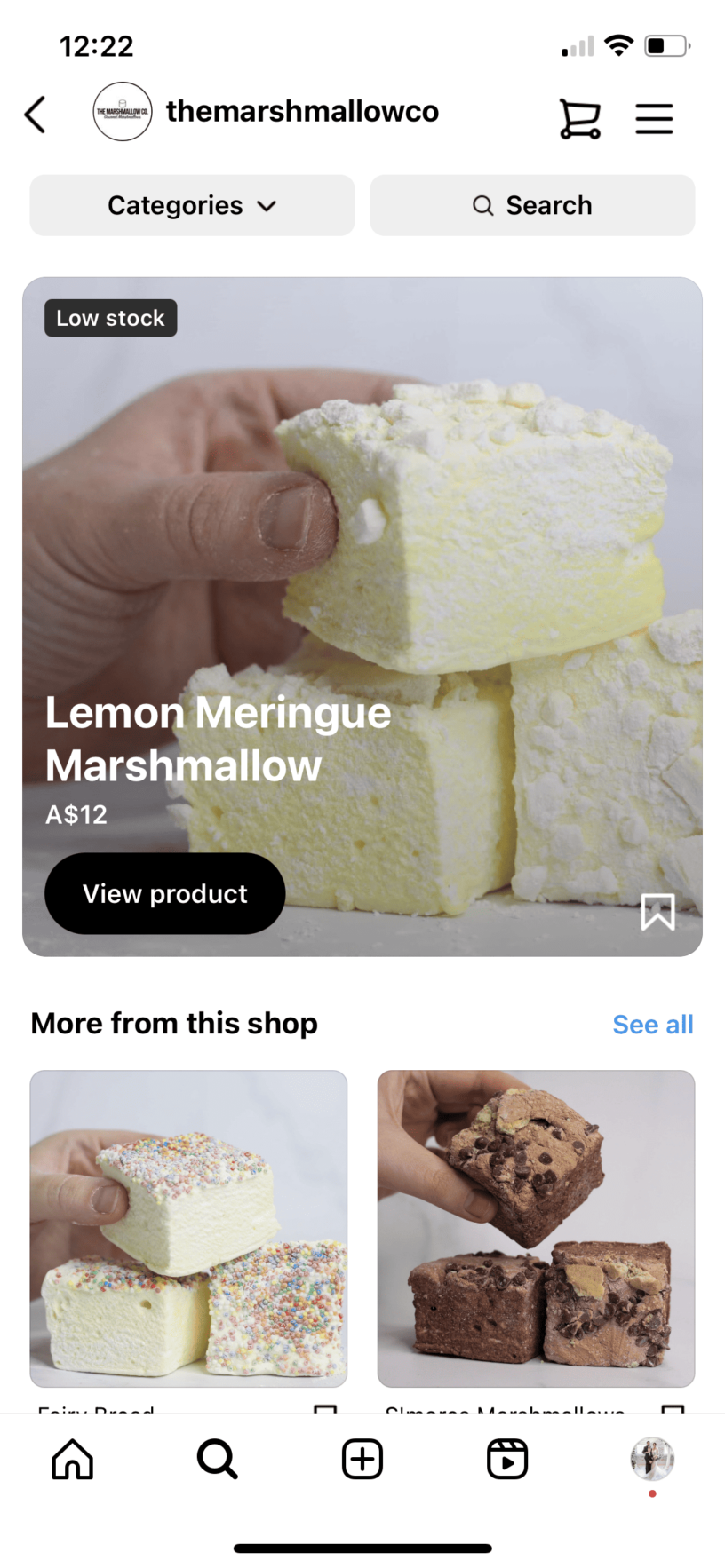
Take a look at this Instagram shop, The Marshmallow Co. The brand has listed a number of types of marshmallows for sale that its customers can easily buy after finding them on Instagram.
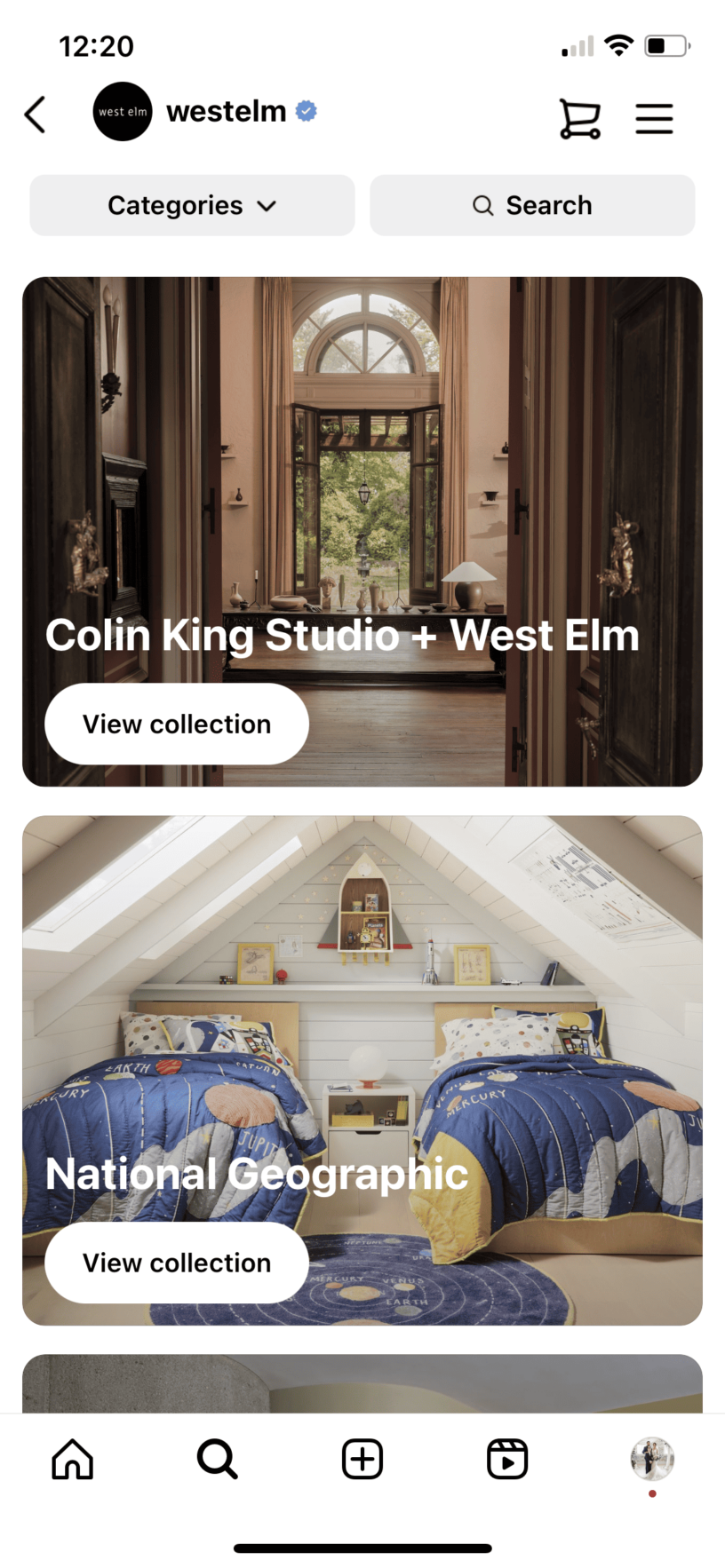
And last, but certainly not least, is furniture! While bulky, if you have a website that you use to sell furniture, you can easily translate that to an Instagram shop.
Here’s an example of popular furniture brand West Elm’s Instagram shop:
Courses and downloads can't be listed in an Instagram shop, but Instagram is still a good place to find buyers for them. Here's how creators sell digital products from Instagram:
If you're ready to turn Instagram followers into paying customers, you need somewhere to host and sell the course, download or coaching offer you're promoting. Start a 7-day trial and build your first course before committing to a plan.
Can I sell directly through Instagram?
Partly. You can list products in an Instagram shop and tag them in posts, Reels and Stories, but since September 2025 buyers complete the purchase on your website, not inside Instagram.
Can you sell digital products on Instagram?
Yes, but not through an Instagram shop. Meta's Commerce Policies don't allow listings for downloadable digital content or digital subscriptions, so you promote courses and downloads in your content and link to your own checkout.
Instagram shop: A storefront built inside your Instagram business profile where you list products for people to browse and tag in your content.
Commerce Manager: Meta's tool for setting up and managing the product catalog that powers your Instagram and Facebook shops.
Product tagging: Adding clickable tags to products in posts, Reels and Stories so viewers can tap through to a product page.
Website checkout: The purchase flow Instagram now uses for every shop, where buyers complete payment on your own site rather than inside the app.
Bio link: A link in your Instagram bio that points followers to your own sales page, useful for selling products like courses and downloads that can't be listed in a shop.

TL;DR: There are 7 commonly cited types of learners: visual, auditory, reading and writing, kinesthetic, verbal, social and solitary. The first four make up Neil Fleming's VARK model, the most widely used framework, which treats them as preferences rather than fixed labels. Research has not found that matching lessons to one preferred style improves learning, so treat these categories as a checklist for variety, not for sorting students. The practical takeaway for course creators: build each lesson in more than one format, such as video, a written summary and a hands-on task, and ask students how they like to learn.
We all absorb and retain information in different ways. Some people learn faster and more efficiently when content includes visuals like charts, photos, or videos. Others prefer to read and write to retain information. Course creators that know the different types of learning styles can use them to improve student experiences and outcomes. If you know your students and the ways they learn, you can adapt your teaching styles to suit them better.
Creating courses with learning and teaching styles in mind will set you and your students up for success. We’ll go over each learning method and how to identify them. Plus, we’ll provide examples and tips on how to create courses, coaching, and other educational products for each learning style.
Learning styles are the preferred methods that people use to understand and remember information. By identifying your students’ learning styles, you can create course materials that suit their preferences.
There is some debate over how many types of learning exist. Common models list between four and eight learning styles. We’ll go over each in detail below.
One person can have multiple styles. These are known as multimodal learners. They retain information and may thrive using more than one learning style.
Most people do have preferences for how they take in information. But a 2017 review in Frontiers in Psychology found that the idea that teaching to a student's preferred style improves learning "has been repeatedly tested and there is currently no evidence to support it" (Newton and Miah, 2017).
That doesn't make learning styles useless for course creators. Treat them as a checklist for variety, not a rule for sorting students. A lesson that combines a short video, a written summary and a hands-on task works for more people than a lesson built for one style.
New Zealand educator Neil Fleming developed the VARK model in 1987. It’s one of the most common methods to identify learning styles. Fleming proposed four primary learning preferences: visual, auditory, reading/writing, and kinesthetic. The first letter of each spells out the acronym (VARK).
We’ll go over the VARK learning styles and three others that researchers and educators have identified below.
When you create a course curriculum, consider how many and what type of visuals to include. Visual learners prefer to see information laid out, so diagrams and video often do more for them than long blocks of text.
To learn best, visual learners need graphs, illustrations, diagrams, videos, and other visuals. You can also teach visual learners better by incorporating these into your lessons.
Using all of these visuals at once will overwhelm your students. Instead, identify opportunities to display information as a visual and choose the best method for it.
Video courses are a natural way to help visual learners. If you’re new to recording videos, you can take a course or watch a tutorial on making high-quality videos for your courses. You can also design and voiceover slideshows.
Visual learners also read and write like other students but may add images to notes, highlight sentences, or draw graphs. It can be helpful to provide them with downloadable versions of course materials so that they can take notes. On our platform, you can add digital downloads to your website and courses.
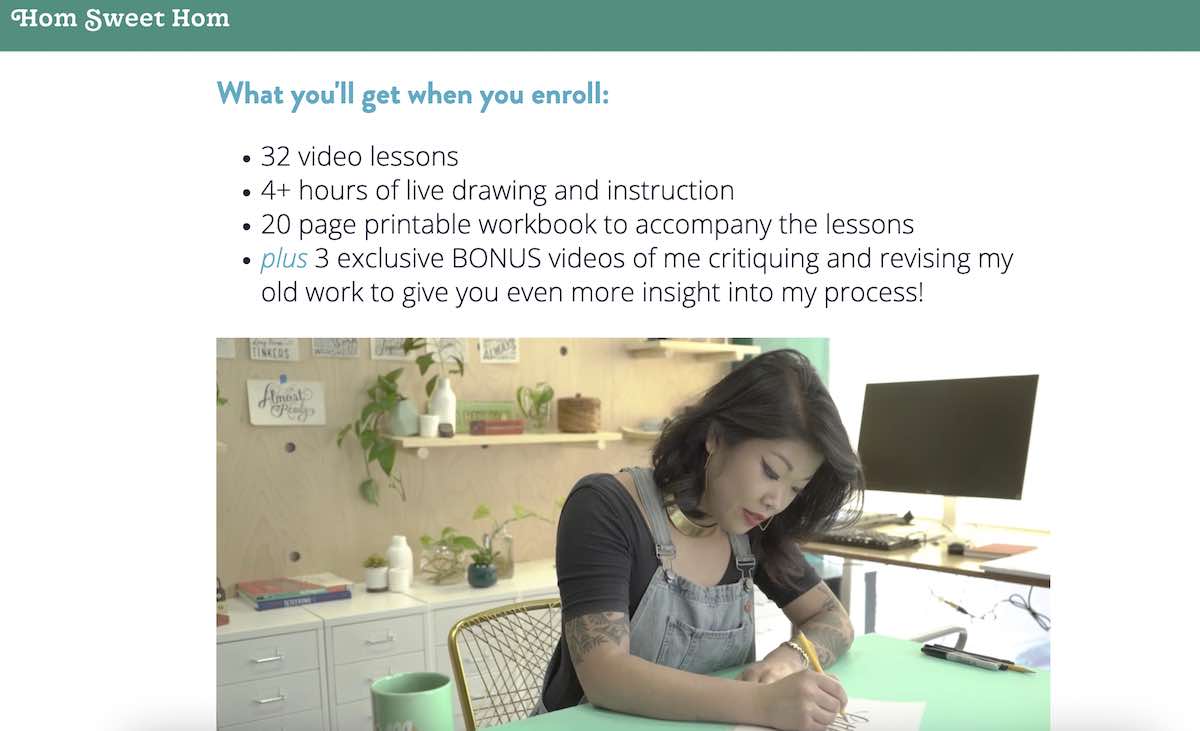
One of our creators, Lauren Hom, combines visual and other types of learning styles in her lettering course. Course lessons include videos, live drawing practice, and printable workbooks.
Auditory learners like to listen to absorb information. Auditory learners may listen to lectures, podcasts, music, and videos.
They also tend to read their notes aloud to help them understand and retain information or listen to music to study.
You can cater to auditory learners by:
In addition to adjusting your teaching methods to different types of learners, you should also consider the subject.
For example, if you teach guitar online, it will naturally have an audio element. However, you may combine the sounds of different guitar strings with images and videos of them. When you combine different teaching methods, you can cater to multiple learning styles.
Learners who prefer reading and writing thrive with traditional textbooks, handouts, and written assignments. Reading and writing learners are similar to visual learners because they like to see the information on a page.
To teach reading and writing learners, try to present information in one of these forms:
You could also consider creating an ebook to supplement your course material. So if you have a video course, add transcripts to your lessons so students can read along and take notes.
The kinesthetic learning style is learning by doing. And people who are kinesthetic learners learn better when they’re physically moving and getting hands-on experience.
Kinesthetic learners prefer playing games or doing puzzles as part of the learning process. They tend to enjoy problem-solving and trying new activities to build skills.
Many people associate kinesthetic learning with physical activities and in-person learning environments. However, you can still cater to kinesthetic learners when you create an online course.
For example, many developer courses include coding challenges, hackathons, and other activities where students learn by doing.
Here are some ideas to help you teach kinesthetic learners:
If you want to add a more physical element, you can also include printables and supplies. Another option is to send materials to students in the mail.
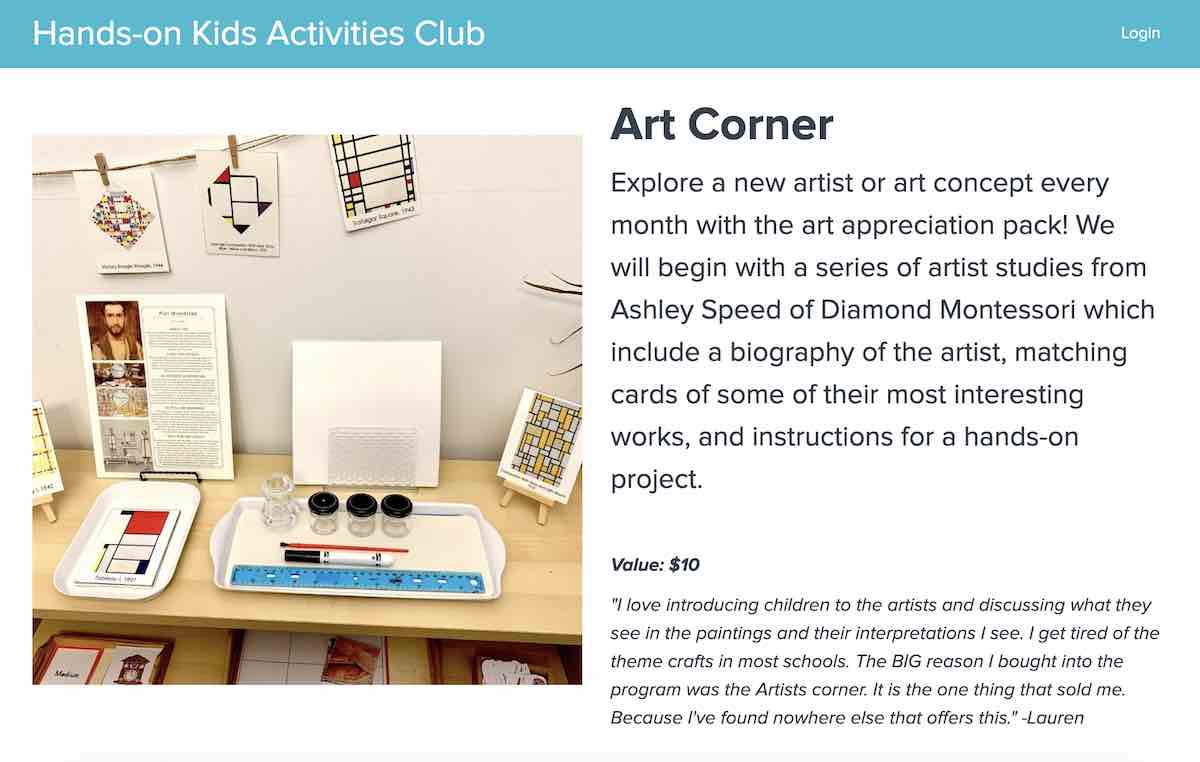
There are many ways to teach kinesthetic learners. One example is the Hands-on Kids Activities Club (HOKA), a membership club for teachers. Every month, teachers get downloadable printables and other resources to create hands-on learning experiences. In one bundle, students learn about an artist and do an art project in that artist’s style.
Verbal learners or linguistic learners retain information best by hearing and envisioning words. You may also hear this called verbal-linguistic learning. Similar to an auditory learner, a verbal learner speaks aloud to memorize information better. They tend to be avid readers and may be talented storytellers or poets.
Any of these can help a verbal learner:
This type of learning is also common in language courses. If you teach students how to speak Spanish, English, French, or another language, verbal learning will come in handy. They’ll want to hear how you pronounce words and practice speaking them on their own.
Some students learn better alone and others learn better while in groups. Social, also called interpersonal, learners thrive in group discussions and group coaching.
They enjoy speaking in front of groups and asking questions. A social learner will like to give and receive feedback from other students and bounce ideas off others.
Interpersonal learners prefer these types of activities:
For online courses, live cohort sessions and group coaching calls give social learners the interaction they look for. See our guide to cohort-based learning.
Solitary learners prefer to learn on their own rather than with groups of peers. The word intrapersonal is similar to introvert. Solitary learners can feel drained from social activities.
These students don’t enjoy group work and would rather get a list of items to study and work independently. Instead of getting ideas and feedback from other students, solitary learners are more introspective. They can get lost in their work and are more hesitant to ask for feedback or ideas from others.
Here are some ideas to help teach solitary learners:
Solitary learners are self-starters, so they usually have the determination to complete a course. Even though they prefer learning independently, learning from others has many benefits too.
Sometimes getting a solitary learner to open up more, ask for feedback, and challenge themselves can improve their learning. You could also offer solitary learners coaching or feedback sessions with you to help them develop their learning in a one-on-one environment.
Most adults have a sense of their preferred learning style. You can ask students or coaching clients which methods they prefer via an intake form when they sign up for your courses or coaching.
To identify learning styles, you can:
You can also use an online quiz like the VARK questionnaire to understand new students better. VARK describes its results as a pattern of preferences rather than a fixed label, so use them as a guide, not a box to put students in. Another option is to create your own assessment and tailor it to your teaching style and course topic. Some sample questions you can use to create a quiz or questionnaire to identify learning styles are:
Let students know this is the kind of quiz with no wrong answer. You’ll use the answers to understand what type of learning style they prefer and tailor your teaching to better suit them.
Note that this type of questionnaire works best with coaching or online courses that use cohorts with specific start dates. You can use it to fine-tune your course curriculum for each cohort or personalize coaching sessions.
As you plan your course, think about how you can accommodate each learning style. For example, auditory learners usually thrive on discussion. On the other hand, learners who prefer to read and write might struggle with group discussions or debates. Discussions can be harder for them because they like to write their thoughts down first before speaking.
To accommodate different types of learning styles, provide several options. In the example above, you could give your students a discussion prompt ahead of time. Reading and writing learners can write talking points down before and auditory learners get the benefits of learning through discussion.
A simple way to build this into every lesson:
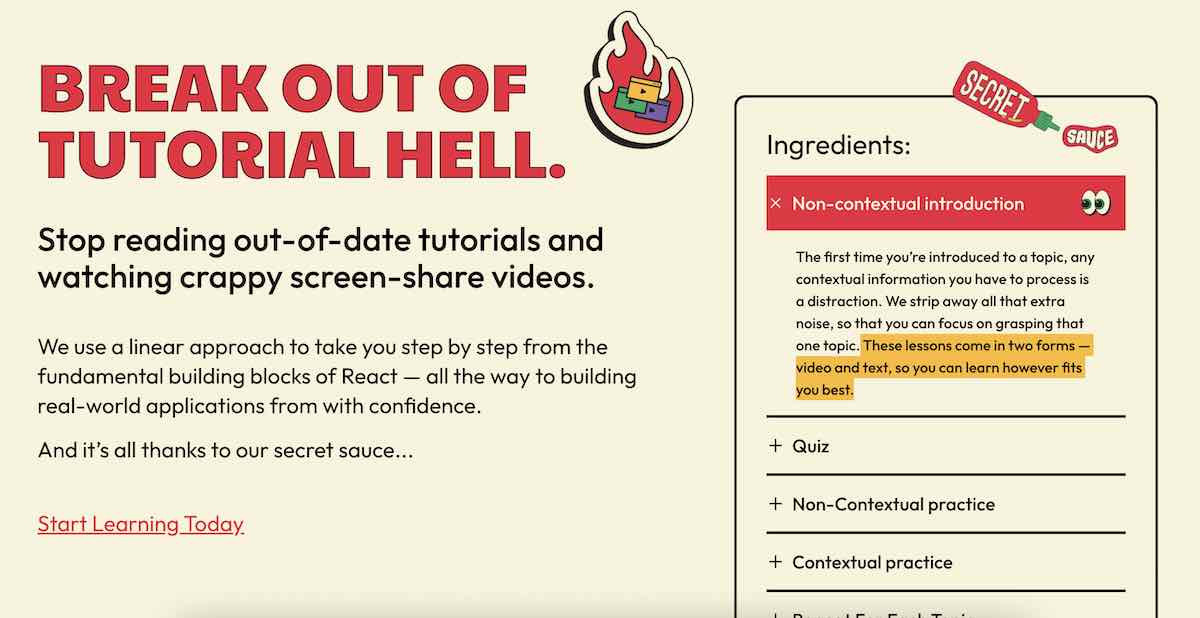
The ui.dev online courses are perfect examples of how to consider different types of learning. Looking at their React coding course, you can see that they provide lessons in two forms: video and text. This way visual, auditory, and reading and writing learners can refer to the materials that they understand best. It also includes kinesthetic learning with practice coding activities and projects where students build real-world applications.
No two students are exactly alike. A learning style that works for some students might not work for others. You can still offer your students or clients a meaningful learning experience.
Identifying how your students learn best helps you teach them in ways that will be the most successful. It also shows them that you care about their learning experience and outcomes. So by considering all the different learning styles, you’ll create an online course that appeals to a larger pool of people.
How students prefer to learn is one half of the picture. The other half is how you teach, which our guide to teaching stylescovers. If your students are adults, our explainer on adult learning theory is a useful next read.
Once you've planned how to support each learning style, you can create a course with us. From there, you can build online courses, coaching services, and even digital downloads. To get started, try our online course platform free for 7 days.
What are the 4 types of learning styles?
The 4 types of learning styles in the VARK model are visual, auditory, reading and writing, and kinesthetic. Many guides add verbal, social and solitary learning to reach 7.
Does teaching to learning styles improve results?
Research has not found that it does. Studies of the matching idea, where each student gets lessons in their preferred style, have not shown better learning. Offering the same lesson in several formats is the more practical approach for online courses.
Can you have more than one learning style?
Yes. People who use more than one learning style are called multimodal learners. Most people have a dominant preference but also pick up information through other styles, so building lessons in multiple formats works for most students, not just the ones who match a single, pure type.
How do I find out my learning style?
Take an assessment like the VARK questionnaire, or ask directly through an intake form when students sign up for a course. Observing how students engage with different materials over time is also a reliable way to figure out what works best for them.
Learning style: a person's preferred way of taking in and processing information.
VARK model: Neil Fleming's framework for visual, auditory, reading/writing and kinesthetic learners, treated as preferences rather than fixed labels.
Multimodal learner: someone who learns effectively through more than one learning style rather than relying on a single preference.
Interpersonal learning: the formal term for social learning, where a person learns best through group discussion and collaboration.
Intrapersonal learning: the formal term for solitary learning, where a person learns best working independently.
Black Friday is eight weeks away, and if you're like most creators, you're thinking about your offer. But the creators who have their best Black Friday don't start there. They start with their buyers: who has already bought from them, what those people bought, and where in the world they live.
Here's what to do before you build anything, and how each step should shape your offer.
Your best Black Friday audience are the people who have already trusted you with their money. Pull your sales from the last 12 months in Teachable and look for three things:
These insights are where your offer should come from. Bundles, early access for past buyers, or a "complete the set" deal for students who already own one course give people a reason to buy beyond a discount, and that's exactly what top-performing Teachable creators lean on.
.png)
Now look at the same buyers, plus your site traffic, email list, and social followers, by country. Many creators are surprised by what they find: a meaningful share of their audience is outside their home country, often people who have followed for years but never bought.
It’s not for lack of interest, either. If you ask creators why they don't actively sell internationally, many will mention a conversation with an accountant or advisor who warned them that selling abroad could trigger tax registration or filing obligations. That warning has some merit. Many countries require sellers of digital products to collect and remit tax on sales to their residents, and in places like the EU and the UK, that can start with the very first sale. So international buyers quietly get left out of the plan, whether or not anyone decided they should be.
During Black Friday, that decision becomes more costly than any other time of the year. It's when your entire audience, wherever they live, is looking for a reason to buy. If a slice of your list is international and your plan ignores them, your biggest sales weekend is capped before it sta

"Teachable was easy and intuitive from the start. I could upload my digital products without having to build a website, set up payments, or figure out currency conversion for my international audience."— Anjali Viramgama, Tech & AI creator
Once you know who your buyers are and where they are, plan for them deliberately:
.png)
The last step takes 10 minutes and protects everything you already planned. Before Black Friday, check that:


“Before Teachable, handling payments manually through PayPal was not working for me. Now everything is integrated and easy to use, so I can focus on creating the curriculum and finding new ways to serve my students.”— Wendy Ramirez, Founder & CEO of Spanish Sin Pena
Log in to Teachable and pull your last 12 months of sales. Note your top products, your most common pairings, and where your buyers are. That's your Black Friday map, and it should take less than an hour. Once you have it, you’ll know what to offer and who to offer it to.
TL;DR: Most platform comparisons focus on discussion features. The real differentiators are fee stacks, tax compliance, and course delivery depth. Skool offers strong gamification and Circle has polished discussion layouts, but both leave international tax filing to the creator across most markets. Our Teachable Payments handles automated tax remittance across 45+ countries, and our Builder plan ($69/month on annual billing) bundles course delivery tools and 0% platform fees in a single subscription. If you sell structured courses to an international audience, the fee math and tax exposure matter more than leaderboard badges.
A thriving discussion board is only as valuable as the business infrastructure sitting underneath it. Creators who pick a community platform based on engagement features alone often discover, after their first international sale, that they owe VAT or sales tax to authorities in various countries, and their platform left that entirely to them. This guide compares the top online community platforms on the metrics that actually determine take-home pay and operational risk: fee stacks, tax compliance, course delivery depth, and mobile delivery.
Running a paid community is running a business. Before evaluating discussion layouts and gamification, confirm a platform covers three operational requirements:
Creators who skip this audit typically discover the gaps during a live launch, when a broken checkout or missing payment tool costs them revenue that cannot be recovered. The launch strategy resources on our blog cover how to pressure-test your full workflow before a live window opens.
Engagement inside a paid community does not happen by itself. The platforms that drive the highest daily active participation combine three mechanics: structured prompts that give members a reason to post, member directories so participants can find peers with shared goals, and gamification layers such as points, leaderboards, and badges that reward consistent contribution.
The trade-off is that gamification without structured content creates engagement that peaks and then plateaus. For creators building course-based student engagement, the combination of discussion spaces and drip-released lesson content produces more sustained retention than either tool alone.
You need built-in checkout support for one-time purchases and recurring memberships, multi-currency acceptance, and subscription management tools that allow students to pause or cancel without manual intervention on your end.
A short enrollment window to a warm email list is a high-stakes event, and downtime or a broken upsell during that window is not recoverable. Reviewing a platform's incident history and uptime documentation before committing is a useful due diligence step.
A community without a learning path is a chat room. Creators who combine structured courses with discussion spaces see meaningfully higher completion rates because students have clear milestones to work toward and a community to discuss them in. The features that separate deep course delivery from basic video hosting include drip content scheduling, progress tracking at the individual student level, compliance settings like minimum watch-time enforcement, and quizzes with graded assessments.
These features also affect how students perceive the value of what they bought. For creators building toward credentialed programs, delivery depth matters as much as the content itself.
Headline subscription prices are the sticker price. The receipt has more lines. Every platform stacks a subscription fee, a platform transaction fee on every sale, and a payment processing fee charged by the underlying card processor. International transactions can add a currency conversion fee on top.
Think of the platform transaction fee like rent versus buying: percentage-based fees on lower-tier plans compound as revenue grows. The revenue and pricing strategy resources on our site cover how to model this across different product structures.
The six platforms below represent the realistic shortlist for creators building monetized communities in 2026. Each has a distinct strength, and each has structural limitations that matter at different revenue levels.
Skool positions itself around community-first design: the member feed is the product, and gamification, including points, leaderboards, and level-ups for participation, drives daily logins. Skool's Pro plan runs $99/month on monthly billing ($82/month effective on annual billing) and charges 2.9% + $0.30 per transaction up to $900, rising to 3.9% + $0.30 above that.
On tax compliance, Skool collects and remits VAT for EU buyers as a qualifying marketplace under VAT regulations. That coverage does not extend to the 45+ countries that Teachable Payments covers, so creators with students in Australia, Canada, India, or across the US may remain personally responsible for those tax obligations.
On course delivery, Skool reportedly lacks quizzes and completion certificates. Skool reportedly includes a drip feature that unlocks content after a set number of days from when a member joins. If your paid community sells certification-based programs or needs graded assessments, Skool may require a separate platform to handle that delivery, which adds cost and integration fragility.
Circle offers polished discussion spaces with custom branding, organized spaces, and solid moderation tools. Circle's Professional plan runs $89/month on annual billing with a 2% transaction fee, and Business runs $199/month annual with a 1% fee, both stacking on top of standard Stripe and PayPal processing fees.
Circle's course builder reportedly includes basic quiz functionality with minimum passing grades and drip content scheduling across structured and time-based release options. It also reportedly supports basic lesson-order enforcement. What Circle reportedly lacks are graded open-ended assessments, rubric-based scoring, and completion certificates at the level we provide. Circle does not automate international tax remittance, so creators handling international sales are personally responsible for calculating and remitting VAT, GST, and applicable sales taxes. Our Teachable Payments automates that across 45+ countries, and our Builder plan includes the certificate issuance and compliance settings that Circle reportedly cannot match at its mid-tier pricing.
Fully branded iOS and Android mobile apps on Circle require Circle Plus, which carries custom pricing. We include native apps on all plans.
Mighty Networks combines community, courses, and live events under one roof. According to third-party sources, its plan structure reportedly includes Launch ($79/month), Scale ($179/month), and Mighty Pro (custom pricing) tiers. Platform transaction fees reportedly run 2% on Launch, 1% on Scale, and 0.5% on Mighty Pro.
Mighty Networks supports drip content scheduling and course modules, but does not issue native completion certificates, requiring a third-party tool connected via Zapier to generate them. Like Circle, Mighty Networks reportedly does not automate international tax remittance, leaving VAT and GST obligations as a manual responsibility that Teachable Payments removes. Custom-branded iOS and Android apps require Mighty Pro, putting them out of range for most independent creators, while we include native apps on all plans without an enterprise subscription.
Discord costs nothing to start, which makes it an attractive early option. The operational reality for paid communities is less convenient. Discord offers native Server Subscriptions where members pay a monthly fee directly for exclusive channels and perks, with Discord taking a 10% cut of subscription revenue. What Discord reportedly cannot do is gate content by lesson completion, track learner progress, deliver drip-scheduled course content, or automate international tax remittance. Paywalled course delivery still requires third-party tools, and each additional integration is a failure point during a live launch.
Slack's free plan limits message history to 90 days of searchable content, which becomes a real problem for a paid community designed as a searchable knowledge base. Paid Slack plans run $7.25 to $15 per user per month on annual billing, and those per-seat costs scale against you as your community grows. Neither Discord nor Slack reportedly includes built-in course delivery, checkout capability, or automated tax compliance. Both require external subscription management software and leave you personally responsible for international VAT and GST remittance that Teachable Payments automates across 45+ countries.
Our course delivery infrastructure covers graded assessments, native completion certificates, drip content scheduling, and watch-time enforcement. No other platform in this comparison provides all four natively. Teachable Payments automatically calculates and remits VAT and GST across 45+ countries, removing the creator from the tax filing loop entirely, at a geographic breadth no other platform here matches. The Builder plan ($69/month on annual billing) carries a 0% platform transaction fee, native iOS and Android apps, affiliate tools, and email integrations. BackOffice, an optional add-on carrying its own 2% to 2.8% fee, automates affiliate payouts and tax forms so you don't have to handle disbursement manually.
"Easy to create courses and sell. The platform is so good, and mainly, the designs of the landing page are stunning... I also loved the community they built." - Raghu V. on G2
The table below covers the full cost stack across each platform for a creator on an entry-level paid plan, including subscription, platform transaction fees, and payment processing ranges.
Teachable processing: 2.9% + $0.30 for US cards, 3.9% + $0.30 for international cards. Non-USD transactions incur an additional 0.95% Stripe currency conversion fee where currency conversion is required.
The Starter plan's 7.5% platform transaction fee costs more than upgrading to Builder once monthly revenue passes $533 on annual billing, or approximately $667 on monthly billing. Creators should model their expected monthly revenue against both plan options to determine which tier offers better economics at their revenue level.
At higher revenue levels, the math becomes more stark. Percentage-based platform fees on lower-tier plans can compound significantly, while plans with zero platform fees eliminate that variable cost entirely. Non-USD creators should also model currency conversion fees against expected international transaction volume before comparing net take-home across platforms. For a deeper breakdown of how these fees interact with different product structures, the revenue and pricing section of our blog covers the modeling frameworks.
The three structural differences that determine long-term operational risk are:
The table shows that drip content scheduling is available across most platforms, but the features that separate us are quizzes with graded assessments, native completion certificates, and watch-time enforcement. For creators building certification-based programs, these features are not optional additions. They are the product.
Your primary interaction mode determines which platform makes the most sense operationally. If your members primarily engage through live events and real-time video sessions, dedicated event integration is a gap on Teachable, but creators who choose a community-only platform for that feature remain personally responsible for VAT and GST filing across the EU, UK, Australia, and Canada, where none of those platforms automate remittance.
If your members primarily work through asynchronous video content and self-paced lessons, our course delivery infrastructure gives you deeper student management, graded assessments, native certificates, and Teachable Payments handling tax remittance automatically across 45+ countries. If long-form threaded discussion is the main mode, community-only platforms offer more layout customization for that format, though adding structured courses or certificates later means either working around a platform that lacks them natively or migrating your community to one that does, which is disruptive to members and administratively expensive.
Building on a platform that handles structured course delivery from day one reduces migration risk, provided community discussion depth is not the primary product you are selling.
Community-only platforms offer threaded, channel-based discussions with search and moderation tools, along with more layout customization or event integration than a course-first platform typically provides.
These platforms require creators to manage international tax compliance manually, which becomes a material risk as international sales grow. Our Teachable Payments removes that administrative burden across 45+ countries, and creators whose members expect a community-first experience should weigh that tax and course-delivery advantage directly against the discussion depth and layout customization that Circle and Mighty Networks offer.
Discussion-first creators who choose Circle or Mighty Networks also inherit the course-delivery gap: no native completion certificates, no graded assessments, and no compliance settings, which becomes a structural problem the moment a student asks for a credential or a program needs watch-time enforcement.
Low-ticket memberships at $10 to $20/month are highly sensitive to transaction fees. Processing fees and platform transaction fees can represent a significant percentage of revenue per member. When a platform adds a percentage-based transaction fee on top of processing, those margin losses compound fast. Our Builder plan eliminates the platform transaction fee entirely at $69/month annual, so the only per-sale cost is payment processing.
A free or low-ticket community tier works as a lead magnet for higher-ticket structured courses. Creators who offer free community access to warm their audience before a course launch consistently see higher conversion rates from engaged community members than from cold email lists. Our audience-building resources detail how to structure this funnel across different audience sizes.
Three clear triggers indicate that a community-only platform is no longer the right fit:
Sending a paying community member to a separate URL to access the course they paid for is friction. Friction reduces completion rates and drives refund requests. Our case studies show how creators structure combined product tiers without splitting the student experience across tools.
When course content and community discussions live on separate platforms, students deal with two login systems, two notification streams, and two places to look for help. Each additional tool is a potential failure point, and the creator absorbs the support load when they break. Disconnected tools also make it impossible to tie community access to course completion milestones, which is one of the most effective retention mechanics available to course creators.
Our drip content lets you release lessons on a schedule that syncs with community discussion topics. For example, a creator running a six-week cohort can unlock lesson three on Monday and progress students to lesson four the following week, all without manual intervention. For cohort-based teaching design, this sync between content release and discussion timing is the structural mechanic that drives higher completion rates.
The most durable revenue architecture for creators combines three tiers: a free or low-ticket community entry point, a structured paid course as the core product, and a high-ticket coaching or mastermind tier for students who want direct access. We support all three through free enrollments, paid course checkouts, and native coaching features. Each tier feeds the next, and Builder's 0% platform fees protect margins across all three revenue streams.
If you're modeling platform costs before committing to a plan, run the full fee stack, subscription, transaction fee, and processing, against your expected monthly revenue. Compare plans and fees on our pricing page, or start a 7-day free trial and build your first course before paying anything.
What should you look for when evaluating platforms for paid groups?
Prioritize payment processing, tax compliance, and course delivery depth before evaluating discussion features. We automate VAT and GST remittance across 45+ countries and include quizzes, certificates, and compliance settings, while Circle and Mighty Networks reportedly leave international tax filing to the creator and lack native completion certificates.
Does managing courses and community in one hub improve student outcomes?
Yes, students who access courses and discussions through a single login complete more lessons and submit fewer support tickets than students navigating between disconnected tools. Single-hub management also allows milestone-based community unlocks, where completing a course module automatically opens a new discussion channel.
How do you calculate your true platform take-home on each plan?
Start with your monthly revenue, subtract the platform transaction fee (percentage varies by plan and platform), then subtract payment processing fees (typically 2.9-3.9% + $0.30 depending on card origin, plus potentially a 0.95% Stripe currency conversion fee for non-USD transactions), and finally subtract the monthly subscription. The economics shift depending on your revenue level and the specific fee structures of each plan tier.
How quickly can you go from signup to first sale on Teachable?
KYC verification is required before payouts are enabled, and processing time varies, so connecting your payout account early in your setup is worth doing before your launch window opens. Most creators build their first course in the no-code editor within a few sessions. The 7-day free trial gives you enough time to build a full course, connect your payout account, and test checkout before committing to a paid plan.
Does Skool handle VAT and sales tax?
Skool remits VAT for EU buyers, acting as a qualifying marketplace under EU VAT regulations, per Skool's own VAT documentation. Skool does not automate tax remittance across the broader set of countries covered by Teachable Payments, so creators with significant sales outside the EU remain personally responsible for calculating and filing those tax obligations.
What is the transaction fee on Teachable's Builder plan?
Our Builder plan charges a 0% platform transaction fee. Standard credit card processing fees apply to US and international card transactions, with a separate Stripe currency conversion fee on non-USD transactions where currency conversion is required.
Teachable Payments: The native payment gateway that automatically calculates, collects, and remits sales tax, VAT, and GST across 45+ countries, removing the creator from the tax filing loop entirely.
Platform fee: The percentage-based transaction fee charged by a platform on each sale, sitting on top of standard credit card processing fees and separate from the monthly subscription cost.
Merchant of Record: A legal entity authorized to process payments and assume liability for financial transactions, including tax compliance and remittance to the relevant tax authority on behalf of the seller.
Drip content: A content delivery method where course lessons unlock on a schedule or after specific conditions are met, rather than all at once on enrollment.
Break-even point: The monthly revenue level at which the transaction fees on a lower-cost plan equal the subscription cost difference of the next plan up, making the upgrade economically rational.

TL;DR The best online learning platform depends on what you're trying to do. If you want to own your brand, pricing, and student list while selling your own courses, we're the strongest fit, with built-in payments that remit VAT and GST across 45+ countries. If you want a ready-made audience instead, marketplaces like Udemy give you reach but control your pricing and discounting. If you're after accredited, university-backed learning rather than a platform to sell your own course, academic providers like Coursera and edX cover that instead. This guide compares all 11 platforms, from course-selling tools to marketplaces to academic providers, so you can match one to how you actually want to teach, sell, or learn.
Picking a place to teach, sell, or learn online can feel harder than it should be, because "online learning platform" covers a lot of very different products. Some are built for course creators who want to sell under their own brand. Others are marketplaces that bring you students but keep control of pricing. Others are academic providers offering accredited, university-backed learning that has nothing to do with selling a course at all. That mismatch is why the wrong choice costs real time: months spent building on a platform that was never designed for what you're trying to do. If you want a deeper walkthrough of that decision, see our guide to choosing a course platform that includes pricing too.
Online learning has grown into a major market. The online education market generated $185.20 billion in 2024 and is projected to reach $279.30 billion by 2029. This growth underscores the increasing demand for flexible and accessible learning solutions. Whether you're a creator turning your expertise into courses, a coach building a paid program, or a learner picking up a new skill, choosing the best online learning platform for you can make or break your results.
The challenge is that not all platforms serve the same purpose. Some focus on hosting and selling courses, while others specialize in structured academic learning or creative skills development. This guide breaks down the best online learning platforms, helping you determine which one fits your needs best.
Before you start comparing platforms, it's important to understand the key factors that determine the right fit. Whether you're a course creator, or a lifelong learner, consider the following aspects:
By keeping these factors in mind, let's explore the best platforms for different learning and teaching styles and needs.
If you're looking to sell online courses, coaching, or digital products under your own brand, we're built for exactly this: you set pricing, own your student list, and keep 100% of revenue from the Builder plan up at $69/month on annual billing. Over 150,000 creators use us to build, sell, and run their online courses.
Best for: Creators, coaches, and educators who want full control over their online school.
Example: A fitness coach could launch a paid video course with us, bundle it with 1-on-1 coaching, and sell it directly to their audience.
Udemy is one of the largest online learning marketplaces, with hundreds of thousands of courses across dozens of languages.
Pros:
Cons:
Best for: Instructors who want to reach a massive audience but don't need full control over branding or pricing.
Coursera offers university-level courses, degrees, and certifications in partnership with top institutions worldwide.
Best for: Professionals seeking accredited certifications, university-backed courses, or corporate training programs.
For creators: Coursera's instructors are university faculty and industry partners invited onto the platform, not a self-serve place to publish and sell your own course. Worth recommending to students who want an accredited, university-backed credential alongside what you teach them.
EdX provides an extensive catalog of university and professional courses, including MicroMasters programs.
Best for: Lifelong learners and professionals looking for structured, high-level education without committing to a full degree program.
For creators: Like Coursera, edX's courses come from university and industry partners rather than an open self-serve upload, so it is not built as a place to sell your own course. Worth recommending to students who want structured, university-partnered coursework beyond your own.
MIT OpenCourseWare (MIT OCW) provides free access to lecture notes, exams, and videos from MIT courses.
Best for: Independent learners who want high-quality, no-cost education from a top institution.
For creators: MIT publishes its own course materials here for free, there is no path for outside instructors, individual or institutional, to sell anything on it. Worth recommending to students who want deeper, no-cost study of a subject you teach.
BBC Maestro offers masterclasses by leading experts, similar to MasterClass but with a UK-centric focus.
Best for: Creative professionals and learners looking for expert-led courses in storytelling, music, and business.
For creators: Instructors are selected and invited by BBC Maestro's curation team rather than applying to self-publish, so it is not a place to sell your own course. Worth mentioning if your students want a UK-centric masterclass experience from recognized experts.
MasterClass offers high-production video courses taught by celebrity experts across various fields.
Pros:
Cons:
Best for: Those looking to gain insights and inspiration from top industry leaders rather than structured skill-building.
For creators: MasterClass invites its instructors directly with no public application or self-serve path, so it is not a place to sell your own course. Worth naming if your students want inspiration from celebrity experts rather than the structured skill-building your course provides.
Udacity specializes in technology and AI-related courses, often in collaboration with major tech companies.
Pros:
Cons:
Best for: Tech professionals looking to upskill in AI, programming, and data science.
For creators: Udacity instructors go through an interest-form and selection process and are compensated by contract rather than per-sale, so it is not a self-serve place to sell your own course. Still a reasonable recommendation if your students want deeper technical upskilling than your course covers.
Pluralsight offers cutting-edge courses in software development, IT, and cybersecurity.
Pros:
Cons:
Best for: IT professionals, developers, and cybersecurity experts.
For creators: Pluralsight's Author program lets individuals apply to create courses, but it is a competitive vetting process, and authors earn royalties on Pluralsight's pricing rather than owning their own pricing and student list the way you do with your own course. Worth pointing IT or developer students toward it for depth beyond your own curriculum.
Khan Academy provides high-quality, free educational courses in subjects like math, science, economics, and humanities.
Pros:
Cons:
Best for: Students, educators, and lifelong learners looking for accessible, high-quality education in core academic subjects.
For creators: Khan Academy is a nonprofit with no paid courses or creator payouts, so it is not a place to sell anything. Worth recommending as a free resource if your students need to shore up core academic fundamentals alongside your course.
YouTube has become an informal learning powerhouse, with countless channels offering free educational content.
Best for: Self-motivated learners who prefer flexible, video-based education at no cost.
For creators: Anyone can upload to YouTube, but it has no built-in course structure, checkout, or student management, so it is not a course platform you would sell through the way you do with your own course. Worth acknowledging as the free discovery channel where many students already look first.
With so many choices, picking the right platform depends on your goals. If you're a creator or educator looking to teach and sell your own courses, we're built for exactly this, with 0% platform fees on the Builder plan and up. We offer complete ownership, flexible pricing, built-in payments through Teachable Payments, and tools to grow a course business you own.
Do you have an existing audience through a Youtube channel, podcast, newsletter, social posts, or books? You can turn it into a paid course. With a free trial, you can be up and running in a few days.
Explore how we can help you build, sell, and grow your online courses. Start with a free trial today. Join the creators who use us to build and sell their courses.
What is the best online learning platform?
It depends on your goal. To sell your own branded courses, we're the best fit because you own your pricing, content, and student list. For a ready-made audience, Udemy is the largest marketplace. For accredited academic learning, Coursera and edX partner with top universities.
What is the best platform to sell online courses?
We're built for selling your own courses: you set your own prices, keep your student list, and our Teachable Payments checkout remits VAT and GST across 45+ countries. Marketplaces like Udemy reach more people but control discounting and take a larger cut.
What is the best free online learning platform?
For free study, Khan Academy, MIT OpenCourseWare, and YouTube offer high-quality content at no cost. They are built for learning rather than for selling your own courses, so creators who want to earn from their content will still need a course platform.
What is the difference between an online learning platform and a course marketplace?
We're a course platform: you build and sell courses under your own brand, keeping ownership of pricing and students. A marketplace, like Udemy, lists your course alongside others and brings its own audience, but controls pricing and discounting.
How much does an online course platform cost?
It varies by platform and plan. Our paid plans start at $29 per month (billed annually), with higher tiers removing transaction fees and adding more products. Marketplaces are often free to publish on but take a share of each sale.
Course platform: A tool built for creating, hosting, and selling your own branded online courses, where you set the price and keep ownership of your student list, unlike a marketplace.
Marketplace: A platform, like Udemy, that lists your course alongside thousands of others and brings its own built-in audience, in exchange for control over pricing and discounting.
Teachable Payments: Our integrated payment system that processes checkout and automatically calculates, collects, and remits VAT and GST across 45+ countries on your behalf.
Transaction fee: A percentage taken from every course sale on top of your monthly subscription. Ours starts at 7.5% on the Starter plan and drops to 0% from the Builder plan up.
Accredited certification: A credential issued in partnership with a recognized academic institution, as offered by platforms like Coursera and edX, distinct from the completion certificates course creators issue on their own.
TL;DR: You don't legally need a life coach certification: life coaching is unregulated, so it's optional, not required. Certification can add credibility with corporate or higher-paying clients, plus structured training and a professional network, and accredited programs (look for ICF or NBHWC) range from about $1,400 to $20,000, with some unaccredited courses under $500. Real-world experience, starting with a few clients, and referrals are legitimate alternatives if you'd rather skip a program. Whichever path you choose, you can build and sell your own coaching program on Teachable.
If you've thought about becoming a life coach, you may have also thought about whether you need a life coach certification. The short answer is no, you don't need one. There's no official life coaching certification process. However, the long answer is it depends on your coaching services, clients, and goals.
Life coaching is a fast-growing industry, with the US market estimated at $2.6 billion in 2025 (IBISWorld). Globally, the coaching industry generated $5.34 billion in revenue over the past year, according to the ICF's 2025 Global Coaching Study. It could be a profitable business for you, but what do you need to get started?
There are hundreds of life coaching programs to choose from, which can also make it hard to decide. In this article, we'll dive into life coach certification programs and alternatives to help you make a decision.
To be a life coach, you only need knowledge and experience in your coaching niche. An accredited life coaching certification can distinguish you from other providers. For example, let's say you work with a large company and offer your coaching services to their employees. The company may ask for a certification as an extra layer of credibility.
Life coaching isn't a regulated profession. It doesn't have a universal standard or certification process. It's up to each coach to decide whether to pursue formal life coaching certification.
However, you can use the qualifications below to help you land more (and higher-paying) coaching clients.
Most life coaches hold a degree, according to ICF's 2023 Global Coaching Study: 30% have a Bachelor's degree and 65% hold a more advanced degree. They don't usually go to college specifically to pursue life coaching. Rather, backgrounds like psychology and business can naturally transition to a life coaching career.
Certification may provide resources, training programs, and networking opportunities. You can supplement certifications with real-world experience, too. For instance, a former personal trainer or professional athlete would have the right experience to become a fitness coach.
Ultimately, life coaches should be ethical, honest, and knowledgeable of the subject they're coaching. Whether you gain those qualities through a life coach certification program or somewhere else, isn't as important.
Becoming a certified life coach won't hurt, but is it worth it? The answer depends on your background, needs, and goals.
For some, life coaching certification is a valuable way to gain the tools and knowledge for a professional coaching career. It can also help you connect with potential clients, demonstrate your expertise and credibility, and expand your network.
On the other hand, you can be a successful life coach without it. Ultimately, you must decide what's best for you. Consider the potential benefits and other factors to determine whether life coaching certification is worth it for you.
Opting out of life coaching certification today doesn't mean you can't do it later on after you have your first coaching clients. You can jump into your coaching career and revisit it in a year or two. There's no right or wrong way to start down the path of coaching.
If you pursue certification, look for programs that are accredited. The International Coaching Federation (ICF) and the National Board for Health and Wellness Coaching (NBHWC) accredit coaching programs. ICF focuses on life coaching more broadly, while NBHWC accredits health and wellness coaching programs.
ICF offers three coaching credentials (ACC, PCC, MCC), each requiring an exam, specific education hours, and logged coaching experience. Here's the breakdown for each level:
Many legitimate coaching programs use the ICF credentialing structure for their certificate programs. However, they may call their levels different names from those above. Carefully review the details of a program to verify it's worth your time and money.
Your coaching niche will also influence the certification you choose. For instance, if you specialize in nutrition, business, or executive coaching, you might look for a certification for that area versus a broader life coaching program.
When you're ready to choose a life coaching program, you may find the number of available courses overwhelming. First, it's helpful to narrow down your niche. Here are different types of life coaches:
Once you have a niche, you can research programs that suit your goals, skillset, and budget.
If you want a thorough life coaching program and don't mind a higher price point, the Institute for Professional Excellence (iPEC) is a good choice. This program focuses on developing leadership qualities and core competencies, including:
The program also includes training on how to create coaching business plans and develop successful teams. The cost includes ongoing support, membership in an online community of other coaches, and monthly seminars from experts.
The base program includes two life coaching certifications, with a third available as a paid add-on. As a result, the iPEC program is one of the most comprehensive, and also more expensive, options on the market. Therefore, it's ideal for full-time, experienced coaches.
If you've been coaching for a few years and want to boost your credibility for higher-paying clients, it could be worth the investment.
The Institute for Life Coach Training (ILCT) has several programs and paths for different credentials and coaching specialties. It offers programs for the following coaching specialties.
At the end of the program, students receive a life coaching certificate and take the ICF exam. Pricing varies depending on the course you choose. ILCT is a good option for those who want to start small and take more courses from the same school later.
Life Coach School's Coach Certification Program is a self-paced, budget-friendly option for those who want to build coaching skills without committing to a long, expensive program. Participants will learn to help others set meaningful goals, create actionable plans to achieve those goals, and develop coaching skills.
The program includes foundational modules, deep-dive coursework, and a certification exam, with 12 months of access to complete it on your own schedule.
Upon completion of the program, participants receive a certification from the Life Coach School.
The Health Coach Institute's courses cover nutrition, lifestyle coaching, business development, and more. It's best for those who want to become a health and wellness coach.
Courses from the Health Coach Institute are entirely online. Still, there are opportunities to connect with others in the program. The Institute gives students access to an online library and a private Facebook group.
Trustpilot users rate the company 4.0 out of 5 stars, based on over 1,100 reviews.
One unique aspect of the certification program is addressing your self-limiting beliefs. Learning to do this personally will help you teach your own pupils to do the same.
Professional health coaches teach all Health Coach Institute courses. Parts of the program offer 1:1 instruction, so you can ask experts questions directly.
The CaPP Institute offers several programs, but the best choice for new coaches is its Coach Training Intensive program. Unlike other coaching certifications, this is a three-day, online workshop that teaches you how to change lives as a coach.
The program focuses on psychology and coaching theory. The end of the course focuses on business development. It includes a workshop where you'll create a coaching business plan.
The Coach Training Intensive program is best for coaching beginners who want to start right away. It's also a solid option for coaches who have been out of the market for a while and want a quick refresher course.
The five programs above compared side by side:
The cost of life coach certification programs depends on the program. Generally, accredited programs range from about $1,400 to $20,000. Some unaccredited online courses may offer life coaching programs for less than $500. However, intensive courses and those accredited by the ICF cost more.
While these prices may seem high, they could be worth the investment compared to how much life coaches make. According to ICF's 2023 Global Coaching Study, the average annual revenue for coaches in North America is $67,800, though this figure will vary based on your niche, experience level, and overhead expenses. The same study puts the average cost per coaching session at $244 globally.
Once you are ready to coach, you can keep your own overhead low by running your program online: with us, you sell coaching without a physical location.
Given all the variables at play, choosing a life coach certification program can be challenging. Answering the questions below will help you decide which coaching program is right for you.
If you don't think life coaching certification is right for you, don't fret. Getting certified doesn't guarantee a profitable coaching business. It's optional. People care more about results than credentials.
Here are some alternatives for life coaching certification:
If you've worked as a personal trainer, nutritionist, therapist, or in another role related to the coaching vertical you've selected, put that to use. Talk about your experience when interviewing new clients and include information about your past in your marketing materials. Relevant work history may get you farther than a certification.
You can always learn by doing, and anyone can start coaching. In the beginning, you can take on two or three clients to build experience. As you gain new skills and confidence over time, you'll be able to take on more clients or charge higher rates. If you want a structured product to sell from day one, you can create an online course or coaching program and price it around your niche.
Most coaches get new clients through referrals. Request Google or social media reviews from your satisfied customers and ask them to pass your name along to anyone they know in the market for services like yours. Those testimonials will do more for your credibility than any certificate would.
Ultimately, whether to pursue life coach certification is a personal decision that you should base on your circumstances and goals. Weigh the pros and cons carefully to decide what's best for you.
If you enroll in a life coach certification program, be sure it's accredited. You should also run the numbers on the course cost and outline a plan for when you'll break even in your coaching journey.
If you decide that certification isn't right for you, draw on your experiences and seek referrals to help you build your business. You can start your coaching journey today without a life coaching certification. Start a 7-day trial and build your first coaching product before committing to a plan.
Do you need a certification to be a life coach?
No. Life coaching is not a regulated profession in the United States, so no certification is legally required to practice. Certification is optional and mainly helps with credibility, training, and access to higher-paying or corporate clients.
Is a life coach certification worth it?
It depends on your goals. Certification is worth it if you want structured training, a professional network, and added credibility with clients who ask for it. It is not essential if you already have relevant experience and can win clients through results and referrals.
How long does it take to become a certified life coach?
It ranges from a few days to over a year. Short intensive workshops run about three days, while ICF-accredited programs require 60 to 200-plus education hours and 100 to 2,500 hours of coaching experience depending on the credential level (ACC, PCC, or MCC).
What is the best life coach certification?
There is no single best certification. Look for programs accredited by the ICF or, for health and wellness coaching, the NBHWC, then match the program to your niche, budget, and schedule. This guide compares five accredited options across price points.
How much do life coaches make?
The average annual revenue for coaches in North America is $67,800, according to ICF's 2023 Global Coaching Study, though it varies widely by niche, experience, and how many clients you take on. The same study puts the average cost per coaching session at $244 globally.
Life coach certification: a voluntary credential from a training program that signals a coach has completed structured education and, often, supervised coaching hours, it is not a legal requirement to practice.
ICF (International Coaching Federation): the leading accrediting body for life coaching, with three credential levels (ACC, PCC, MCC) based on training hours and logged coaching experience.
NBHWC (National Board for Health and Wellness Coaching): the accrediting body for health and wellness coaching certifications, distinct from ICF's broader life-coaching focus.
Accredited program: a certification course that has met an external body's, like the ICF or NBHWC, standards for curriculum, training hours, and assessment.
Coaching niche: the specific area a coach specializes in, such as executive, relationship, or health coaching, which shapes which certification and marketing approach fits best.