Thank you! Your submission has been received!
Oops! Something went wrong while submitting the form.
MENU


Oftentimes, a landing page sets the first impression a potential customer has of your business. The best landing pages inspire visitors to take action. It tells your brand's story, nurtures new customers, and drives conversions – landing pages have 160% higher conversion rates compared to other types of sign-up forms.
To maximize your chances of getting new leads and increasing your sales, you want to make sure you invest your time and effort in building a landing page with great design for your business. Improving your landing page design can lower your paid ad spend because each new visitor who lands on your improved page through ads will be more willing to stick around and convert into a new lead.
Sounds pretty good, right? Now that you know the benefits of a well-designed landing page, let's talk about how to create high-converting landing pages for your business.
{{salespage-component="/blog-shortcodes/blog-popup"}}
A landing page definition is pretty straightforward — it's a single page with a specific target of getting visitors to complete an action. The name "landing page" comes from the idea that people will land on it from somewhere else, usually digital marketing, such as an ad campaign.
Your landing page design needs to speak to your target audience and drive them to your call-to-action (CTA). A CTA can be for a visitor to sign up for your newsletter, download an ebook, enroll in your online course, buy a product, or something else. Everything on a landing page, from copy and images to layout, should support that one goal.
There are different types of landing pages, and each has a slightly different purpose:
Note: At Teachable, you may sometimes hear us call a landing page a “sales page”.
A landing page is different from a homepage. A homepage is designed to appeal to multiple audiences and convey information to anyone interested in your overall brand.
For example, Monday.com is a popular work management tool. If you look at its homepage, it speaks to all of its audiences and products from project management to CRM.
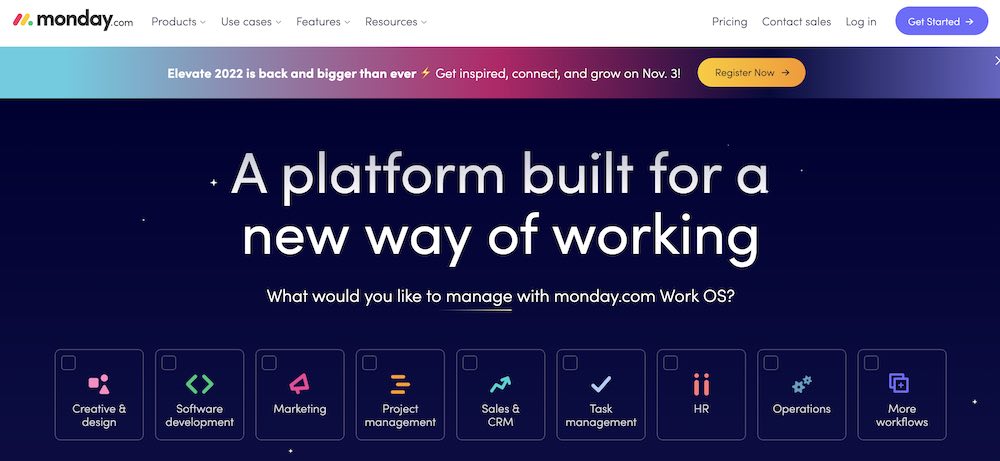
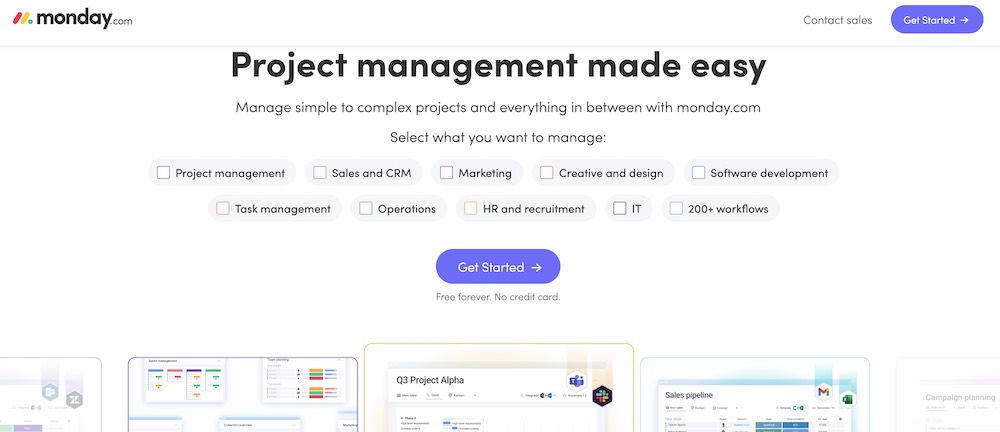
However, it also has Google Ads running for its different verticals. If you search for a project management tool in Google, you might see a Monday.com ad. It takes you to a project management-specific landing page.
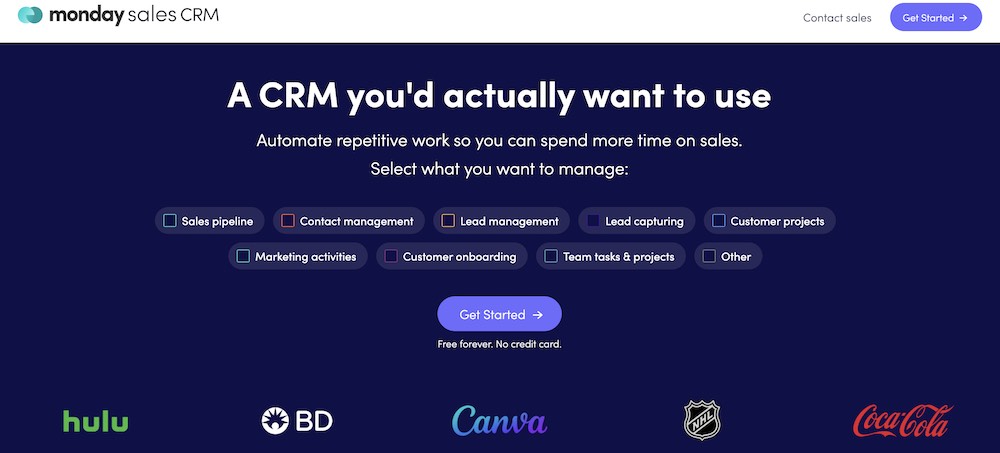
Similarly, if you were to search for CRMs, you might see a CRM landing page. With this, you can easily visualize how a homepage differs from a landing page.
To create a landing page, you first need to craft your copy. These tips can help you write a landing page that communicates your brand story, what your product or service does, and why visitors should take action.
These four questions explain what potential customers get from you and why they can’t live without your offer, while also creating a sense of urgency.
When you are first writing a landing page, answering these questions can help you form your outline.
Simply put, these questions are the beginning steps to building your page’s unique selling proposition. Also known as the value proposition, it is a statement that clearly identifies why a customer buys your product or service.
When you build landing page, consider your audience and your competition. Your landing page copy needs to be tailored to your audience.
Knowing their hopes, ambitions, and goals will make writing engaging copy much easier.
Try visiting online communities, forums, or websites where your audience hangs out. You’ll discover their desires, problems, and what they enjoy. You can use this information to help tailor your copy to their preferences.
In addition, do competitor research. Make a list of at least three competitors and audit their landing pages. How do they position themselves? Where do you beat your competitors?
The goal of your landing page is to get your audience to convert. The copy of your page needs to be centered around this goal and reinforced each time you write a headline, a subhead, and a call-to-action.
Each of these sections communicates your unique value proposition: why people will buy from you and not your competition.
Your text needs to be captivating, persuasive, and above all else, clear. You don’t want your audience to be confused about what you are telling them or what they are getting from being on your page.
One way to do this is by using “power words”. These specific words evoke emotion and establish a connection with visitors, which can help increase conversions.
There are many power words that you can use, but these are three of the most common.
Use these three words to connect with your audience and entice them to buy your product.
If you are unsure of what other power words to use, get some inspiration from your existing customers. Is there a word or phrase they keep using in emails, on social media, or on online forums when talking about your product? If so, try out that phrase.
Talk to a friend, peer, or audience member to see if the message you’re envisioning translates correctly to them. You can even A/B test to see if one performs better than the other.
Now that you have a rough draft of your landing page copy, you’ll need to organize it into sections or components. There are six main components that are crucial to landing page optimization.
These six components need to work in cohesion together to create a high-converting landing page.
Your headline is the first thing a viewer will see when they come to your page. It needs to be clear and concise, confirm your offer, and include messaging that reflects the audience's entrance point.
Effective headlines have these three things:
If you keep these three elements in mind when drafting your landing page headlines, chances are that you'll be able to craft just the right headline (or a few) that speak to your target audience and increase your conversions.
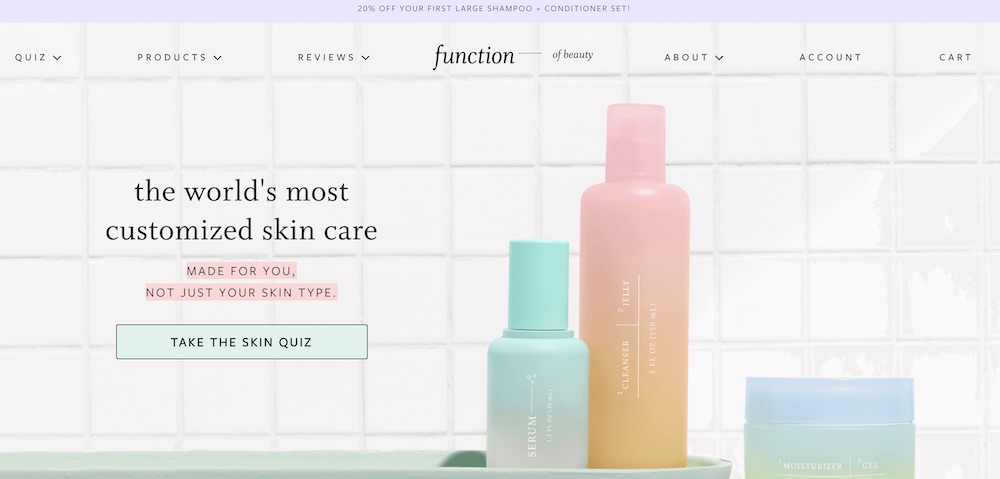
For example, Function of Beauty has a landing page for its line of custom skincare products. The headline is "the world's most customized skin care". It highlights that it is made for you, not just a skin type and it also uses a personalized quiz CTA to reinforce the custom skincare value proposition.
Your subhead is a more in-depth description of your headline. It usually appears just below your headline, and it is in a smaller font. Use the subhead to be persuasive and explain your offer in greater detail.
Let's look at Slack as an example. It clearly highlights the value proposition — work faster and more flexibly — when you use Slack.
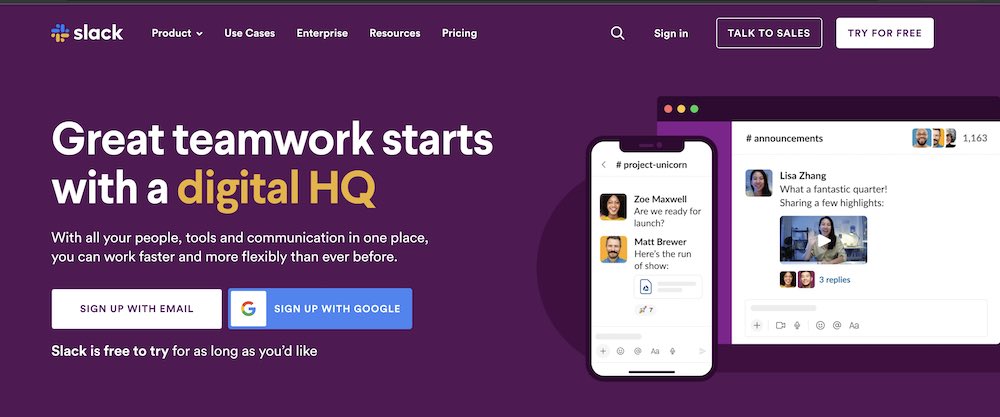
Include a striking image of your product or a photograph that relates to your message. It is even better if you can show your product or service in action or include a video — that alone can increase conversion rates by 86%.
According to The Next Web, our brains process visuals 60,000 times faster than text. Captivating images makes your page look better and gives your audience a better page experience. They also provide visual cues to entice your audience to remain on your page and learn more about your offer.
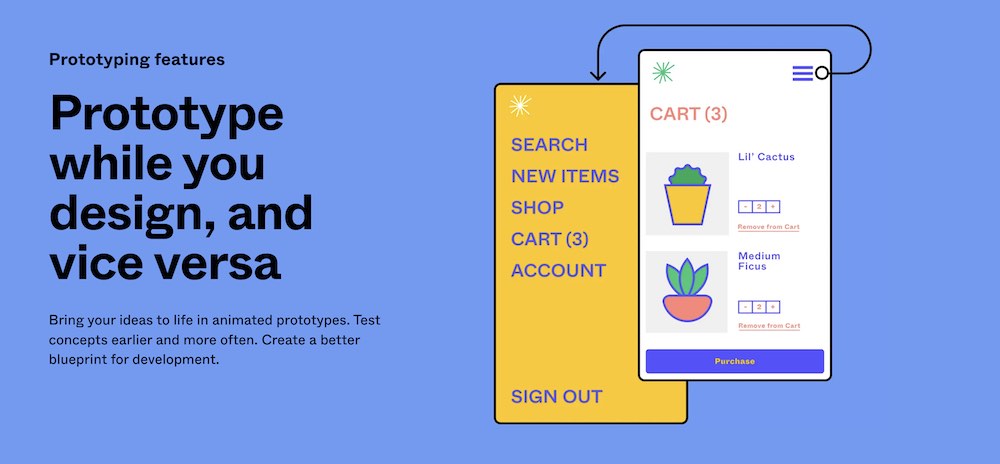
As a design tool, Figma needs to have well-designed visuals. This landing page for its prototype features includes examples of what you can create using Figma. It makes it easy to visualize using it for your design projects.
You need to sell your audience first on why they need your product, and how it solves their problem.
The benefit statement section is where you can address the pain points you’ve found for your audience. Use a bulleted list to explain how your offer directly solves their pain problems. Make sure to focus on the benefits of your product, not solely on the features.
Adding in all of the features at this point may confuse or complicate their decision, which can lead to them not buying at all.
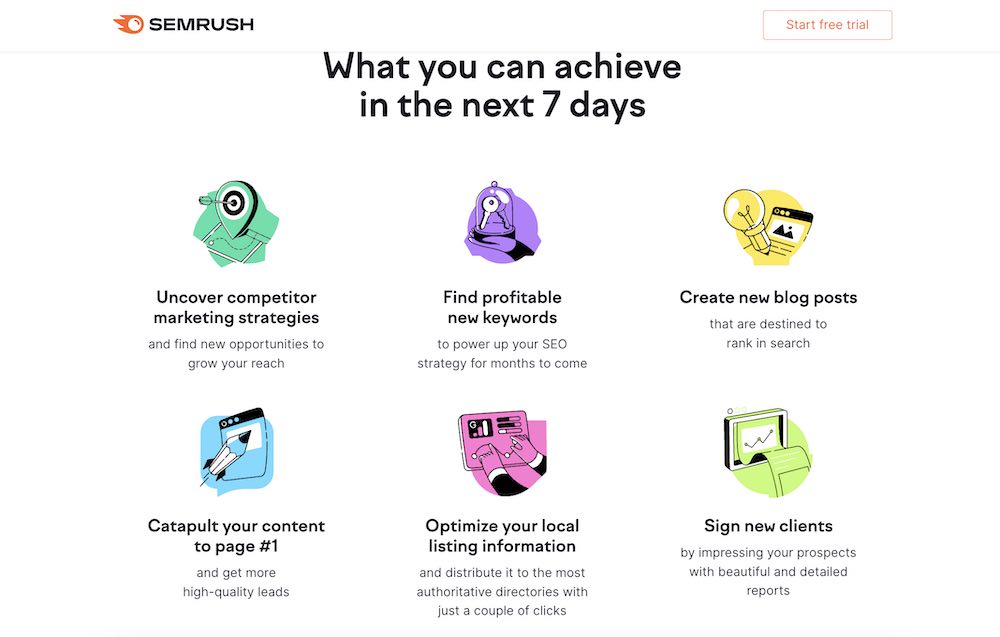
Semrush’s landing page for its free trial highlights six benefits of using the marketing tool. It focuses on what you can achieve within seven days of trying its product, including signing new clients and learning about your competitors.
Including social proof no your landing pages can increase the conversion rates by 5%. Social proof shows your audience that others have taken your course or used your products and would recommend it. It is a necessity to design landing pages that convert. The more a visitor sees that others like and benefit from using your product, the more likely they are to convert.
You can leverage different types of social proof, including testimonials, reviews, and press features.
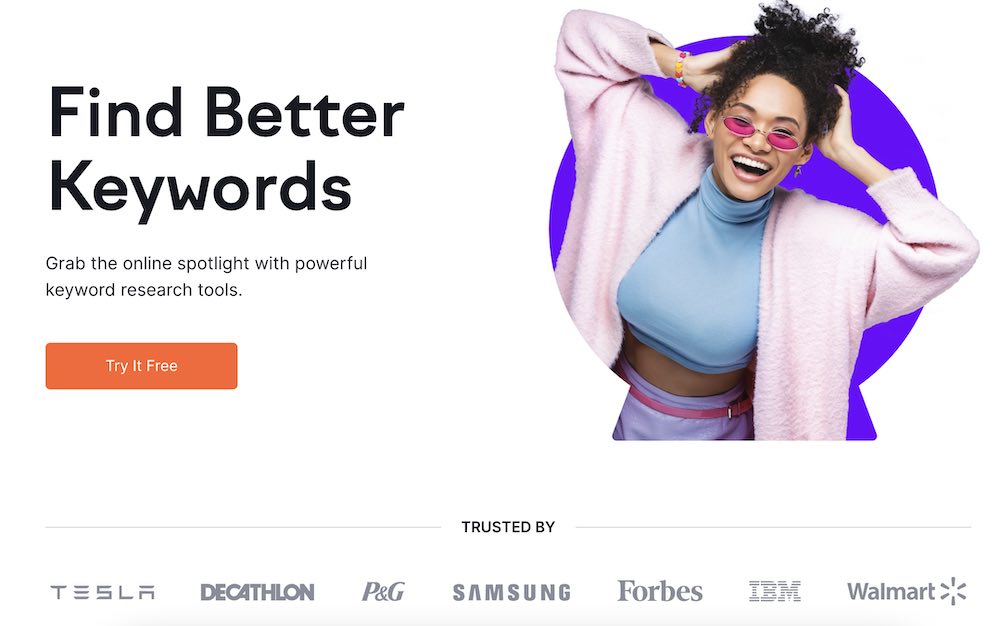
Usually, social proof will appear many times on a landing page, primarily right after the above-the-fold section. Semrush is a great social proof example. You can see they include top companies that use the product, leveraging their brand equity and creating credibility.
Your call-to-action is the most important element of your landing page – that's why you have a landing page. You want someone to sign up for your offer. What it looks like, how it reads, and where it is placed will impact your conversion rate.
Remember, you want to have just one CTA – multiple CTA's reduce the conversion by 226%. A single strong CTA makes it clear to potential customers what you want them to do. Plus, you'll increase your chance of conversion if you are driving them to one goal versus dividing their attention between more than one.
Be brief but clear. Avoid the "submit" and "send" CTA buttons because they are vague. You need to describe exactly what you want from your customers or the next steps—what will happen when they click.
Another element you can capture in your CTA is urgency. For example, this landing page for Nom Nom highlights a special offer to get 50% off and free shipping.

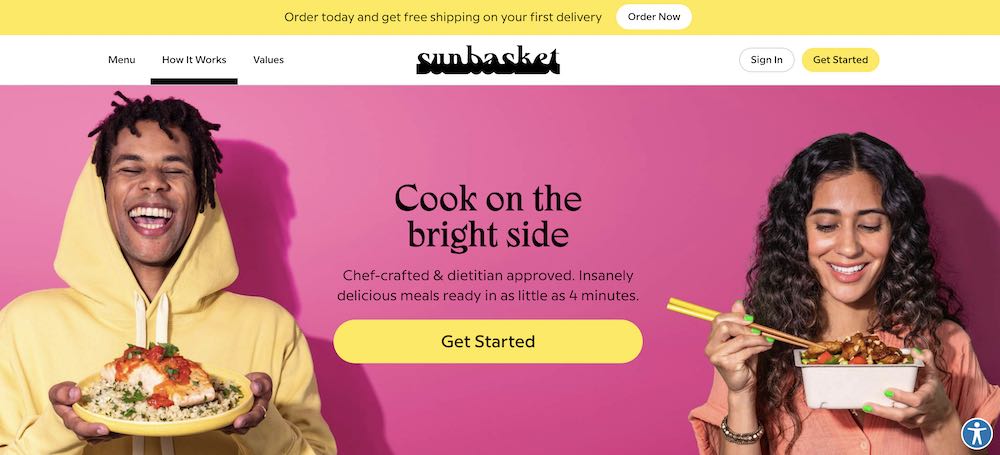
Sun Basket has a CTA button that pops off the page. The bright yellow stands out from the background and it has enough white space around it to draw your attention.
Once your audience completes your CTA, you have one more page to keep their attention and inspire further conversion: the Thank You page.
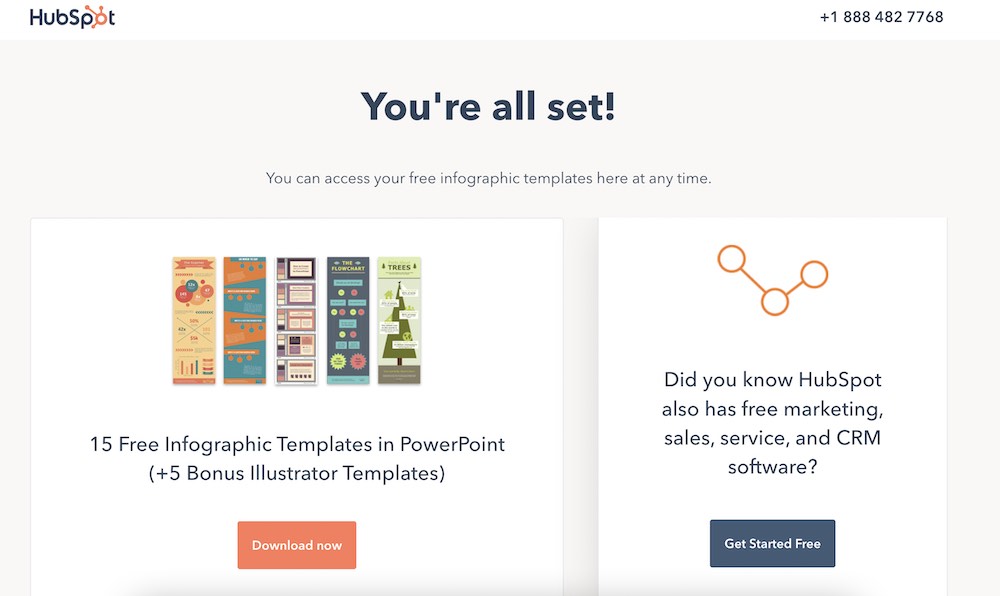
The Thank You page is the perfect place to introduce your audience to other products you have since you’ve already captured their attention. This could be another CTA asking them to share the content they just signed up for, subscribe to your blog, sign up for your newsletter, attend a live training webinar or even give them a bonus piece of content.
For example, when you download a template from one of Hubspot’s resource landing pages, the Thank You or confirmation page looks like the below. It includes a CTA to learn more about Hubspot software.
You don’t need to be a web designer or developer to create high-converting landing pages. In fact, there are many do-it-yourself builders, offering an easy user interface plus hundreds of landing page templates to choose from. You can plug these into your existing website and maintain the same user experience site-wide.
Here are a few user-friendly platforms to design a landing page:
If you sign up for Teachable, you can create a landing page for your first course in as little as 10 minutes.
Next, we’ll discuss some simple landing page design elements (color, typography, images) to think about when you’re creating your page to make it even better.
Whichever path you choose, there are still a few things that you need to think about when building your landing page: color, fonts, and images.
It’s the great marketer debate: Does color affect conversion in terms of landing page design?
To keep it as simple, we’re going to discuss a few elements to consider when thinking about colors for your landing page design (and brand).
Every color has psychological implications associated with it. When choosing your landing page color palette, consider what characteristics you want your brand to portray.
Pick colors that are associated with the characteristics you want to exude. If you want to portray luxury and trust, blue and black would be good options. If you want to hint at optimism and health, use yellow and green.
Contrast is important. When two complementary colors are placed next to each other, their contrast is the strongest, and actually makes the colors appear brighter.
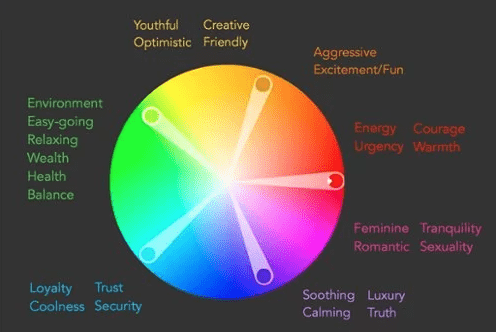
When choosing the palette for your site, make sure to include a color complementary to your page’s main color.
Here are some sites for palette inspiration:
Make sure the colors that you pick are readable. You don’t want a green background with blue text. A helpful hint is to use a light background with dark text.
If you’re designing your own landing page from scratch, you have to pick your own fonts. The best practice is to stick with commonly used Google web fonts like:
Using these fonts ensures that the majority of browsers and operating systems render your text correctly. Plus, it’s much easier when sending newsletters and dealing with different email service providers.
When choosing fonts, stick to one font to reduce the clutter on your landing page. Each of the fonts above has bold and italic styles, which are simple ways to differentiate text. Also, make sure you have the proper licenses to use these fonts for your business.
Another way to differentiate text is with size. A study by Wichita State found that body text is best at 12pt because it’s the easiest to read in the least amount of time. If your audience is older, bumping up the point size to 14 may make it easier on the eyes. Headlines look best at 17 to 25pt.
In that same Wichita State study, it was discovered that any font, larger or smaller than 12pt, decreases readability. If you want someone to spend time reading your copy, try enlarging the size in the testimonial section or reducing the size for the money-back guarantee statement.
The last size factor to consider is line spacing. Make sure there is enough space between each line to give the text room to breathe and be read easily.
Earlier, we explained the importance of having an image of your product. Now we’ll go into more detail on how to choose an image and its importance to landing page design.
Most importantly, you want the image to add to your landing page, not detract from your message. Include a clear, high-quality image that is not busy.
Think about how the text will look on top of the image. If your image has a lot going on, consider darkening it up with Photoshop. This way, the text will be easier to read.
A quick hack is to add a dark rectangle over the photo and reduce the opacity. The image should be dark enough for the text to be readable.
Once you’ve created a landing page, be sure to double check it on mobile devices, which is often where traffic comes from.
With these landing page design tips, you’ll be well on your way to understanding how to convert customers. Test out a few different landing page designs first and A/B test each to see how it performs. Your first version can always be refined after you have some data to understand how users interact with your page. If you are creating a landing page for a course, you can get started easily with Teachable’s sales page template.
The best way to understand the secret to building successful landing pages is to see all these practical tips we discussed today brought to life. So, let's take a look at a few powerful landing page examples:
This is an excellent example of a click-through landing page.
A strong headline, a quick subhead explaining the most important thing, and a very clear CTA to type your email address and get a free trial of the software.
Lower down the page, it has social proof and an FAQ section addressing the most important questions and concerns people might have, which all add to a very simple yet effective landing page design.

Ali Abdaal's landing page for his bestselling book Feel Good Productivity takes the landing page design to the next level. The landing page design is simple, yet effective and super interacting with all the visual element playfully moving through the screen as you scroll down, without impacting the load speed or responsiveness.
This landing page has a strong headline, video explainer, testimonials from industry experts, and very clear CTA's inviting you to buy the book at the very top and bottom of the landing page.

Pat Flynn's online course landing page is very modern and simple, and it captures the visitor's attention immediately. The headline and subhead tell you everything you need to know about the course, and the video explainer is engaging and enticing. There is a very clear CTA, testimonials, and even an FAQ addressing any questions people might have about joining his online course.
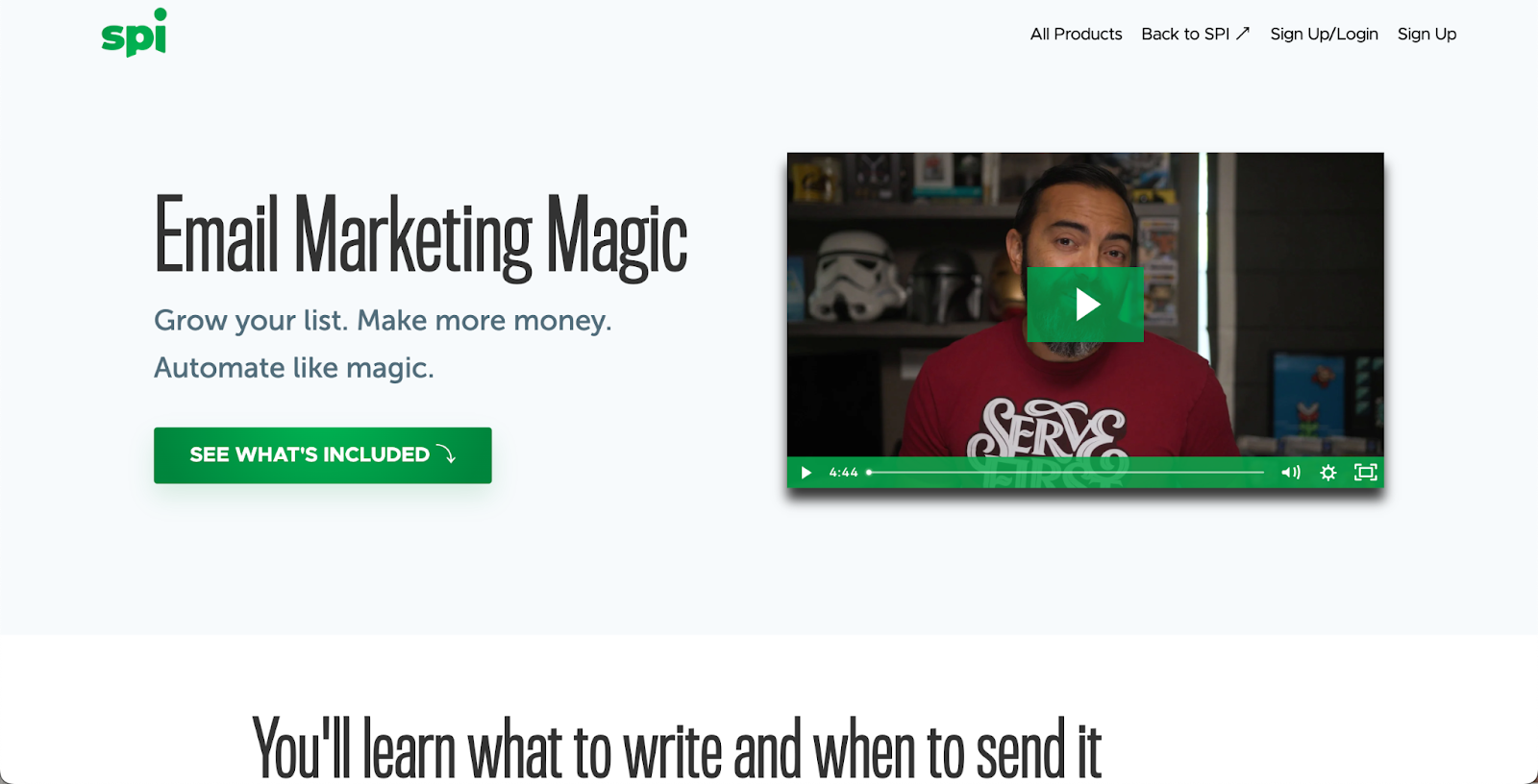
It's worth putting in the effort in your landing pages for free training, and Jenna Kutcher is a great example. Her free email-building training landing page is informative and engaging and has the best personalized CTA right at the beginning of the page. While there is no explainer video, there are visual assets like videos and images of Jenna, which make the design high-quality and professional.

Another phenomenal free-training landing page example is for Mel Robbins's 2-part video training. Right at the very top of the landing page, you see the benefits you'll gain from taking part in this training. Next to it, there is a video explainer, that's informative and engaging. The CTA is clear and simple and takes less than a few seconds of people's time.

This landing page (below) was quite long. The top “above-the-fold” section offers an easy way for customers to sign up (the CTA), alongside descriptions of what exactly is included in the online course. Further down the page are video testimonials (social proof), an overview of the modules, and buttons to reinforce the CTA.

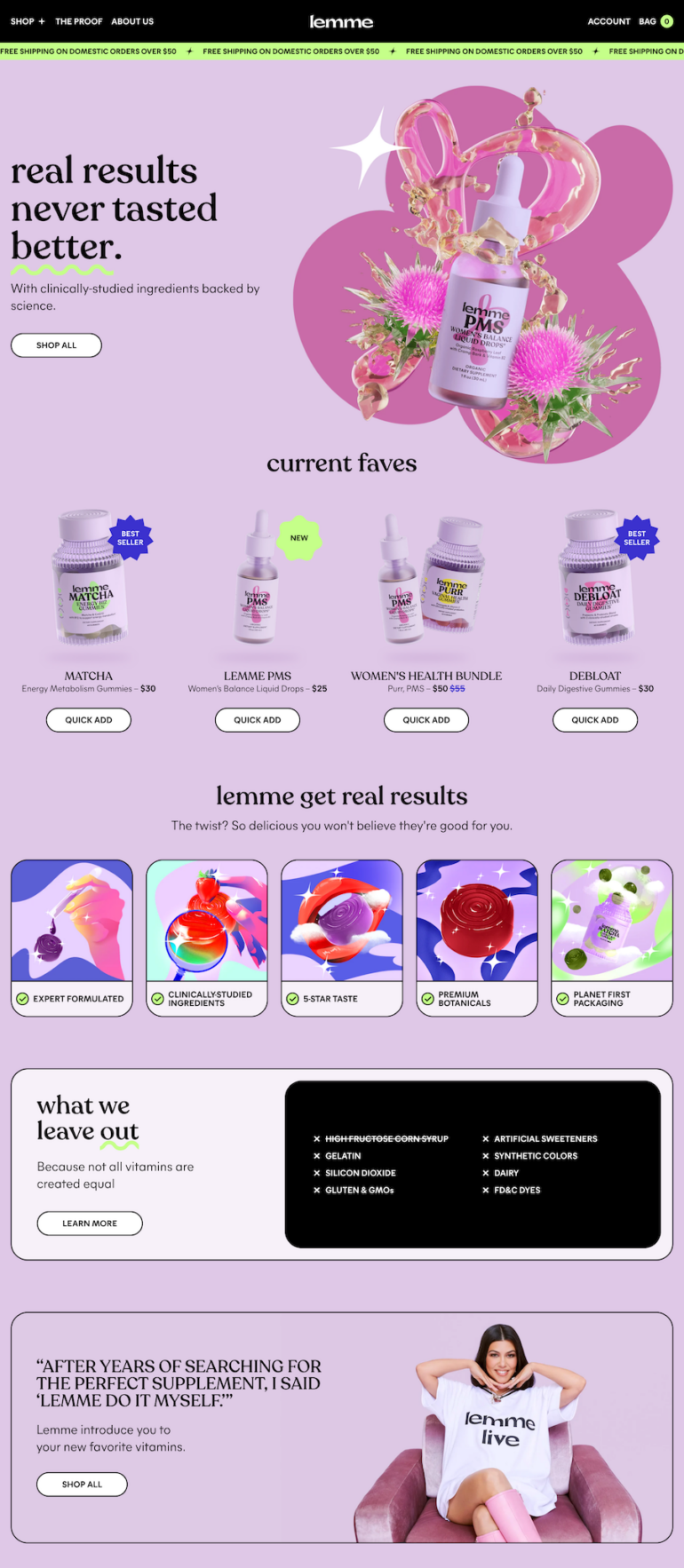
As you’ll see on Kourtney Kardashian Barker’s new online shop of herbal vitamins, this landing page has bright, eye-catching images and a few different CTAs—the dominant invitation being to “Shop All”. As you navigate to individual products, you’ll find social proof, more easy-to-digest information about ingredients, and more.
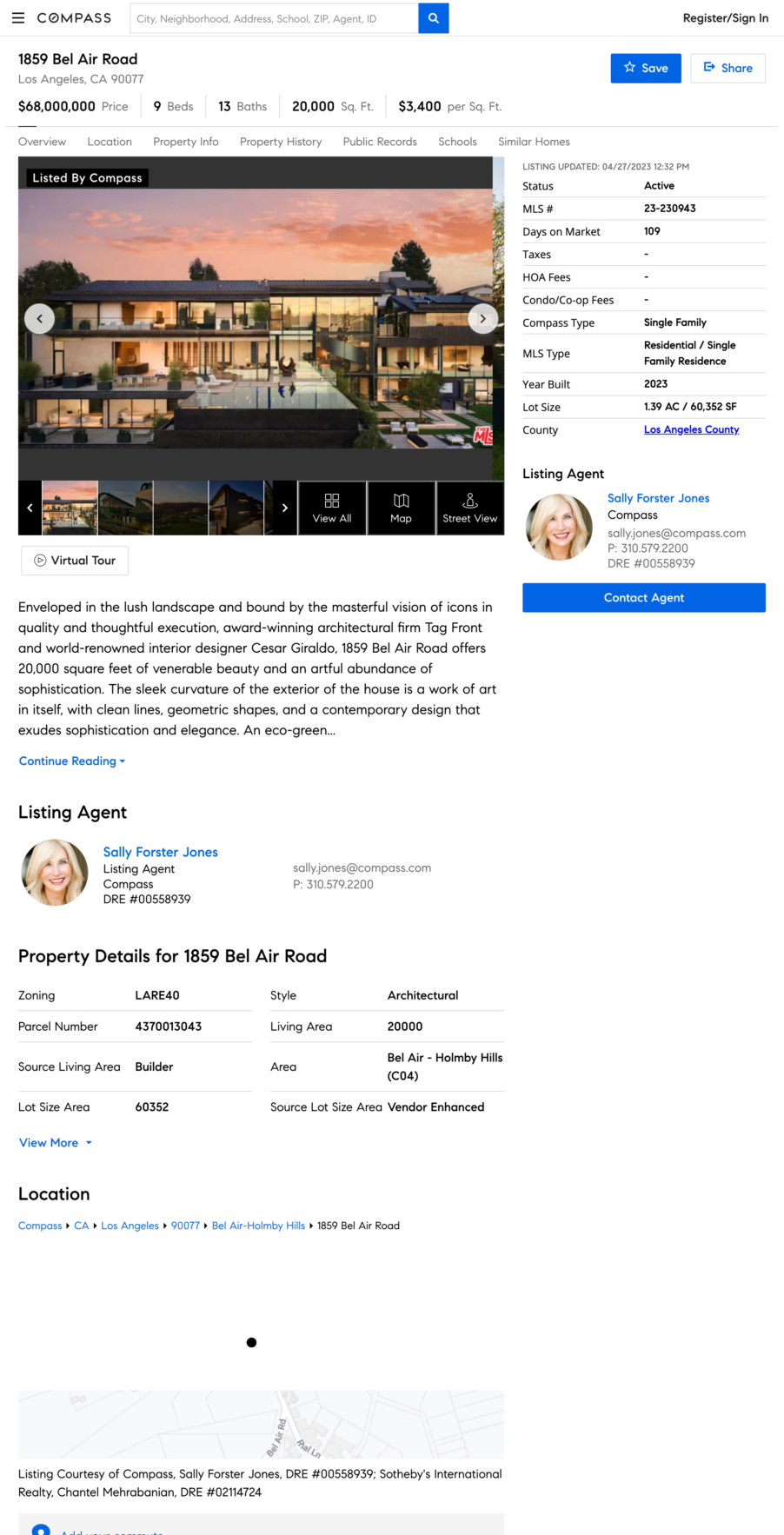
When it comes to real estate, the images are often front and center. You’ll notice this example doesn’t even have a heading or subheading. The benefits are the features of the home, which can be found in the descriptive paragraph and the charts above the CTA button.
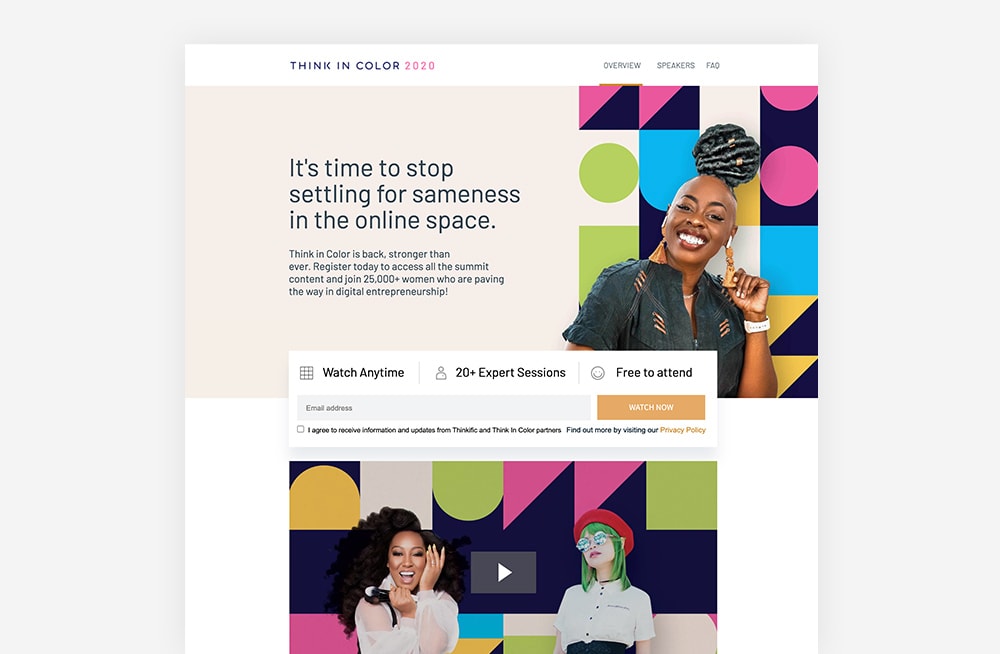
Here is an example Unbounce recognizes as effective because of how it speaks to a specific target audience (women entrepreneurs in the digital space). Meanwhile the design treatment above the CTA bar highlights incentives to sign up: watch anytime, many experts featured, and free.
Popular website builder Wix uses a pop-up to capture visitor information, while all of the benefits remain in the background on the landing page. The CTA button clearly indicates that there is no harm, risk, or commitment to trying: “Start for free.”

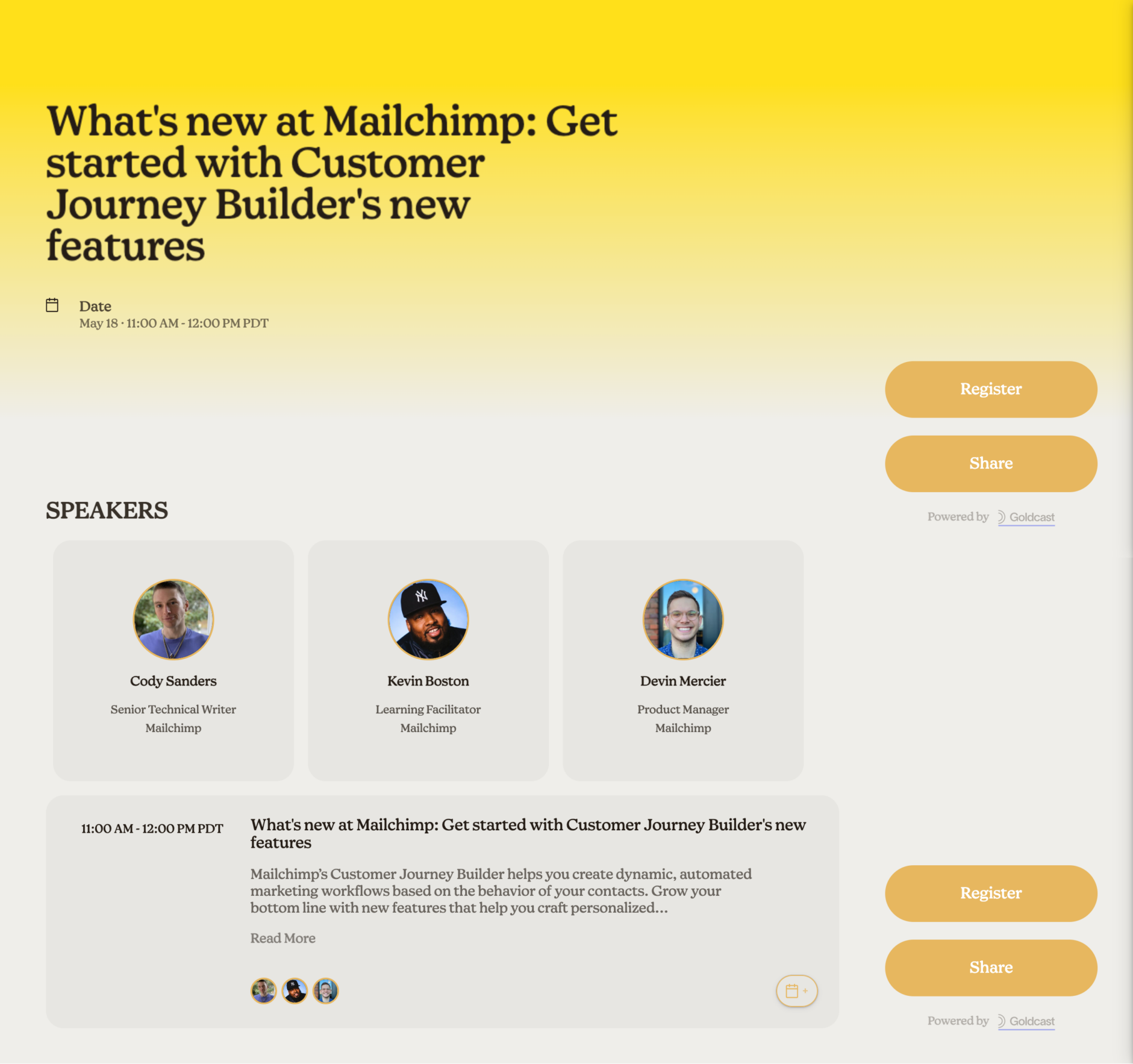
While this webinar, hosted by Mailchimp, doesn’t have a main image (just headshots of the speakers), the branding is consistent with the email and marketing platform. From the headline (and lack of subheading), it’s clear that the intended audience is MailChimp users. Meanwhile, the landing page offers two actions: to sign up or spread the word.
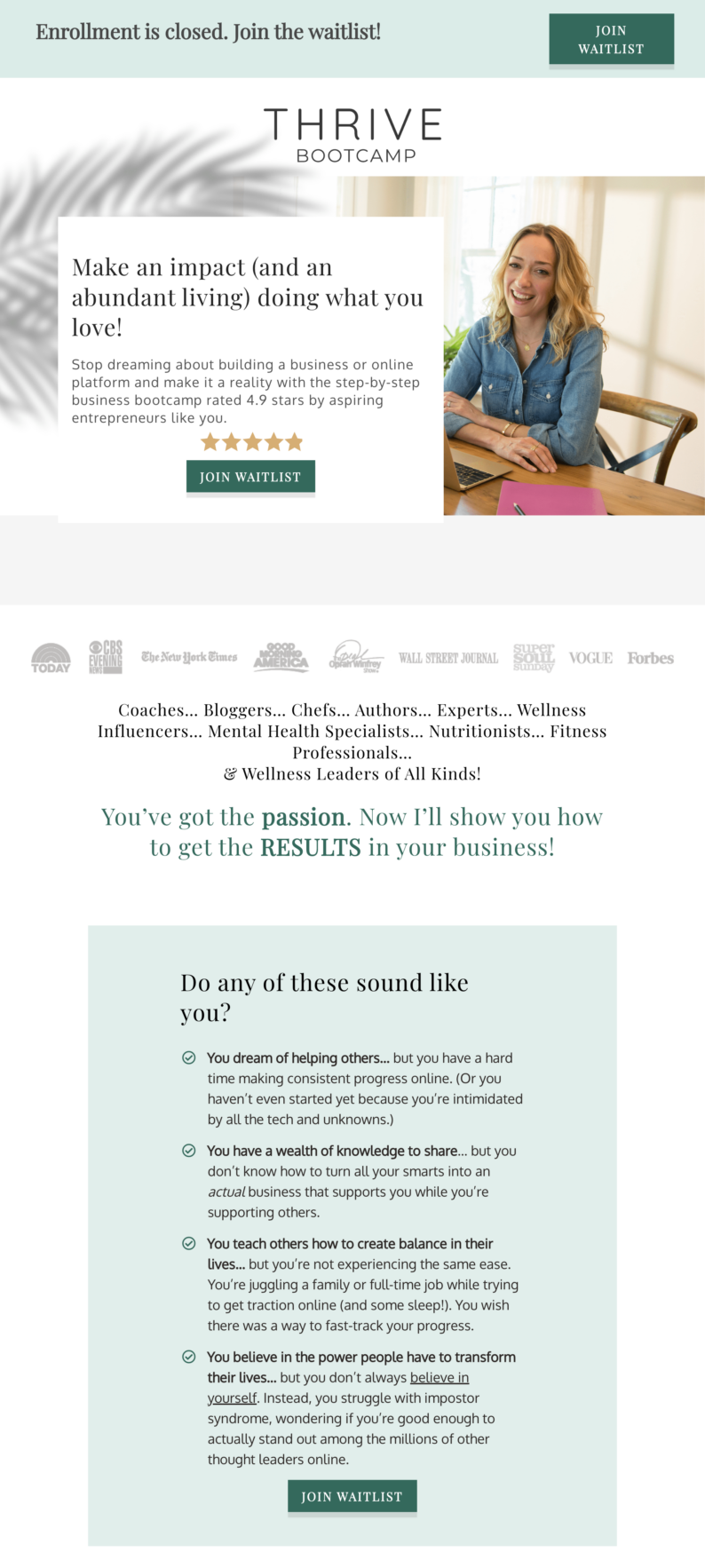
Whether you’re about to launch a course or enrollment has already closed, you can still track interest and capture site visitors’ information. Here’s an example of Kris Carr’s membership container, Thrive Bootcamp.
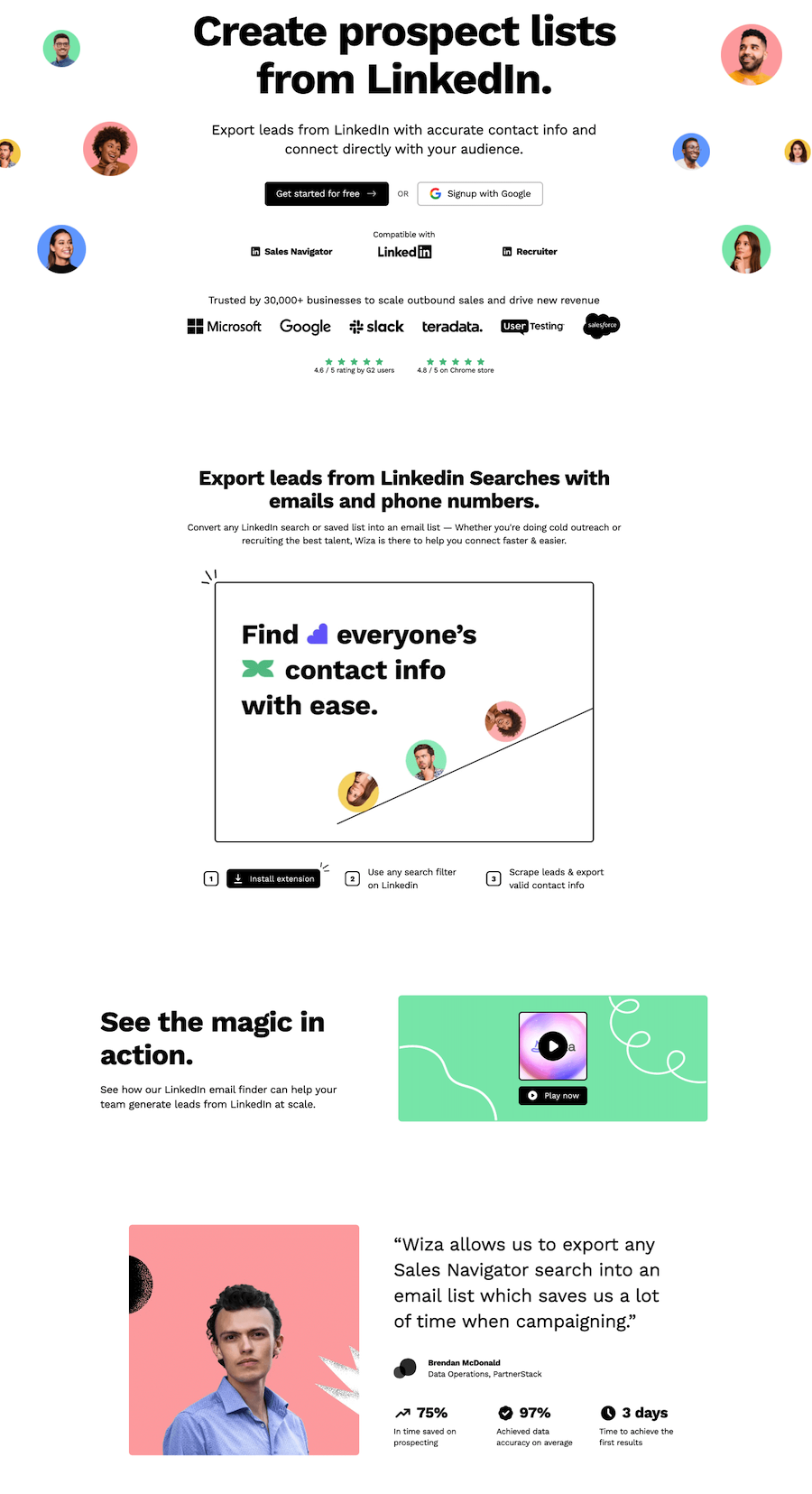
SaaS stands for “software as a service” and allows customers to access applications over the internet through cloud-based delivery. This landing page example features the six key components in a fluid (and effective) way.
Once your landing page is live, your landing page analytics will be your best friend. Through analytics, you can learn what works and what doesn't, and you can get a better look at your audience's behavior. By analyzing your analytics, you'll be able to improve and reap better results for your business.
Here are some of the most important metrics you want to pay attention to when it comes to analytics and optimizing landing pages:
The two most common landing page challenges businesses face are high bounce rates and low conversion rates. If you're also facing these challenges, don't be alarmed – we have landing page solutions for every challenge you might face.
On average, landing pages have a bounce rate of between 70-90%. Obviously, you want to keep your bounce rate at the lower side of things because if you have a high bounce rate, it means that something on your landing page is not working for people. It could be a marketing problem – you're attracting the wrong people, so they bounce quickly. Or, it could be an indication that you need to improve your landing page design.
So, consider tackling the issue at hand in small steps. First, review your marketing efforts and see if your social media promos, and paid advertisement is driving the right people to your landing page. If you find that you are targeting the right people, then it's time to take a look at your landing page design.
Consider tweaking small elements like headlines and your visuals (include visuals if you have none), and review your CTA's – are they clear? Is there more than one? Make sure your copy is easy to read and digest. Utilize the white space and simplify your landing page design.
The average landing page conversion rate across all industries is 4.3%. A good conversion rate is anything above 10%. If you notice your conversion rate to be low, don't get discouraged – there are plenty of things you can do to change that.
One thing that could compromise your conversion rates is your CTA. So, the first thing you want to do is review your CTA's – is there one clear CTA or multiple ones? Is the CTA personalized or general? Does your CTA stand out, or does it get lost amongst other design elements on your landing page?
Once you review your CTAs and make adjustments where needed, you should see an increase in your conversion rates. If not, then consider looking into your submission form, especially if you notice high form abandonment rate. Remember, the more information you ask in the sign up form, the less likely people are to sign up. Maybe it's worth simplifying your submission form to minimize the obstacle.
Alternatively, you might need to reconsider your offer. Maybe it's not clear enough, or maybe you need to find a different angle to convince people why they should sign up for your offer, and how much value they'll get from it if they do sign up.
Ready to boost your business with high-converting landing pages? With Teachable, you can easily create pages for your learning products. Sign up for a free Teachable account today and get access to powerful tools and resources to help you design pages that drive sales and capture leads. Start now!
A landing page is different from a homepage. A homepage is designed to appeal to multiple audiences and convey information to anyone interested in your overall brand. A landing page, on the other hand, is defined as a single page with a specific target—getting visitors to complete an action. The name “landing page” comes from the idea that people will land on it from somewhere else, usually a digital ad or another marketing campaign.
Your landing page design needs to speak to your target audience and drive them to your call-to-action (CTA). Everything on a landing page from copy and images to layout should support that one goal.
There are six main components that make a landing page successful. These six components need to work in cohesion together to create a high-converting landing page:
The elements of a landing page, including copy and graphics, should be intentional and specific to the goal (CTA) or offer. Your text needs to be captivating, persuasive, and above all else, clear. You don’t want your audience to be confused about what you are telling them or what they are getting from being on your page.

We’ve been listening to you, so we’re offering lead magnet ideas so you can create your own content upgrade to grow your audience. We’re even including great lead magnet examples and lead magnet templates you can utilize yourself. In fact, we created three videos explaining how to design your own editable workbooks, cheatsheets, toolkits, and checklists. We’ll even explain how all can be used as a freebie, lead magnet, or content upgrade in your online course.
Why three videos? Since we know we all have and use different software, we created a video for each Google Docs, Pages, and InDesign to give you some options when creating your awesome new lead magnets. But before we get into the details of the videos, let’s answer why content upgrades (or lead magnets) are important.
Your lead magnet should be a juicy piece of content that helps solve a pain point and makes your targeted audience’s life easier—whatever your sphere or niche may be. In exchange, they’ll give you their email address.
Designing and promoting content upgrades or lead magnets are not just limited to online course creators either. If you are an author or writer, use them. An artist, use them. A blogger or YouTuber, use them.
Once your audience signs up to get your free resource, two things happen:
Here at Teachable, we strongly support giving out free content to your audience.
These are all examples of types of lead magnets:
Now, to make a lead magnet (resource) your audience loves, it needs to check off these six boxes:
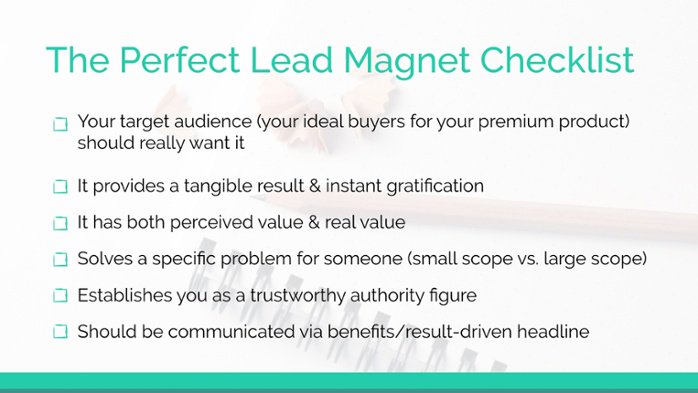
These six boxes hone in on your audiences wants, needs and desires to encourage them to give you their email address.
Effective lead magnets will help you build your email list quickly, attract potential customers, and make it much easier to sell your course. Additionally, many types can be easy to create and boost your content marketing strategy.
As mentioned before, worksheets not only help grow your audience, but also increase the perceived and real value of your course. Any extra material you include with your course content, like a workbook, cheatsheet, timeline, checklist, can be used when promoting your course, either on your sales page or landing page, in your emails, or other social media posts to incentivize people to buy. They can also elevate various pricing tiers.
The value of bonus content is tremendous. It shows your students that you care about their success. They’ll see that you took the extra time and effort to create assets to refine concepts, organize ideas, get the insider details, track progress, and ultimately help them remember what they learned.
All of this will only contribute to the success of your students. More success from them, also leads to more success for you via their glowing reviews and testimonials about your course.
Now once you create the lead magnet and use it to grow your audience, it doesn’t mean that it’s the last time you can use it. Reuse it!
You can keep sharing it with your audience in many ways, like
Each of these methods will allow you to share your resource with an interested audience and collect more email addresses.
This video covers creating editable content upgrades in Google Docs. Although Docs is a bit cumbersome and does not have all the advanced features as Adobe InDesign (or even Apple Pages), it’s a widely accessible software that allows you to create bonus content that is easily shareable and editable. Plus, it’s 100% free.
In this video, we walk you through creating a content upgrade that can be used either as a tool kit, a cheatsheet, a worksheet, a workbook—and all can be editable.
One important thing to note about using Google Docs is how to share the worksheet with your audience after you’ve created it. Don’t share the direct link of the document. Instead, go into the document share settings (blue button in the top right corner), and make sure the share link has the “Anyone with the link can view” setting.
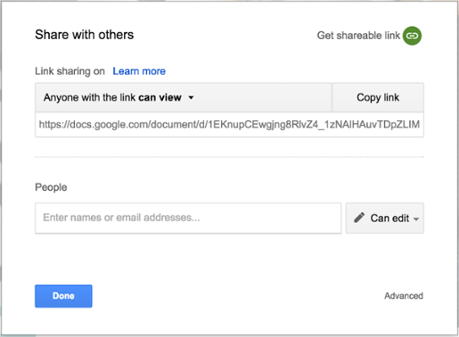
Then copy that shareable link, and give it out to your audience. This way, they have to create their own copy of your document so they can write it in or edit it however they want. Otherwise, everyone will be working off your original copy, and it will change each time someone uses it.
Alternatively, if you are creating a cheatsheet or toolkit that is more informational vs. needing to be editable, you can export the document to a PDF and share that with your audience too.
In this tutorial, we show you some basic features, like creating styles, checklists, making tables and other editable elements that will allow you to have a workbook in no time.
The good thing about using Pages is that if you’ve used Keynote, the layout and functionality are very similar, which will make using it much easier.
One thing to watch out for is Pages’ text wrap feature. Whenever you create a new shape or text box, it automatically adds text wrap around the object, which when it appears on the page, it looks like it deletes elements you’ve already created.
Don’t fret though. Nothing is deleted. It has just been pushed out of the way. All you need to do is select the element you just added to the page, click on arrange, and under the text wrap drop down where it says automatic, change it to none. Then if it has pushed other elements away, they will reappear.
Since InDesign is a more advanced design program, we created this video on the assumption that you know how to use the basics of InDesign. It is an advanced video, not a step-by-step setup guide. We walk you through setting up certain elements that make creating an editable workbook much easier. Plus, we’ve shared a few of our favorite tricks too.
If you’re just starting out with designing resources, don’t feel like you need to use this program. It is an advanced software tool, and as we’ve shown in the other videos, you can create beautiful content upgrades and lead magnets without it.
We can’t write a post about lead magnet ideas and templates without sharing design resources with you.
If you’re still on the hunt for the lead magnet ideas and templates that are right for your business, check out this post on developing a strategy to build your audience using lead magnets.
A lead magnet is free or bonus content given to people, typically in exchange for their email address. This could be in the form of a free downloadable e-book or access to a special video. Your lead magnet should be a juicy piece of content that helps solve a pain point and makes your targeted audience’s life easier—whatever your sphere or niche may be. In exchange, they’ll give you their email address. You’d gate this content, so that the only way it’s accessible is through signing up for your email list. It’s a win-win. Your audience will get your awesome guide. And you get to add them to your email list.
Effective lead magnets will help you build your email list quickly, attract potential customers, and make it much easier to sell your course. Additionally, many types can be easy to create and boost your content marketing strategy. These are all examples of types of lead magnets: toolkits/resource guides, free mini-course, checklists, handouts, downloads, worksheets, webinars, video series, podcast, video content, and free trials.

The entire purpose of an online course is to help your students reach a desired outcome. You do this by figuring out what it is your audience wants to learn, crafting a killer curriculum, and creating course content that keeps your audience engaged and interested. You’re already an expert in what you’re looking to teach, so step one and step two should be easy enough. When it comes to actually creating the content though, we find people often have trouble. They know what they want to teach, but conveying that through creating course material oftentimes overwhelms would-be course creators. The truth is: Learning to create slides for an online course isn’t nearly as difficult as it might seem, so long as you know very basic design principles. That’s what we’re going to cover today.
We’ll share some of the best design secrets to help you create killer visuals and in particularly, slides. These tips can be used for any visual content you’re creating, like ads, your worksheets, other resources, and even on your sales page.
We’re going to walk through:
The best part is you don’t need to be a designer to implement these tips to create slides for online courses.
First, slides are valuable and easy to create. If you’re trying to get content out quickly without having to set up a filming studio or film any videos, slides are great for that.
Most of you have probably used PowerPoint or Keynote at some point in your life. And that’s all you need to create slides for online courses. You can use text and images to create lessons for your students that can be flipped through quickly.
Your slides don’t have to be overly fancy or come with a ton of bells and whistles, as long as they clearly convey the information you’re trying to teach your students.
Now, let’s get into the tips we mentioned earlier—layout tips, colors, fonts, and images to help you take your slides from blank to beautiful.
Any of these tips can be used on any type of visual content you create like Facebook ads, social media images, and most importantly, on your course sales page.
Before you begin designing, make sure your slides are in the video format you’ll be shooting in. For example, we shoot in a 16-by-9 aspect ratio. This is also an ideal YouTube ratio. In Keynote, we designed the slides in the widescreen format. Using slides that are in the same format as your video ensures that no information is cut off and makes editing easier.
When you’re adding text to your slides, keep your copy short and to the point. Don’t put paragraphs of information onto your slides, or they’ll be too difficult to follow.
It’s too much for your audience to take and will cause them to become distracted. They’ll be trying to read everything on the slide instead of listening to you.
Instead, use bullet points or very short sentences. You can even use multiple slides for a point.
Your audience will thank you. Plus, it just makes everything look so much better.
Now, let’s dive into choosing colors for your slides, your brand, and even your sales page. If you already have a brand, use your brand colors in your slides.
Your online course is a direct extension of you and your brand, so your slides should have the same look and feel as the rest of your content. This way, when your audience sees your course, they’ll automatically know it’s from you because they recognize the brand you’ve created.
If you don’t have a brand or a color palette picked already, that’s OK. Picking colors for your slides is a really easy place to start. Choose two to three colors to use throughout your slides. Pick one dark and one light color because they stand out the best when used together. Then pick a third complementary color to use for emphasis.
Keep in mind ease of legibility and how the colors look together when picking yours. To help you choose the colors that work well together, below are three great sites you can use.
Colour Lovers: The first is Colour Lovers. It’s a search engine palette generator and a really great place to start, especially if you’re new to this. You can search for colors by keyword, hex code, and even by most recent creations.
Coolors: Coolors is super easy to use; all you need to do is push the spacebar. That’s it. Just go to the site, click generate palettes and press the spacebar, and a new palette comes up each time. To have more control, type in the color’s hex code. A hex code is that six-digit number that starts with a hashtag. It’s just one more way of representing a color, just like RGB or CMIK. Now once you type in the code, lock it so it doesn’t change. Then—you guessed it—push the spacebar and it will generate palettes that go with that color.
Adobe: The last one is Adobe. You can either start with a very specific color just like we explained in Coolors, or you can play with the color wheel and come up with palettes on your own.
Now every color has certain characteristics associated with it. Pink, for example, is often associated as a feminine and romantic color.
Green is associated with wealth and balance, while blue is cool and trustworthy. Think about it. Most of the major banks you see—like Chase, for example—have blue in their logos. Why? Because they want you to trust them to take care of your money.
When choosing colors for your course, business, or brand, think about how you want to be perceived by your audience.
The colors that you choose for your slides can be used as solid background colors, in shapes, or other design elements along the slides. For text, use one color for the header text or when you want to emphasize an important word. You can also use the other color for body text.
Another note on body text is that sticking with black or dark gray or white, depending on the background color, is really best.
It’s the most common and most standard, and more importantly, the easiest to read. It’s better to stick with those neutral colors for text, and then add bolder color in other ways.
Now let’s go into some tips about typography. First, choose a serif or sans serif font for your text. The difference between them is the serif font has little tails on the edges of the letters, while the sans serif font does not.
Avoid using decorative or script fonts because they’re a lot harder to read, especially when they’re small. Yes, these fonts might add pizazz to your slides, but they’re not good for getting a lot of information across.
Go with a sans serif or a serif.
If you go to the website FontSquirrel, you’ll find free fonts for commercial use that can give your content something extra. Just like color sites, you can search by key words and font styles, for example, hand lettered, serif script, etc. Then all you need to do is download the fonts that you like and install them on your computer.
A quick warning about using these fonts in your slide decks: Since they’re not commonly found on most computers, if you share your Keynote or PowerPoint files with somebody else, you will need to give them a zip file of the font. Otherwise, the content will look different because Keynote or PowerPoint will replace with a different font. Make sure you have your person install all the font first onto their computer before opening the Keynote files. Or, to keep things easier, just share a PDF version.
One last thing to remember when you’re choosing fonts is to make sure you use one that’s large enough to read.
Don’t go for a size 20 font. It’s way too small. Start with at least 40 points, and even that can be pushing it. Bigger is always easier to read.
Visuals keep your audience engaged, and make your slides look awesome.
StockSnap and Pexels are two stock aggregate sites. Search for anything and chances are, they have it. The images on Unsplash are all breathtaking and worth checking out.
Gratisography is a pet project of photographer and designer Ryan Bell, filled with entertaining, laugh-out-loud images.
Now that you’ve found your images, let’s talk about how to use text with them. If the image is dark, use white as your text color. White stands out the best on images, even compared to other lighter colors, like a pale yellow of blue. Obviously every image is different, but start with white.
Test out other colors if white doesn’t look great, but just make sure you can read it.
If the image is light, you should use a dark-colored text. (You might’ve already guessed that.)
If the photo has a lot of colors or just a lot of stuff going on, add a shape over it. Then add the text on top of your chosen shape. When doing so, make sure you add the text in its own text box. This way, you have more control over the formatting versus if you add the text directly into this shape.
Another way to make text readable on a busy photo is to add a solid color rectangle over the image. All you need to do is to make a rectangle the size of the slide, pick your color, place it over the photo, and then reduce the opacity until you’ve reached your desired image-to-color ratio. This is another great way to bring your brand colors into your slides.
You can also reverse that process. Instead of putting a color on top of the image, you can reduce the opacity of the image itself, so it appears faintly in the background.
If you follow these tips, you’ll be able to create slides for online courses with ease.

When we’re talking online courses, your landing page is huge. But one over-arching landing page element that might go overlooked (but really shouldn’t) is your unique selling proposition (USP). We’ll talk about what it is, why you need it, and how to craft it below.
First off, your USP is how you stand out from your competitors. It answer why your audience should sign up/enroll/buy from you and not someone else. Ultimately, it conveys your competitive advantage. The USP is not found on one single spot on your page, but rather it is composed of your copy elements, think headline, subhead, benefits and reinforcing and closing statements, plus support with social proof. Check out some Teachable school examples.
To craft your USP, there are a few things you need to do first:
We’re going forward with one assumption: you’ve done the research and you know who your audience is, where they hang out, what their goals/hopes/desires are and most importantly, what their problems are—aka that you have the answers to Step 1. If you don’t, check out this post on using your audience’s pain points to come up with an online course idea. On to Step 2.
What’s your competition’s unique selling proposition on their landing page? In their offer, what are they doing well? What are they doing OK? What are they doing poorly? Take that information into consideration and tailor your messaging to show how you are different from your competition.
Cal Newport does a great job of explaining why it’s better to position yourself as different and not the best on Tim Ferriss’ blog. He starts by explaining that the competition to be the best is very high. The differences between the one dubbed the best versus the next best are marginally small, but in the end, the best/most well known will usually be chosen above the rest. This is known as the Superstar Effect.
For example, imagine two students with 700s on their SATs and almost identical GPAs. One is ranked first in the class, the other fifth. Using statistics from Dartmouth College, it “showed that the valedictorian has a 75% of acceptance at this Ivy League institution while the near identical fifth-ranked student has only a 25% chance.”
The difference between the two students is small, but when it comes to choosing one, the best (or the superstar) wins, by a long shot in this case. However, Cal points out that there is “a crucial addendum that makes the power of the Superstar Effect available to most people. I call this addendum The Superstar Corollary.”
As an example of The Superstar Corollary, Cal describes Michael Silverman, an average high-school senior who was accepted into Stanford in a year where only 7.2% of applicants got in. Why did Michael stand out? Well, instead of focusing all of his time on being number 1 in a wide genre, Michael earned press coverage, grants and recognition for his work in environmental sustainability. Michael differentiated himself into a small niche where he could easily become the top of his small field.
“…Nothing about Michael’s rise to stardom required a rare natural talent or overwhelming workload. His projects required, on average, less daily time investment than participating in a varsity sport. Yet, he was the best at what he did among all applicants to Stanford, and the resulting Superstar Effect earned him a disproportionate reward.”-Cal Newport
To avoid getting overlooked in a sea of “the bests,” be different by finding a niche in your specific market and excel there. Find your market niche to show your audience how you are different from your competitors and why they should use you instead.
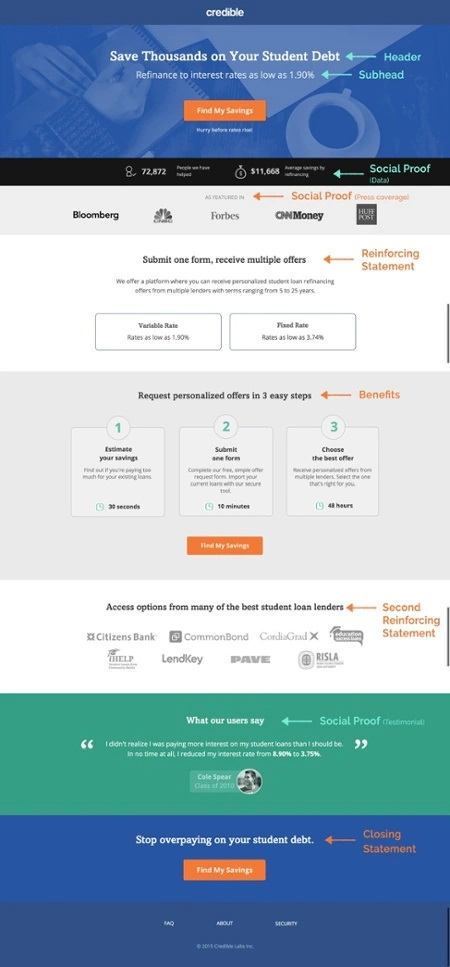
We discussed the importance of compelling copy in landing page, but as a quick reminder, make sure to write your copy in the voice of your audience. Your messaging should add to the conversation your audience is already having about your product and how it solves their problems. Look at social media, discussion boards or emails to find the language your audience is using and replicate it.
Your copy needs to state the value your audience is getting clearly and quickly. Avoid over-hyped words (think of all those weight-loss supplement commercials), superlatives (world-class), and business terms. Your unique selling proposition is expressed through the headline, subhead, benefits, reinforcing and closing statement on your landing page. And of course, social proof is also used to support your USP.
Your headline is the first stop for your audience to see what your product is and the problem you’re solving. It needs to be short, clear, and easily understood.
“Your headline has one job and one job only. To get your visitors to continue engaging with your message, increase their desire for what you’re offering, and motivate a Call-To-Action click. That’s why when it comes to crafting effective landing page headlines, choose clarity over clever. Clever calls attention to itself at the expense of the message. Clarity smooths the way to conversion.”-Roberta Rosenberg, Copywriter
Roberta offers great advice. Your landing page headline isn’t like a blog post headline. You aren’t trying to write the wittiest title to make your audience laugh. You are trying to get your audience to stay on your page, realize you are better than the competition, and ultimately sign up for your offer.
To see if your headline is clear, follow Peep Laja’s advice: Imagine your landing page is just your headline and call-to-action. Will your headline get your audience to click on your CTA? If you are chatting with a friend, would you use the exact headline to explain your offer? If you answer yes, you’re on the right track. There are tons of different formulas to use to help write a headline.
Copywriter Joanna Wiebe created a list of five headline formulas and examples to try (even huge companies use them) which I’ve copied below for your convenience:
1. “Get the [Rarely Seen Adjective] Power of [What Your Product Does] Without [Pain]

2. [Adjective] & [Adjective] [What You Are / SEO Keyword Phrase] That Will [Highly Desirable Promise of Results]

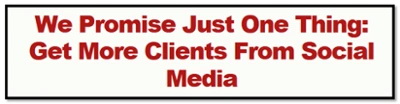
3. We Promise You This: [Highly Desirable Promise of Results]
4. [Known Competitor] [Does This Undesirable or Unimpressive Thing], and [Your Brand Name] [Does This Highly Desirable or Impressive Thing]

5. The Only [SEO Keyword Phrase] Made Exclusively to [Highly Desirable Outcome or Benefit]”

{{threesteps-component="/blog-shortcodes/blog-popup"}}
These formulas are guidelines for construction, the success of them depends on you and your product.
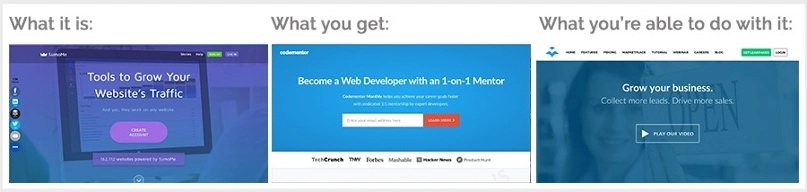
Joanna also created this headline style list to get increased conversions and showcase your unique selling proposition:
Use your subhead to further explain the solution stated in your headline. There are two ways to think about your subhead:
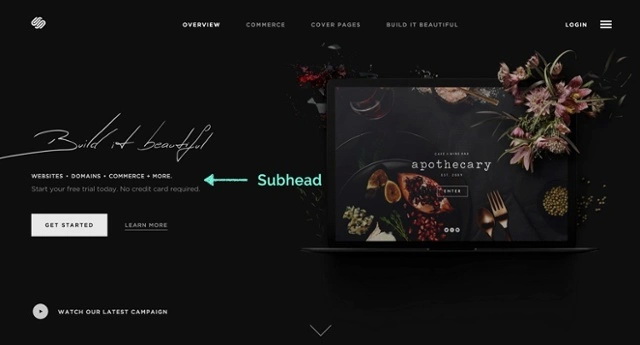
When writing your subhead, follow Neil Patel’s tips: clearly state the benefit and tie it into the headline while keeping it to one sentence. Since readers’ attention spans are shrinking, keep your subheads short and to the point because it’s easy for your audience to scan—but also encourages them to keep reading.
By this point, you’ve hooked your audience. Now it’s time to answer their questions on how you will solve their problems. The best way to outline these answers is with a list. It’s an easy way for your audience to get the information quickly and clearly. To start, try answering the question “What do my potential customers need?” with a one sentence answer.
On your page, include three to five points on the biggest problems you are solving for your audience. Rewrite this section as many times as needed to keep your language succinct.
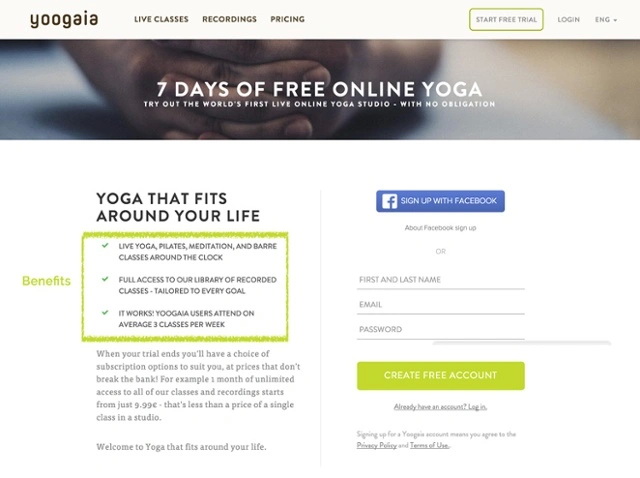
In this section, make sure to focus on the benefits of your offer (how you are solving a problem) and not the features (describing what the product/offer does). This will help drive your unique selling proposition home.
Including an explanation of the features is a fine line. It helps those in your audience who need more information to make a decision, but it can also make someone’s easy decision more complicated because of an information overload. Since you know your audience best, it’s up to you to find that happy medium.
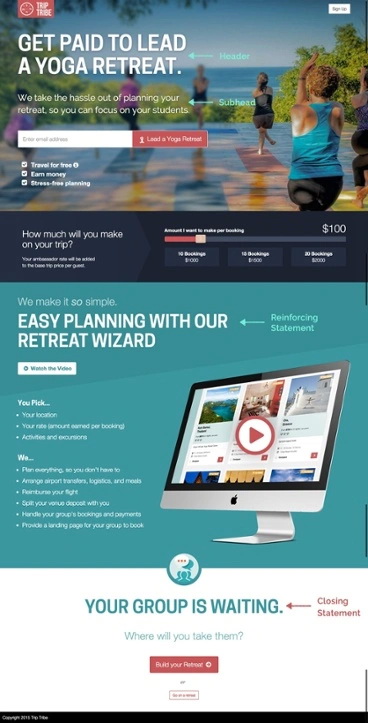
The reinforcing statement is a second headline found midway down a landing page. The goal of it is to continue your USP found in the main headline. This is a great way to showcase a high-value benefit of your product/offer. Use the same design (size, width, color, etc.) as your main headline.
When creating your headlines, Oli Gardner says to think about it as a story written in three pieces: headline, reinforcing statement, and closing statement. You can also think of it this way:
Your main headline explains your product/offer and captures your audience’s attention. The reinforcing statement targets a benefit of your product/offer. While the closing statement is there to get your audience to convert.
This is your last chance to reinforce your unique selling proposition. It’s usually found at the end of a longer landing page and reflects a similar message to your headline. Once again, this should look like the other headlines on your page. Couple this statement with another CTA button to increase conversion opportunities. If your landing page has all of the information above the fold, this statement isn’t needed because your headline is still visible.
Technically, this isn’t an element of the USP, but it’s a huge supporting factor. Social proof plays to the emotional data of your audience to support their logical decision to act on the offer. According to Wishpond, “63% of consumers indicate they are more likely to purchase from a site if it has product ratings and reviews.”
When you think about it, that’s a pretty significant percentage of your audience looking for social verification about your product. There are four easy ways to add social proof to your landing page through:
Since a landing page is designed with a single objective for a specific audience, find social examples that will directly relate to the audience you’re targeting while being authentic and not spammy. We break each of these examples up below.
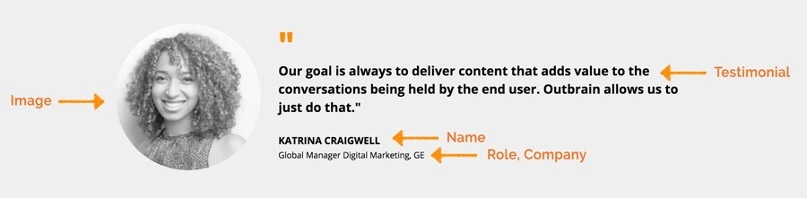
Customer testimonials or reviews are a great way to share those quotes from your audience saying how and why your product is valuable. Include their name, website, company, job title and a picture to bolster credibility. Because of the Superstar Effect mentioned earlier, your audience will be more likely to use your product or sign up for your offer if someone with high influence (a “superstar”) has too.
Place these under the benefits statement and near your CTA.
Use numbers to impress your audience and show how popular you are. Show off sign-ups per week, number app downloads, total subscribers to your newsletter or blog, number of students enrolled in your online school, etc. Data can be used in your headline, near your CTAs or in your reinforcing or closing statements.
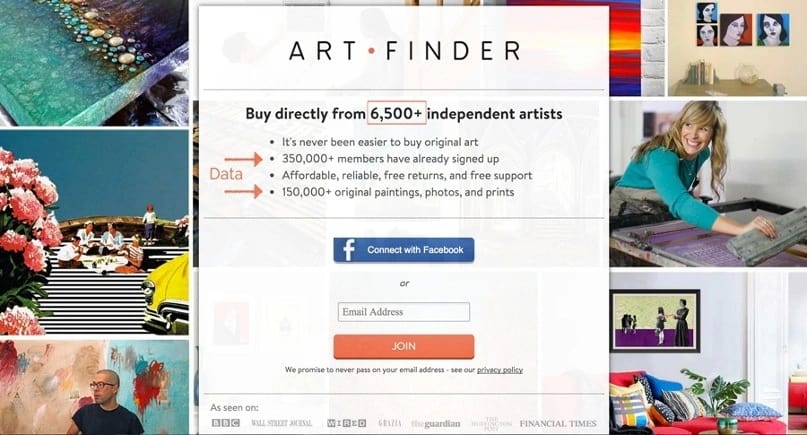
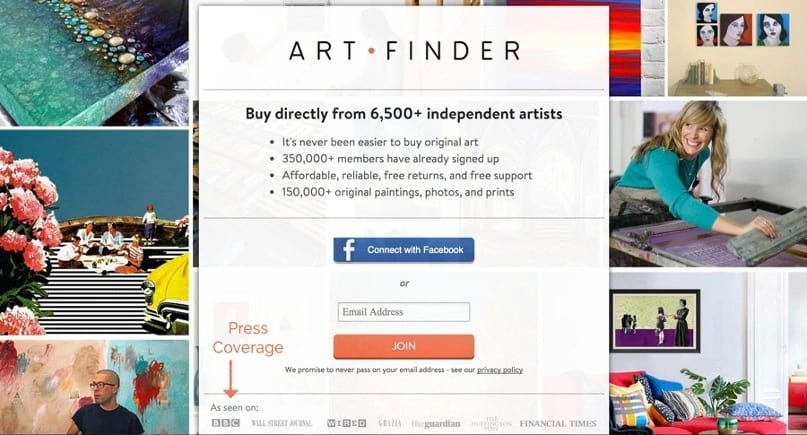
Show off the publications or websites you’ve been featured in by displaying their logos on your landing page. Including highly reputable organizations on your landing page boosts your credibility (just like including a testimonial from celebrity influencers). If large, trusted publications recommend you, then it convinces the masses to trust you too.
Put these logos just above the fold or above the footer at the bottom of the page.
Trust seals are great to include if you collect and store your audience’s personal data. These types of symbols reassure your audiences that their information is safe and secure.
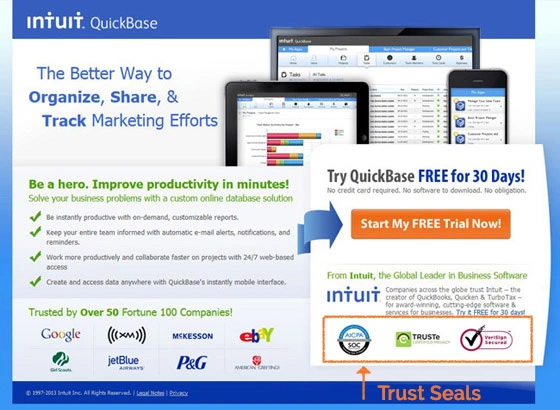
Trust seals are not always necessary. Consider the type of landing page you’re creating and the data you are asking for. Are you creating a landing page to get your audience to enter their email to download a presentation template? You probably don’t need a trust symbol. If you have a large e-commerce site and are collecting credit card information, then maybe a seal might be helpful for your audience. When in doubt, A/B test it!
With these six elements, you’re now ready to start building your unique value proposition for your landing page or website.

Are you on the hunt for free Keynote and PowerPoint templates or slides? We all love presentations that are well-designed and informative. And yet, so many presentations lack basic design knowledge. (Think: too much information crammed into one slide, cheesy graphics, confusing complex data, and more.)
Plus, the default Keynote and PowerPoint templates aren’t always great if you’re looking to differentiate yourself. What’s more, we all know that engaging visuals are essential for your content or course, but producing them is challenging, especially if design isn’t your strength.
Below, we’ve included basic design tips, color palettes, and fonts in each template. We’ve even included Keynote and PowerPoint template versions (based on the software you may have.) We recommend checking out the first slide of the presentation to learn how to create great presentations. This has extra design tips and explores presentation structure. These Keynote and PowerPoint templates are meant to be a guide for you. Customize them as you see fit—or follow them exactly. How you use them is up to you.
Do you want more info on design and branding? Take a look at our recommended reading list here.