Thank you! Your submission has been received!
Oops! Something went wrong while submitting the form.
MENU
The latest product releases, platform updates, and fixes from the Teachable engineering team.
.avif)
If you’ve ever tried building a course or launching a digital product, you know how hard it is to get the guidance you need at the level you need it.
That’s why we’re launching the Teachable Customer Journey program.
We’ve put together a tiered program that matches the level of guidance, access, and recognition you receive to the size and ambition of your business.
The more you grow, the more we grow alongside you.
You built a course. Then another one. Students enrolled, revenue grew, and before you knew it, you were running a real business on Teachable.
Think of it like an airline loyalty program, but instead of up
‘rades to first class, you get dedicated success managers, invite-only in-person events, and recognition designed to actually move your business forward.
The Teachable Customer Journey has three tiers, each based on your annual sales through the platform. You don’t need to sign up or apply. Your tier is tracked automatically, and you’ll be placed into the right level at the beginning of each quarter based on your performance over the rolling last 12 months.
If your sales grow and you qualify for a higher tier mid-year, you could be upgraded at the start of the next quarter. And to protect creators who have a slower season, downgrades are only processed annually, giving you room to recover.
Here’s what each tier looks like.
This is the starting line. Every creator on Teachable begins here, and the experience is built to help you find your footing, make your first (or next) sale, and build momentum at your own pace.
What you get:
Teachable Base is self-serve by design. Step-by-step tutorials through Teachable:U and YouTube, combined with regular live sessions, give you the tools and answers to keep moving without waiting on anyone.
Once your business crosses the $250K threshold, you stop figuring things out alone. A named Teachable success manager is assigned to your account, and the resources available to you shift from general guidance to targeted, growth-focused execution.
What you get:
The difference at this level is focus. Your success manager helps you decide which sessions to attend, which features to prioritize right now, and what to ignore until later. Practical templates, session recordings, and clear direction replace the guesswork that can slow down growth at this stage.
At this level, Teachable becomes a true partner in your business. The conversation moves from “what should I do next” to “where should my next $500K come from?” A dedicated senior success manager works alongside you on strategy, not just execution.
Everything in Teachable Select, plus:
Elite-tier creators also gain access to small, curated rooms that don’t exist anywhere else on the platform. Council sessions bring together top creators and Teachable leadership for candid conversations about market shifts, strategic decisions, and the future of the market.
These aren’t webinars. They’re working sessions for creators operating at a scale where the right conversation can be worth more than the right feature.
We built this program because the old model didn’t match reality. Creators at $50K need different things than creators at $500K, and both need different things than creators pushing past $1M. The Teachable Customer Journey puts the right resources in front of you at the right time, so your energy goes toward growing your business instead of searching for answers.
Whether you’re building early momentum, scaling toward your next tier, or operating at the top of the platform, this program is designed to reward your progress and accelerate what comes next.
.avif)
Hey there! I'm excited to share something we've been working on that I think is going to make a real difference in how you sell on Teachable.
Over the past year or two, I've had the privilege of sitting down with dozens of creators—some selling their first course, others running thriving schools with multiple products. And you know what kept coming up? Sales pages.
Not in a good way, unfortunately.
The conversations usually went something like this: "I love Teachable, but I spent three weeks perfecting my sales page before I could launch." Or my personal favorite: "I have this amazing course ready to go, but I'm still tweaking the layout of my sales page..."
Three weeks. To build a page. When you already had an amazing product ready to sell.
That didn't sit right with me.
Here's where it gets interesting. We dug into the data, and what we found was honestly kind of heartbreaking. Creators were spending not just hours, but days customizing their sales pages. We're talking serious time investment—choosing fonts, adjusting spacing, moving elements around pixel by pixel.
And the correlation with increased sales? Basically nonexistent.
In fact, in many cases, all that customization just meant one thing: delayed revenue. While you were perfecting that hero image, potential students were waiting. While you were A/B testing button colors in your head, sales that could have been happening... weren't.
The other issue? Our existing sales page builder made it really hard to figure out what actually worked. Because every page was so custom and unique to each school, there was no clear pattern of what led to more conversions. You were essentially starting from scratch every time, flying blind.
Look, I wish I could tell you we built some magical tool that lets you customize everything AND guarantees higher conversions AND launches in five minutes. But that's not reality.
What we could do was ask ourselves: What if we flipped the script entirely?
What if, instead of giving you a blank canvas and infinite options, we gave you something that was ready to sell right now? What if we took all the information you've already added about your product—the stuff that's sitting there in your course setup—and automatically turned that into a sales page that actually converts?
That's exactly what Product Detail Pages (PDPs) are.
Here's the beautiful part: PDPs take the content you've already created and transform it into a sales page that's ready to go. No hours of customization required. In fact, we've intentionally limited the customization options at launch.
I know what you're thinking: "Wait, less customization? Isn't that... bad?"
Nope! Here's why: we only want to add customization options that we know drive conversions. No fluff. No features that look cool but don't actually help you sell more. Every option we add will be backed by data showing it makes a real difference.
And the results so far? They speak for themselves. We're seeing over 50% higher conversion rates with PDPs compared to traditional sales pages. Fifty. Percent.
Let that sink in for a second. You're doing less work and selling more. That's the dream, right?
PDPs are laser-focused on one thing: getting visitors to take action. To click that purchase button. To become your student.
Every element on the page is designed to guide people toward that conversion. No distractions, no unnecessary bells and whistles—just clear, compelling information about your product and a straightforward path to purchase.
The best part? PDPs work across your entire catalog:
No matter what you're selling on Teachable, PDPs have you covered.
This is just the beginning. We're watching the data closely, listening to your feedback, and already planning what comes next.
Our focus moving forward is simple: help you sell more, easier. Every feature we add, every tweak we make, will be in service of that goal.
We're not trying to build the fanciest sales page builder in the world. We're trying to build the most effective one. The one that gets your products in front of students faster and converts those students at higher rates.
Product Detail Pages are about giving you back your time. Time you can spend creating better content, engaging with your students, or—wild idea—actually enjoying your life.
They're about eliminating the barrier between "my product is ready" and "I'm making sales."
And honestly? They're about us finally giving you something that works better, not just something that feels busier.
We can't wait to see what you do with all that extra time you're getting back. (Might I suggest making another amazing course? Just a thought. 😉)
Ready to check out PDPs? Head to your Teachable dashboard and see how fast you can go from product to purchase-ready. I think you're going to love it.
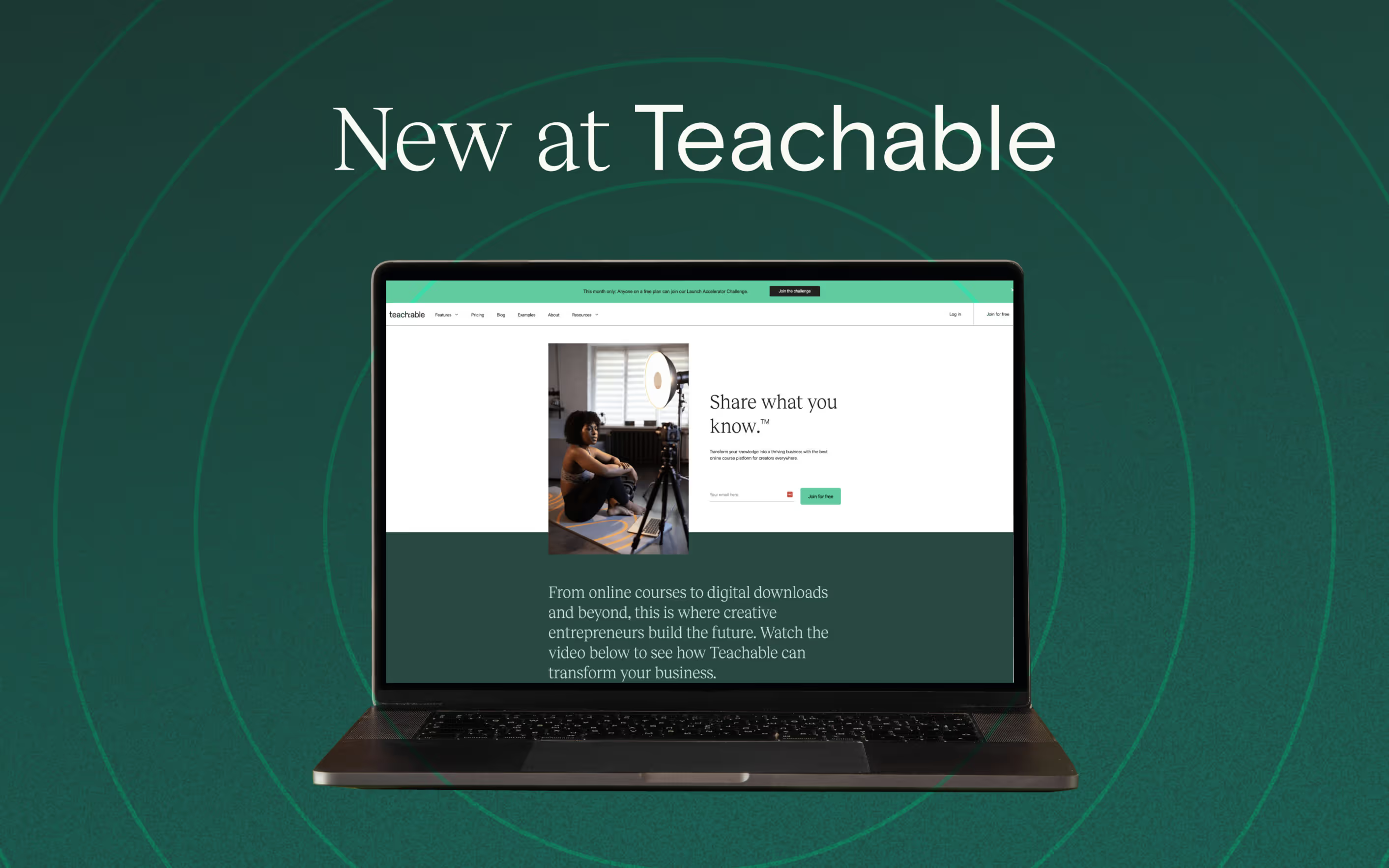
We’re constantly inspired by your stories, strategies, and successes. As you look to scale your business and your impact through courses, coaching, and downloadable content, we’re right there with you—building tools to help you better engage your students and maximize your earning potential.
We’re working hard to roll out tools and features to tackle your evolving needs so you can create content, sell smarter, and deepen your impact on your audience. And while you can always find our exciting product news in your inboxes and helpful guides in our Knowledge Base, we want to use this space to share with you the latest news and launches in 2023.
Want to see what’s ahead? Scroll to the bottom to see what tools and features are coming soon.
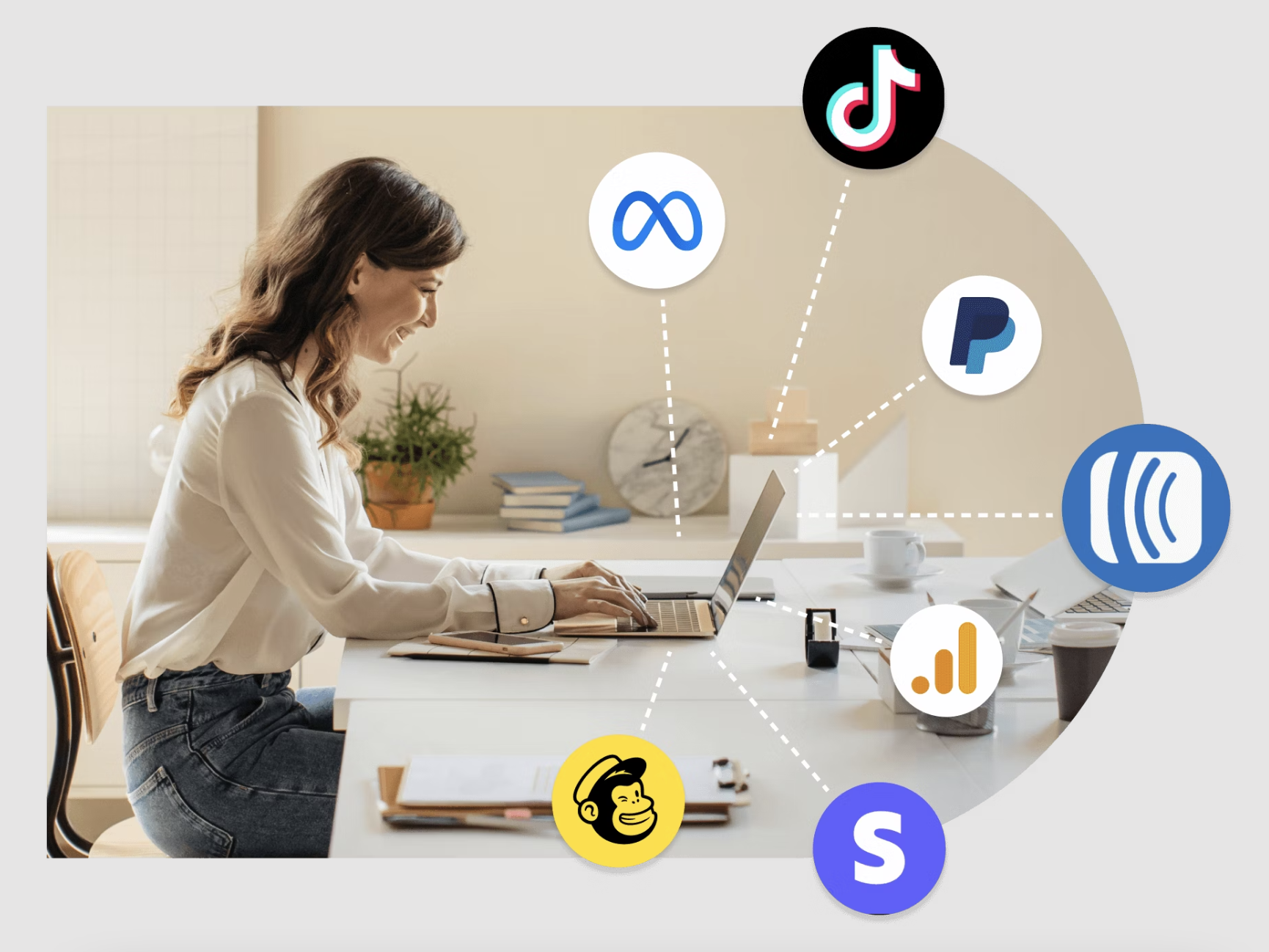
Did you know your favorite apps are on Teachable with our App Hub? We know your business isn’t built on a single platform, so that’s why we connect with dozens of third-party apps—to let you run your business your way. From email marketing to analytics, site design to sales and conversion, our newly released Teachable App Hub is a marketplace of powerful tools to help you run your business with the tool kit you love.
Take a look at some of our top partners (and this is just the beginning).
This new integration allows creators to add their customers to mailing lists in AWeber based on various Teachable triggers, including:
But we know you don’t just have one tool in your kit. That’s why in addition to the other library of apps we integrated with, we’re offering an integration with ActiveCampaign. Here, you can connect your Teachable school directly to your ActiveCampaign account and manage both school-wide and course level events, like new sign-ups, sales, and more. Learn more about setting up and managing your ActiveCampaign integration.
Learn more about the App Hub here or login to access apps.
Are you ready to be your most efficient self? The Teachable AI Hub is a host of AI-powered tools designed to drive efficiency while you stay in control of your brand and your business. These tools are integrated directly into your Teachable school for a seamless experience. Learn more below:
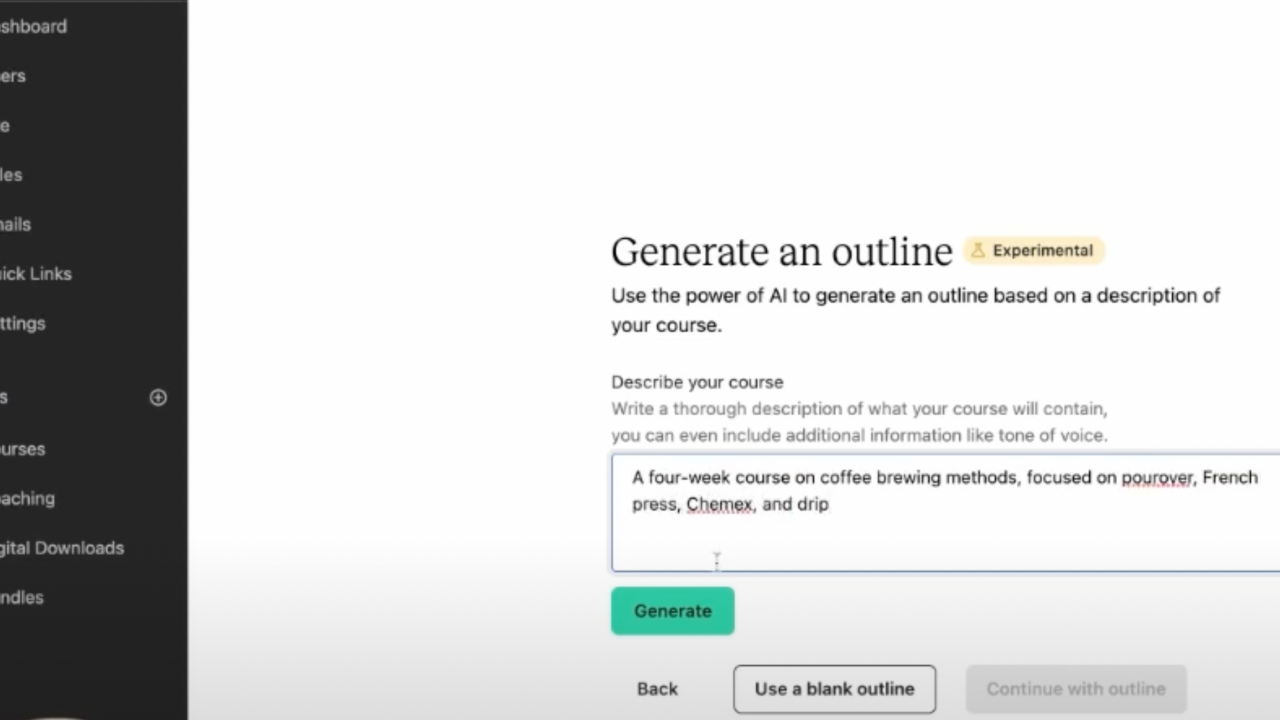
Our new Course Curriculum Generator tool leverages AI directly in the platform to help you build an initial course outline in seconds. Simply enter a topic and description of your course and the generator reveals a sample outline for that course. From here you can adopt and edit to fit your needs and expertise.
While we never believe AI can replace the knowledge and skill of a creator, we do believe leveraging a powerful tool like our Course Curriculum Generator can help jumpstart creativity, overcome roadblocks, and get you back to creating faster. What’s more, anyone on any Teachable plan, including our Free plan can access this powerful tool. See how to get started in the video below or log in from your Teachable admin area, check the “Help me generate a course outline box” when creating a new course product.
Since its release, roughly a third of all schools on Teachable have used the Course Curriculum Generator, amounting to roughly 130 curriculums a day on average.
Quizzes are a proven way to boost student engagement—and now you can produce them faster than ever using our quiz generator. Not only do interactives like quizzes add value to your courses, but they boost student engagement. Leverage high-quality quizzes to do just that with our AI-generated quizzes that engage students while saving you time and effort.
Everyone learns differently, we get that. Make sure you’re arming your students with everything they need to absorb your content the best they can. Our AI Summary Generator helps you easily provide students with the abridged version of your course via automatically generated content summaries of lessons and sections.
Those on a Basic plan and above can say goodbye to costly third-party subtitle services. Now you can save time and money by creating subtitles automatically when you upload a video on Teachable. You can also translate those subtitles into 72 (that’s right, 72!) languages.
To start, click the gear icon next to any video you’ve uploaded into your course. In the “Add subtitles” section, select auto-generate then choose a language. Once the subtitles have been generated, translate them into one or more different languages by clicking on the translate icon next to the subtitles.
Pro-tip: You can edit the subtitles by downloading the file, making any changes, and then re-uploading them
Dive headfirst into your first (or next) course. Our AI Course Starter, builds on both our AI Curriculum Generator and our AI Lesson Writing Assistant. Now, you can have text dropped into each of the lessons you just created using the AI Curriculum Generator.
How do I try it? Create a new course. When naming your course, check the box for “Help me generate a course outline.” Use the generated outline, then click “Generate” on the Generate Lesson Content screen.
Learn about our latest AI tools here. And start for free with a free plan.
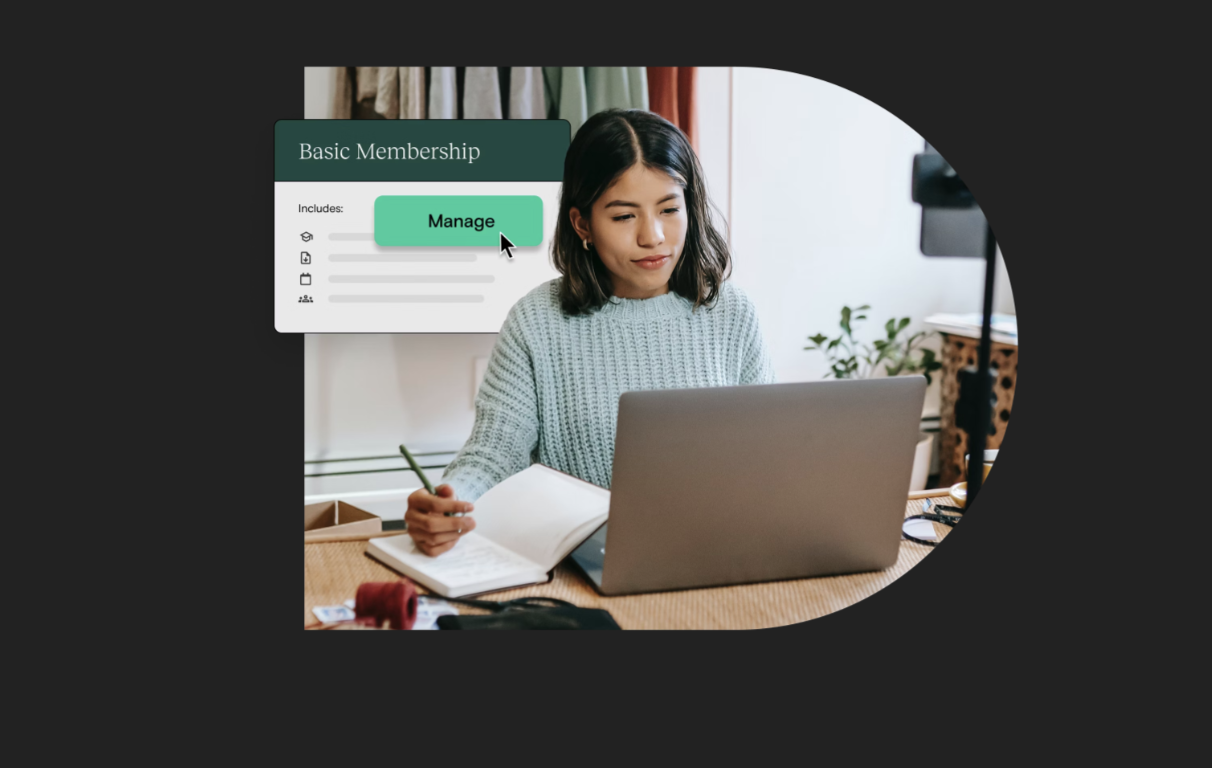
With memberships, creators can now build a recurring revenue model that centers around gating product access by tiers. Creators can customize the student experience of each tier, and students can upgrade and downgrade between tiers all from their own accounts.
Flexibility matters. And that’s why we’re putting control back in your hands, and giving your students the same power too.
Why memberships? Hint: it’s like putting revenue on repeat
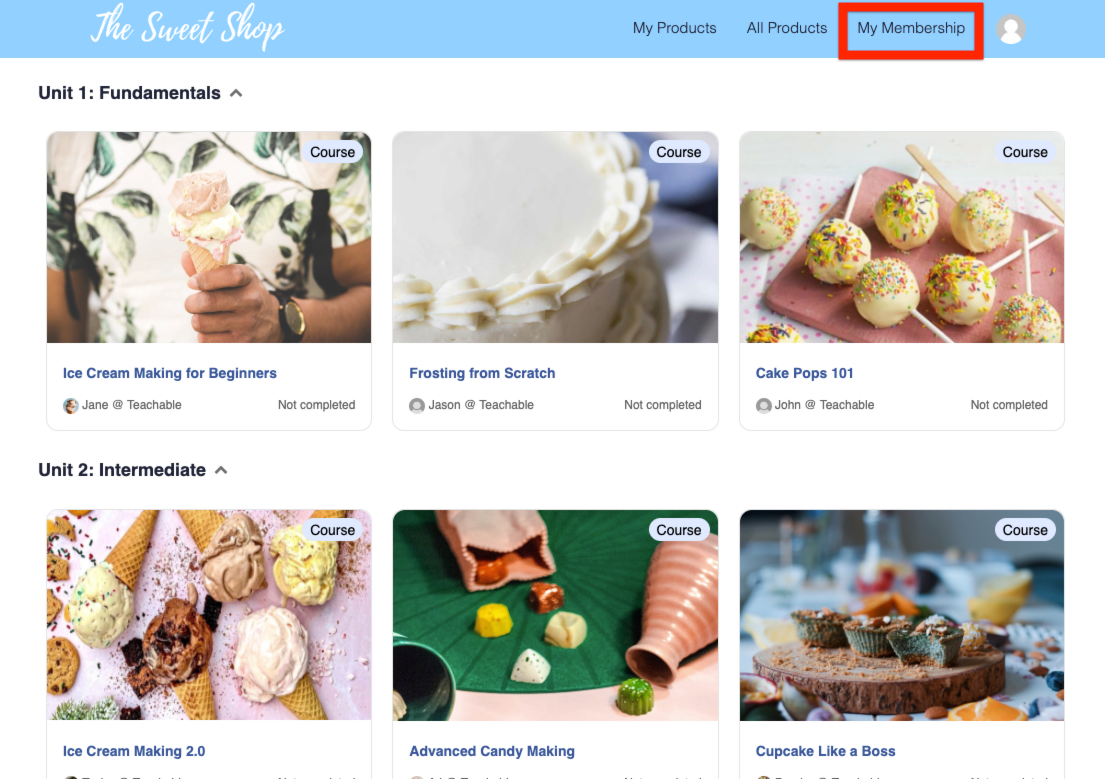
If you’re on a paid plan at Teachable, you can take advantage of the membership product immediately in just a few steps.
To create a membership tier:
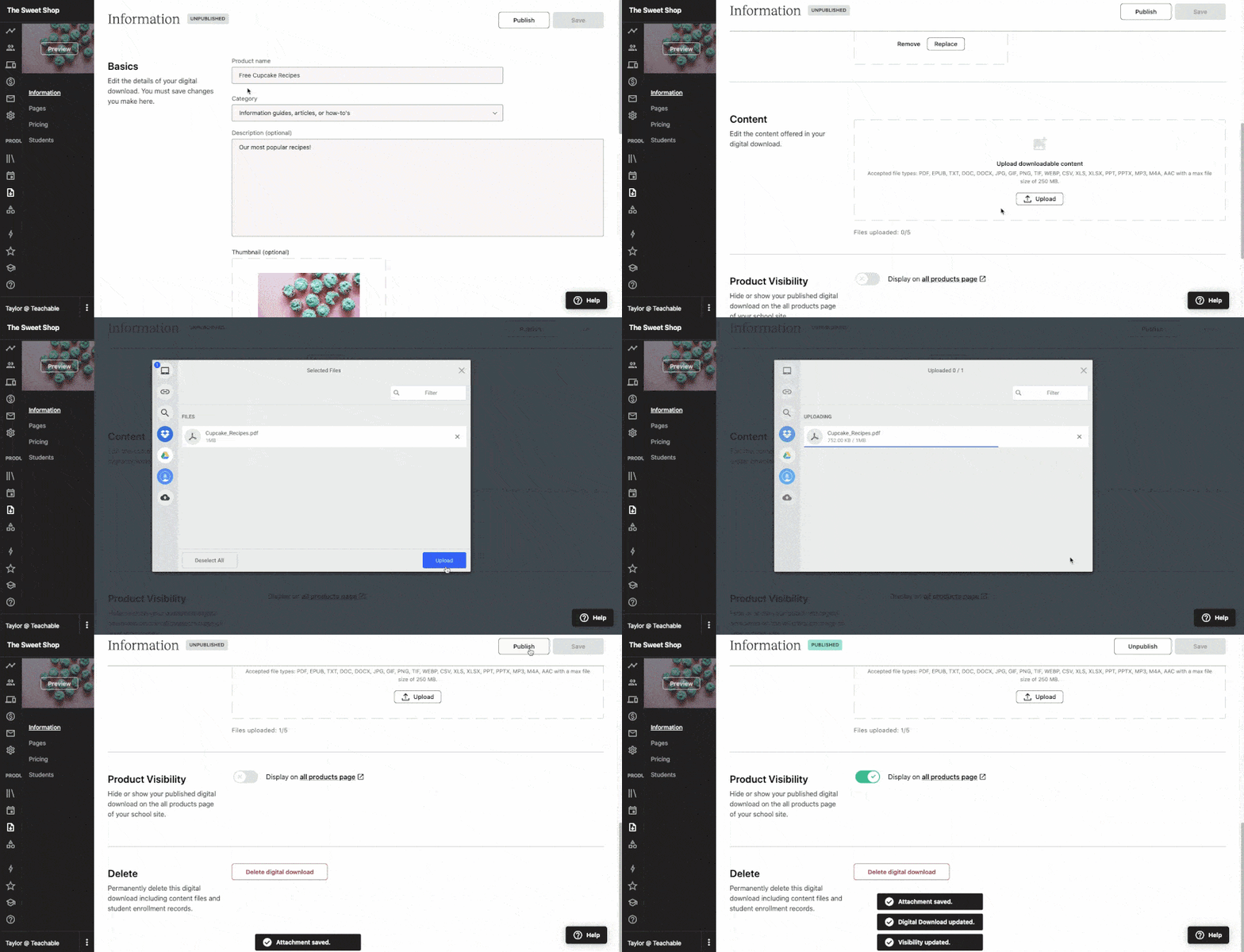
Earlier this year we launched the simplest way to sell your knowledge: digital downloads. Whether you’re looking to start your business, diversify a revenue stream, or deepen your product offering for your students, our digital downloads feature gives you yet another option to create and earn.
Start small by testing the waters with your content. Digital downloads are a great way to gauge interest in content or grow an audience through a lead magnet. Or, level up existing content by offering digital downloads alongside your online course or coaching product. Our bundles, order bumps, and upsells features give you the flexibility to sell your products, your way.
What’s more, your power to earn is limitless with our feature that supports: ebooks, templates, downloads, how-to guides, newsletters, podcasts, spreadsheets, audio files, and so much more. You can create and sell one digital download on a Free plan, while those on a Basic or Pro plan have unlimited digital downloads.
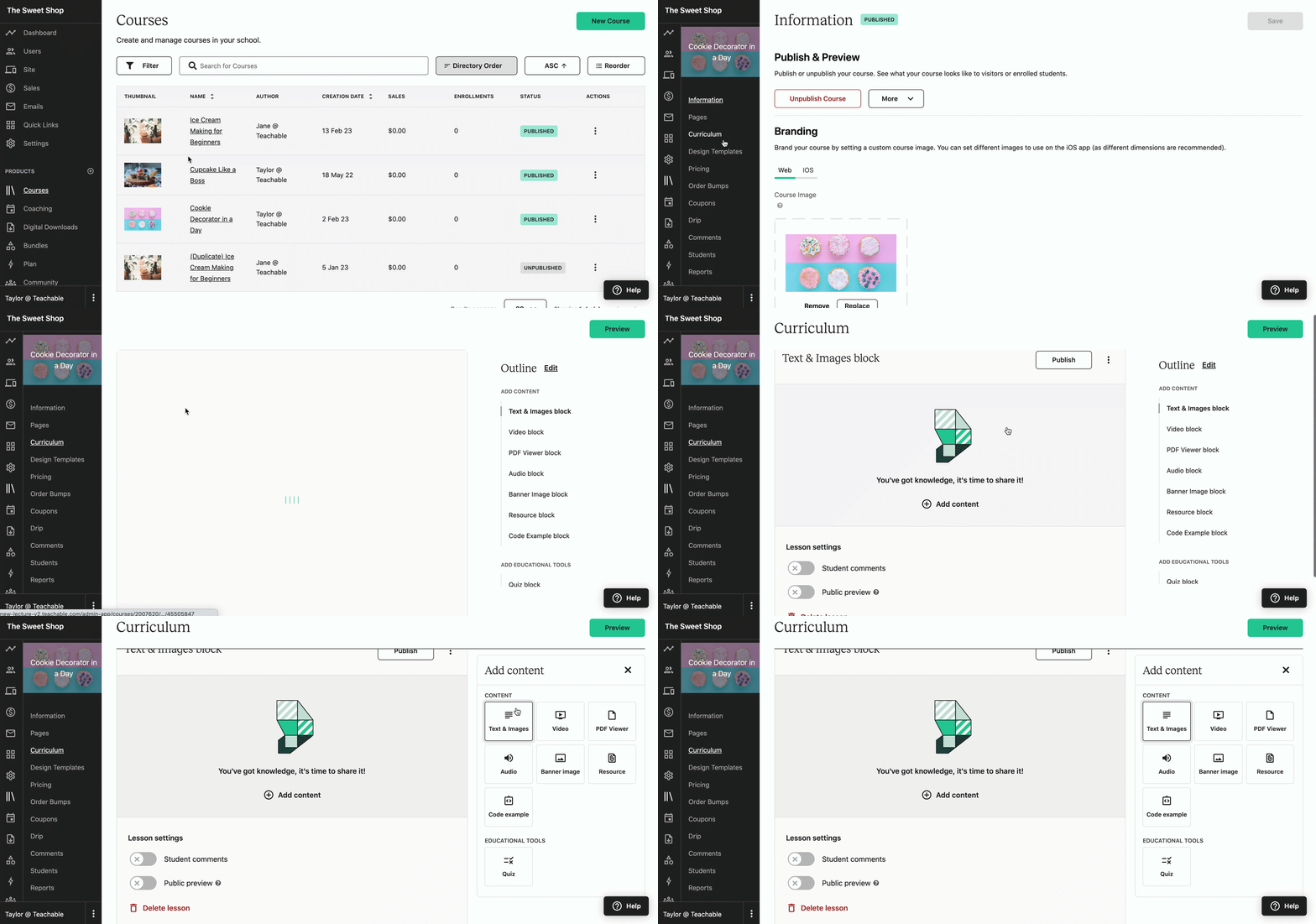
Additionally, we made it better and easier for you to create and customize the course you want. Our redesigned Curriculum Editor, Lesson Editor, and Lesson Blocks give you to the easy-to-use tools you need to build the learning experience you want for your students. Our no-code platform makes for a headache-free creation experience.
Experience a new streamlined curriculum layout format so you can quickly build lessons and make bulk changes. Our new content-focused file upload process allows you to easily add all your content from videos to podcasts and downloadable resources faster. What’s more, in-line previews give you a better sense of what your students will see so you can ensure the best learning experience.
With this update, curriculum and lesson editing page load speeds are up to 95% faster, too. Log into your Teachable admin area and start editing or creating a new course to see these improvements in action.
You asked, we listened. As one of the biggest launches of the year, our Buy Now, Pay Later (BNPL) feature on checkout for BackOffice subscribers is finally here. Use BNPL to increase sales and make larger course purchases more accessible to more students. This feature has been so
In fact, BNPL can increase creators’ total sales by an average of 25% on Stripe. You’ll get paid upfront while your students have the flexibility to make installment payments through Affirm, Afterpay, or Klarna (coming soon). BNPL is currently available for users based in the US and will soon be available for international users in July.
Enable BNPL within your BackOffice settings now!
Never leave a sale behind with Cart Abandonment. As part of the latest addition to our industry-leading sales and commerce tools for creators, this tool allows you to access customer data and use it to re-engage customers who failed to complete checkout and purchase a product but dropped off before completing checkout. With enhanced customization, data access, and built-in tooling, you have complete flexibility at your fingertips to enable this feature in the way that works best for you—and your customers.
Creators using the feature have boosted earnings by 14% on average—with some increasing their bottom line by more than 100%.
Those on a Basic plan or above have access to our standard abandoned cart template. And, those who upgrade to Pro or Business can unlock a fully customizable abandoned cart email, including:
See how you can unlock this game-changing tool now in our Knowledge Base article.
We already made it easier for you to re-engage customers who dropped off at checkout with our Cart Abandonment feature. Now, you can easily add a Schoolwide coupon to your cart abandonment email to entice customers to buy. Get started today: It’s as simple as selecting your schoolwide coupon from a dropdown when editing your cart abandonment email.
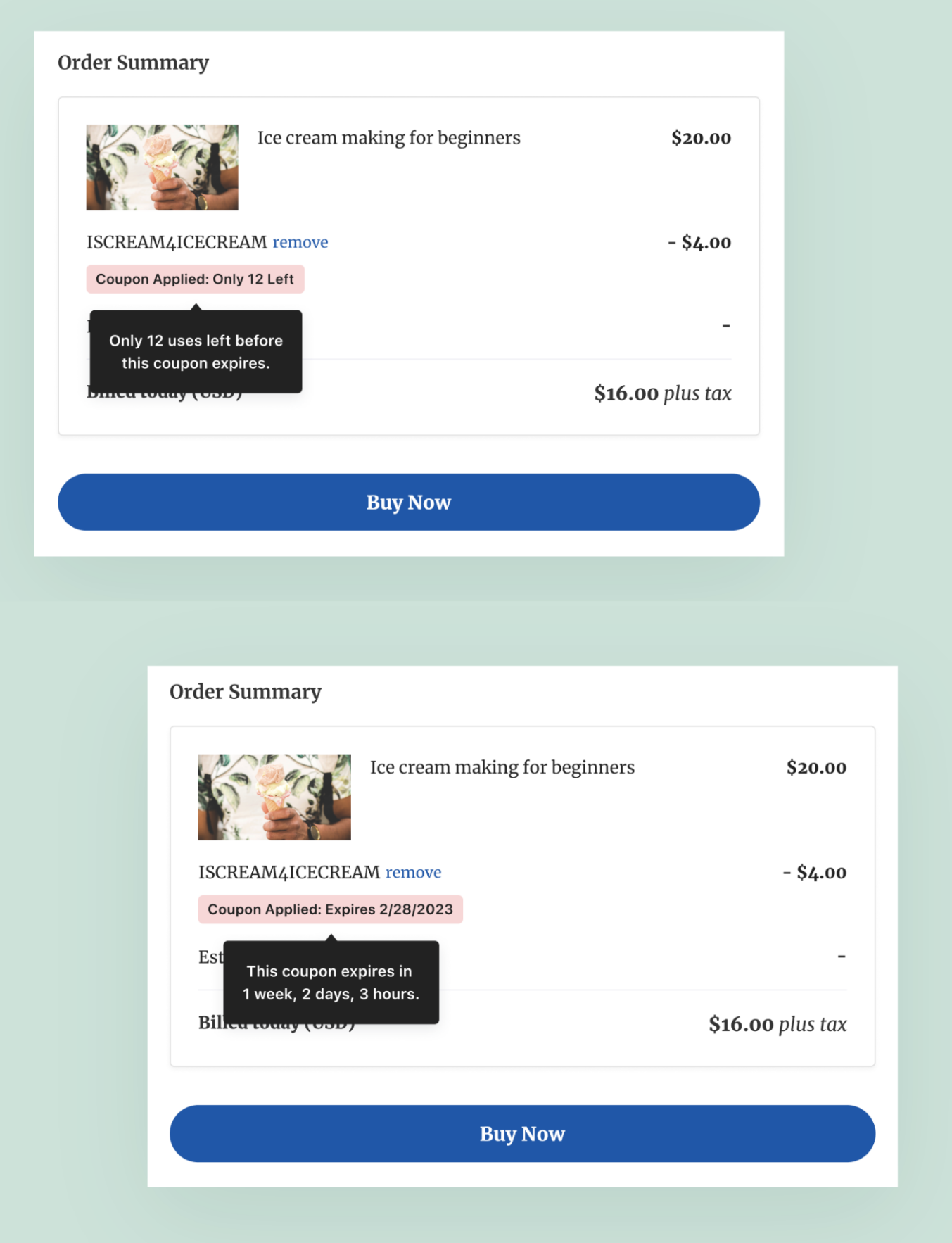
Nothing makes a customer more eager to purchase than a coupon. Add a little urgency and timeliness to that and you’ve created a desire to buy—now. With Coupon Urgency Drivers, you can increase student excitement as you now have the ability to make existing coupon expirations or deadlines visible to students on sales pages and checkout in order to drive up urgency and excitement to purchase. Consider this a powerful marketing tool for creators to drive urgency around purchases with time-based and headcount-based coupon caps placed front and center.
Our Creator Referrals program is a highly-requested feature that lets you leverage the power of your strong network by rewarding existing Teachable creators with a $25 credit each time you invite new creators who subscribe to Teachable—with new creators also receiving a $25 credit. You’ve worked hard to build your network—now earn from it.
Access your unique referral link in the Settings > Earn Credit tab of your school’s admin. Learn more about this rewards program.
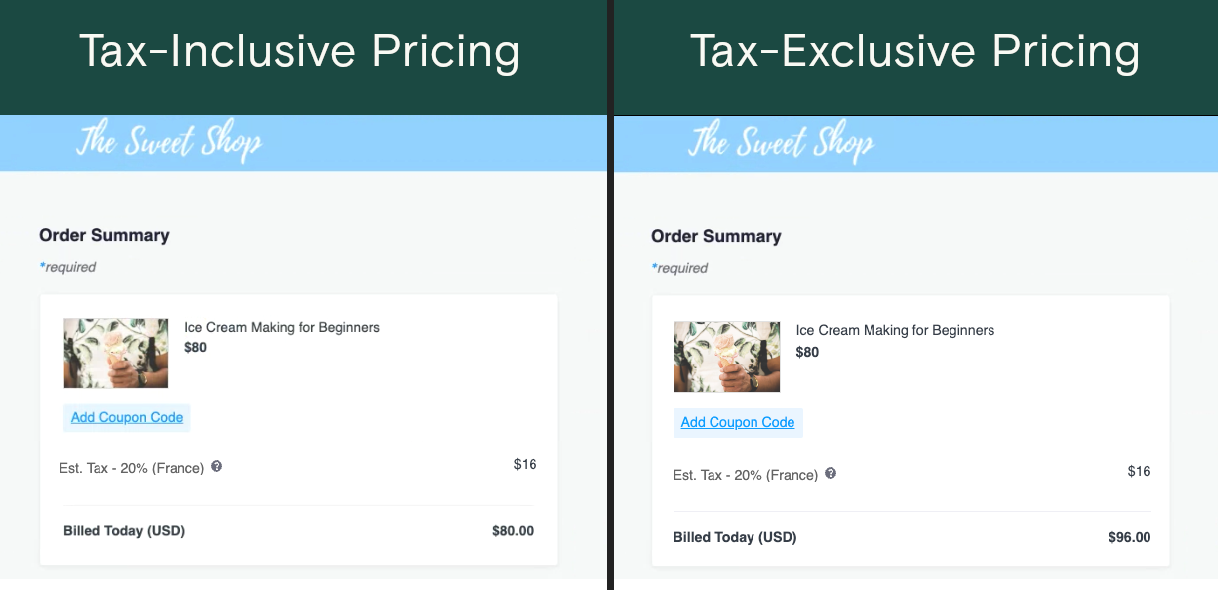
Set the price of a product with the tax already included, so that students—regardless of location and applicable taxes—see the same final sale price. Tax-inclusive pricing is a powerful way to boost conversions in the EU and other global markets. Plus, it’s just one of the many ways teachable:pay, our complete suite of monetization and ecommerce tools, helps you streamline your business.
Unlike many competitors, our goal is more than just getting you paid—though that’s a big part of it. We’re also giving you peace of mind and flexibility while saving you time. It’s time to sell confidently. Learn more about how to turn on tax-inclusive pricing in our Knowledge Base.
Round out your course, coaching, and download offerings with the upcoming addition of Community. Set to launch in beta this month with a select group of creators, our new Community feature offers creators a valuable way to interact with students—responding to questions, participating in conversations, and receiving feedback directly. What’s more, students are able to connect, support, and learn from each other more effectively than ever before—and all in one place. The addition of community ensures creators can seamlessly facilitate a more holistic course experience for their students.

We designed our online course bundle feature to give you more flexibility over how you sell on Teachable. Most recently, we made it so that you can pair coaching and courses together. But did you know that you can use the bundle feature to offer tiered levels of access to content within your school?
To put it simply, you can easily set up multiple bundles within the bundles product area of the admin to craft a tiered structure product that best suits your business.
There are times in which you want to offer your products à la carte. And there are times when you want to create memberships and subscriptions. But there are also times in which you may want to drum up a bit of exclusivity and give your students a world of options.
Offering a tiered access program can be a great way to package the products you already offer in a way that’s easy to digest. Imagine you’re a yoga teacher and you want to offer different options for students of different levels: Beginner, Intermediate, and Advanced. Or if you’re a mindfulness instructor and need a way to limit how many coaching clients you accept, you may opt for package levels that include other high-value content (such as lessons and course videos) but only permit coaching access to the top package tier.
For this post’s example, imagine you run a knitting school. You may want to offer:
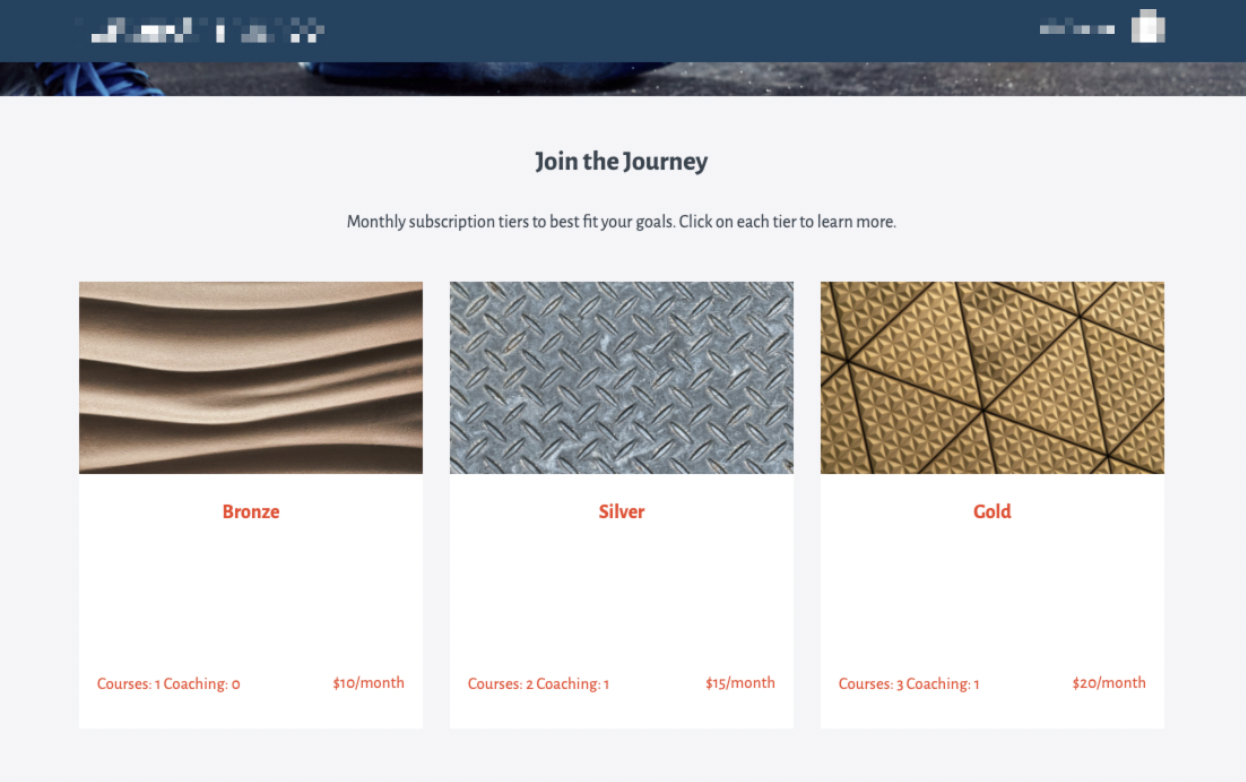
You can easily set up each tier as an online course “bundle” and curate which products are included within each tier. You can also set varying price levels for each tier individually.
To set up tiers:
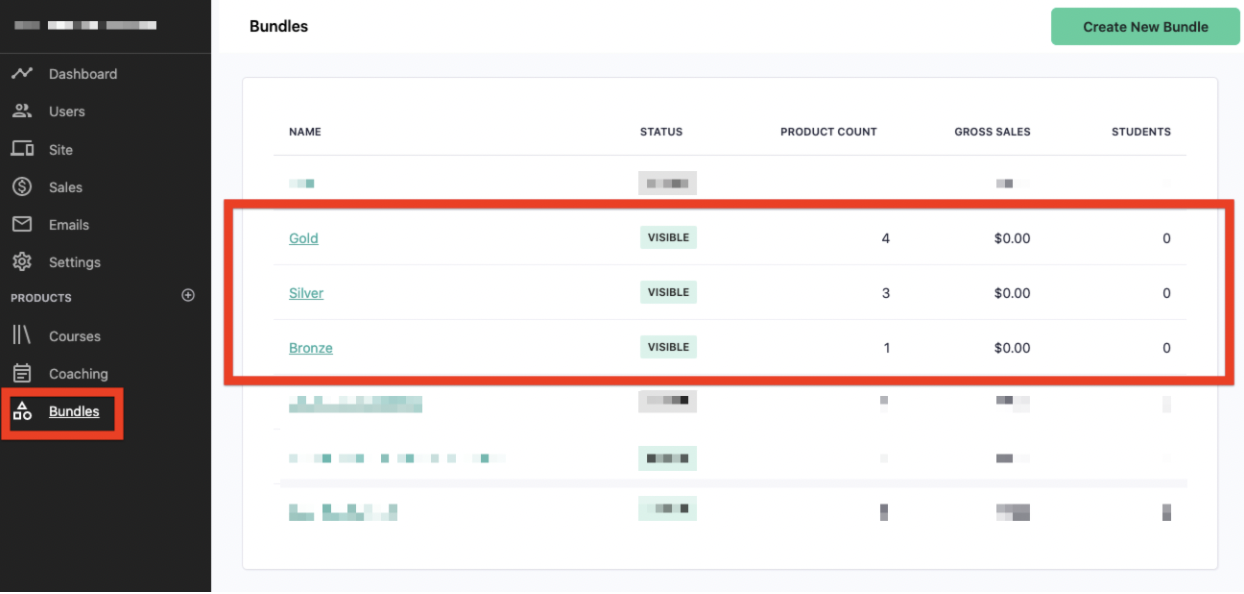
Go to ‘bundle ‘products’ on the left side of the menu within the admin. Create and name as many or as little tiers as you like. Once you’ve created your bundles, each will have its own sales and checkout page for students to purchase.
What you choose is up to you! You can select from already published courses that you sell individually. However, you can also select courses or coaching products that are unpublished and require direct or manual enrollment. This means these options will only be accessible through a bundled product and can drive exclusivity further.
Just remember: Any changes made to a course or coaching product will be available for all bundles that offer access to that product.
Whether you prefer a one-time payment or subscription model, all the options are in your hands.
In our above knitting example, we’ve opted for a subscription pricing model so that the Bronze bundle would have one subscription plan of $10/month, Silver at $15/month, and Gold at $20/month.
To learn more about setting up online course bundles, visit this Knowledge Base article.
{{buildcommunity-component="/blog-shortcodes/blog-cta"}}
Setting up a tiered system can be a great way to market your content, package it in a way that delivers maximum impact (with little extra work), and give your students more options.
Just don’t be afraid to get creative with what you include within each tier.
Offering courses is the natural first step. But to make it easier on yourself, consider duplicating course products so you’re not making new content each time.
For example, if you have a course with 10 lessons and you want your Bronze tier to have access to only the first five lessons, duplicate the entire course to begin. Then delete the lessons you don’t want the Bronze tier to see. From there, add the Bronze level course to the Bronze bundle and the other course with all 10 lessons to the other bundles.
Another great way to distinguish between tiers is to include coaching access. Consider access to a one-on-one coaching call with you or if you’re offering a subscription tier, a recurring invite to a group session each week.
You can also offer access to your private Circle community. Consider creating tiers within your own community and offer exclusive access based on the student’s tier purchases. To learn more about managing and integrating Circle into your Teachable school, check out this Knowledge Base article.
Beyond courses, coaching, and community access, consider going the extra mile with a few extra offers. Downloadable ebooks, worksheets, checklists, and more can be incredibly powerful assets and can provide extra opportunities for students to learn—and quick ways for you to add value.
In our knitting course example, access to exclusive patterns or a valuable ebook that you normally offer as an order bump can be a great addition to a higher priced tier.
Whichever path you take, the power over your product is in your hands. And we wouldn’t have it any other way.

Over the past seven years, we’ve had the privilege of helping 150,000 creators share their knowledge, connect with 47+ million students worldwide, and generate over $2.5 billion in sales.
This incredible journey has been made possible by creators, educators, and business owners like you who trust Teachable to help bring their visions to life.
As we continue to grow, we remain deeply committed to ensuring that Teachable is a strong, stable, and reliable platform for you.
Recently, we’ve taken significant steps to improve our foundation and make your experience smoother, especially during critical moments like high-traffic sales periods.
We know that for many of you, Teachable has delivered a reliable experience with only the occasional bug or quirk.
However, we also hear from creators who have faced outages or performance challenges, and we take that feedback seriously.
To better understand your needs, we analyzed survey responses, direct feedback, bug reports, incident metrics, and ticket volumes.
This data has guided our efforts to strengthen the platform in ways that matter most to you.
Over the past few months, we’ve taken the following actions:
These improvements are just the beginning, and we’re excited about what’s to come.
As we move into 2025, we’re refining our focus to prioritize what matters most to you. At the top of that list is ensuring a reliable, stable platform, and we're dedicating our energy to delivering exactly that.
We’re committed to keeping you informed and involved every step of the way.
Thank you for being the most important part of Teachable.

Subscription models might be in trend, but the simplicity of one-time payments for online courses will never go away. It is an easy, low commitment strategy to get interested students to purchase your online course. What is often up for debate, however, is how long your students should get access to the course. It’s common to see course creators market and offer their courses for lifetime access. It’s a catchy phrase and simple sales strategy. By offering lifetime access to content students want, you’re removing blockers such as “I don’t have time now, ” and “Can I complete the course in 90 days?” But, is it really that simple?
Increasingly, course creators are being asked what “lifetime” means. How long is a lifetime in the ever changing world of the internet? Is it my lifetime, your lifetime, or the lifetime of the software it’s hosted on?
To allow creators to have the flexibility to change their launch strategy and pricing models, Teachable rolled out the feature to let you set your own course access durations. Three months later, our creators have set up over 10,000 products with limited course access duration that have generated over $3.5 million USD.
Let’s dive into some numbers on how creators are using this course access duration feature, and how you can utilize it in your course offerings.
As business owners and course creators, you probably love exploring numbers and finding out what they mean. So do we. Here are some statistics on how creators have utilized the limited course access duration feature:

Since we rolled out the feature, almost half of our paid members have created a product with limited course access. In fact, about 25% of those creators only have courses with limited access, eliminating any lifetime access to courses they offer.
When you set time limits on course access, you can choose a specific date or time frame when the course expires. For example, if you choose a specific date such as December 31, 2020, then all enrolled students will lose access to the course at the end of the year regardless of when they purchased the course.
In contrast, setting a specific time frame will allow all students the same amount of time to access your course, starting from the date they purchased it. If the course was available for one month, a student purchasing it on March 1 will lose access on April 1. Similarly, a student who purchased it on March 15 will lose access on April 15.
As shown above, setting a specific time frame is more popular than setting an expiration date. Specifically, the most popular time frames are one year, one week, and one month, which are easy time frames to market for your prospective students.
How you price your launch is heavily dependent upon the type of course you are creating. Prior to launch, we spoke to many creators who were interested in offering limited course access. One common strategy creators want to implement is cohorts. The idea is to create cohorts that mirror school semesters—a learning behavior that most people are already familiar with.
Across different course categories, this strategy works. In fact, the leading category for limited access is health and wellness, followed by professional development, business and marketing, academics and languages, and other.

You can create three-month cohorts that mirror the semester schedule. Or you can create shorter or longer cohorts that best fits your curriculum. Nevertheless, many creators have already created three-month, semester-like courses in the chart above.
This not only helps with how you market to your audience, but it also manages your content and finances. With planned cohorts year round, you can add refining sessions in between to update content. Then, project how many students you can enroll. This leads to predictable recurring income without a subscription model or lifetime access. That’s why 10% of our users are already only selling courses with limited access.
Whether you’re offering an online fitness bootcamp or a professional development course, offering a limited access option might help you boost revenue and student engagement.
Research proves that if you give people three options, they will likely go with the middle. A more neutral option. Do the same with your online course. For every course, offer more than one pricing plan and access duration. Set up three different pricing plans with three varying course access durations to increase average revenue per purchase.

{{tpay-component="/blog-shortcodes/blog-popup"}}
Increasing student engagement
With an expiration date, your student has pressure to finish the course. While this may be a barrier to purchase, it can also weed out prospectives who are truly not ready to take your course. When you are upfront about a timeframe, they can make time to commit to it. This is important for student satisfaction, making sure they got the most of the course, which most often will help lead to better testimonials and marketing content for you to use.
Plus, if they don’t finish, you can upsell them with a discount to re-purchase your course for additional access to complete what they started.
Based on how our creators have utilized this feature, we recommend you test this feature out to see if it impacts your sales and student engagement. Take one of your courses and test to see how this might perform via one of your marketing channels or campaigns. Learn and iterate based on how your audience is responding to your offers, and see how limited course access duration can impact your business.
.avif)
Memberships, or tiered, subscription-based access to your content, have more than tripled in adoption and usage on our platform in the past two years. And this trend is not specific to Teachable - market analysis predicts a growth rate of the online subscription market of over 65% by 2028.
So, why the upward trend? For starters, there is the clear benefit of revenue stability that comes from recurring payments. But a Membership is much more than a simple subscription pricing model - Memberships are a vessel for long term student engagement, thriving peer-to-peer community, and manageable content creation. Put simply, Teachable strongly encourages Memberships because it is a self-sustaining strategy: a way to both nurture engagement and grow recurring revenue that you can count on.
But a Membership model is only as good as the system that’s powering it.
Without the right infrastructure to support, every aspect of managing a membership from billing to content regulation becomes a headache. Managing a membership on your own ultimately puts you further away from what matters most: your knowledge and the audience you’re sharing it with.
That’s why we have invested heavily this past year in the health of our membership product - to ensure that you don’t have to. We’re excited to share the following enhancements and bug fixes:
One of the core functionalities of our Memberships product is the ability for a student to upgrade and downgrade between tiers. The student simply navigates to their subscription from the student admin, clicks ‘compare tiers’, selects the new tier they’d like to purchase, and Teachable will handle movement and proration across tiers.
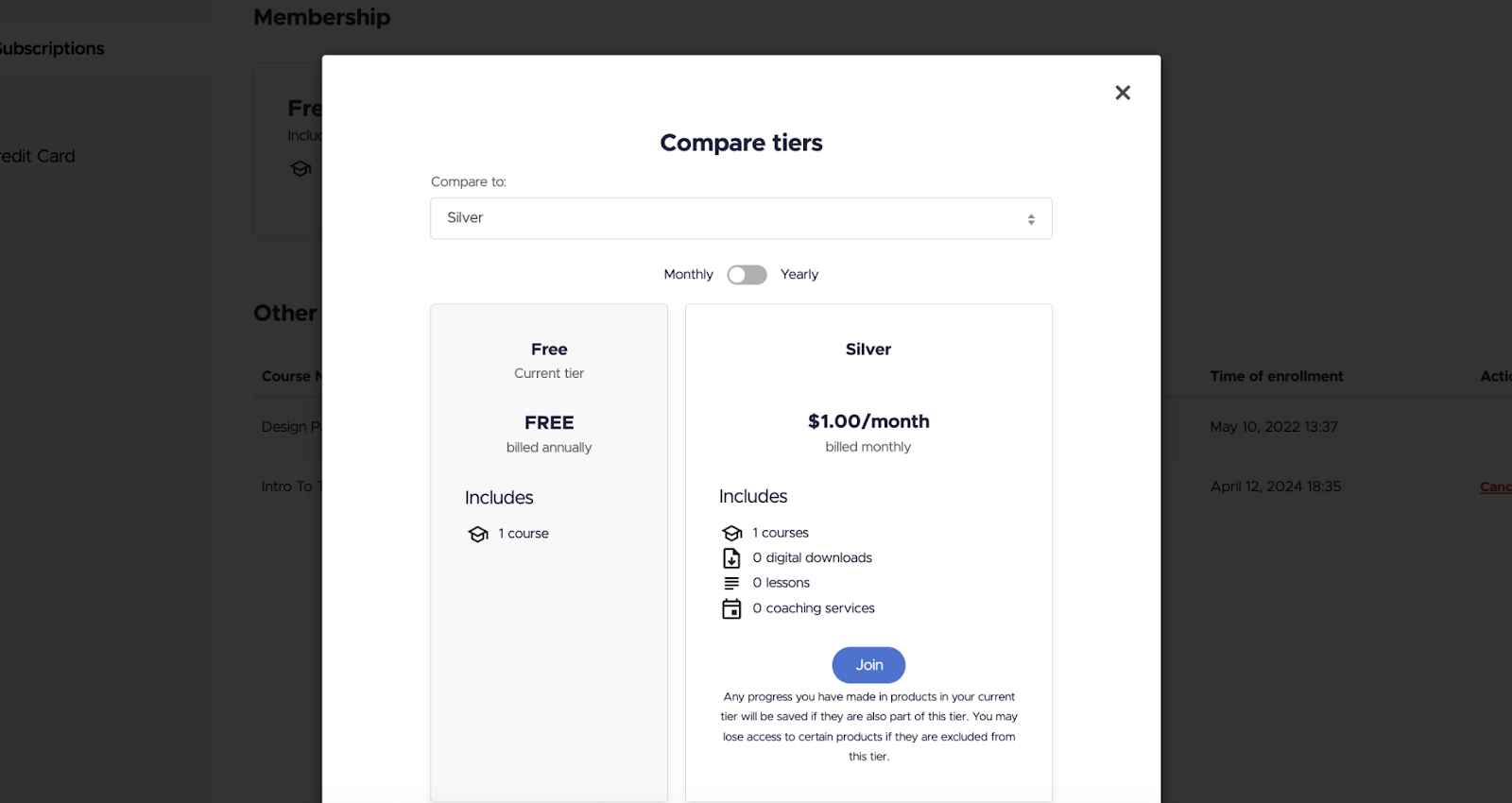
As a creator, you have the ability to add/remove content at any time from any of your tiers, and that content change will be reflected for both new and existing members. We’ve made a few updates to ensure this process works seamlessly and smoothly every time.
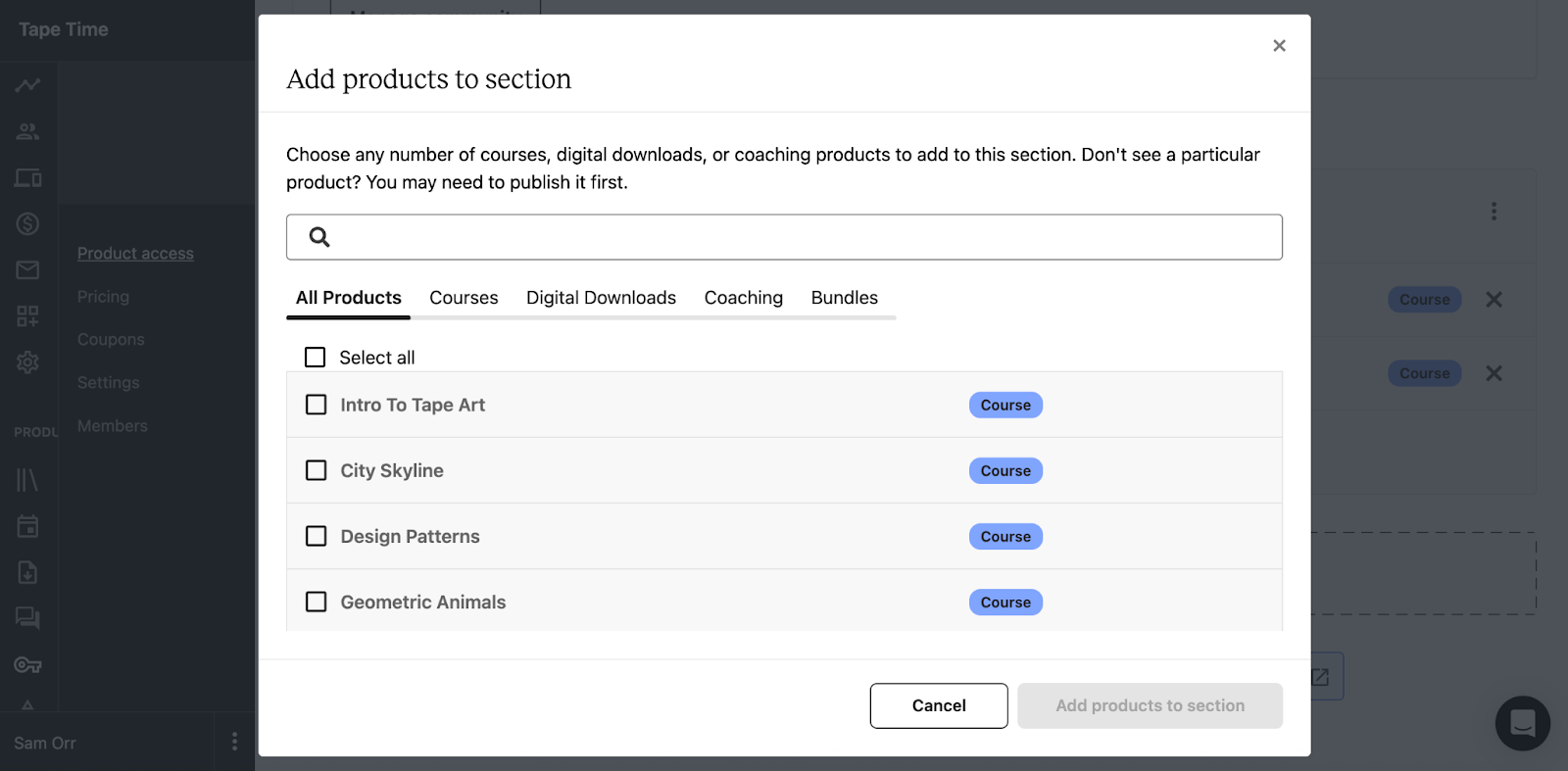
While maintaining your existing membership base is crucial for long term success, it’s equally important to continue to grow that membership base. We’ve launched a great new tool to help you do so.
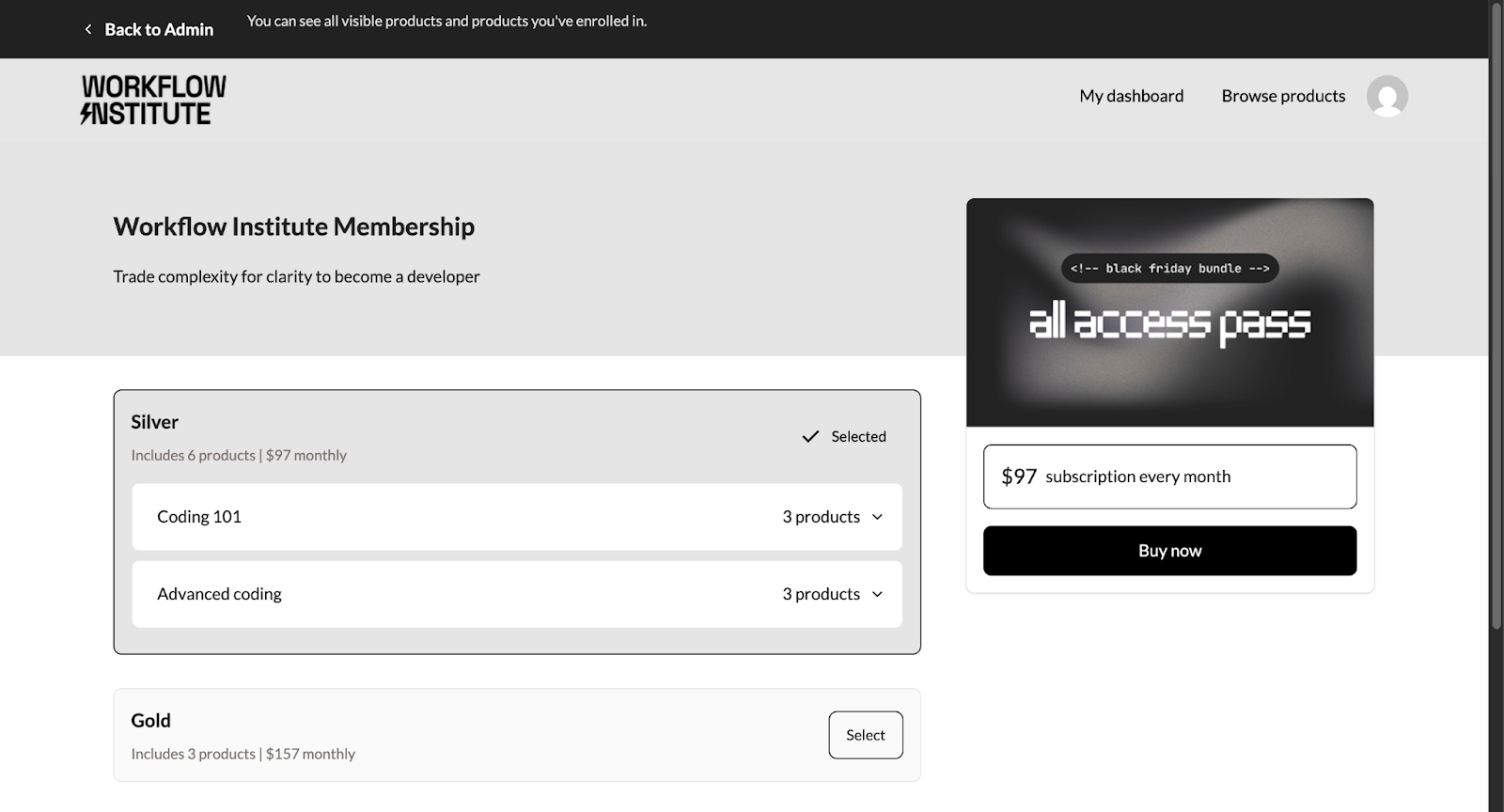
The result of all of these improvements? An average increase in student lifetime value of 11% across adopting schools, and a community of creators leveraging our membership offering that grows by the day.
We’re excited to continue our investment in this core Teachable offering well into the future, and we’d love your help in shaping how this feature evolves. If you have any feedback for us on Memberships, or additional improvements, please reach out to support@teachable.com.

Your sales page holds so much power when it comes to helping potential students make the decision to sign up for your course. So much power, in fact, that we’ve even written several blog posts about writing sales copy that converts. But once you have the perfect copy to make your course offer seem irresistible, you need to get your users to actually read it. That’s where the design of your sales page comes into play, along with custom sales page blocks.
At Teachable, we strive to learn from the thousands of online schools hosted on our platform and work hard to give you everything you need to create compelling and beautiful sales pages.
Yet, we still get excited when we look at some of the stunning sales pages our instructors put together:
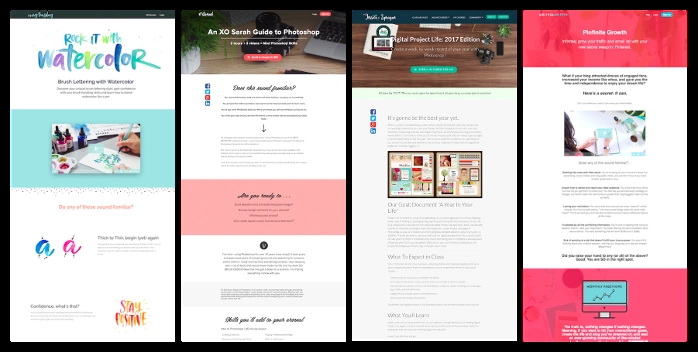
We’ll explain how to use five custom page blocks to take your sales pages to the next level. These blocks will give you additional templates to provide social proof, display personal statements, and present your sales copy in exciting and engaging ways.
1. To start creating blocks using these templates, navigate to the admin area of your school, choose the course you want to edit, and select Sales Page from the sidebar. This will bring you to your sales page editor:
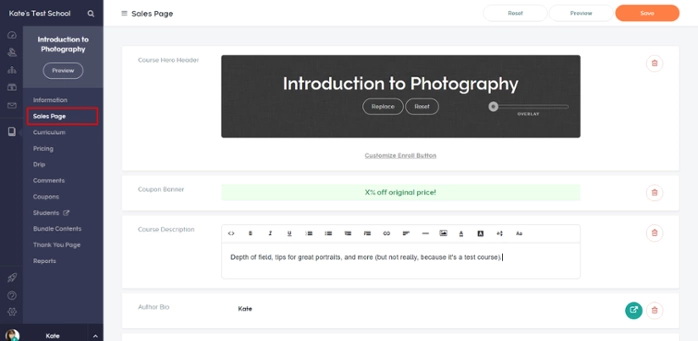
2. Add a custom Liquid/HTML block by hovering over an existing block and choosing it from the selection wheel:
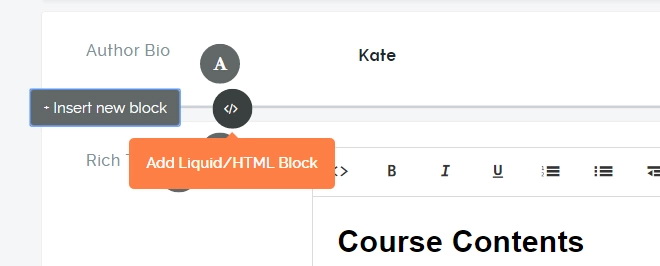
3. Copy and paste the code from your chosen template into the new block.

4. Customize the code to be specific to your course. In this section we’ll cover how to do this on each of the five templates, noting the customizable areas with instructions in red. You’ll also see examples of how the raw templates will look on a sales page.
This template allows you to feature your personal story in letter form, to address your visitors in a more personal way.
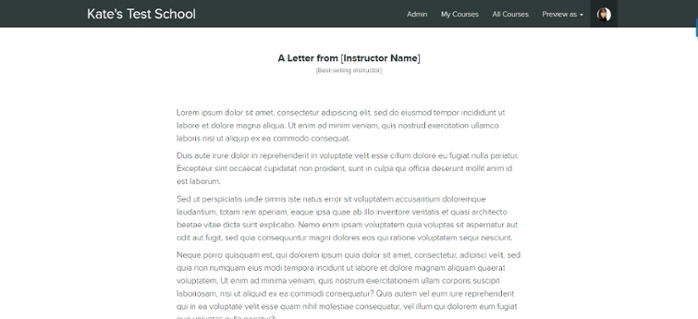
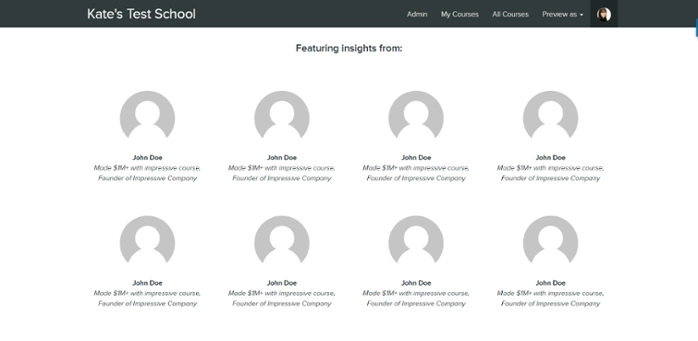
Have influential people contributed to your course? Did you include interviews in your course content? This block will allow you to highlight their profiles.
This template has space for eight featured people in two rows. To adjust according to how many people you’re featuring insights from, simply remove or add more of the sections that begin with

If you want to only have one row of people, remove one of the sections starting with div class=”row” all the way up until the next enter space.

If your course is taught by multiple instructors, use this template to feature their names, photos, and bios.
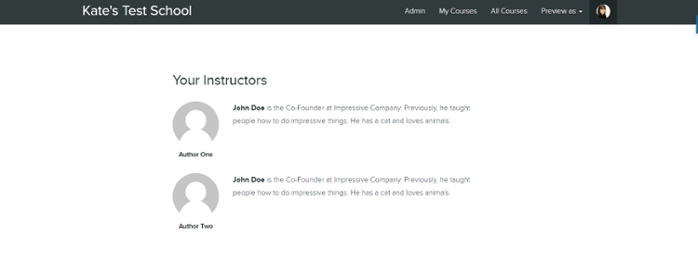
John Doe is the Co-Founder at Impressive Company. Previously, he taught people how to do impressive things. He has a cat and loves animals.
John Doe is the Co-Founder at Impressive Company. Previously, he taught people how to do impressive things. He has a dog and loves animals.
With this template, you can add more social proof to your sales page by featuring names, photos, and quotes from students who have taken your course and enjoyed it or been successful.

Quote about the course. Lorem ipsum dolor sit amet, consectetur adipiscing elit, sed do eiusmod tempor incididunt ut labore et dolore magna aliqua.
Quote about the course. Lorem ipsum dolor sit amet, consectetur adipiscing elit, sed do eiusmod tempor incididunt ut labore et dolore magna aliqua.
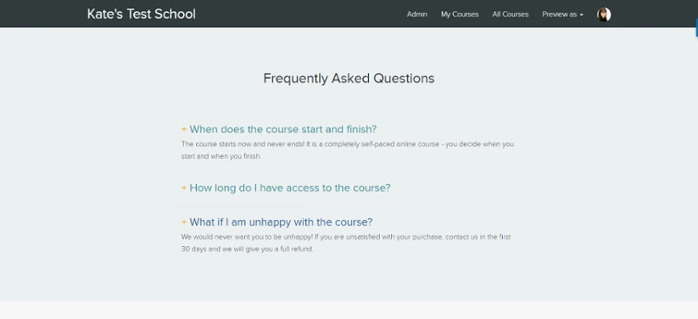
This template allows you to create a dynamic FAQ section, where students can simply click on the question to reveal the answer.
This one is a little different in that you won’t modify the template itself to change or add content. Instead, go into your original FAQs block to add or modify questions to your liking. This template will pull content from that block. When you’re done making changes, delete the original FAQs block (so you don’t have two of them showing up on your sales page) and save your changes.
If you want to add or modify questions in the future, simply add the original FAQs block back in, make the changes, and delete it again. Any changes you make will apply to this block.
This post is just a baseline on how to improve the design of your sales page.
We’d love to see you take your school beyond what’s explained in this post and we’ve created an exclusive workshop just for that.
The content on some of these blocks is static
Because of the way these blocks are built, you will have to go into the blocks to change the content displayed in them. For example, if you decide to use the Multiple Instructors Template and want to update the author information, instead of going to Site > Authors in the Admin Area as you would usually do it, you will need to go directly to the sales page editor and update the information in the block.
Did you find this useful? Want to see more content like this? Tag us on Instagram and let us know.

As an online course instructor, you want to engage your students and provide an incentive for them to complete your course. Many instructors also need to provide a way for their students to verify that they did in fact finish the course—e.g. for a license, governmental agency, or as part of internal training. And we all want that extra “edge” in our course or product: the factor that convinces students that we’re better than the competition.
That’s why we are so thrilled to announce the release of native course completion certificates on Teachable.
There were workarounds for creating certificates on Teachable in the past. In fact, many Teachable school owners have discovered and shared their own strategies using a range of third-party services and tools. However, these options were not ideal, as they could be time-consuming to set up, incur additional costs, or be unreliable. Native certificates make these workarounds a thing of the past.
Certificates make it possible to provide verifiable training services online, for the purposes of licensing, corporate training, and so forth.
Teachable instructor Daniel Elizade is doing exactly that with his Internet of Things Product Management certification course. He provides training services to individuals and companies in both online and in-person settings. For his online students, having a completion certificate allows them to prove to their company (or to a hiring manager) that they finished the course.
“My certificate helps them demonstrate that they have skills in the very complex area of IoT Product Management,” says Daniel. “They’re looking for an edge to advance their career.”
Beyond authentication to an employer, certificates have also been shown to improve student engagement and course completion rates.
According to a Harvard and MIT study, students who pay for certificate verification on otherwise free courses are much more likely to finish the course. The study found an average 5% course completion rate among students who didn’t opt for the certificate. Among those who did, the number skyrocketed to 59%. “The perceived value for most is a more official and shareable certification of knowledge, skills, and abilities,” says the report.
The extra motivation here can be for professional reasons or simply for the enjoyment of achieving personal success.
“Many people post a screenshot of the certificate on LinkedIn,” says Daniel. “It also works well as a job-searching tool to demonstrate to potential employers they’ve taken this curriculum. My goal for offering a certificate is to elevate the value of my program and help me compete with other schools that offer certificates as well.”
Certificates are available to schools on Professional plans and up, and are found on the course level (Admin > Courses > Course > Certificates), so you can design a unique certificate for each course you offer.
Teachable offers three out-of-the-box templates you can use. Or, you can make your own certificate from scratch, as they are fully customizable with our block editor (rich text and Liquid/HTML blocks).
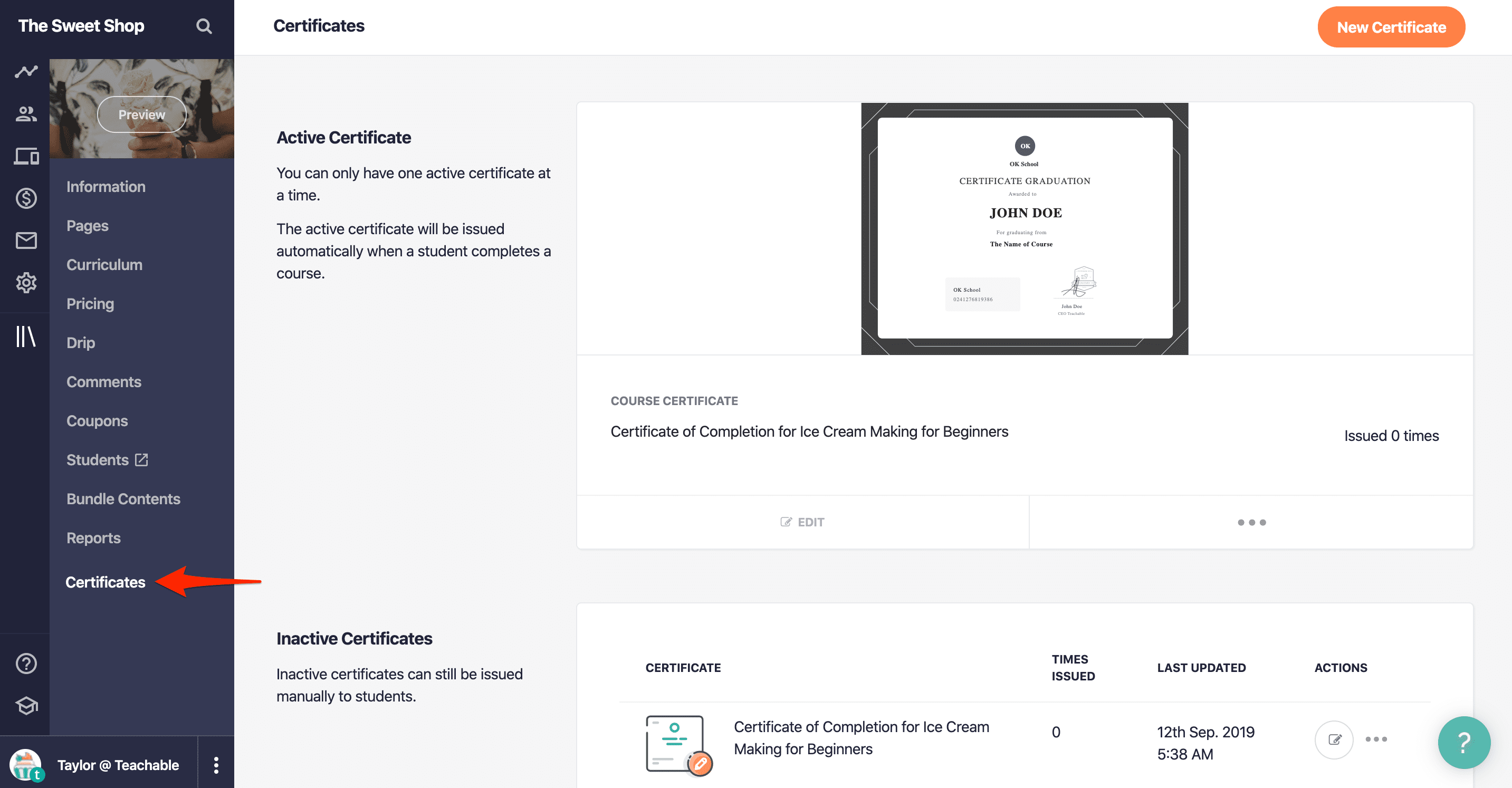
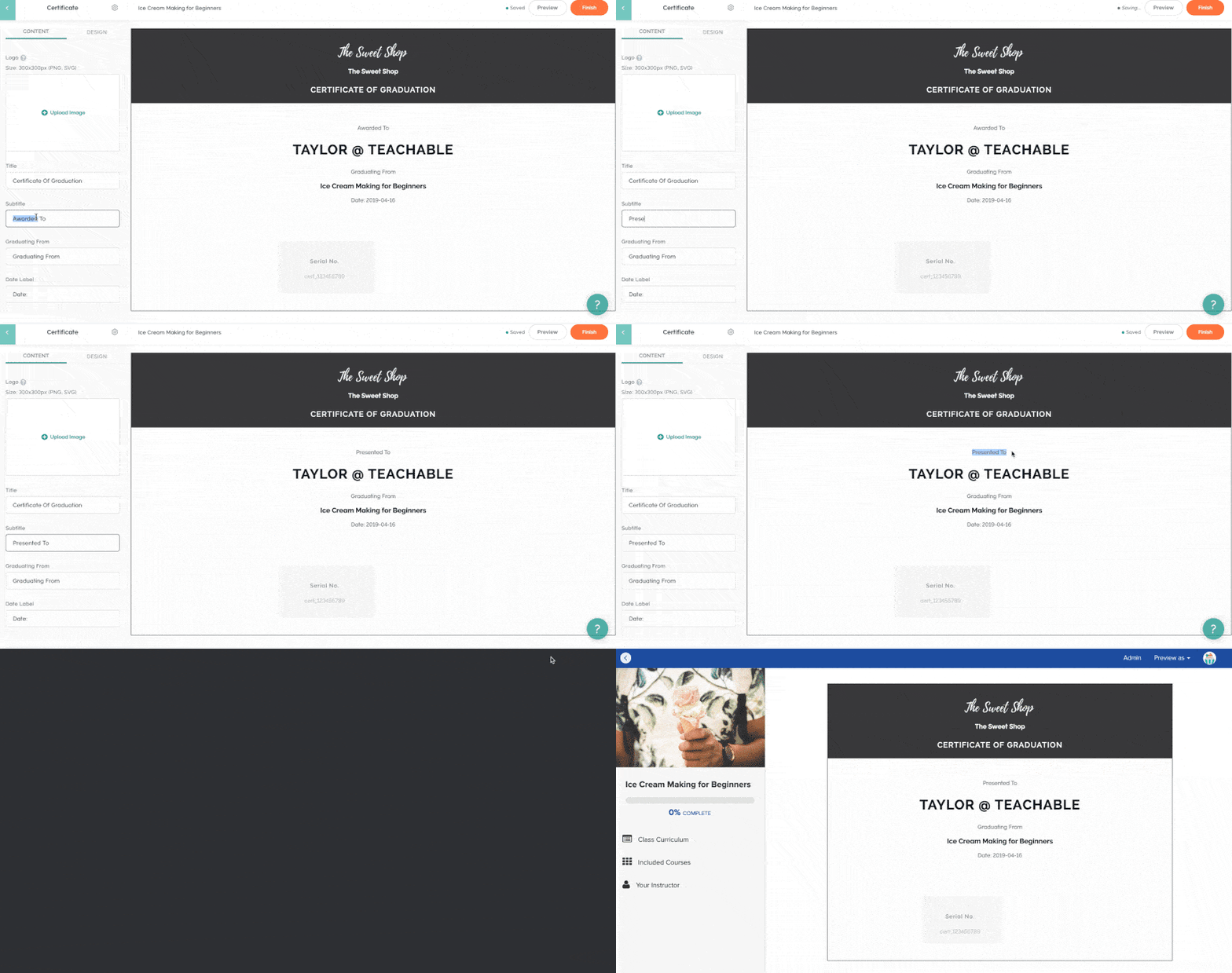
When using one of our templates, you’ll have the ability to customize the copy and colors. You can also add a course-specific logo and signature. We’ll even add in a serial number automatically for authenticity as well.
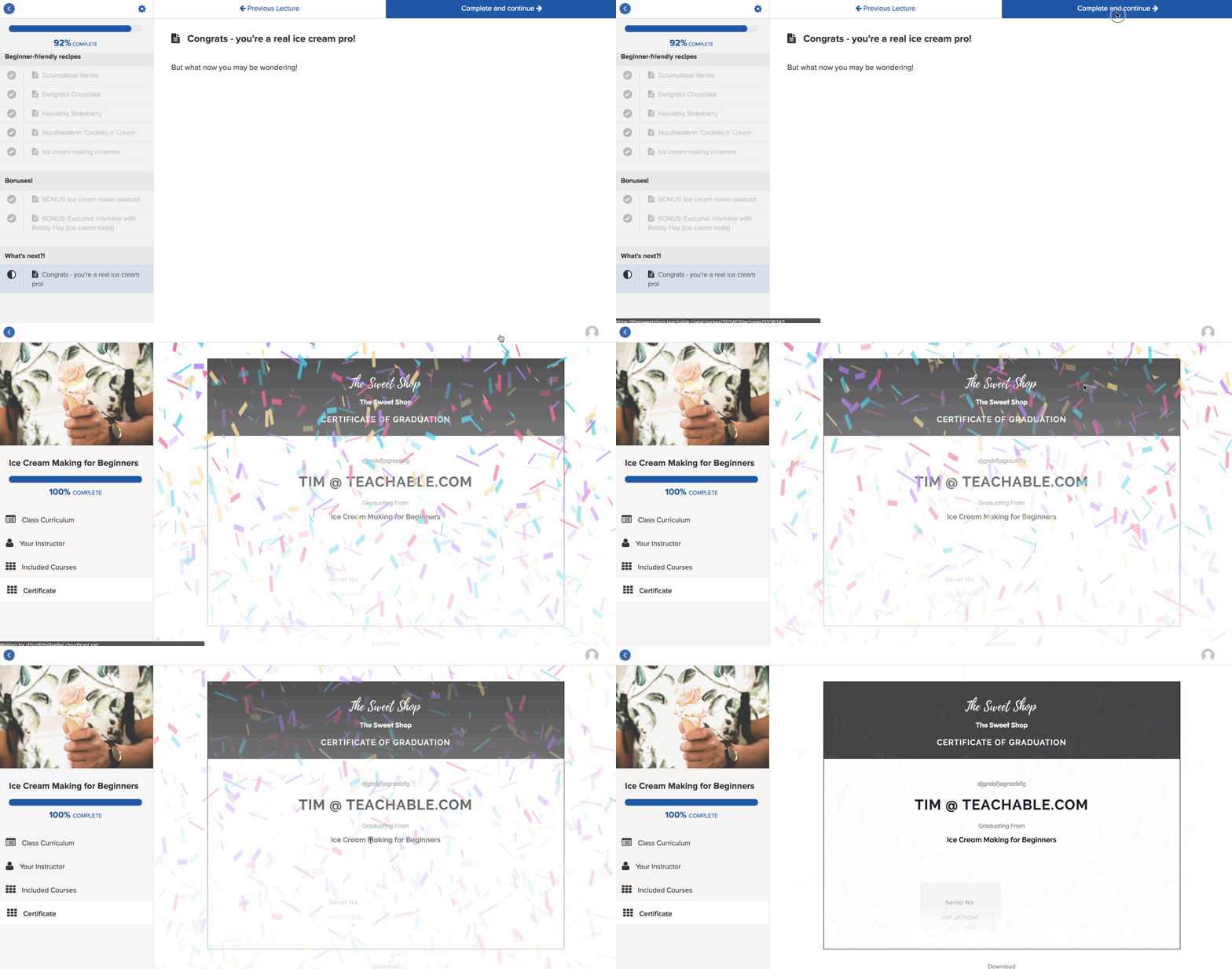
You can issue certificates to students automatically or manually. With either method, students can save their certificate as a PDF. With the automatic method, when a student completes the course, they will be taken directly to their certificate of completion inside the student lesson area. Additionally, the student receives an email with a link to their certificate.
If you choose to issue certificates manually, you’ll be responsible for deciding when certificates are sent out. You can do this by visiting the student’s profile, clicking the Enrollments tab, and selecting Issue Certificate from the Actions menu for the course. This will send them an email with their certificate link.
Want to learn more about generating certificates on Teachable? Check out our guide in the Knowledge Base.
Zoe Joy of Autism Ed Support provides official continuing education courses for behavior analysts through her Teachable school. Her students rely on certificates to provide proof of their required continuing education hours to the BACB, an international licensing board.
“Before, I used Zapier with WebMerge to automatically send a completion certificate to students,” Zoe explains. “However, I’ve been having some issues lately with that system.” The introduction of native certificates on Teachable is saving Zoe “not only time and frustration, but money as well!”
With built-in certificates on Teachable, you can save time, money, and the tech headache and reliability issues associated with integrating with a third-party certificate provider. Now, you can do even more from one, centralized place: your Teachable school. It’s all part of our goal to be a one-stop shop for your online business needs.
Since making the switch, Zoe says, “I am loving this feature! It has been really easy to navigate, and the fact that you can customize what the certificate says is also a valuable addition! I’m excited to use this feature more, especially as I partner with various agencies across the country to feature me as their sole continuing ed provider.”
{{todolist-component="/blog-shortcodes/blog-popup"}}
Providing native course completion certificates is one more step towards giving Teachable school owners greater control over the student experience. We can’t wait to continue providing instructors with the tools and features they need to create an amazing student experience. If you’re on a Teachable Professional plan or higher, you can make your first course certificate today. If you’re on the Free or Basic plan, you can upgrade to start using certificates on your school.