Thank you! Your submission has been received!
Oops! Something went wrong while submitting the form.
MENU
How-tos and campaign guides for educators using email to grow and retain their student base.

Your sales emails are one of the main means by which your students regularly hear from you. So what’s in them is incredibly important. We asked two of our successful creators to share their successful sales emails and broke down why they work so well.
Take a look at our sales email template guide with emails from Pat Flynn and Grace Abbott. They should help you write your own sales emails. We broke down what works well in Pat’s email and what works in Grace’s email that you could use to templatize your own emails.
This sales email template guide will show you the important features of each email. The sales page template can help you figure out what to include in your emails and where to include it. Calls to action, the reason you’re emailing, and a sense of urgency are all parts of successful email strategies.
{{salespage-component="/blog-shortcodes/blog-popup"}}

Subscribing to and reading newsletters is a great way to stay in the know about the latest trends, case studies, and industry updates in the creator world. But with so many newsletters out there, it can be difficult to know which ones are the most valuable.
To help, we’ve put together a list of 15 newsletters every creator should subscribe to. Learn more about what you’ll learn to see if each newsletter is right for you and your creator business.
We of course can’t talk about newsletters for creators without mentioning our own newsletter “In The Know.” Since our entire platform was built to help creators thrive in the creator economy, our newsletter is fully dedicated to keeping you fully in the know.
Topics covered: Creator tips, inspiration, case studies, online business tips, Teachable product updates
Cadence: Weekly
ThoughtLeaders is a company dedicated to helping brands, creators, and influencers find each other for partnership opportunities. They offer two weekly newsletters: one called Weekly Insights which shares data and insights about influencer marketing and branded content, and another called Creator Cheat Sheets which shares tips and business opps for creators.
Topics covered: Influencer marketing news, creator tips, brand opportunities
Cadence: Weekly
The Publish Press is a 3x weekly newsletter run by well-known creators Colin and Samir. They have a popular YouTube channel and have been successful creators for several years. This newsletter talks about the latest creator news to keep those running creative businesses up-to-date with anything they need to know.
Topics covered: Recent creator news
Cadence: Three times a week
Tubefilter is an online publication sharing creator economy news and stories. Their newsletter pulls together top stories from each day to share with their subscribers. This includes stories like TikTok creating its own publishing company (thanks to BookTok’s success) and a creator making $15,000/month by streaming herself sleeping.
Topics covered: Creator news, top stories
Cadence: Daily
Insider Creators is a LinkedIn newsletter run by Amanda Perelli, the creator economy reporter at Business Insider. This newsletter is sent out weekly to subscribers but can also be viewed as LinkedIn articles. They cover creator news topics like Snapchat creators posting 100+ stories/day and experts to know in the creator economy.
Topics covered: The latest scoops, trends, and strategies in the creator economy
Cadence: Weekly
The Information is a publication that shares stories about the tech and business industry. Its Creator Economy Newsletter shares stories four times each week about the actual economical state of the creator industry. Topics include things like the surge of video podcasting or creators at Cannes.
Topics covered: Economical insights about the creator economy
Cadence: Four times a week
Passionfruit is another online blog and newsletter that focuses exclusively on content related to creators. From articles and newsletters about specific creators that are in the news to the latest events, there’s plenty of content to go through. Recent newsletters include news about VidCon 2023 and new “anti-creator” policies from Twitch.
Topics covered: Creator news and tips
Cadence: Two times a week
Creator Science’s tagline is “Become a smart creator in 10 minutes per week.” By subscribing to Creator Science, you’ll get a weekly newsletter with interviews with successful creators, evidence-based advice, experiments the writer has made with his own business, tools he loves, and more.
Topics covered: Creator experiments, expert interviews, creator tips, useful tools
Cadence: Weekly on Sundays
Create and Sell is an email marketing-focused newsletter specifically for helping creators master email marketing and sell their products. Past issues have covered topics like making money from your newsletter and subscriber segmentation methods. If you’re looking to become better at email marketing for your creator business, this is the perfect newsletter for you.
Topics covered: Email marketing tips for creators
Cadence: Two times a week
The Saturday Solopreneur is a short, weekly newsletter that comes every Saturday morning. It’s designed to be just a four-minute read with a single actionable tip for growing your business in each issue. Past topics have discussed how to sell yourself and how to get better followers.
Topics covered: Tips for growing your online business
Cadence: Weekly on Saturdays
ICYMI (short for “in case you missed it”) is a weekly newsletter run by Lia Haberman sharing the latest news that you may have missed. Initially created for Lia’s UCLA students, she eventually opened it up for marketers and creators to also subscribe to. Being a Substack newsletter, Lia offers a paid version that comes with a Slack community, industry reports, and additional paid-only newsletters.
Topics covered: Social media news, platform updates, industry trends, creator insights
Cadence: Weekly on Fridays
For The Interested is a unique newsletter. Monday through Friday, newsletter creator Josh Spector sends out a single-paragraph newsletter with tips for growing your creator business. Then on Sunday, he sends a full newsletter that includes links to tips from him and other creators.
Topics covered: Quick tips for building your creator business
Cadence: Sunday through Friday
Creator Weekly is a LinkedIn newsletter created and distributed by the LinkedIn VP, Daniel Roth. It focuses on creating content for LinkedIn, helping those publishing posts regularly to reach a wider audience.
Topics covered: LinkedIn creator tips, news, and insights
Cadence: Weekly
Passionfroot is a company that helps creators secure sponsorships and collaborations. They have their own newsletter called the Frootful Creator which includes tips and carefully curated content about running and growing your creator business.
Topics covered: Creator tips, curated content for creators
Cadence: Weekly
The Loaf, created by creatorbread, is a newsletter that focuses on money and business education for self-employed creators. Past newsletters have covered topics like paying off debt as a creator and personal finance for creatives.
Topics covered: Money tips for creators
Cadence: Weekly
Subscribe to these 15 newsletters to get the best creator insights you can. Then, start growing your own creator business. Use Teachable to help you launch your online course, digital products, and so much more.

Business email writing can be tricky. Writing great email content that subscribers look forward to opening each time is even harder.
People delete millions of emails every day without opening or reading them. However, every successful entrepreneur will tell you that email is the backbone of their business. It’s where you can connect with your audience and build an engaged community.
This will be your go-to guide showing exactly how to write email content that will engage readers and grow your online business.
According to recent studies, welcome emails have the most engagement out of any other email content. When a person subscribes to your email list, they want to receive that first email–they expect it.
In fact, welcome emails have a 91% open rate on average. Plus, they have a 42% higher than average read rate.
Since this is the first email that your audience will open, you’ll want to make a good impression.
Your welcome email will set the tone for your relationship with email subscribers. So, how do you write it? We have a full guide on how to write welcome emails with examples. The main takeaway to remember is that a great welcome email starts with the five Ws.
Most good email writing–and writing in general–starts by answering the five Ws.
The subject line is one of the most important parts of an email. It is one of the first things that people will see when they go to their inbox. A good email subject line grabs attention without coming off as clickbait.
You can try formatting your subject line using the prompts below to catch readers’ attention.
Try to keep your email subject line under 40 to 50 characters or six to 10 words. Otherwise, it will get cut off when they view it in their inbox. In general, short and to-the-point subject lines perform better than long ones.
How will you speak to your audience? What voice and tone resonate with them?
If you haven’t done audience research yet, start now. Dig deeper into your target audience–who are they? What do they care about most?
Course creators are likely talking to potential, current, and past students. Since your email list is a part of your overall marketing strategy, it should have the same voice and tone that you use in your courses.
Email writing tends to have more of a friendly tone. It’s like you’re chatting one-on-one with each of your subscribers.
There’s no hard-and-fast rule for the best time to send an email. Some studies say 10 a.m. Others say 8 p.m. to midnight. The real answer is that it depends on your audience.
What works for one email list or newsletter might not work for yours. You can A/B test a few different times and see how that impacts the open and click-through rates. You can also poll your audience and ask them when they would like to receive your emails.
The important thing to keep in mind is that the time you choose to send your email to subscribers should stay consistent. For example, let’s say you send on Sundays at 4 p.m. each week, and you know that cadence works. You should consistently send your emails at that time each week because your readers now have the expectation that Your email will be in their inboxes every Sunday.
In 2021, people spent ten seconds on average reading emails from businesses. It might not seem like a lot of time. However, when you think about how people open emails and interact with digital content, it makes sense.
Most people check email from their phones. They might be on their way to work or winding down for the day. You only have a limited amount of time to get your message across. When writing email content, make it skimmable.
Here are some tips you can use for your email writing.
These are just a few tactics. Once you send more emails, you’ll better understand what works best for your audience. Look at what sections they click on most, and mark emails that get a lot of engagement.
Over 60% of emails are opened from a mobile device. If you’re not optimizing your email content for a mobile audience, you’re missing out on potential students and sales.
After writing emails, test how they look on desktop and on a mobile device before sending them to your list.
To make sure that your emails are mobile-optimized, use this checklist:
Along with subject lines, the pre-header text is what readers will see when your email appears in their inbox. The pre-header text is a summary of what is inside your email, and it should also entice readers to click.
What action do you want your subscribers to take? Do you want them to sign up for email notifications, follow you on social media, take a poll, or something else? Your goal will likely be the CTA or call-to-action button in your email.
The goal isn’t always to make a sale. Nor should sales be the goal every time you send an email.
Yes, at the end of the day, email content is a marketing strategy. Many course creators use email to boost course sales. That doesn’t necessarily mean that they always include a call to action for email readers to buy their course.
Email is also a great way to build and connect with your audience. It’s hard to form connections with someone that is constantly selling to you. You need to provide value as well.
Sometimes, after a person subscribes, you need to nurture that relationship before they’re ready to purchase. Think about what stage of the buyer journey your audience is in, and craft email content for them.
For instance, if customers are at the top-of-funnel or middle-of-funnel, they aren’t ready to purchase yet. Educate them about your course, and move them through the funnel with a nurture email sequence.
You’ll have different types of email content based on your audience. Set a goal for each email you send. For instance, the goal of a welcome email is obviously to welcome new subscribers, but it’s more complex than that. You may want to give new subscribers information about you and your course or engage them further.
The goal of a course pre-sale email campaign could be to get email subscribers to sign up for a course waitlist. This way, they get notified by email when your course goes on sale.
Ideally, your email copy will only include one CTA at a time. If you have two calls to action, think about how that will impact click rates.
If you have two CTAs, you risk dividing the traffic between them–each one will get fewer clicks. On the other hand, one clear CTA will drive clicks to the same place. You’ll make it clear to readers what you want them to do.
A best practice is to include your primary CTA or link above the fold. It will be the first thing that readers see when they open your email, and it doesn’t require them to scroll down to read more.
Personalization is the key to great marketing–whether you are writing emails or social media content.
One of the top ways to personalize email content is to use audience segmentation. Most marketers segment around different audiences but it varies. You can segment your email list based on:
You can personalize your email content for your online business with these other tactics.
One of the struggles with email marketing is how to keep subscribers engaged. Even if you have great email content, you still have to entice and entertain your audience.
You can offer an exclusive discount on courses or content. However, that can come off as promotional if you do it too often. One of the best ways to engage your audience is to offer something for free.
This can be a giveaway for prizes like a gift card, books, or tech. You can also offer perks without dropping money on them. Offer expert advice and tools that they won’t find anywhere else.
For example, if you teach a personal finance class, you could offer free budgeting templates or a 20-minute one-on-one financial coaching session.
You can even set up a student affiliate program for your Teachable courses and integrate it into your email content. As students share your emails with their networks, they could earn perks. In some cases, they may earn money when someone they referred buys a course or coaching session from you.
Email writing takes a lot of time. Luckily, you can create email templates that you can reuse throughout your business. Plus, when you set up email sequences, it sets up a schedule to automatically send to your audience when you want.
There are tons of email sequences and templates that you can use. Ultimately, it depends on what stage of the buyer journey your audience is in, the purpose of your email, and what action you want them to take.
Here are some email examples that you might include in a sequence for your course business.
An anticipation email builds excitement. It gives your subscribers a sneak peek at something that they might look forward to getting. For example, an email about your new course could be an anticipation email.
When you release a new course, you should have a complete email launch strategy, not just one email.
The common questions email has one main goal—answer questions potential students have that may prevent them from buying.
Make a list of frequently asked questions that your potential students ask. These may also include reasons that a student is hesitant to purchase your product.
This is a small sample of common questions to include. If there are a lot of questions, perhaps you’ll want to break them out into separate emails.
This email creates a sense of urgency. One way that you can create urgency is to offer a bonus for students who buy now rather than later. You should also include the dates that your course starts and when sign-up ends.
Another method is to set student enrollment limits. If you only have 20 spots available for your next course, they’ll be more motivated to buy fast.
The course close email is another example of an urgency email. You can set a trigger so that the email will automatically send to recipients. This will send a notification to your audience when there are 24-hours left until course sign ups close.
The last call email is just what it sounds like—it’s the last reminder to purchase the course before it is no longer available. It is sometimes called the last chance.
You can add some flair to your last call email by including figures like how many people viewed the course in the last hour or day. You may also want a responsive countdown inside the email that will update based on when a person opened it.
Of course, if your course has sold out before the last call, that’s great news. You don’t need to send a last call email, and it can even frustrate subscribers if you send it and it’s sold out. So, make sure that there are spots available before you hit send.
Every course should have a launch email sequence. By sending multiple emails instead of one, you can nurture leads. You also aren’t putting all your income potential into one email. Unless you have a huge email list—well over 100,000 active subscribers—and a small number of spots, you’re not likely to sell out instantly.
Treat your email launch as if you’re selling in person. If you were selling your product in person and someone walked into your store, you wouldn’t scream at them to buy a TV. Instead, you’d ask if they needed help, maybe share details on the product or inform them of current discounts.
How do you replicate that experience through email content?
Launching your online course is arguably the most exciting part of the whole course creation process. It’s the moment when all your hard work starts to pay off. If you’ve never launched an online course before, don’t worry.
Here are some resources that can help you craft the perfect email launch sequence.
As you build your email list, it’s crucial to stay connected outside of promoting course sales. Periodically email your list with new content and updates. Therefore, when you want to sell something you’ve already sent several weeks’ worth of valuable content.
For email content inspiration, you can check out these newsletter examples:
These newsletters have one thing in common—they provide value to their readers. Your email content should be high quality and useful. As an expert in your field, you have the knowledge and tools that they value. Share your experience with your readers in creative ways.
Here are some other email content ideas that will get you started.
Writing great email content is a process that you’ll get better at the more that you do it. These tips can help you take your email writing to the next level–engaging more students and growing your business.

We know what you’re thinking. So many businesses send Black Friday and Cyber Monday deals, and your small online course business stands no chance against Amazon or Walmart.
However, if you don’t participate, you’ll be missing out on a pie so massive, not even the biggest companies can eat it on their own (especially because you own an online business.)
Here’s a couple of facts you might want to consider:
We know you’re busy, so we’ll keep it short and sweet to give you EXACTLY what you need to set up your Black Friday and Cyber Monday emails.
Here’s what you need to do.
Schedule the first email to go out on Friday at 6-7am. This one is meant to introduce your deal and set the timeframe for its validity. We’ll also include a nifty free countdown timer into it.
Here’s how it’ll look.
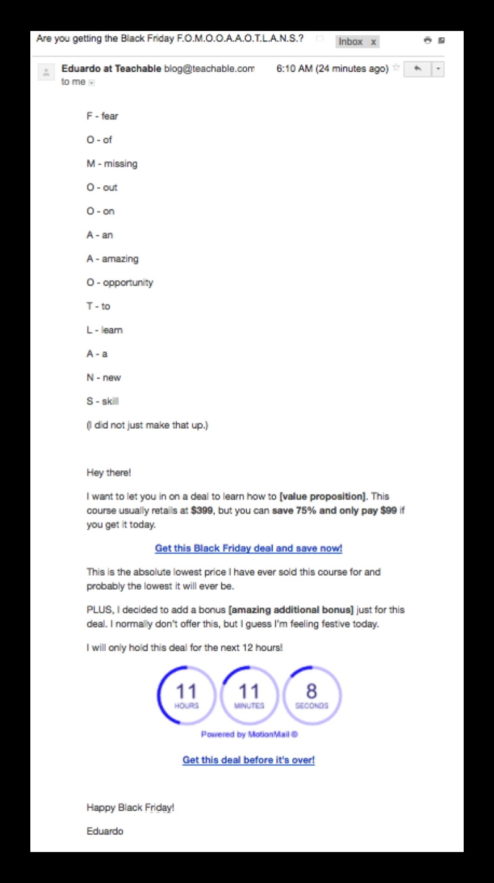
What you need to look out for:
Schedule the second email to go out on Friday 90 minutes before the deal ends. This will rely heavily creating urgency to drive purchases.
Check out how it will look:
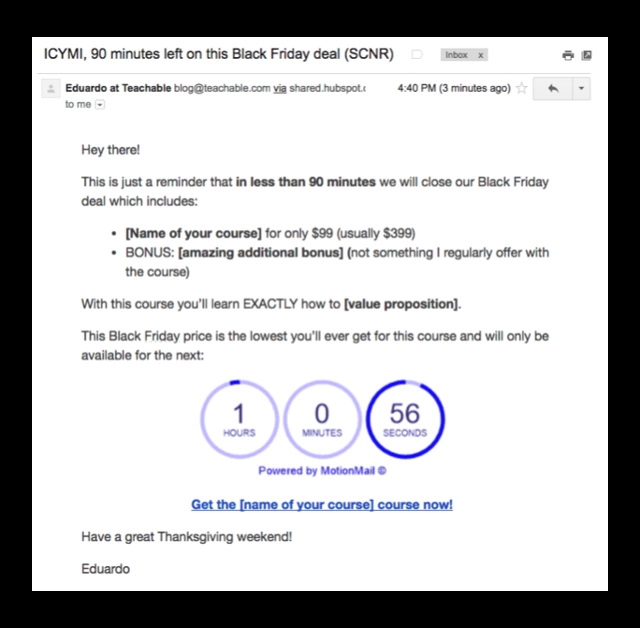
Keep in mind to:
With your first Monday email, you’ll be reopening the doors to your deal based on the great response you got from people on Friday. Schedule this email for Monday at 6-7am.
Here’s the template we created for you:

Again, keep an eye out for:
Last email in the campaign! This is your fourth email in 4 days (2 business days), so we’ll keep it short and to the point. You can schedule this email 2 hours before closing the deal window.
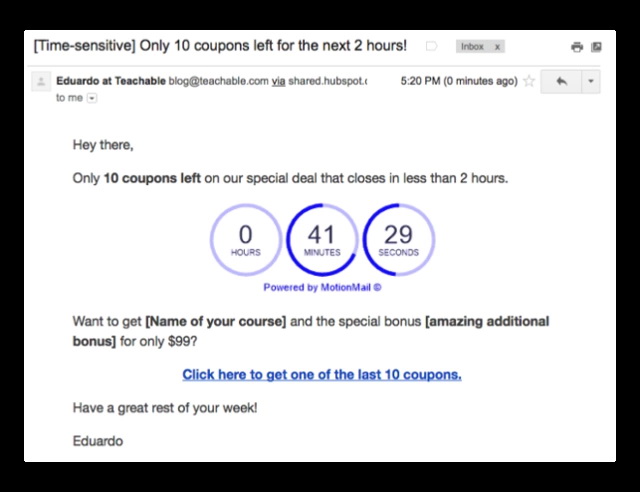
You know the drill. Make sure to customize the template and include a countdown timer.
PROTIP: Exclude people who buy your course from receiving more emails from these deal—you don’t want to spam them.
Did you implement these or other Black Friday/Cyber Monday campaign? We want to hear about it!
Head over to our Facebook group, The Teachable Tribe, and share your experience and learnings.

You might have previously heard the terms organic email list and non-organic email list used when talking about email marketing. While most email marketing advice out there is focused on organic list building, there are still businesses that rely on the non-organic way.
So, what do these terms mean, and what is the difference between the two strategies? We’ll explain organic vs. non-organic email lists ahead.
Organic email list building is an email marketing strategy when you’re building your email list from scratch using organic methods.
The process is usually simple: You create a lead magnet or incentive, build a landing page to collect new sign-ups, and then onboard people into your email list. People on your organic email list are there because they found you and decided to sign up themselves.
A great example is an online entrepreneur and course creator, Pat Flynn. When you visit his website, the first thing you see is the invitation to sign up to his email list:
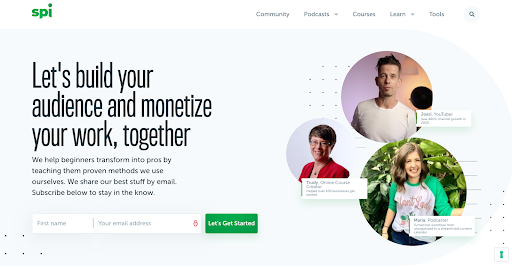
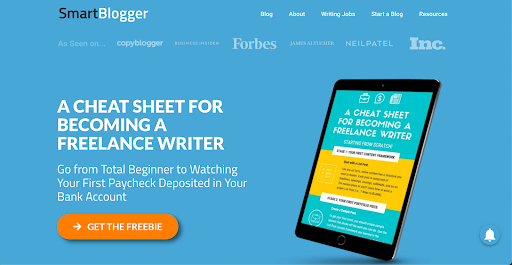
Sometimes, the incentive is more obvious than a simple invitation to sign up for a newsletter that will bring you value. Some entrepreneurs opt for offering solid lead magnets like PDFs, ebooks, email courses, etc. A good example is the Smart Blogger and the Cheat Sheet they offer in exchange for people’s emails:
Pros:
Cons:
Non-organic email list building is a marketing strategy when you use special services to purchase email lists instead of capturing them yourself.
Companies scrape available emails online and gather them into databases that are later sold to businesses looking to build their email lists. The emails on those lists are from all over the place, and there is no guarantee that what you’re buying will be your target audience.
So, with the non-organic email list building, you’re skipping the lead capturing yourself, instead opting for someone else to do that work for you.
Pros:
Cons:
{{threesteps-component="/blog-shortcodes/blog-popup"}}
The easiest way to grow your organic email list is to offer a freebie or a lead magnet of value to people as an incentive to sign up for your email list.
This could be anything from ebooks, PDF files, quick guides, email courses, workbooks, access to part of your course for a limited time, etc. Just make sure it’s good quality and value to your prospective students.
The welcoming sequence will be the most important part of your email campaign. It’s the thing that will introduce your new subscribers to your business and tell them what they can expect from you.
So, take the time to set it up in a way that lets you automatically onboard new subscribers, welcome them, and streamline them into your regular email list.
How are people going to know you have an email list if you don’t tell them?
Include your email list sign-ups everywhere around your website, in your blog, in every blog post you write. If you have a podcast, mention it every episode and link to the sign-up in the show notes. Add the link to your social media profiles and even in your email signature.
Make signing up to your email list accessible to people.
When creating your sign-up form, make it short and sweet. Asking for the name and an email is enough. You don’t need to ask people for their surnames, address, and other personal information to join your email list.
The shorter the sign-up process, the bigger the chances that they’ll sign up.
Make it clear to people what kind of emails they will get, how they can unsubscribe, and your privacy policy right off the bat. This will show prospective students that you’re honest, and they can trust you from the very beginning.
If you want to keep people on your list, you have to give them exactly what they signed up for. Always make sure the content you’re sending is valuable, actionable, and useful for your subscribers.
The same goes for the frequency of your emails. Send emails weekly or bi-weekly, and avoid appearing spammy by emailing your list daily. Reserve more frequent, daily emails when you have a sale week or a new product launch.
You have a reputation to build with email service providers, and the engagement of your list is a fairly important metric they track. If you have a large list that’s not very engaging, that damages your reputation.
So, every six months, do a purge where you eliminate inactive subscribers from your list to keep your email list and reputation with email service providers healthy.
Now that you understand the difference between organic vs. non-organic email lists, the choice is yours how you build your list.
.png)
Cyber Monday may be over, but did you know that buyer interest often peaks after that initial rush? Plenty of students miss the first deadline or need extra time to budget. Extending your offer (even briefly) helps you turn that lingering interest into revenue without having to create a whole new promotion.
Here are a few simple, low-lift email templates you can use to capture last-minute sales without starting from scratch.
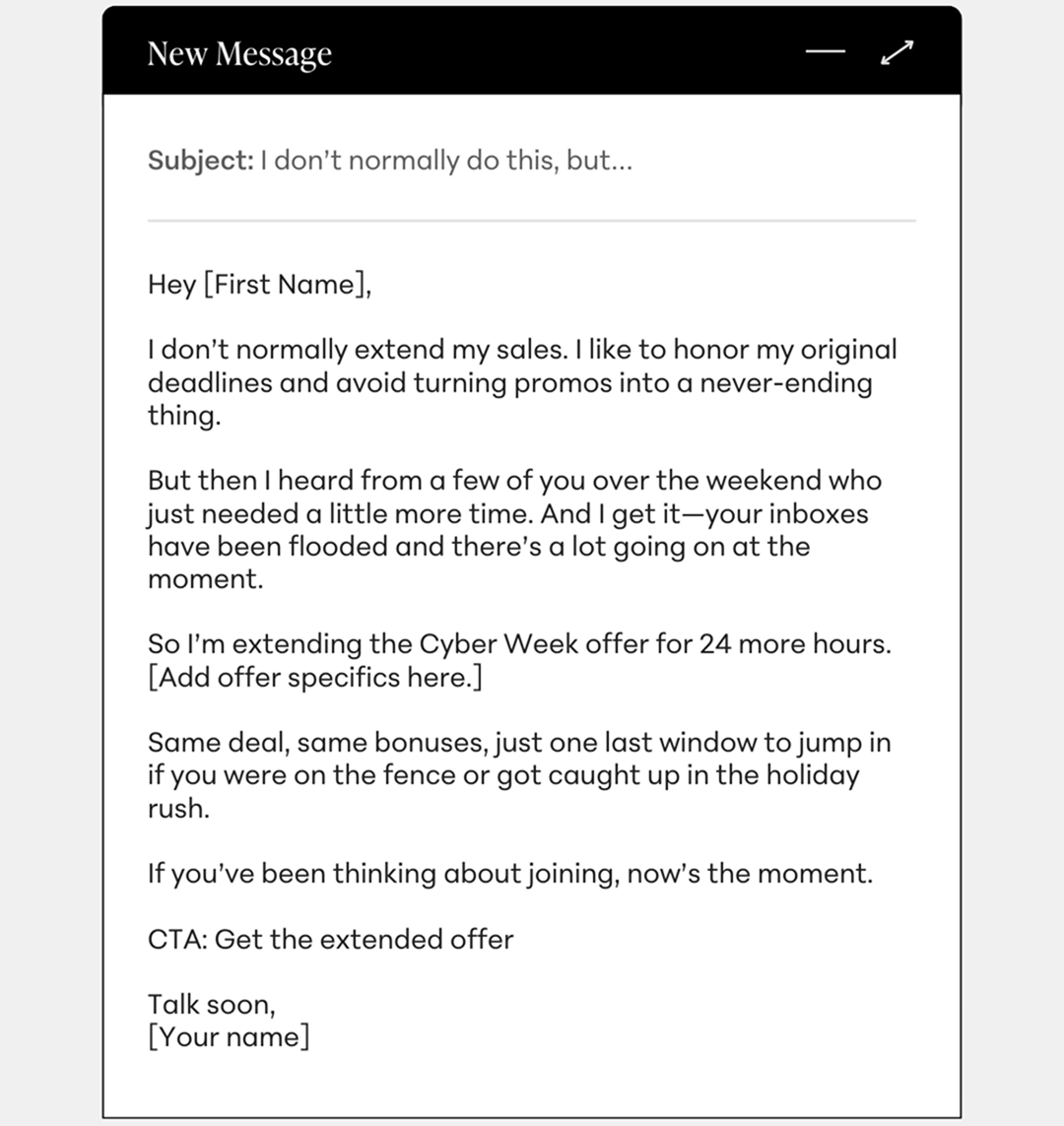
Try a warm, personal note that acknowledges your student relationship and creates a justifiable reason for extending the offer. It feels personal and is best suited for tight-knit communities or high-touch programs.
Subject line ideas:
Email body (copy and paste this):
Hey [First Name],
I don’t normally extend my sales. I like to honor my original deadlines and avoid turning promos into a never-ending thing.
But then I heard from a few of you over the weekend who just needed a little more time. And I get it—your inboxes have been flooded and there’s a lot going on at the moment.
So I’m extending the Cyber Week offer for 24 more hours. [Add offer specifics here.]
Same deal, same bonuses, just one last window to jump in if you were on the fence or got caught up in the holiday rush.
If you’ve been thinking about joining, now’s the moment.
CTA: Get the extended offer
Talk soon,
[Your name]
Pro tip: Hyper-personalization works great here—mention real questions that came in, delays your audience faced, or specific reasons people asked for more time. It makes the extension feel earned, not manufactured.
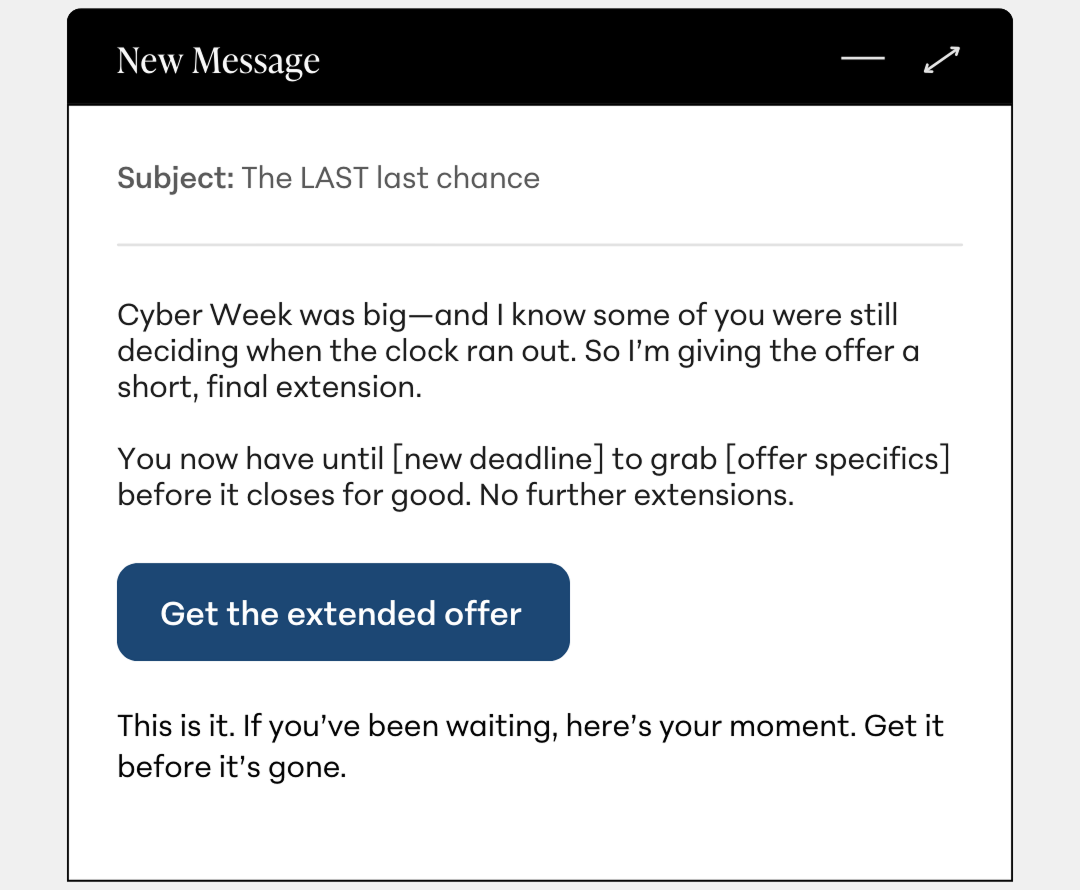
When it comes to closing last-minute sales, high urgency and to-the-point copy go a long way. This is your strongest “the deadline is real” message.
Subject line ideas:
Email body (copy and paste this):
Cyber Week was big—and I know some of you were still deciding when the clock ran out. So I’m giving the offer a short, final extension.
You now have until [new deadline] to grab [offer specifics] before it closes for good. No further extensions.
CTA: Get the extended offer
This is it. If you’ve been waiting, here’s your moment. Get it before it’s gone.
Pro tip: Pair this email with a countdown timer or a clear timestamp (“ends tonight at 11:59 p.m. ET”). Urgency lands harder when the deadline feels real and specific.
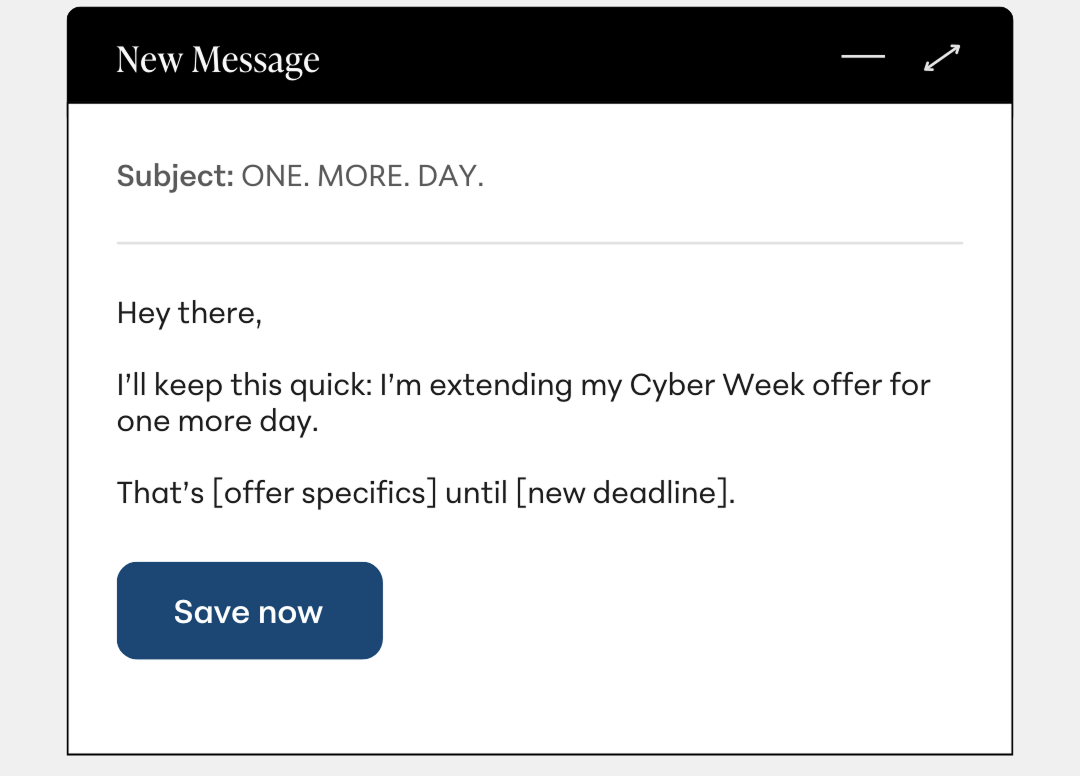
Simplicity is the strategy. A minimalist extension email keeps the important details (the offer and the deadline) front and center. You can do plain text, but this approach really works well as an eye-catching, design-forward announcement.
Subject line ideas:
Email body (copy and paste this):
Hey there,
I’ll keep this quick: I’m extending my Cyber Week offer for one more day.
That’s [offer specifics] until [new deadline].
CTA: Save now
Email body [design-friendly variation]:
Think of this version like an announcement card—clean, high-impact, and instantly scannable
Pro tip: This approach shines when sent fast—think right after the original sale closes—to the right people. If you delay the extension too long, the simplicity reads flat. By sending it to a segmented group of people who have already opened your previous emails, you can be sure that they already have a clear understanding of the benefits of your offer.
By opting for a feedback-driven approach, you can leverage the power of social proof to get people to buy. This is perfect for audiences that regularly reply to or interact with you.
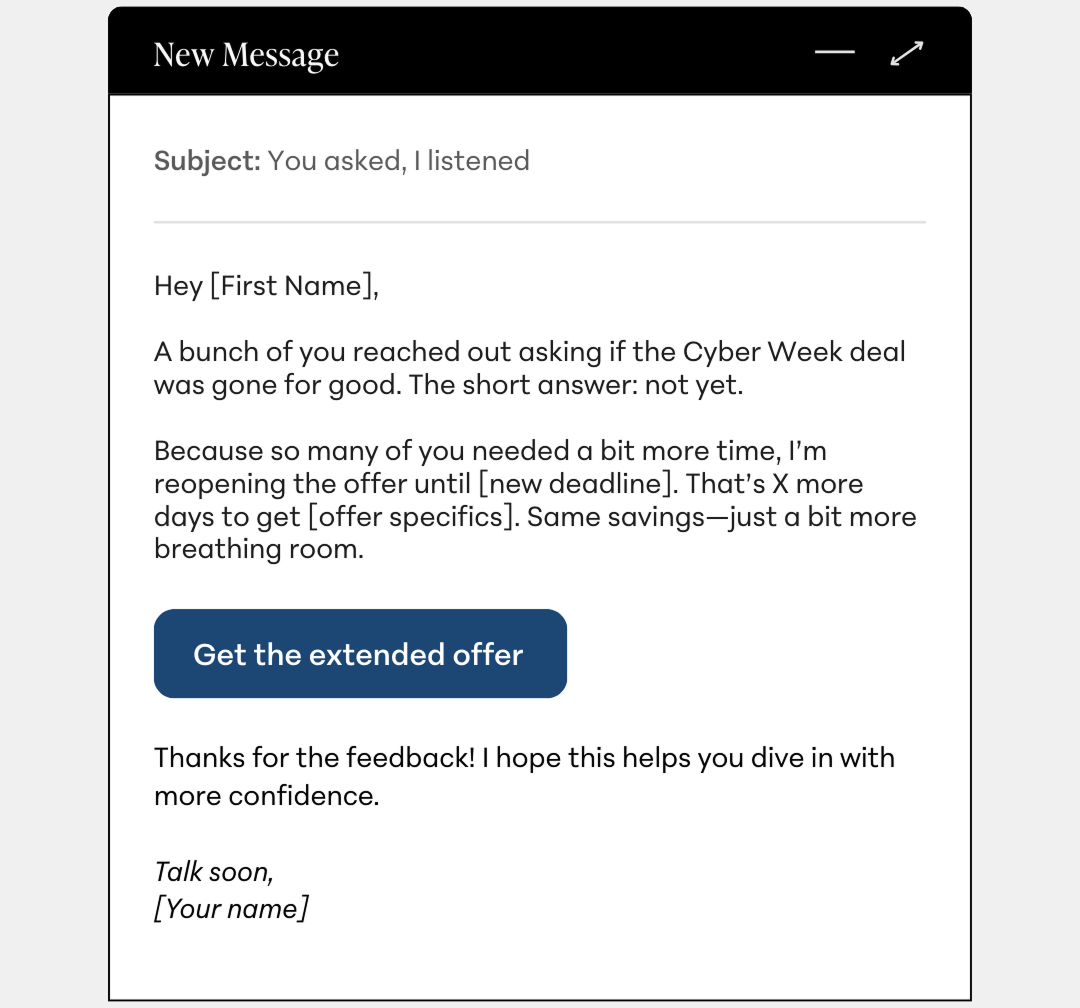
Subject line ideas:
Email body (copy and paste this):
Hey [First Name],
A bunch of you reached out asking if the Cyber Week deal was gone for good. The short answer: not yet.
Because so many of you needed a bit more time, I’m reopening the offer until [new deadline]. That’s X more days to get [offer specifics]. Same savings—just a bit more breathing room.
CTA: Get the extended offer
Thanks for the feedback! I hope this helps you dive in with more confidence.
Talk soon,
[Your name]
Pro tip: Screenshot a DM (with permission!) or reference a real note you got. It adds specificity and reinforces that the extension is in response to genuine demand.
This option is great for higher-ticket offers where the decision cycle is longer. Potential buyers will naturally take more time to decide when the investment is higher, so it’s important here to reiterate the value of what you’re offering.
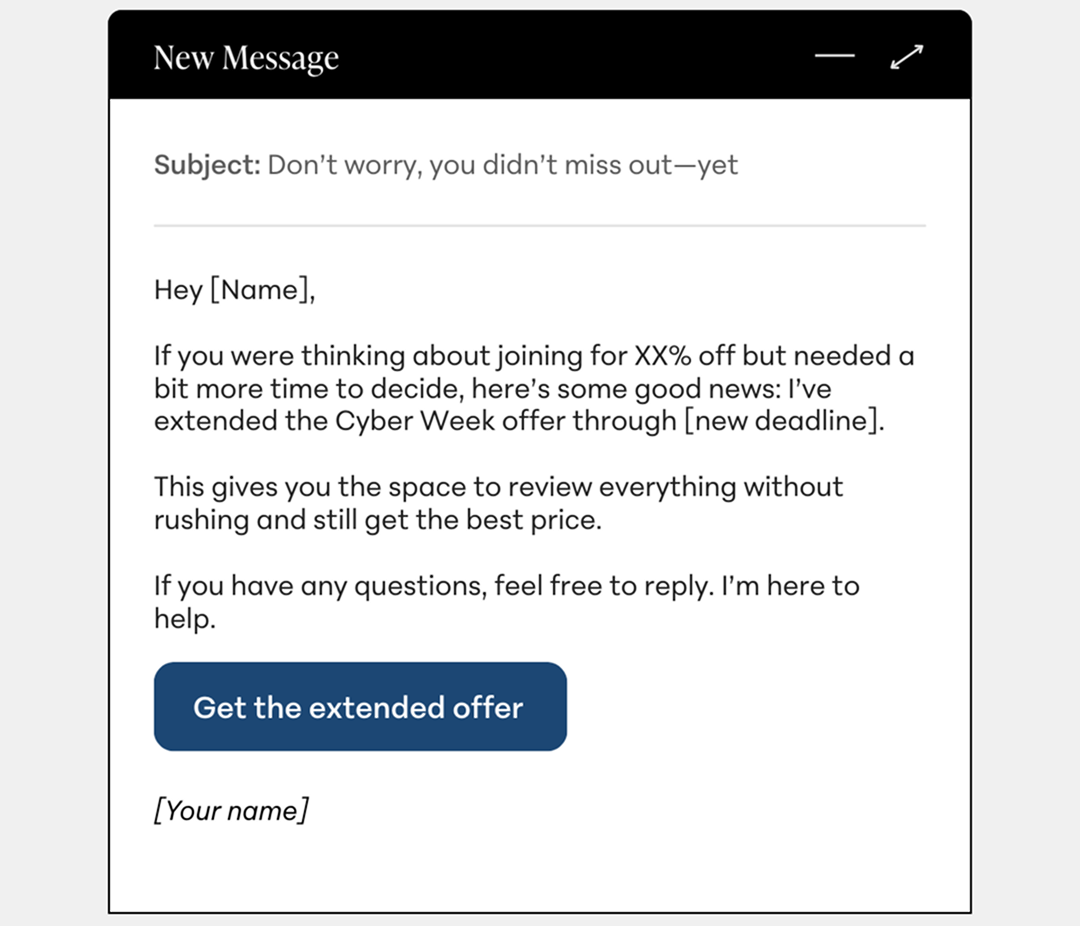
Subject line ideas:
Email body (copy and paste this):
Hey [Name],
If you were thinking about joining for XX% off but needed a bit more time to decide, here’s some good news: I’ve extended the Cyber Week offer through [new deadline].
This gives you the space to review everything without rushing and still get the best price.
If you have any questions, feel free to reply. I’m here to help.
CTA: Get the extended offer
[Your name]
Pro tip: This email works even better if you briefly remind people why the offer is compelling—one sentence on the transformation, bonuses, or value goes a long way for hesitant buyers.
Offer extensions work best when they feel thoughtful, time-bound, and rooted in actual customer behavior instead of like a never-ending promo cycle. These templates will give you a clean, compelling way to wrap up your end-of-year sales with confidence.

To maximize the effectiveness of your email marketing, you’ll need to master list building. After all, without a comprehensive list of email recipients, even your best marketing emails won’t be sent to prospective or current customers!
But building a list can be trickier than you think. Today, let’s take a look at how to build an email list step-by-step, plus explore some additional tips and email marketing strategies you can employ.

To build an email list effectively, you should follow the below major steps.
First, you should always use the right email marketing tools, like:
The right tools will make building and using your email marketing list much easier than otherwise. More importantly, they will allow you to control and modify your list of email contacts as it grows larger and larger.
Next, you’ll need to make email opt-in forms across your website. Opt-in forms are the forms that customers or clients fill out to sign up for your email newsletter.
Then you’ll need to organize all your information as you collect emails. As people sign up for your brand’s email newsletter, all that information needs to be categorized, analyzed, and fully understood. That way, you know which marketing emails to send to which prospects.
At this stage, all that’s left is to plan to send your email campaigns to their target recipients! With luck, those marketing emails will bring new customers and subscribers to your brand in no time.

Email list building tools are vital, especially for brands that already use other software solutions.
For example, email marketing automation software allows you to automatically send emails to target recipients without someone having to push a button dozens of times. Alternatively, you can use A/B testing software to try out different email varieties and see which performs better among your target audience members.
Some examples of important tools to build your email list include:
Building an email list might seem simple, but it’s always a matter of convincing your target people to sign up for your newsletter. You can use a handful of best practices and smart strategies to make opting in to your email mailing list a much more attractive prospect.
First and foremost, always make sure your opt-in forms are simple, streamlined, and easy to complete. The longer it takes to fill out an email newsletter opt-in form, the less likely it is a customer or client will do it.
To that end, only gather as much information as you need. That way, prospective customers can sign up for your email newsletters in a matter of seconds once they decide to do so.
However, you should also position your email newsletter opt-in forms in the right locations. There are a few great spots to put opt-in forms, such as:
A lead magnet is a deal or free asset/offer that you provide to customers in exchange for contact information or email sign-ups. For example, you can offer a free $5 coupon, free shipping, or some other attractive prospect to get website visitors to sign up for your email list.
A call to action or CTA is an important part of any email sign-up form or request. The CTA for each email sign-up request should:
This is a principle you should apply to all of your pages and product descriptions, as well. The better your CTAs are, the more likely customers are to heed those requests and sign up for your email newsletters.
Lastly, don’t forget to build stellar landing pages across your site. The better those landing pages are, the better the first impressions your clients will have of your website and e-commerce brand overall.
That first impression will have an outsized impact on whether or not they sign up for an email newsletter list (and whether they make a purchase).

While there are things you should focus on when building an email list, there are also some mistakes you should strive to avoid. These include:
As long as you avoid these mistakes, building an email list will be more likely to result in major benefits for your brand.
As you build your email list and organize its information, you’ll want to track a handful of metrics for analysis purposes. The more analytics you track, the better you can understand your target audience and how well your email newsletter performs. Good KPIs or key performance indicators to track include:

{{todolist-component="/blog-shortcodes/blog-popup"}}
All in all, growing your email list also means designing your website and its content around drawing people to your brand. If your e-commerce site overall is attractive and well-designed, building an email list will be much easier than it would be otherwise. Keep these tips in mind!
List building is the process of adding new subscribers to your email list. You can do this with several different strategies, some of which you can use all at the same time. Usually, you would offer some sort of content or value in exchange for an email address from the people who visit your website. So you could offer a content download in exchange for an email address to help build your email list. Or you could simply have a popup on your website that lets visitors know that to stay up-to-date with the latest from your blog or business they could subscribe to your newsletter or email list.
List building is important because it’s a great way to help you scale and grow your business. The larger your audience is, the easier it will be for you to reach a large group of people when you’re ready to create your course or sell your online services. Email is a great way to keep in touch with your students or customers and to let them know when you have a new product or launch. Having their emails is especially useful when you’ve got a promotional offer for them. Plus, it’s not expensive like paid ads for your business would be.

Recently, Aquila Farrell joined us live to share her strategy on how to build an effective email sequence in the post-purchase journey.
Aquila has turned her love of fashion and design into an email marketing career. Her courses on Teachable are all about turning followers into a strong community by strategically using emails to build trust. She’s worked with Fortune 500 brands including Google, Godiva, Amazon Music, Audible, Dyson, Lululemon, and Vaseline. You can also find her mentoring other email marketers in her community, Convert More.
During her session with our community, Aquila shared her expertise on the types of emails you can send in the post-purchase journey. She even walked community members through how to set up certain automations and triggers for their email campaigns. These emails are aimed at increasing your communications and strengthening your community.
“At the end of the day, if you’re not using email marketing in the post-purchase journey, you are losing money and leaving money on the table,” she said. Remember this is far from everything she shared in her hour-long session, so be sure to sign up for community on a paid plan if you want to access the replay of this session, or sessions to come.
The first email she recommends adding to your roster if you don’t already have it is the upsell email. Maybe your student didn’t purchase an upsell at checkout. So email marketing gives you another chance. A strong email journey offers you the opportunity to nurture your audience by giving more context on the product’s value. And it makes the sale less like a transaction and more of a dialogue since students have the option to reply.
“This is one that I absolutely do with every course that I create,” Aquila said. As the title suggests, this is all about guiding your students to course completion. Usually, this looks like a weekly email opening the floor for questions, presenting that week’s recaps, and what else to expect in the next module. Reminder, as Aquila noted in her webinar, you’re “not being annoying, you’re making sure that they have the support they need.”
While we all wish getting sound bytes that compliment our work happened organically, testimonials require more care than that. Gathering testimonials doesn’t always have to be a direct request. You can jazz it up by asking for progress screenshots or providing prompts asking students how they feel about the modules. This is a great way to have a paper trail which you can use to build trust with other leads.
Having a strong email marketing strategy is something every creator will need in their toolbox. The cost of not executing a solid email strategy can impact your bottom line. It shows a level of disengagement from eager students. When students don’t engage, they forget to make your course a priority. All of which result in a loss of revenue and the chances of returning students.

The sad reality of running an online business is that countless people will start working their way through your checkout flow and then spontaneously abandon their cart. Using abandoned cart email subject lines can be a helpful first step.
Unlike a physical storefront where you can walk customers through their purchases and counter their objections, online your potential customers are anonymous and can disappear at the click of a mouse.
Building compelling emails is important and can promote sales.

This is a tough reality check for most people who are new to running an online business. But don’t let this data discourage you. This is not the end of the story.
This post will show you exactly how to generate additional revenue from your existing site visitors, by using a simple but highly effective technique: abandoned cart emails.
Once you’ve made peace with the fact that most people who start your checkout process will not finish it, you will be able to see abandoned carts for what they really are: an opportunity.
Let us break this down for you:
Have you ever walked through a supermarket and noticed a jar of mayonnaise in the cookie aisle? This is not a sign that you should dip your Oreos in mayo. Some other shopper probably grabbed the item from the shelf and changed their mind before reaching the checkout lane.
The same type of thing happens when you sell digital products.
In your online business, abandoned carts happen when website visitors start the checkout process for a product but leave your site before completing the purchase.
This leads to the next obvious question:
Before you give up on improving your cart abandonment rates, you can do your best to remove any obstacles that could discourage your potential customers from purchasing.
According to Statista, these are the main reasons why digital shoppers in the U.S. abandon their carts.
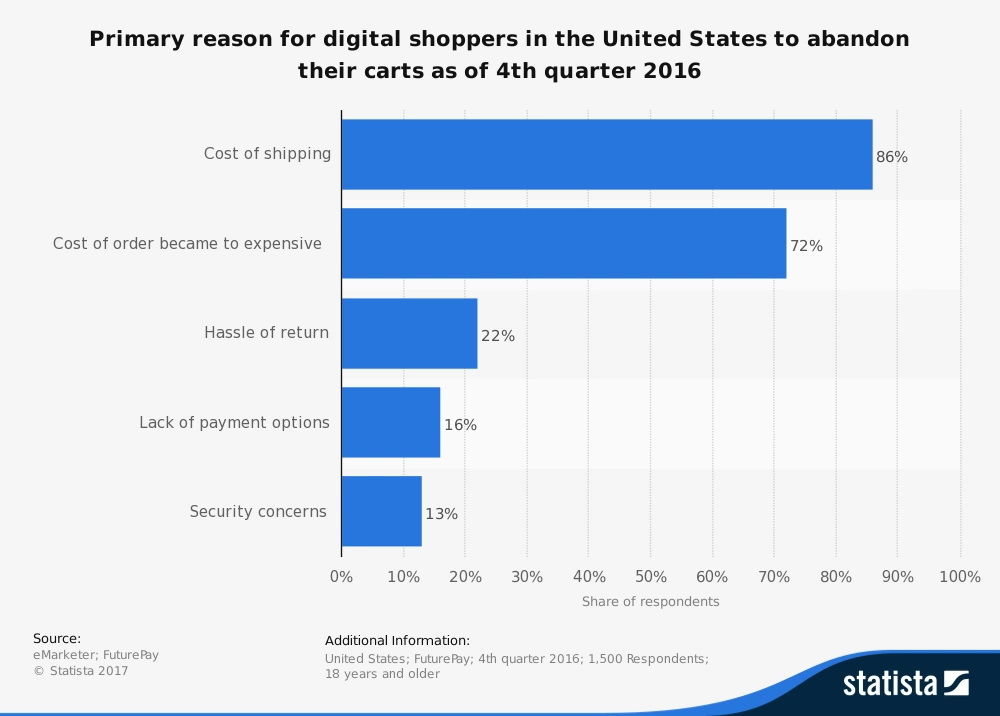
Let’s dig in a little, shall we?
There is one factor that did not make the top five reasons for cart abandonment. Whether or not the checkout process should include the creation of an account (to collect email addresses) before presenting the user with the checkout total and payment options is the source of a lot of dissenting opinions amongst digital marketers.
Since collecting emails is fundamental to this tutorial, we think it’s worthwhile to review this question.
Let’s start with the main reason why some people are against this method: it adds another step to the checkout process.
This is 100% a valid concern.
By collecting their email addresses, you are asking people to fill in at least one additional field and make one additional click, which can seem like a lot in the world of online marketing.
However, if you look at this additional step through the lens of the top five reasons for cart abandonment, you’ll notice that it does not fit any one of the reasons shown above. In any case, it can actually make it easier for you to issue a refund when necessary.
For the most part, the main advantage far outweighs any downside of asking customers to take this extra step. Since you now know that most of the people who start your checkout process will drop out, you need to find an effective way to re-engage them.
If you did not have a way of collecting emails during the checkout process, your only other option (for attempts to recover some of the sales from cart abandonment) would be retargeting.
Have you ever looked at a fancy new pair of shoes online, and then found yourself being followed around the Internet by these shoes? The shoes are not stalking you; that’s retargeting at work.
While retargeting is great, it does have some disadvantages:
On the other hand, following up on abandoned carts via email has none of these disadvantages. Instead, emails have advantages such as:
Ultimately, the ability to send emails to abandoned-cart segments is worth the additional friction of a two-step checkout process.
Some may people will disagree with this. However, do you know who else agrees with asking visitors for their email address during checkout? Only the largest online retailer in the world.
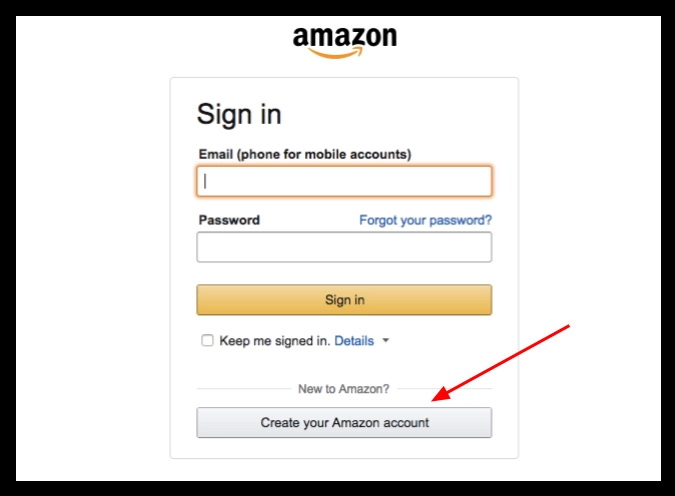
If you don’t have an account already, this is the first thing you’ll see when you try to purchase a product on Amazon.
Now that we’ve got this concern out of the way, let me show you what a great abandoned-cart email looks like.
Amazon is a prime example of consistent abandoned cart emails. If you’ve ever added products to your cart, initiating but never finishing checkouts, it’s not long before emails start to hit your inbox.
We’ve always been amazed by Amazon’s ability to get us to purchase items left in our carts, so we started with those emails. Surprisingly, their abandoned cart emails are just simple reminders rather than big marketing ploys.
This is an example:
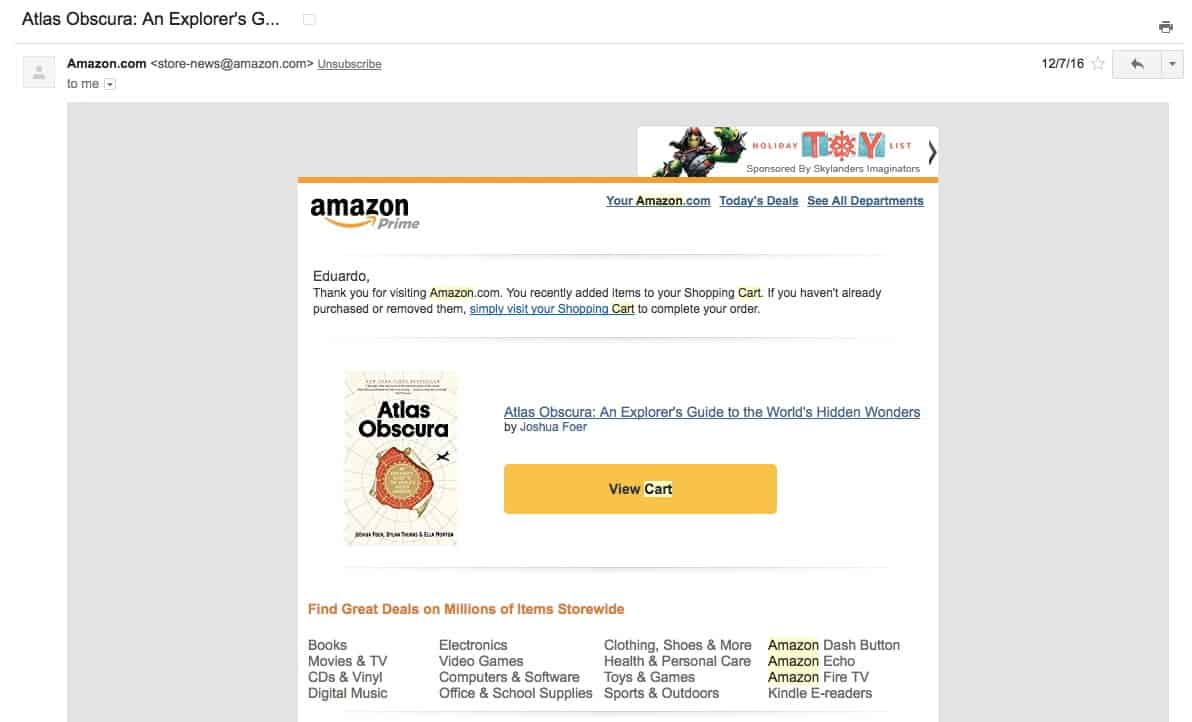
There are several important highlights about this email:

For another great example, let’s review Carthook:
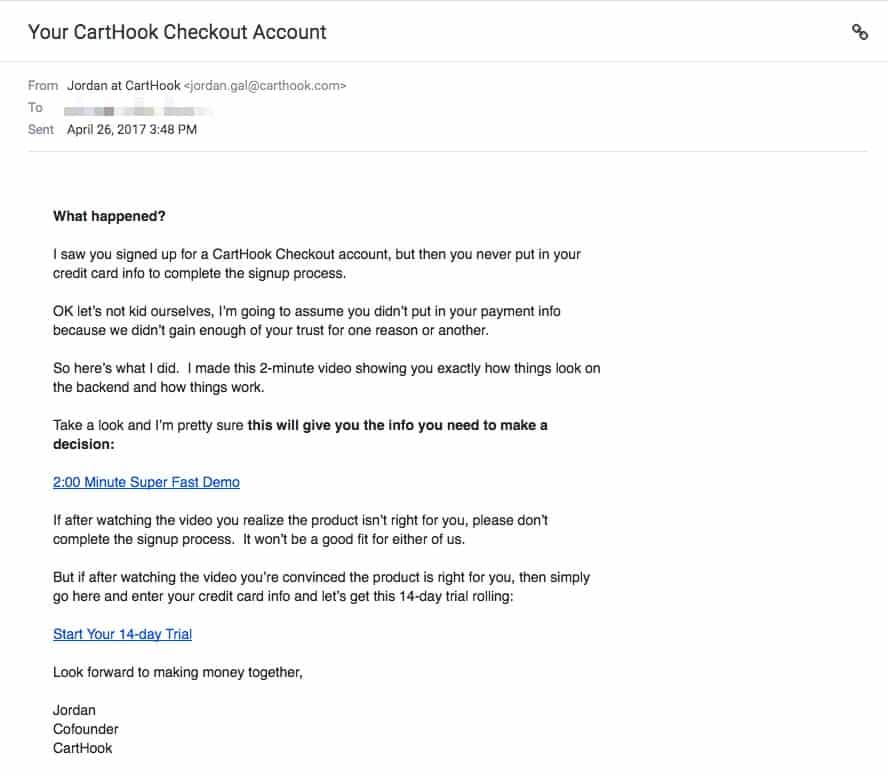
Though it may look like a simple, run-of-the-mill email, my quick analysis of the copy revealed the greatness of this abandoned-cart email:
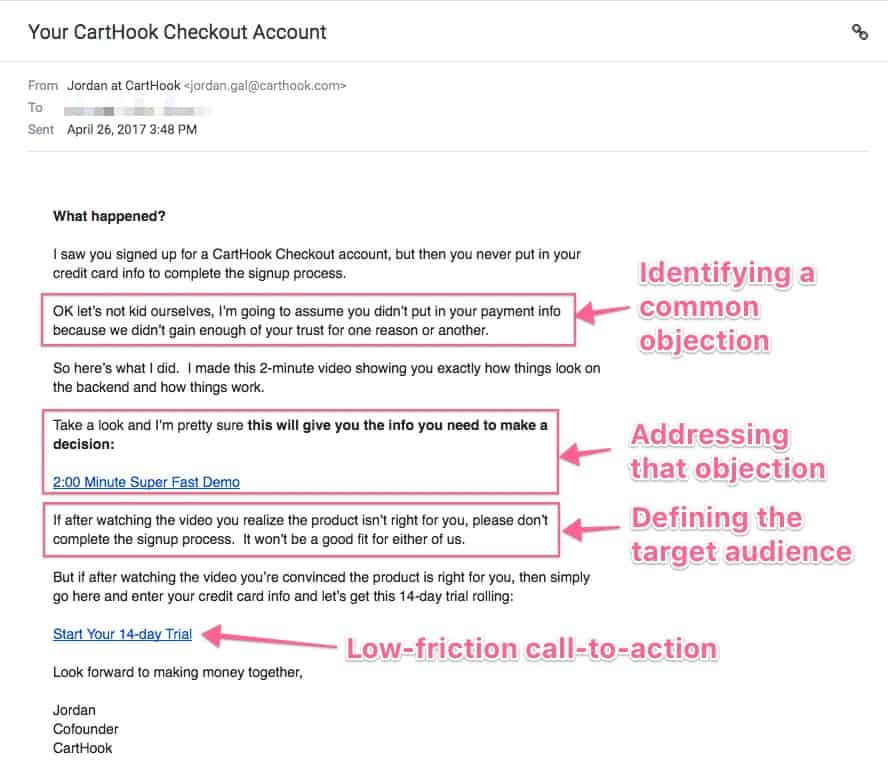
This email follows a typical user journey in just a few paragraphs:
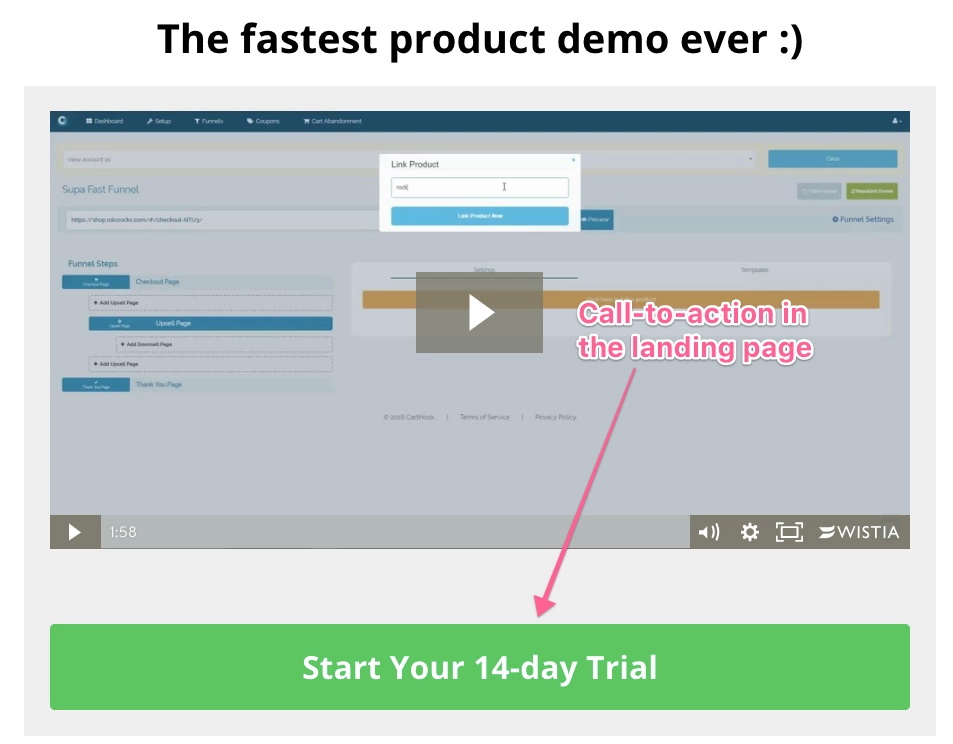
Let’s continue reviewing interesting abandoned-cart emails. Now it’s Kettle and Fire’s turn on the hot seat.
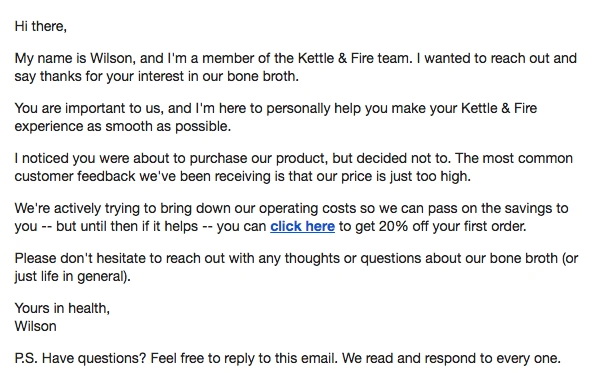
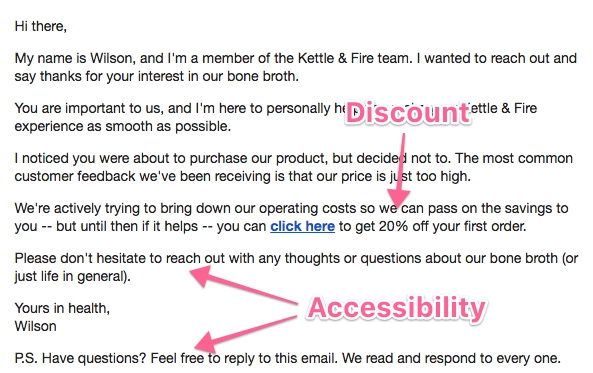
This email retains many of the elements mentioned in the first two examples, but a few additional elements make it highly effective. Were you able to spot them?
Now, we’ll show you a great email from the dozens we’ve reviewed.
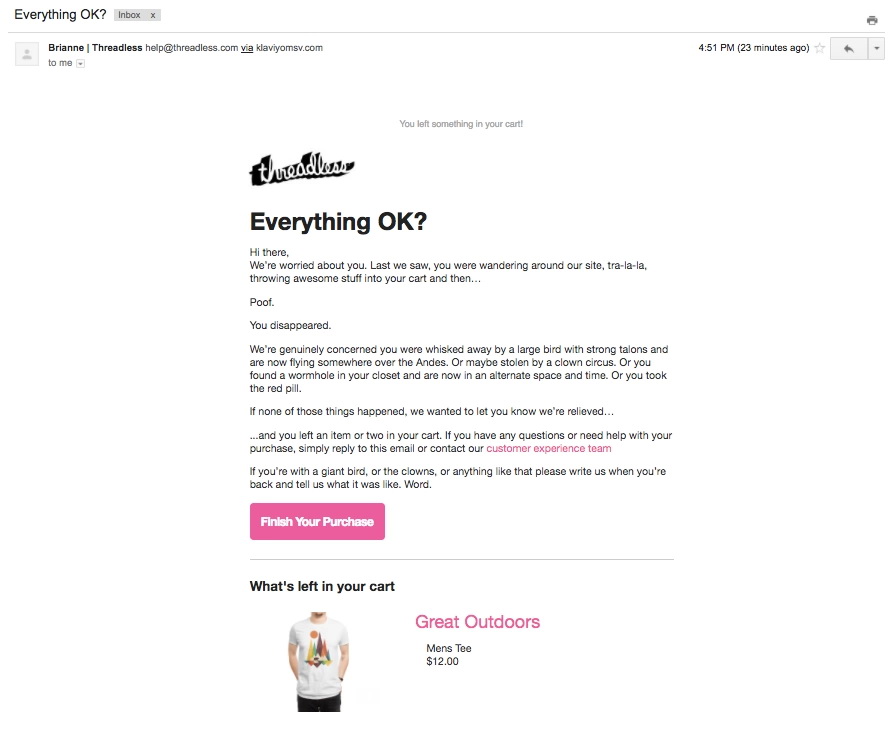
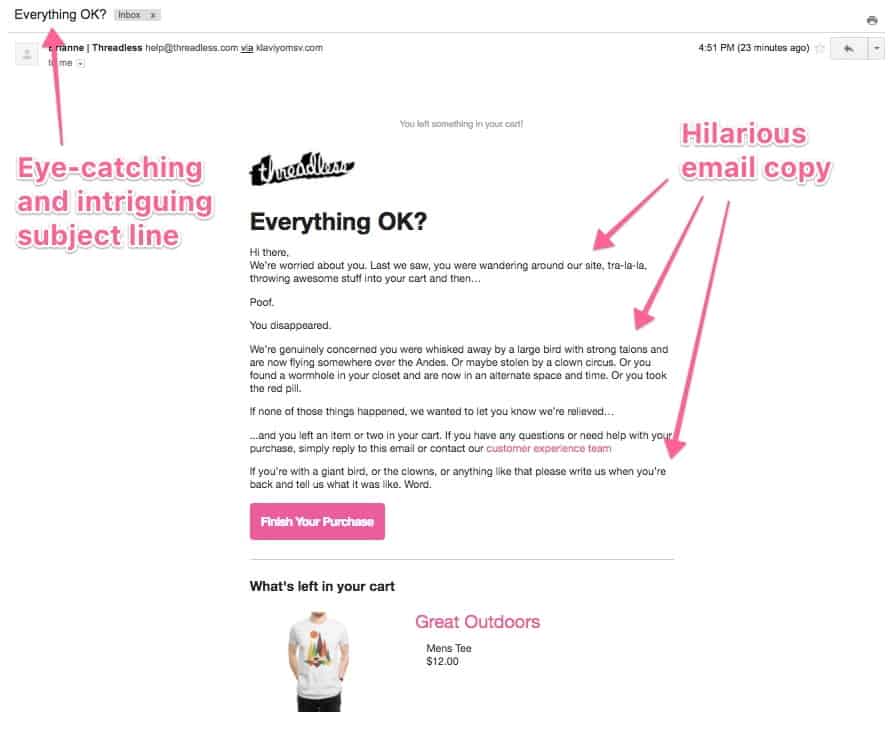
This email includes several elements we’ve already mentioned, but it also has the best email copy of all of the emails we’ve reviewed.
Are you thinking about getting started? After analyzing all of these emails, we summarized our key takeaways that you can use to implement these tactics in your own business.
If you decided to just skim over this article for best practices, this list includes the must-haves when writing your own abandoned-cart email:
You can use our customizable template to set up your own cart-abandonment email. Just copy and paste this content into your email service provider (ESP) and be on your way!
NOTE: The phrases between [square brackets] are meant to be filled by you or substituted by the appropriate merge fields from your ESP.
This email should get straight to the point. Just address customers’ most frequent concern about your product, and give them a way to complete their purchase.
When to send: Between 1 hour and 1 day after the visitor starts the checkout process. Give people some time to complete their purchase, so don’t send this email immediately after they join your list.
Subject line option #1: I think you forgot something
Subject line option #2: Did you forget something?
Email body copy:
Hey [first name]!
! I noticed you were thinking about purchasing [name of your product] but left before completing your order.
Many potential customers mention [most common concern about your product].
I wanted to reach out personally, just in case you felt that way too, to let you know [answer to the most common concern].
If you want to complete your purchase and [product value proposition] just click the link below.
Click here to get [name of your product]
If you have other doubts or questions, I’d be happy to answer them—just reply to this email and I’ll get back to you.
Looking forward to seeing you around!
[Your name]
While every industry and product is different, these emails should work for most situations. If you’re just getting started with cart-abandonment emails, these templates will help you get up and running in a few hours.
However, systems and processes can always be improved once they’re applied to a specific situation. If you decide to use these templates, we recommend that you regularly track their performance and look for ways to optimize open-and-click rates using industry-specific techniques and copywriting styles .
These are just a few ideas you might consider:
This tutorial will cover the exact step-by-step process to implement an abandoned-cart email for your Teachable online course.
You will need:
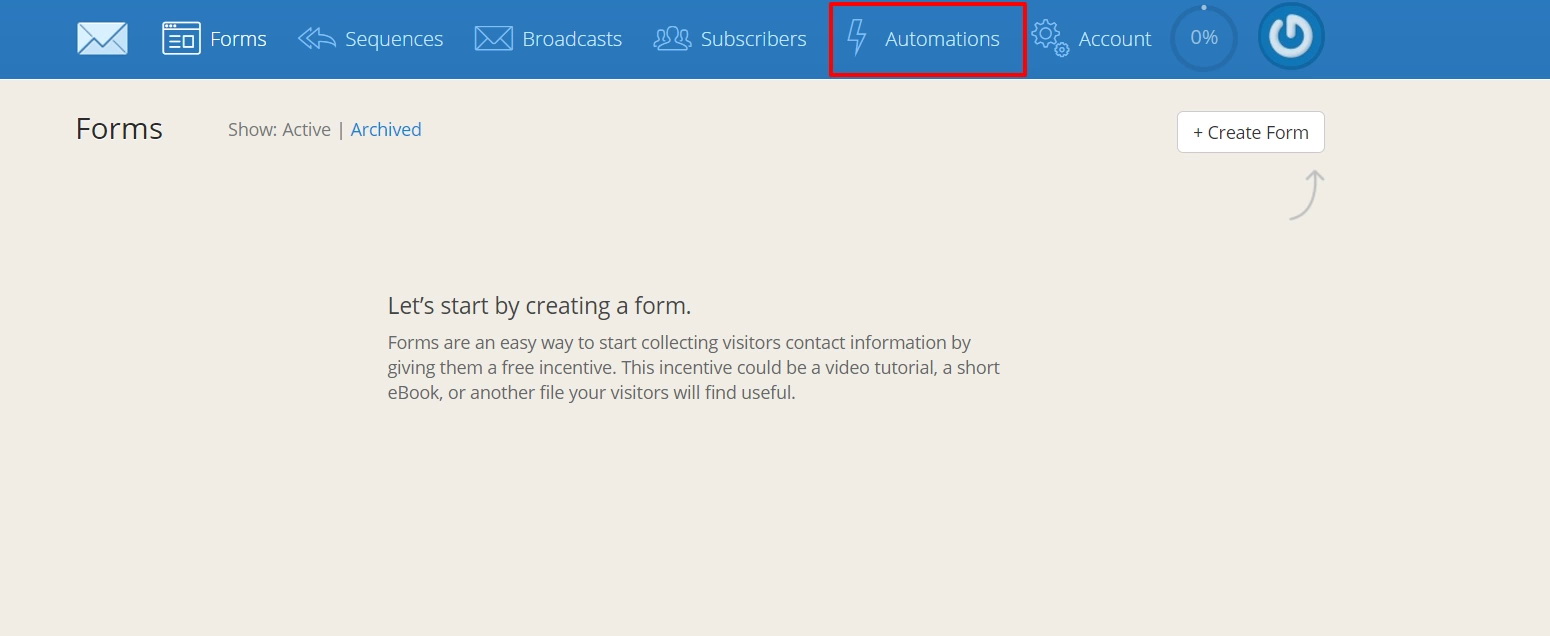
1. First, we’ll need to connect your Teachable and ConvertKit accounts. Log into ConvertKit and click Automations in the top bar.
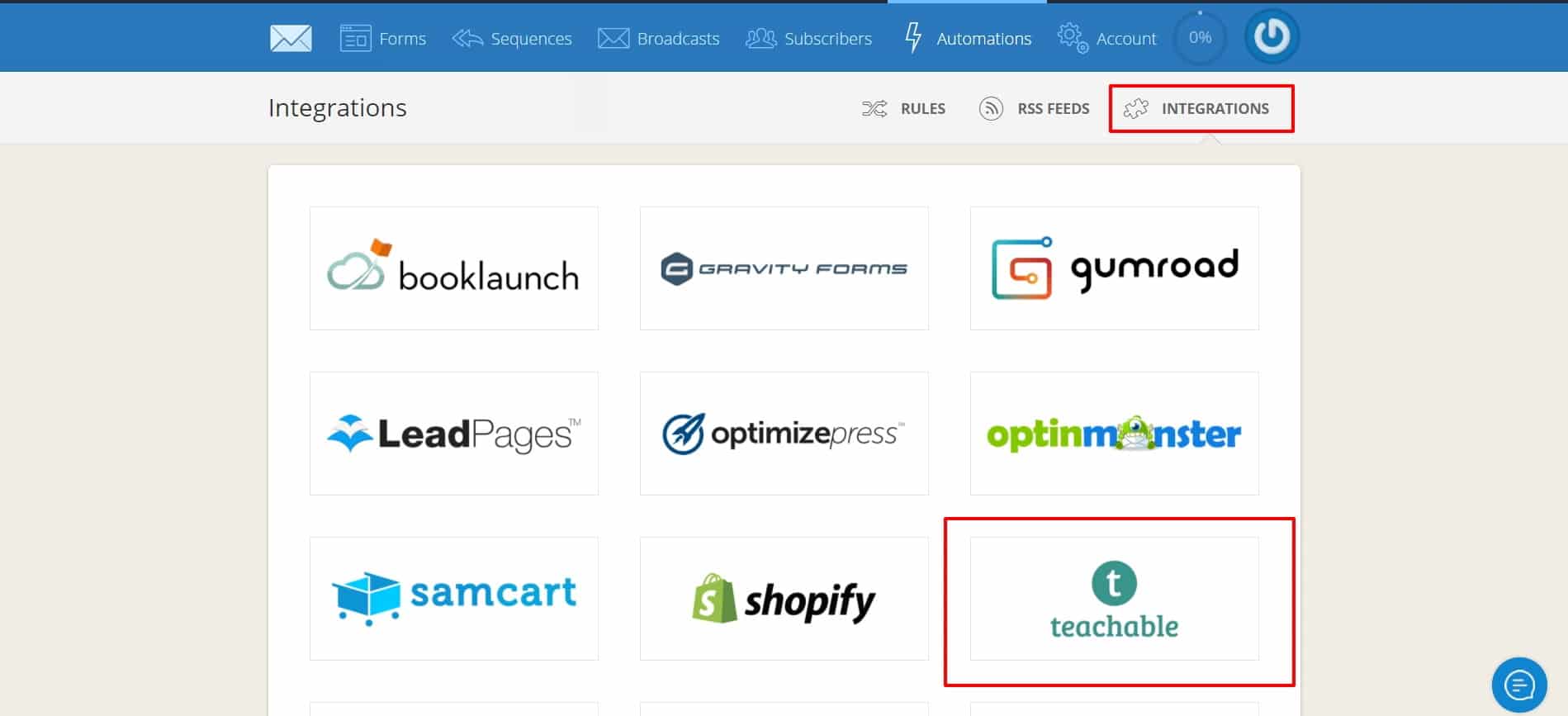
Then, select Teachable from the Integrations list.
Add the URL of your Teachable school and click Next.
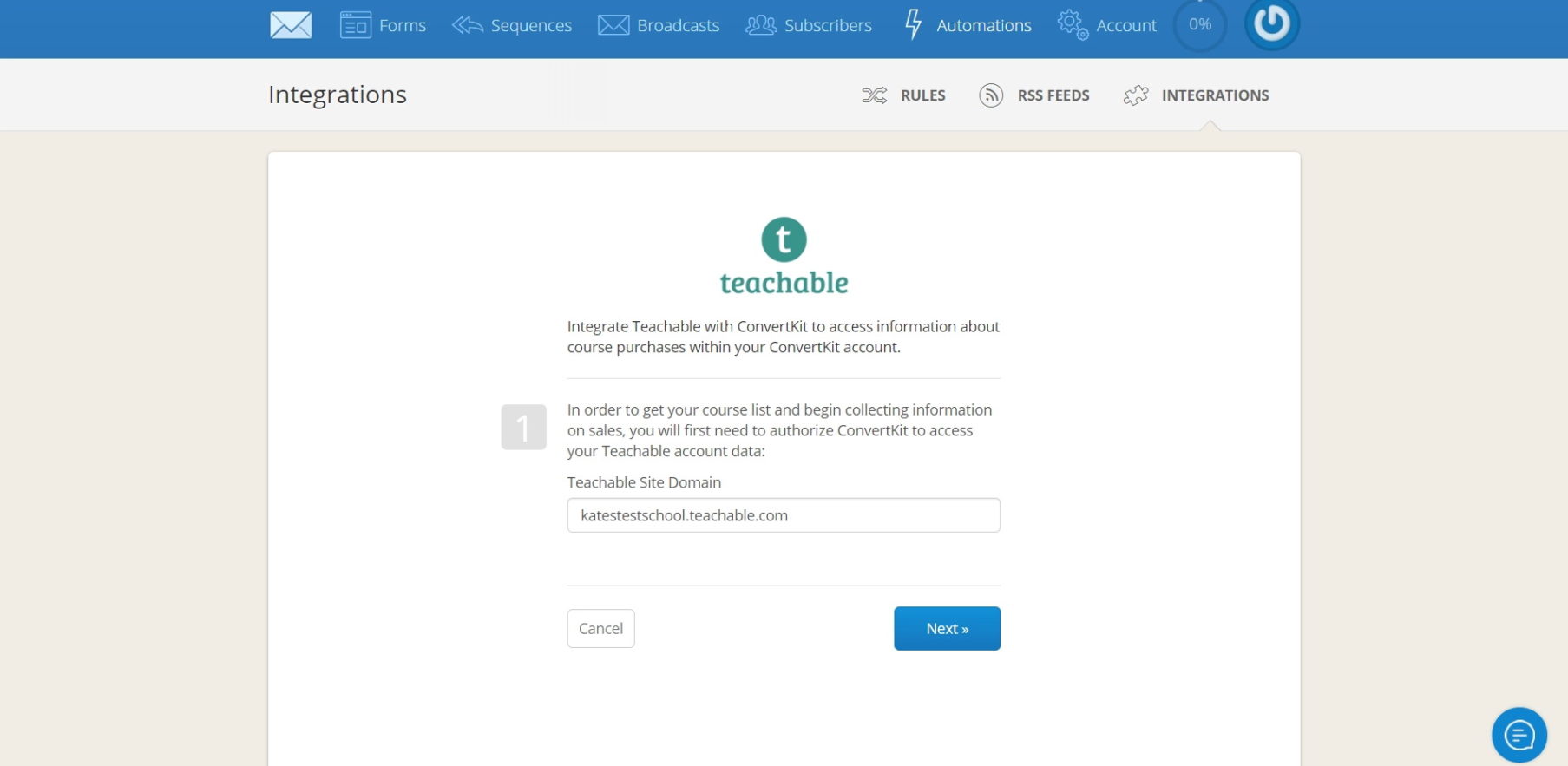
After this, your accounts should be connected.
2. Write your emails and create a ConvertKit sequence (set up cadence, delivery dates, etc). Call it “Abandoned cart sequence.”
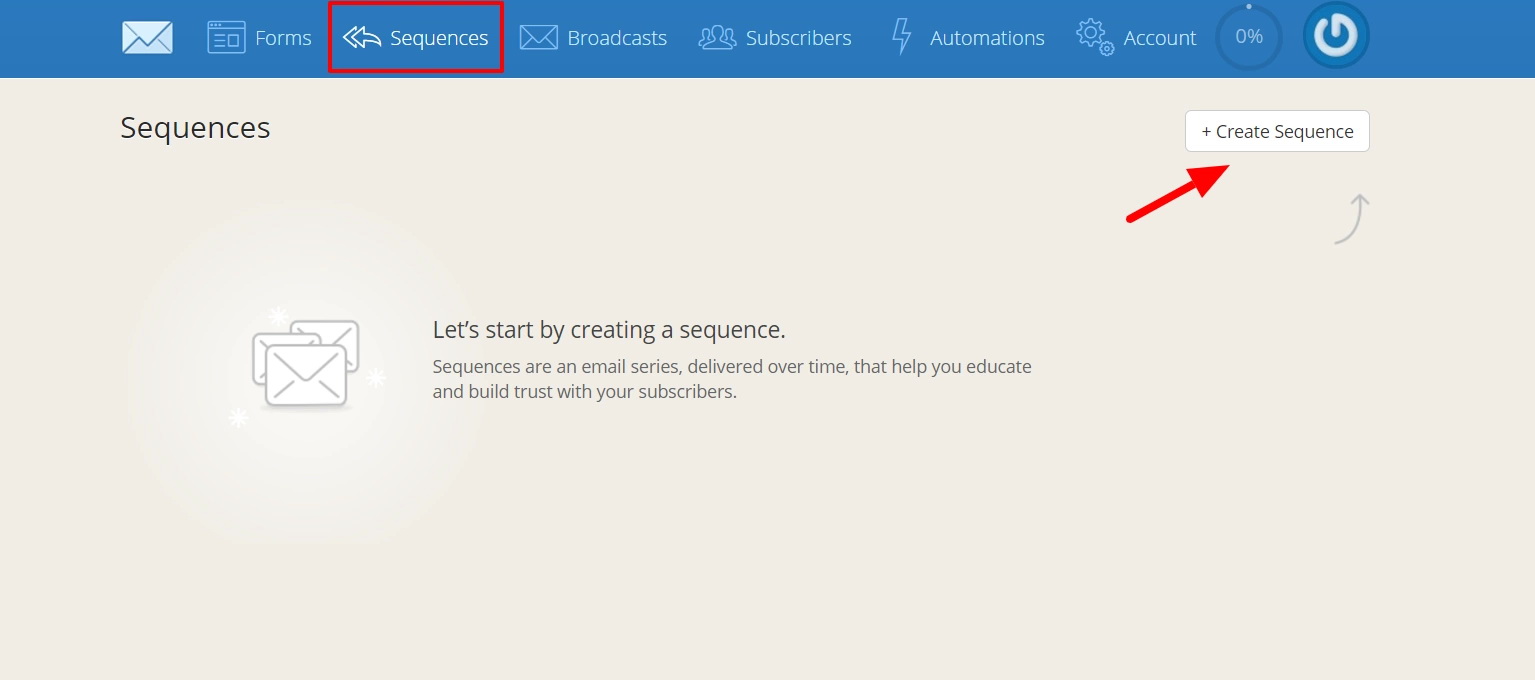
3. Under the Subscribers tab in Convertkit, add two tags: Signup and Purchase. We’ll use these tags in our next two steps.
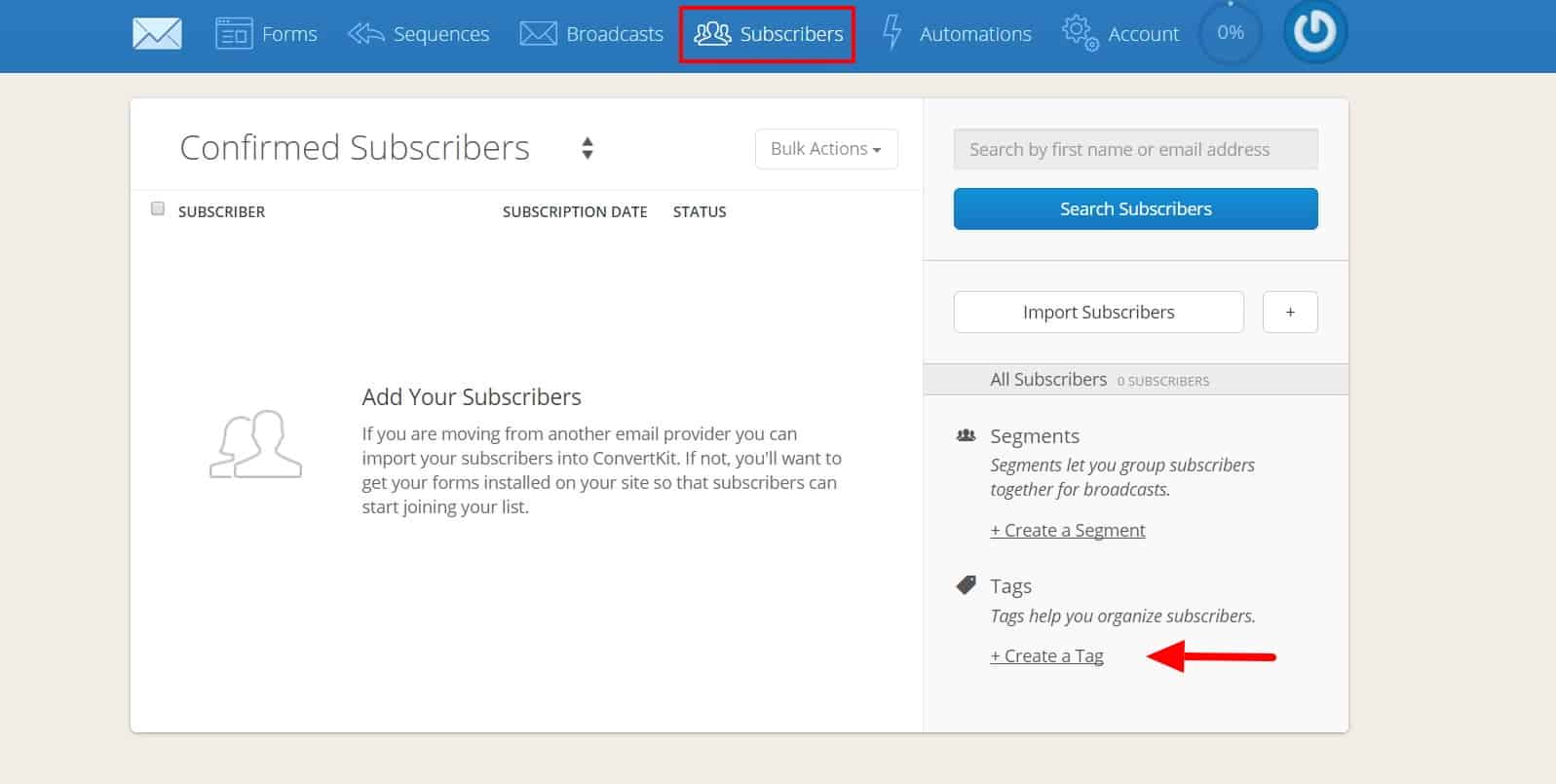
4. Now, head over to Zapier and click Make a Zap! This zap will add new Teachable signups to the Signup tag in ConvertKit. The trigger step is simple enough: Choose Teachable as the trigger app and New User as the trigger.

5. (OPTIONAL) Before proceeding to your main action step, you might want to address one logistical issue. Since Teachable only stores full names, rather than separate first and last names, you’ll need to add two intermediary Zapier actions if you want to automatically split full names into first and last, for correct processing through ConvertKit.
This step is optional because you could always set up your emails with a generic standard greeting that doesn’t address the customer by name (i.e. “Hey there!”), bypassing the issue of needing to isolate the first name. That might be a good option if you don’t have or want a paid Zapier plan, since on the free plan you can only set up Zaps of three steps or fewer.
If you do want to separate the names, add two action steps using the formatter action app, following the directions in this Knowledge Base article. Add them as steps 2 and 3, in between your step 1 trigger and your step 4 main action.
The completed step 2 action—which will split out the first name—should look like this:
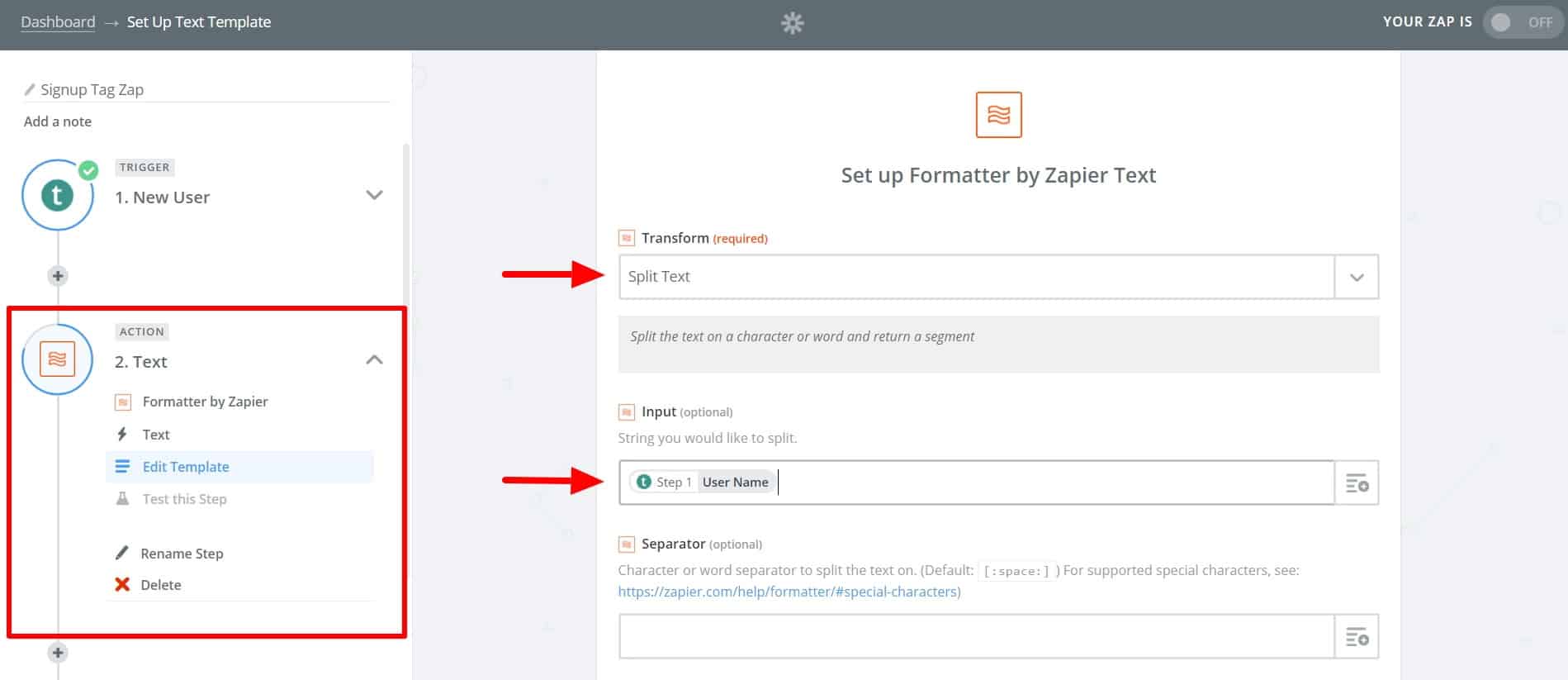
The completed step 3 action—which splits out the last name—should look like this:
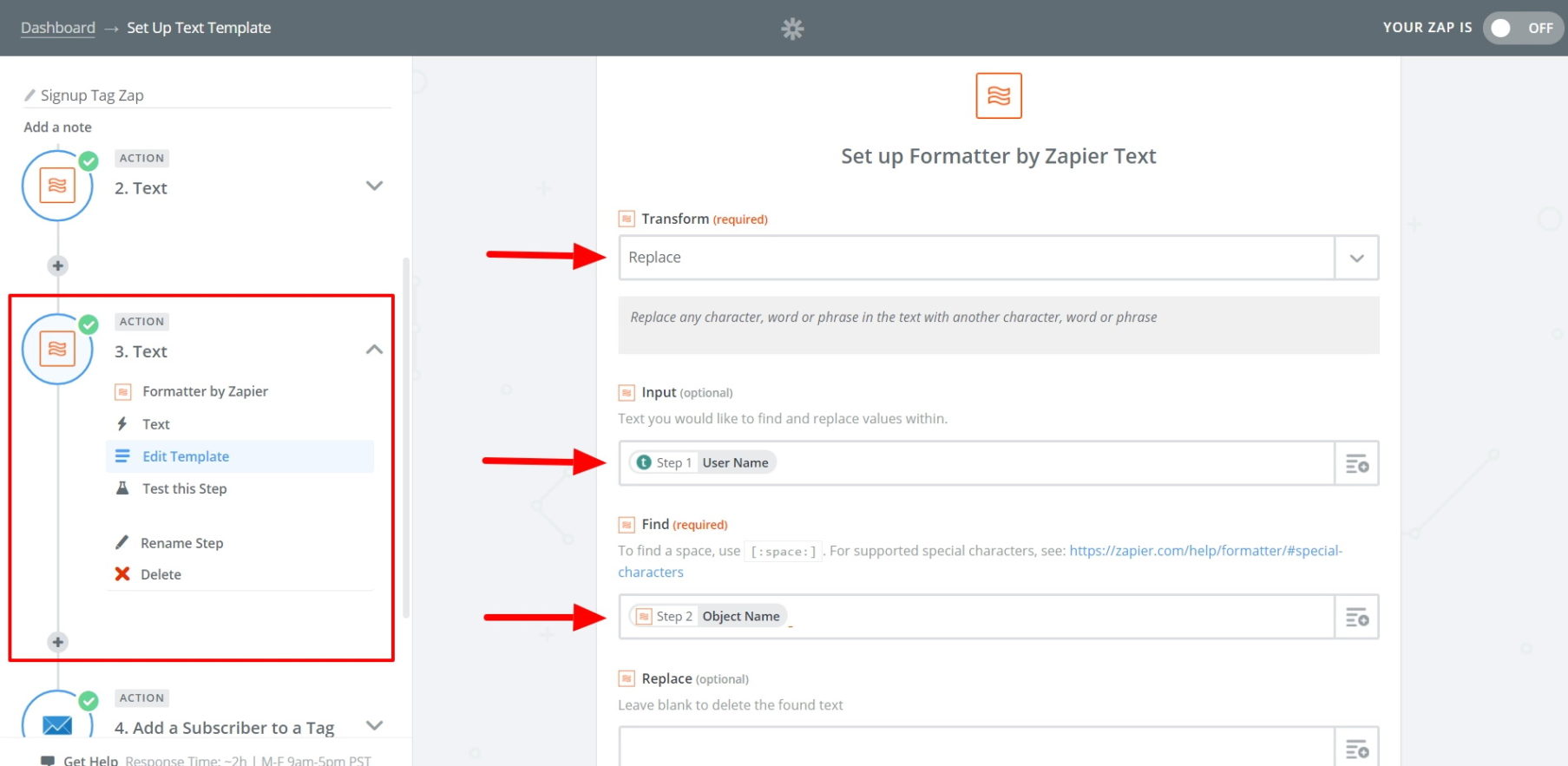
6. Now, proceed to your main action step, choosing ConvertKit as the action app with Add a Subscriber to a Tag as the action.

After this, you’ll be prompted to connect your ConvertKit account (if it isn’t already connected). You can do this with your ConvertKit API key and API secret key, both found on your ConvertKit account page.
Once the accounts are connected, continue setting up your action. First, select Signup as the tag from the first dropdown menu.
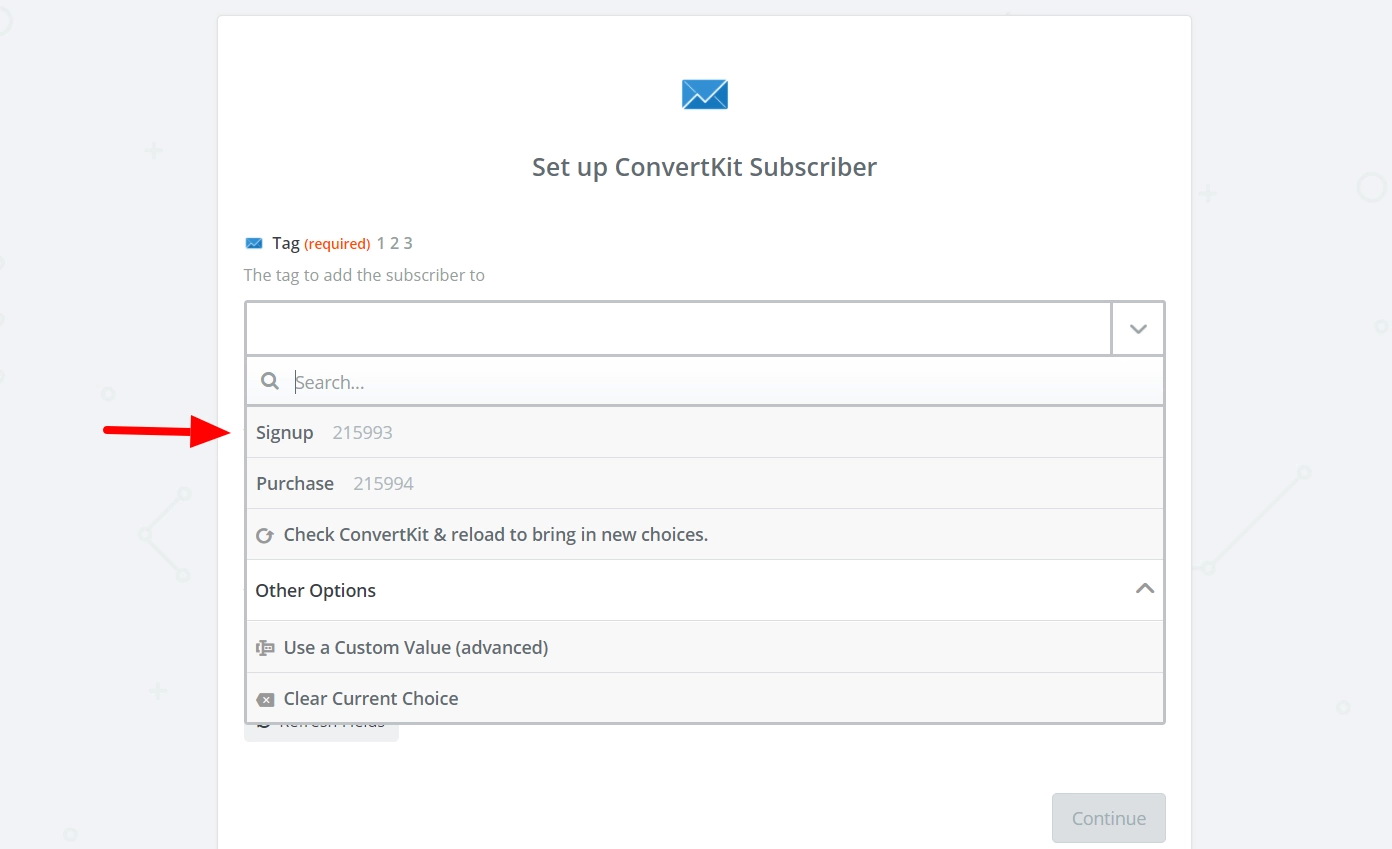
In the Email field, click the box to the left and select the User Email from your New User step.
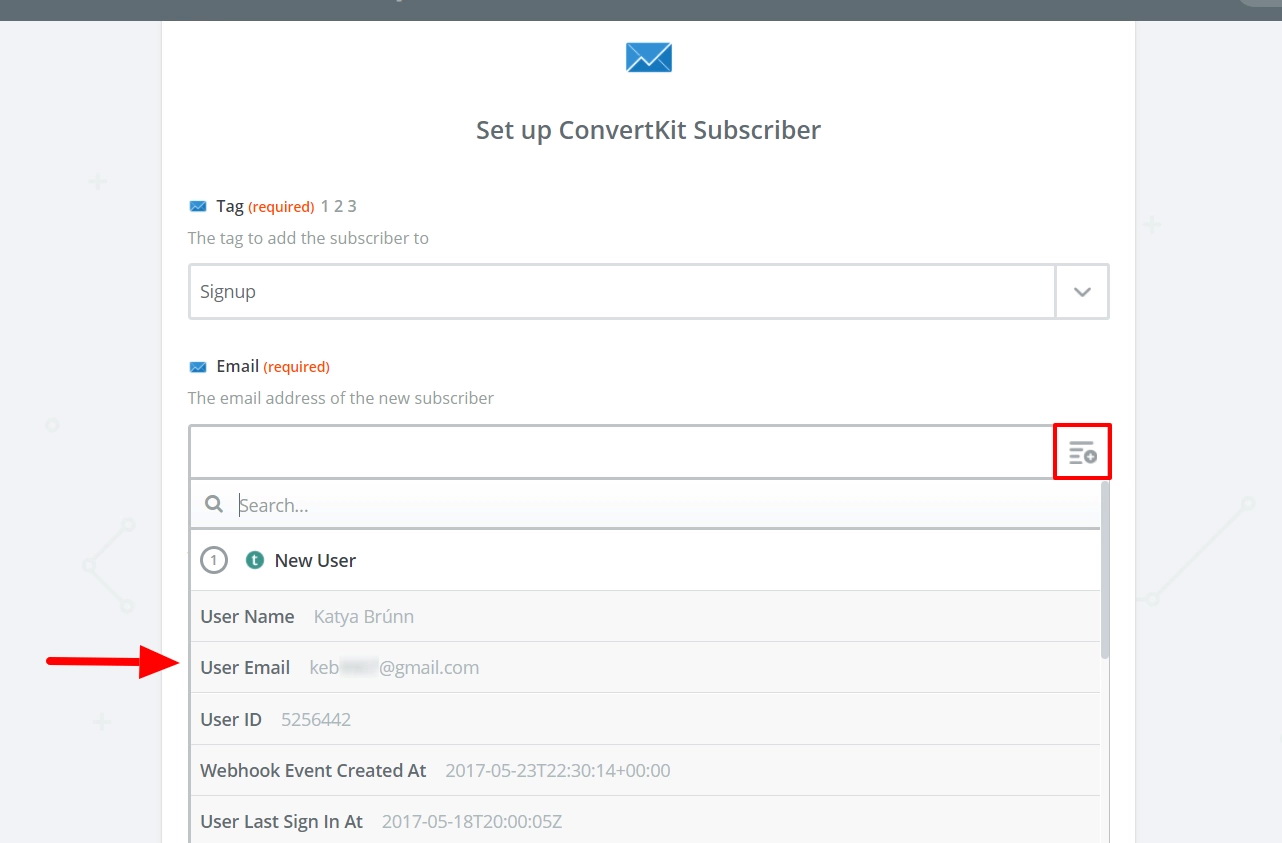
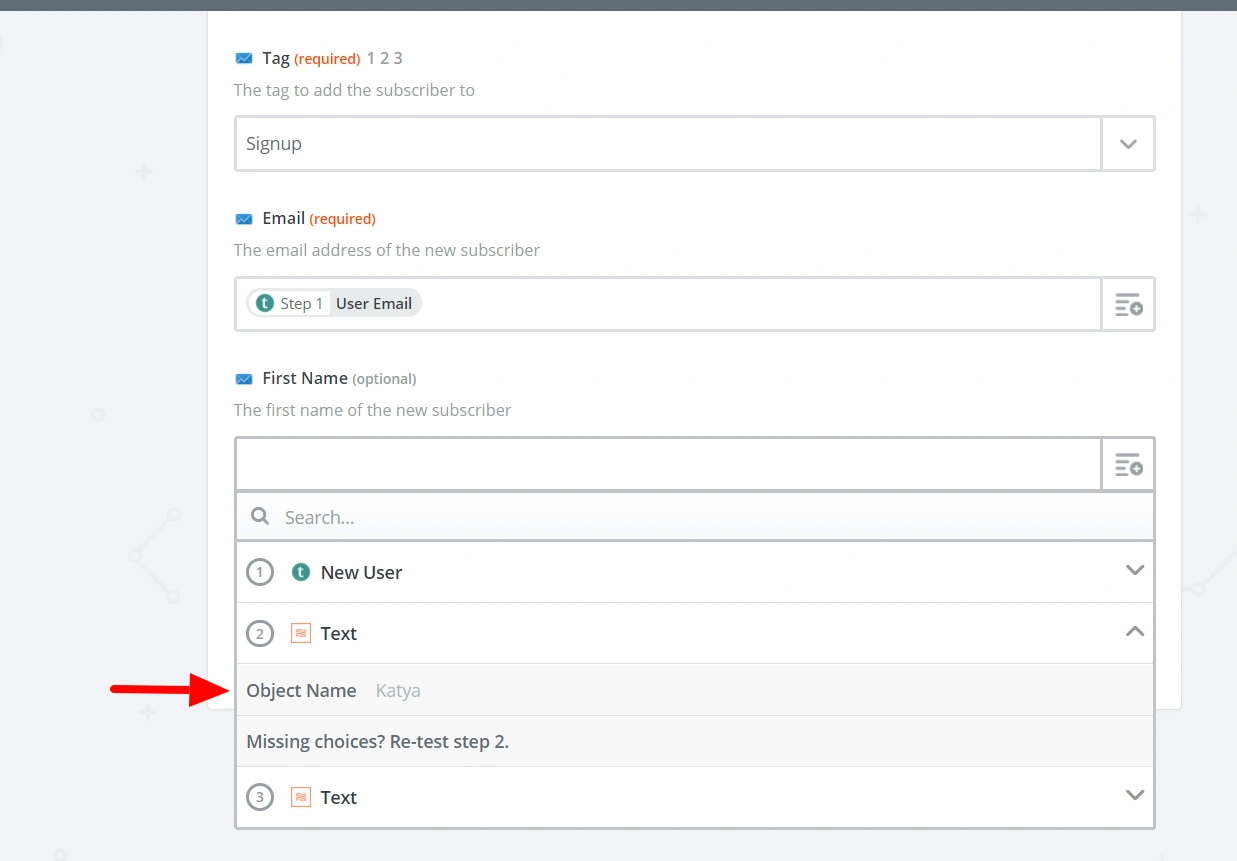
For the third field, you could leave it blank. If you did step 5, choose the Object Name from step 2 (the separated first name).
Now, you can test your Zap. If everything is working correctly, name it and turn it on.
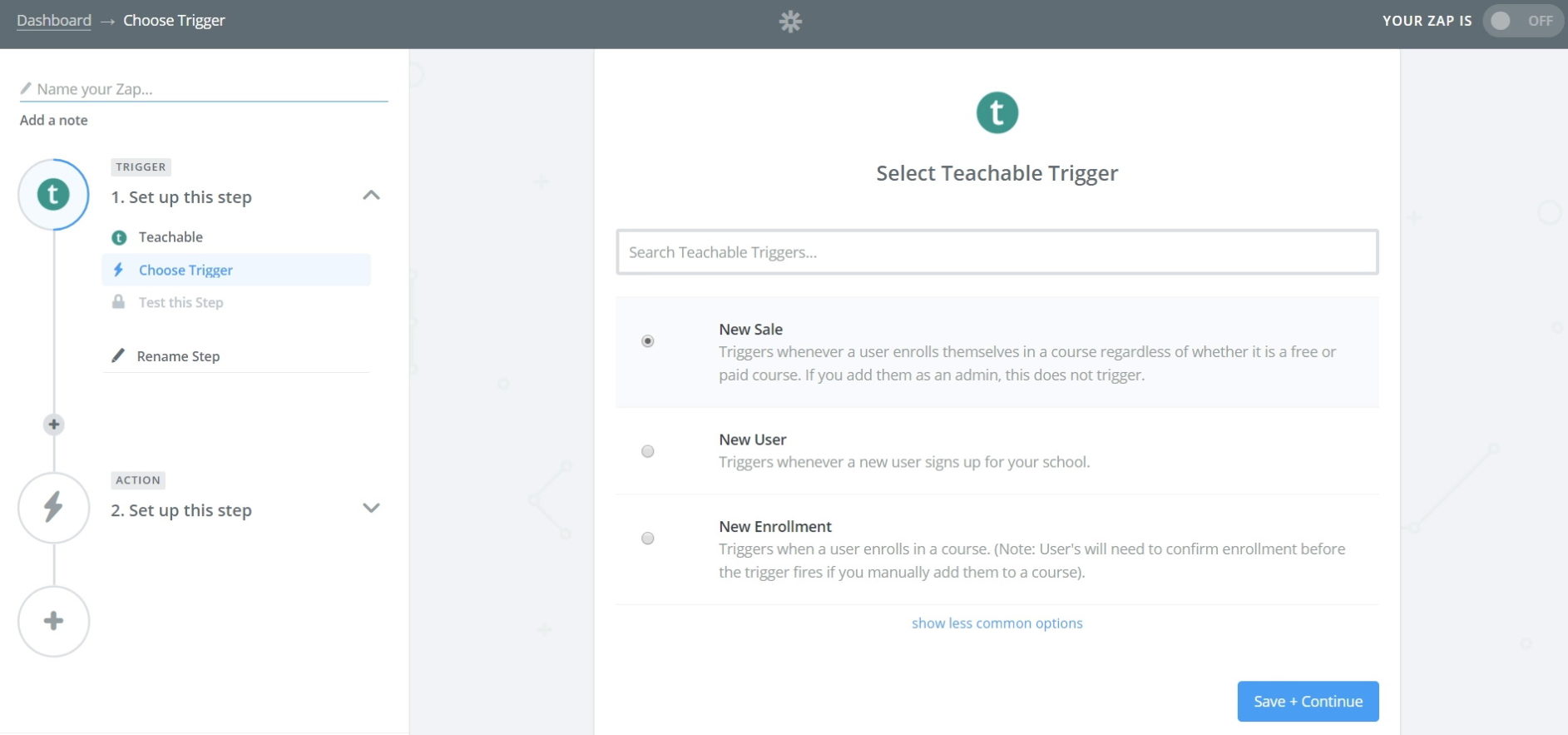
7. Don’t leave Zapier just yet—we need to create a second Zap. This Zap will add new purchases to the Purchase tag in ConvertKit. Choose Teachable as the Trigger app again; this time, the trigger will be New Sale.
8. (OPTIONAL) Like with the first Zap, if you want to address students by their first name, repeat the two Formatter actions from step 5.
9. Again, your main action will be to Add a Subscriber to a Tag, using ConvertKit as the action app. Set up the template so the tag is Purchase and the email is the User Email from step 1.
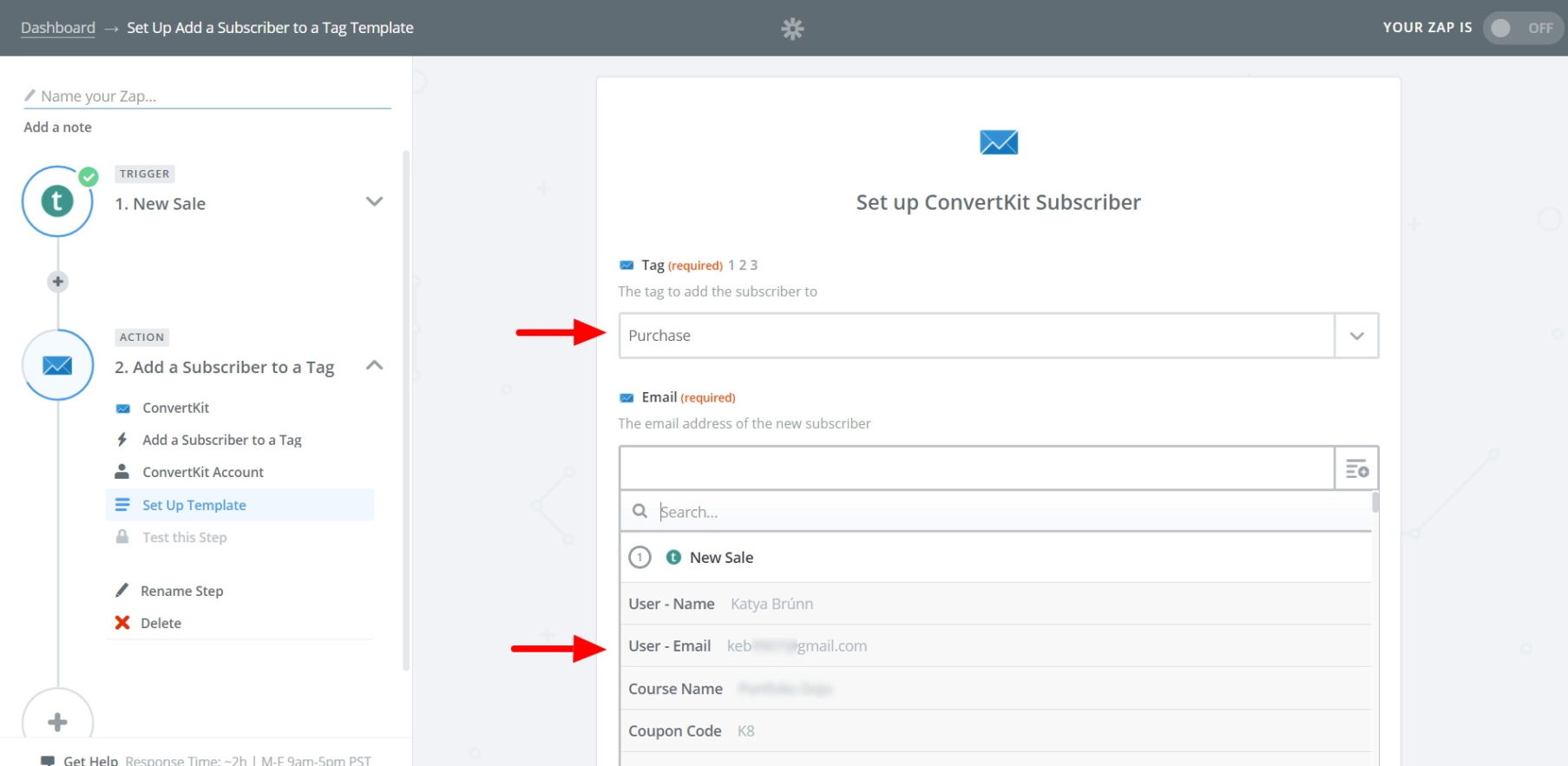
Once you’ve completed the template, test your Zap, name it, and turn it on.
10. Finally, we’re going to return to ConvertKit to subscribe tagged Signup users to your abandoned-cart email sequence (and unsubscribe purchasers). We’ll do this by creating two automations.
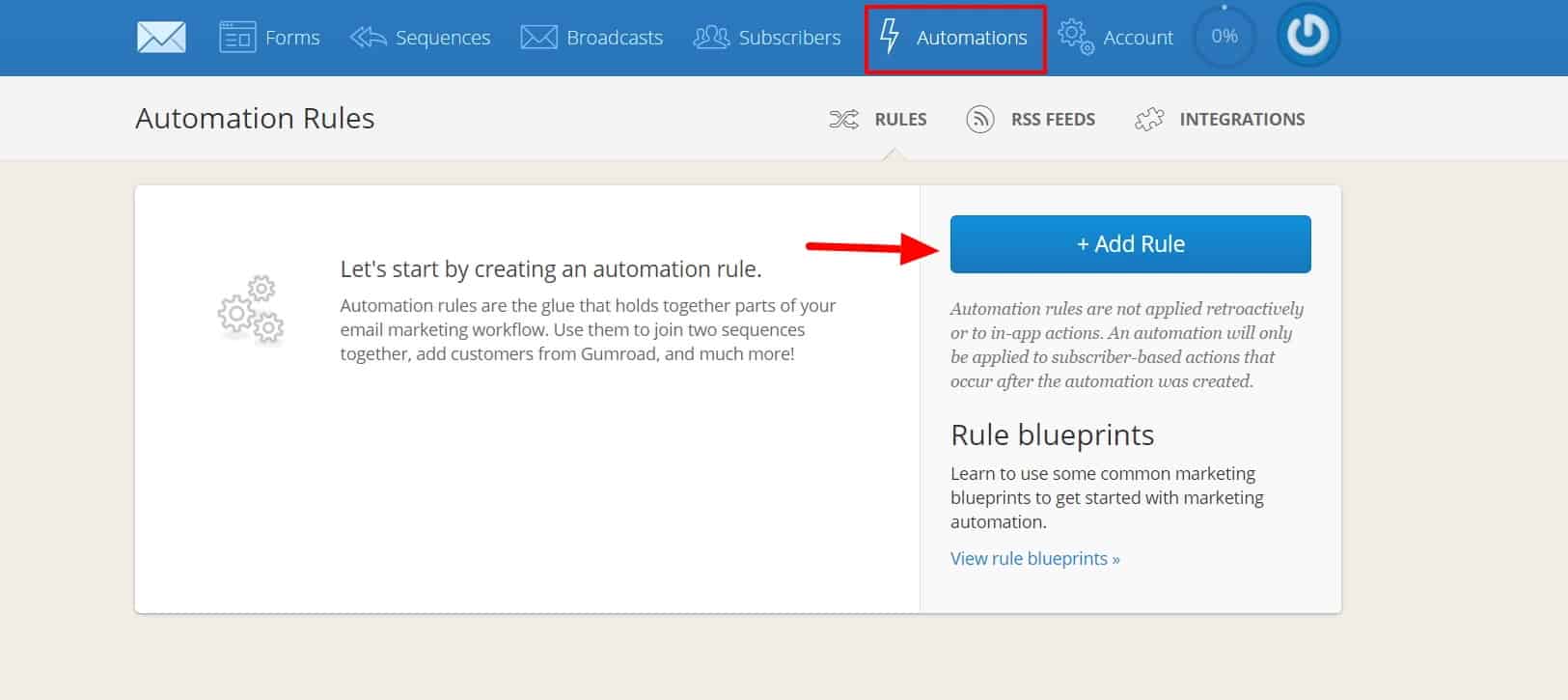
Navigate to the Automations tab and click Add Rule:
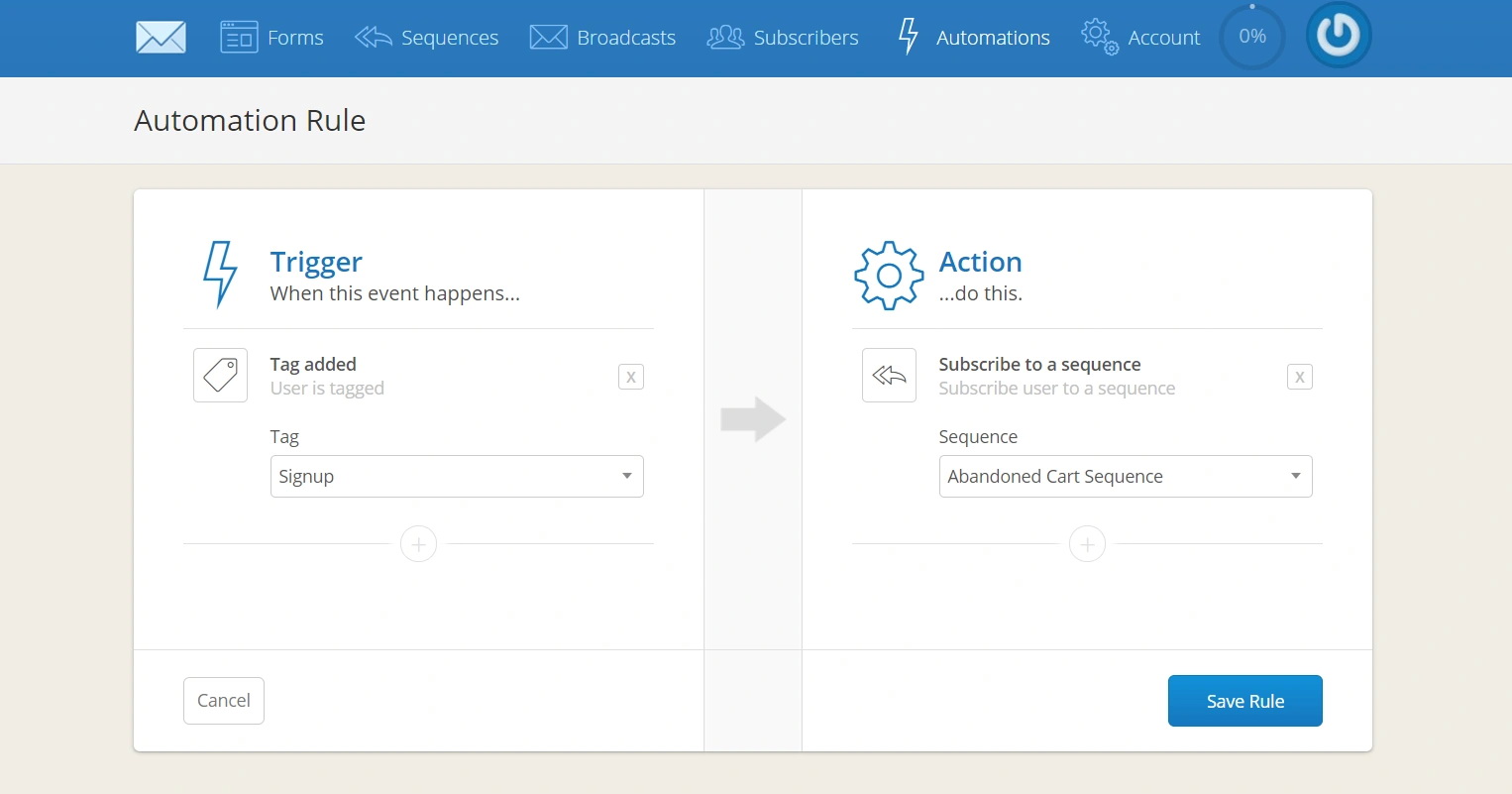
Automations work similarly to Zaps, with a trigger and an action. For your first automation, select Tag Added (Signup) as the trigger, and Subscribe to a Sequence (Abandoned Cart Sequence) as the action. Click Save Rule when done.
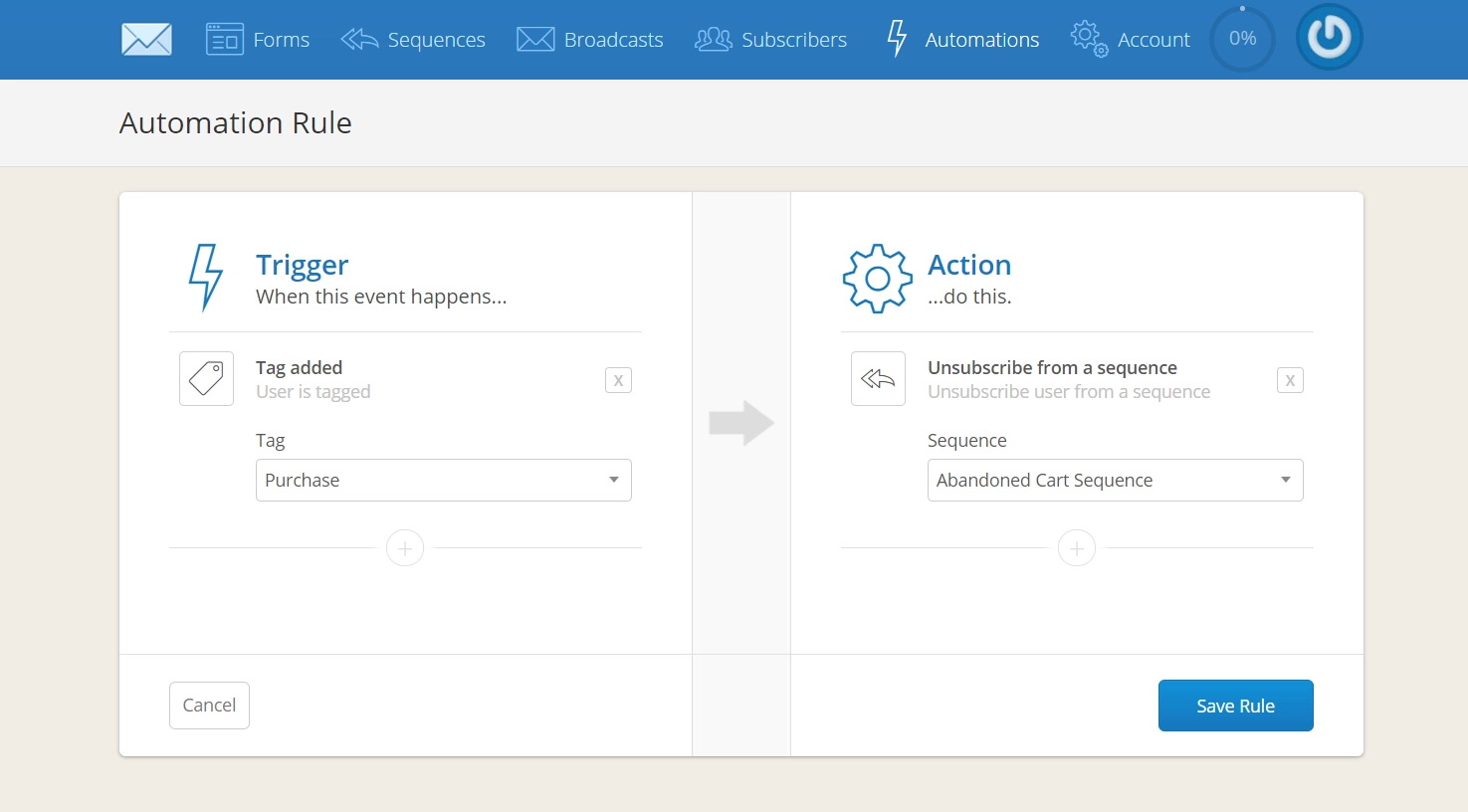
11. Your second automation will unsubscribe any new users who have made a purchase. Select Tag Added (Purchase) as the trigger, and Unsubscribe from Sequence (Abandoned Cart Sequence) as the action.
That’s it!
You’re all set. Anyone who creates an account on your Teachable course during the checkout process, but abandons their cart before making a purchase, will receive emails you’ve created specifically to remove their barriers to purchase and increase conversions.