Thank you! Your submission has been received!
Oops! Something went wrong while submitting the form.
MENU
Frameworks and how-tos for designing learning experiences that keep students engaged from start to finish.

If you’re looking to expand your online course business and try the cohort-based course model, there is one easy way to do it. Instead of creating a new course from scratch, turn one of your evergreen online courses into a CBC.
Transforming an existing course is much simpler than creating a brand new one. You already have the curriculum and the course material ready. All that’s left to do is make a few changes, add a few key pieces, and re-launch. Let’s discuss how you can accomplish all that in six easy steps.
Before making any business decision, it’s smart to do some market research. The same applies to turning your evergreen course into a cohort-based course. To check if there is demand for cohort-based learning, turn to your current audience.
You can carry out the market research in two ways:
A soft launch is a very popular strategy for online course creators because it allows them to see whether their ideas are valid before perfecting the course curriculum. Yes, you read that right. To validate your CBC idea this way, you only have to announce the course launch without creating it.
Entrepreneur Adam Keesling did just that with the first cohort-based course he decided to launch. On his Twitter, he shared the tweet that announced his upcoming CBC before he even started working on it:
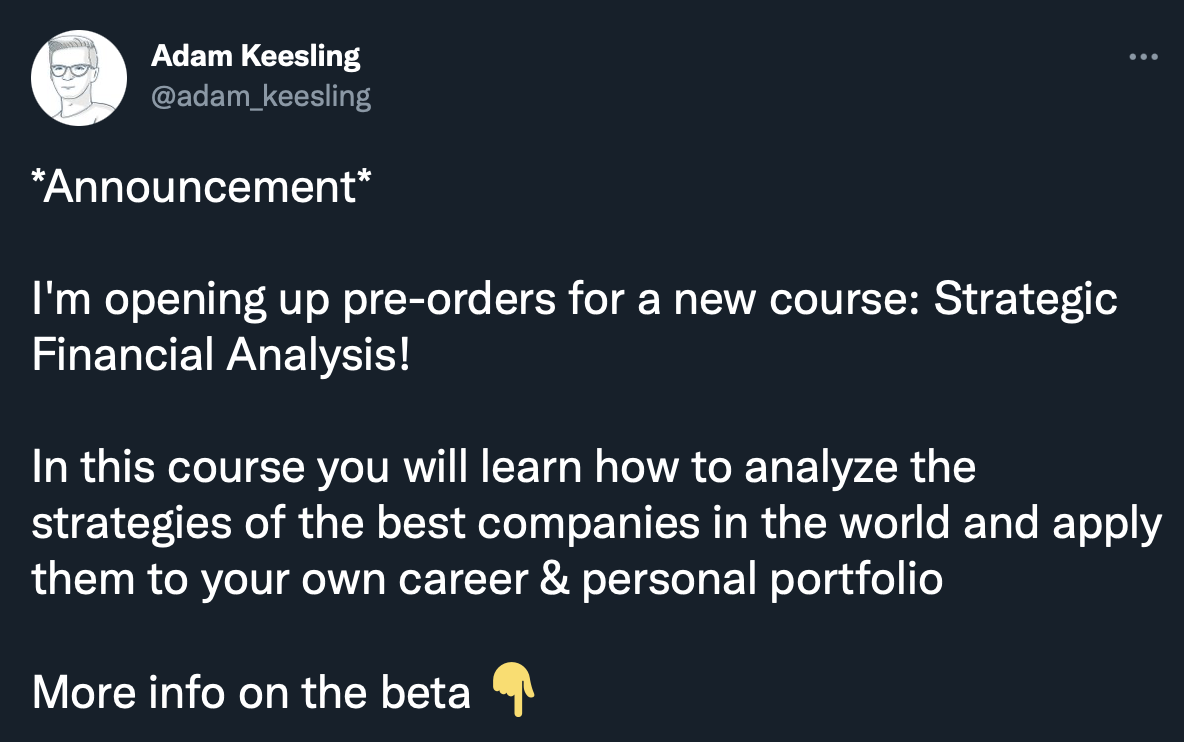
After 24 people signed up for the course and another 200 joined the waitlist. Only then did Keesling get to work creating the curriculum he was going to teach his in his cohort-based course.
You can easily borrow this soft launch strategy and apply it to verify whether there’s a demand for your evergreen course in a cohort format. On your social media or in email newsletters, invite people to register for the small group course you’ll be teaching.
When there’s interest and the available spaces are filled, you can be sure that your idea to turn the evergreen course into a cohort-based course is valid. And then, it’s time to start working on turning the evergreen course into a CBC.
Adapting an evergreen online course into a CBC is easier than creating one from scratch. You already have the curriculum and course material ready. However, there will still be some work to do.
First, you’ll want to look at your curriculum and course material. Decide which parts of your lessons you want to teach students live, and which they should cover on their own time. It might be a smart idea to teach your students the theory on the subject and lead discussions during live sessions. And then, leave them with assignments to deepen the new things they learned on their own.
For example: Let’s say you teach people how to manage their time better. During your live lessons, you might want to spend time teaching your students the theory of different productivity and time management strategies. You might also want to go over some case studies. These can come from your previous students or your personal experience.
Then, you can assign homework that would include practical assignments to help students apply the theory they learned during live lessons on their own time. Things like “use the Pomodoro technique we learned today to plan your work next week.” Or “use the GTD method to organize your work documents until we next meet for a live lesson” are great homework assignments that will help your students put theory to practice.
Of course, how you’re going to put together your CBC curriculum depends on what sort of subject you’re teaching. If you’re teaching coding, for example, you might want to explain the theory and give students the assignments in class to make the learning more effective.
Remember: You can always adjust the way you structure your lessons in the future. One of the best things about cohort-based learning is the immediate feedback you can receive from your students. So, if you’re unsure how to structure your lessons, start with something and then be ready to adjust as you go.
Deciding on the right pricing for your cohort-based online course is a very important step because you’re going to be investing your time and energy in teaching and managing students. So, don’t be afraid to set the right price for your time.
When you’re thinking about setting the price for your newly transformed online course, think of it this way:
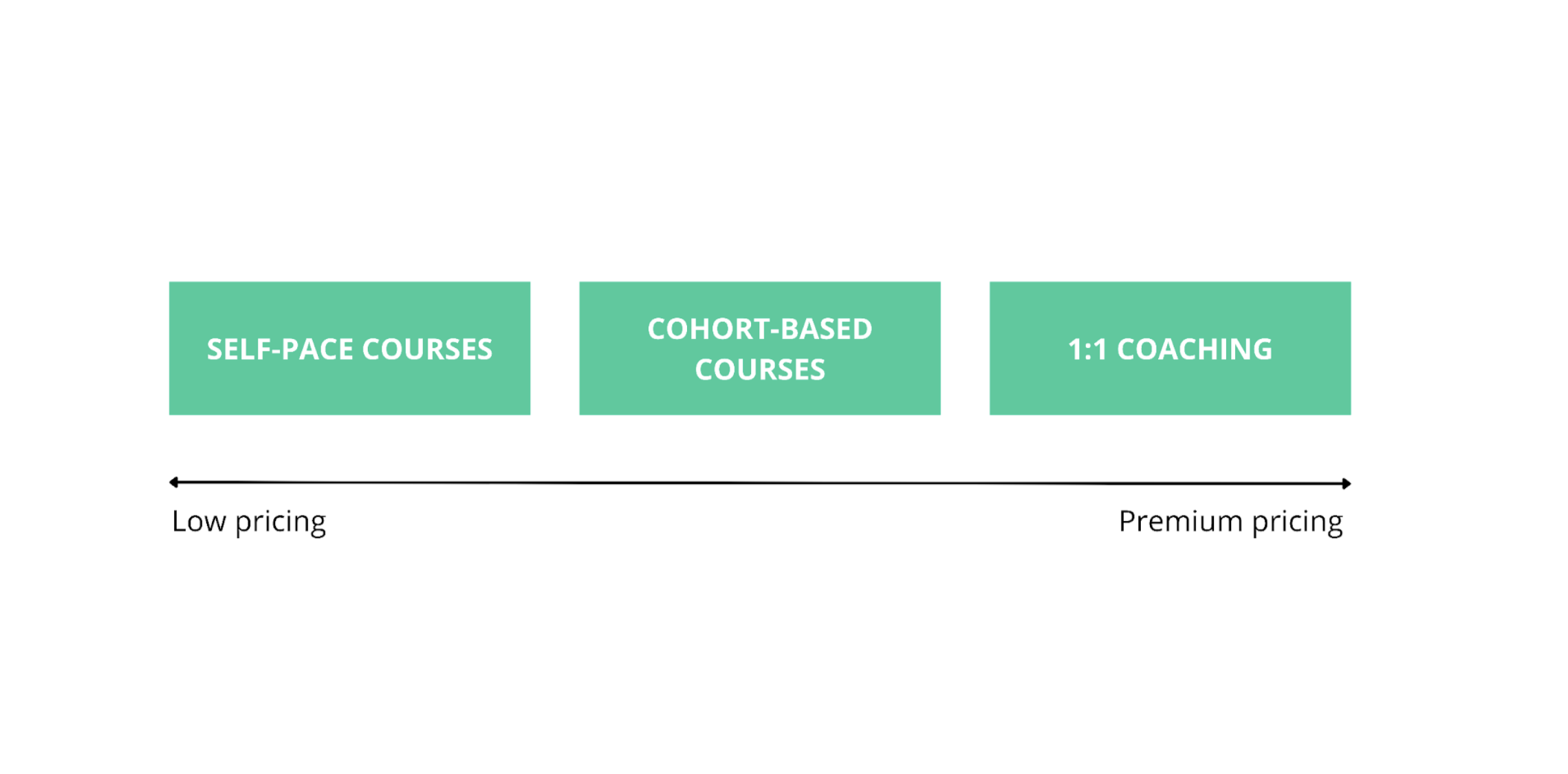
Cohort-based online courses fall in a sweet spot when it comes to pricing your services. You can charge more than you would for your evergreen course. This will increase your revenue and provide more value for your students all at the same time.
Research the market to see what other online course creators are charging for their cohort-based courses. The price will vary depending on the industry. So looking for examples from other creators in your niche might be smart. This way, you’ll get the most accurate picture of what people are willing to pay for a course similar to yours.
Unlike your evergreen online course, a cohort-based course will require you to communicate with your students. And for that, you’ll need to find the best solution that works for you and your students. There are many different tools available online that you can use:
This platform is very comfortable because you can create a private server that only your students can access and chat with them there. In addition, you can create different forums on different topics where people can chat. Discord also allows you to do voice and video calls all in one place, and you can easily stream your screen to your students while you’re doing something.
Zoom is a free conference call software available online to everyone. You can create meetings and share links with people to access the call with one click. It’s easy to use, and flexible, allows you to have audio and video calls, share your screen, do polls, and even record your sessions. If you want your students to have access to the sessions after, so they can easily go back and re-watch certain sessions, Zoom can be very handy.
For community management, Facebook Groups are convenient and available. It’s free to use, and most people already have Facebook accounts and are familiar with the platform, so joining the cohort group will be easy.
Inside your group, you can do lives, upload videos and other content straight to the platform, run polls, and allow your students a place to connect. It’s a very useful tool if you’re looking to cultivate a community and a lot of online course creators use it for their businesses.
The cohort-based course will require much more time management than the evergreen online course. Once you have all of the details sorted for the course material, it’s time to spend some time scheduling and planning out the lesson times.
If your students are in different time zones, you’ll have to make sure you pick the time for live lessons that works the best for everyone. Of course, no time will ever be perfect for every single student. But choosing the time of the day that’s appropriate for most should be enough.
You might want to create a calendar that you’ll share with your students. This will allow you to easily manage and plan your time. And, it will save you time and effort because you can share the calendar with all cohort students without having to tell everyone when the lesson takes place each time.
Google Calendar is a free tool available to everyone with a Gmail account. It allows you to create different calendars and color code them. So, you can create one for each cohort you launch and easily invite people to events and lessons.
Preparation in advance will save you a lot of time and headaches, so spend some time scheduling and planning out the curriculum. And when the course launches, everything will run smoothly.
Turning your evergreen course into a cohort-based online course is huge for your business. So, don’t sweep the launch under the rug. But plan it properly and launch with a bang. Adapting your self-paced content into a CBC opens your business to a new market, and you want to take advantage of that.
Here are a few launch strategies you want to consider:
Turning your evergreen online course into a cohort-based course is exciting, so share it with your audience and build the momentum like you would with a completely new course.

Reducing customer churn is critical because it directly affects a company’s profitability and long-term success. In fact, data shows that a mere 5% increase in customer retention can boost profits by 25% to 95%.
In this context, cohort analysis is one of the best tools to tackle churn. It gives businesses a clearer view of customer behavior, allowing them to see how different groups of customers interact over time.
This way, it’s easier to address the specific needs of different customer groups, which not only reduces churn but also improves brand affinity and customer satisfaction.
Cohort analysis is a data segmentation method that groups customers based on shared characteristics or behaviors over a specific time period. Instead of analyzing all customers as one entity, cohort analysis focuses on smaller, more defined groups to uncover behavioral patterns.
This approach offers a deeper and more actionable perspective on customer retention and churn. It also comes with several critical benefits that contribute to improved customer retention.
Cohort analysis enables businesses to monitor customer behavior across specific time periods, revealing trends that are often missed with broader analytics. Cohorts can highlight how engagement changes during critical periods, such as the first 30 or 90 days after a customer signs up.
These insights reveal moments in the customer lifecycle where satisfaction may drop or loyalty increases, allowing companies to take timely action. This detailed understanding helps improve customer experience at key touchpoints, reducing churn and enhancing retention rates in a targeted, effective manner.
Segmenting customers into cohorts allows businesses to uncover the root causes of churn specific to each group. Traditional analytics often show overall churn rates but fail to reveal why customers are leaving.
Cohort analysis digs deeper, identifying particular reasons, such as poor onboarding or unmet expectations for certain groups. With this knowledge, companies can develop targeted solutions to address the factors driving churn.
This can be through product improvements, customer support enhancements, or refining their communication strategies to better align with customer expectations.
Every customer group has distinct behaviors and needs, and cohort analysis helps businesses tailor retention strategies to match these differences.
New customers might require more educational content or a refined onboarding process, while long-term users may respond better to loyalty rewards or personalized offers.
With insights from cohort analysis, you can create targeted approaches that resonate with each group, improving their chances of keeping customers engaged and loyal over time. This personalization leads to stronger customer relationships and a better overall retention rate.
Cohort analysis contributes to an increase in CLV by enabling businesses to reduce churn and extend the duration of customer engagement. When companies understand the reasons behind churn for specific cohorts, they can implement strategies that encourage customers to stay longer, resulting in a higher CLV.
Additionally, retaining existing customers tends to be more cost-effective than acquiring new ones. This makes cohort analysis a valuable tool for boosting profitability by enhancing customer loyalty and reducing the costs associated with acquiring new customers.
Cohort analysis empowers businesses with clear, actionable insights that facilitate informed, data-driven decisions. Instead of relying on assumptions or general trends, this method allows companies to see exactly how different customer groups respond to various strategies and changes.
For instance, offering discounts might increase retention for one cohort but have no effect on another. These insights help businesses focus resources on strategies that are proven to work, refining their approach to customer retention in an efficient and effective manner.
Cohort analysis can be a powerful tool to help reduce customer churn, but to get the most out of it, you need a clear, step-by-step approach.
The first step in cohort analysis is to decide how you want to group your customers. Cohorts are typically based on specific characteristics or behaviors. The two most common types are:
To use an example, if you run a subscription service, you might group customers based on their signup date or their first interaction with a new feature. Defining cohorts clearly is critical for accurate analysis.
Once you’ve defined your cohorts, gather the relevant customer data. This data can come from various sources, such as your CRM, analytics tools, or customer databases. Key data points to collect include:
Structure your data properly in a format that can be analyzed easily, and organize data by customer group and the actions they take over time. Once you've gathered the relevant customer data, you can even generate report documents to summarize and present this information effectively or to conduct regular assessments.
This way, you can clearly visualize trends, share insights with your team, and make informed decisions on how to address churn and improve customer retention strategies.
Next, decide which metrics are most important to your churn reduction efforts. Common metrics in cohort analysis include:
Visualizing your cohort data is a crucial step in making it actionable. Most analytics platforms, like Google Analytics, Mixpanel, or Amplitude, offer cohort analysis features that allow you to visualize trends over time.
You should create a cohort retention chart that shows how many customers from each cohort are still active after a certain number of days, weeks, or months. These visualizations help spot patterns, such as whether churn tends to spike at certain points, like the first 30 or 60 days after signup.
With your cohort data visualized, start looking for patterns in customer behavior that lead to churn. For example, you might discover that customers who fail to complete the onboarding process are more likely to churn, or that users who don’t engage with a specific feature leave after a short time.
Identifying these patterns allows you to pinpoint exactly where and why churn is happening for specific customer groups. This information will then guide the next steps in your retention strategy.
Once you’ve identified the factors driving churn, it’s time to take action. Develop targeted strategies to address the issues specific to each cohort.
If churn is high within the first 30 days, focus on improving onboarding. This might be a catalyst for introducing new features, such as implementing a QR code generator instead of referral codes to simplify access to onboarding materials, enhancing video tutorials, or offering a personalized dashboard that highlights key features based on user behavior
If long-term customers are churning after 6 months, consider implementing strategies that reinforce their ongoing value, like loyalty programs that reward sustained engagement, offering personalized content or recommendations based on their usage patterns, or rolling out exclusive features or premium support options that cater to their advanced needs.
Cohort analysis is an ongoing process. After implementing retention strategies, continue monitoring your cohorts to see if the changes are reducing churn. Track key metrics over time and adjust your strategies based on new data and trends.
If a new onboarding process reduces churn for a specific cohort, you can apply it across the board. If a particular strategy isn’t working, tweak it or try a different approach. Regular analysis ensures that your retention efforts are constantly evolving and improving.
Many tools allow you to automate cohort analysis, streamlining the continuous monitoring of customer behavior without the need for manual data crunching.
Platforms like Google Analytics, Amplitude, and Mixpanel offer automated reports and real-time dashboards to track cohorts and key metrics effortlessly. Automating the process not only saves time but also ensures a quick response to emerging churn patterns.
Additionally, joining cohort analysis communities can help you learn new tricks and stay updated on best practices, allowing you to refine your strategies even further.
Now that we’ve gone through how the process works, let’s take a look at a couple of tools that can provide you with everything you need to perform cohort analysis. Try them all out before settling on a single one, as each has its own set of unique features.
Mixpanel is a powerful tool focused on product and user behavior analytics. It offers advanced cohort analysis features, allowing you to group users based on actions they take, such as signing up, making a purchase, or using a specific feature.
Mixpanel provides real-time insights into customer behavior, and its intuitive dashboard makes it easy to visualize trends. You can also track how changes in your product impact different user cohorts over time, making it ideal for product managers and growth teams.
Best for: Detailed behavioral cohort analysis for apps and digital products.
Google Analytics is a popular tool for cohort analysis, especially for websites and apps. Its Cohort Analysis Report allows you to track user behavior based on their acquisition date and see how different groups interact with your site over time.
You can monitor metrics like retention rates, sessions, and goal completions. While basic, it’s a great starting point for businesses already using Google Analytics for other purposes, and it’s free, making it accessible to small businesses and startups.
Best for: Simple cohort analysis for websites and apps.
Amplitude is another advanced tool designed for in-depth cohort analysis, especially for product and growth teams. It helps you track user behavior across digital platforms and provides predictive insights using machine learning.
With Amplitude, you can create behavioral cohorts, segment users by activity, and track how product features or updates impact customer retention. It also integrates seamlessly with other tools like CRM systems, making it easier to use in broader marketing and product strategies.
Best for: Large-scale businesses needing predictive insights and detailed user behavior tracking.
Batelco, a telecom provider in Bahrain, utilized MoEngage’s platform to enhance user engagement across channels like push notifications, SMS, and email. This data-driven approach allowed Batelco to create personalized, event-triggered campaigns, significantly boosting app usage by 35% and increasing monthly active users by 77%.
Targeted, relevant messaging based on customer behavior and location contributed to reducing churn and improving overall user retention.
DocuSign leveraged Mixpanel's Funnels to monitor how free users interacted with premium features, resulting in a 5% increase in upgrade conversions among their 130,000 daily new users. A/B testing with Mixpanel helped boost new Signer account creation by 15%, as users were encouraged to sign up after completing documents.
Additionally, by analyzing where users dropped off after signing up, DocuSign implemented a guided onboarding process, leading to a 10% increase in conversions from Signer to Sender. This optimized user engagement and improved conversions effectively.
Probely used Chargebee to reduce churn by streamlining its subscription management and improving customer flexibility. With automated billing, invoicing, and VAT management, Probely addressed pain points in the customer journey that contributed to churn.
Chargebee's integration with tools like HubSpot and Intercom allowed Probely to gain real-time insights into customer behavior, enabling targeted retention efforts and improved customer engagement.
This approach helped optimize their pricing strategy and fostered better subscription experiences, leading to reduced churn.
Cohort analysis allows businesses to proactively identify points where customer interest wanes and take corrective action before churn occurs. Tools designed for cohort analysis make it easier to track and visualize these patterns over time, helping businesses build stronger customer loyalty and drive long-term growth.
Ultimately, a well-executed cohort analysis not only reacts to churn but works to prevent it, ensuring both retention and sustainable success.

There are a million ways to grow your audience online. However, they aren’t all created equally. Our favorite way to grow an audience is through lead magnet creation. More specifically, we like creating a mini course to give away as a lead magnet. Simply put: Mini courses are shorter online courses that take two hours or less to complete. What’s more, they’ll cover a very specific topic, and are usually used as a marketing tool or funnel.
But the best part of mini courses? They’re quick to create and are often made from repurposed content you’ve already published. To make the process even easier, we created a mini course creation guide walking you through creating your first mini course, start to finish.
{{minicourse-component="/blog-shortcodes/blog-popup"}}
Before you get started, keep in mind: The key to creating a mini course is to keep it mini.
So many creators end up giving away courses that could be stand-alone products that sell for hundreds of dollars. And while it’s generous to give away all of that info for free, our goal is to help you make money online—not give away your value for free.
With that in mind, make sure to download our mini course creation guide above. You’re now ready to get started working your way through creating your own mini course.

There’s a huge difference between coming up with an online course idea and coming up with a good online course idea. For example, you could say, “Hey, I want to start teaching people how to tame and domesticate the wild ducks from their local pond.” And you could create an entire course on how to do that. But that’s something not many people may actually be interested in buying. Instead, maybe you could broaden your topic to team people how to hatch and care for ducks in an elementary school classroom. Now that might be more profitable and have more appeal.
Online courses are a great way to make money. But, you’ll only be successful if you’re making a course that your audience actually wants to buy.
A good online course idea will meet these criteria before you start creating:
Your first step in finding a good online course idea will be to find an audience. For example, if you’re passionate about dog training, it’s likely that you already frequent a few dog training forums or are part of Facebook groups where people share their experiences. And from there, you can start building a name for yourself as a helpful and knowledgeable community member.
For some niches, it may not be as simple as logging onto Facebook. Depending on your target demographic, you may be more likely to find your audience on forums, or subreddits, or even within certain Twitter or Instagram hashtags. The key is to find them before you start coming up with course ideas.
Why? Because you’re going to be able to use that audience to start finding profitable ideas for your online course.
If you don’t know where to start looking for communities try starting here:
Once you know where your audience hangs out, start interacting. Answer questions people have and start networking.
More than growing your audience, you want to become a thought leader in your niche. This requires time and dedication. But it will help you gain a better understanding of your audience’s pain points while setting you up to have a successful online course launch.
If you’re truly trying to become a thought leader, it’s important not to spread yourself too thin. You’re better off developing a solid audience on one platform than you are developing a lukewarm audience spread across a handful of different social media sites.
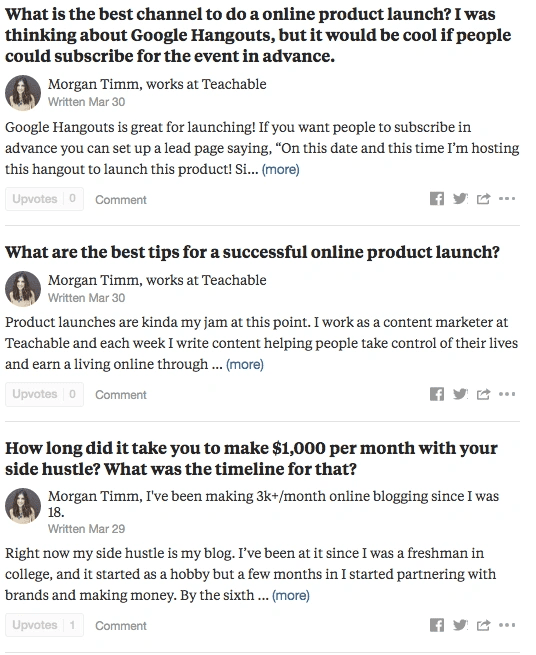
The most important step you can take in becoming a thought leader is showing up consistently and actually providing value. Every time someone sees one of your posts or interactions, understand that it may be their first ever impression of you and you want it to be great from the start.
You’ll eventually find that people are asking the same questions over and over again. In that case, it’s beneficial to have an organized doc where you can keep the answers to common questions and group them together. When you see a question you’ve answered in the past you can easily copy and paste and in 30 seconds you’ve positioned yourself as an expert for the day.
Once you’ve become active in the online communities, you can begin figuring out what you your audience’s pain points are and what online course topic would best serve them.
There are a number of ways you can do this. The simplest is to see what types of questions are being asked and notice consistencies. If you’re seeing that a third of the posts in your group all touch on the same topic, that’s a great place to start. You can also be more forward and ask people to share their pain points in a thread.
Once you’ve got an idea of what you’re struggling with, make a list of potential good online course ideas you can create based on those topics. Try to get nine or 10 to work with on the list.
It’s time to start getting nitty gritty and decide upon the one transformation you want for your students. It might be tempting to say, “I’m going to create the ultimate supreme course to dog training.” However, it’s unlikely that you’ll actually be able to pack every single thing anyone will need to know about dog training into one, easily consumable course.
Instead, narrow it down.
Create a course on how to train an adult rescue dog, how to house train a puppy when you’ve got a full-time job, or how to potty train an older dog with a bell.
All of those topics are more narrow and help solve a specific pain point.
A good online course idea is a shortcut to an outcome. And you’re better off if that outcome is a tangible change. Sure, it’d be great to make your students an expert on all things dog training. However, if you give them a focused course that will help them leash train their rescue dog in five weeks, that single improvement will be more valuable to them than a vague overview.
In other words: Don’t make your audience wade through a bunch of information that isn’t relevant to them.
When we talked to Joseph Michael, he mentioned going “four deep” with your online course idea. This means you should really narrow down your niche and hone in on a very specific pain point.
To stick with our dog training example, going four deep might look a little something like this:
Let’s look at another example. Now let’s pretend you want to teach people how to create a blog. Here’s how we’d go four deep. How to create:
Action step: Create a list of at least 10 course ideas that are narrow and specific within your niche. These course ideas should take your students to a clear outcome and all be topics you’d be excited to teach.
Once you’ve come up with your 10 online course ideas, it’s time to narrow them down. First off, circle the five you’d be the most interested in teaching. Let’s focus on these. From there, you need to go back and reexamine what your audience really needs help with. Take into account how skilled they already are, and how long your ideal audience has already been in the industry.
If you’ve got an email list, segment them into five sections to do somewhat of an A/B test. Send a short email with each course you’re considering as a title. Write a three or four paragraph mini-guide regarding that topic and see which performs better.
Take into consideration clicks and engagement.
If you’re looking for guidance, the five email subject lines you send might look something like this:
Once your emails have been sent out to the segmented lists, wait a few days and collect the data. You’ll probably find that one or two emails got significantly higher open rates than the others and hopefully one of those got better engagement making your job a lot easier.
If they all performed really well or really poorly, your job just got a bit harder. If they performed well you can assume that your audience would be interested in any of them, if they didn’t you may have to go back to the drawing board.
If it ends up being the latter, go back and reanalyze your audience and challenge yourself to figure out why they weren’t interested in the topics you proposed. Once you’re better able to get into their head you can come up with ideas they will be interested in.
This is the hard part. When it comes to choosing and validating a good online course idea, a lot of people begin to suffer from “imposter syndrome.”
The one thing we can’t stress enough to online course instructors is: You don’t have to be an expert to successfully teach an online course. In fact, you’re often better served not to be an expert. After all, experts have often been in their field for decades and may not remember what it was like to be in their target audience’s shoes.
Being able to recall your own experiences and not gloss over the things that may be second nature to the “expert” is powerful, and why often times people who are newer to the field themselves create more helpful online courses.
You know what you’re capable of and the experiences you’ve had, now you need to prove to your audience that you’ll not only be able to help them but that you’re the best person for the job. If you’ve been around the Teachable blog for a while, you can likely anticipate what we’re going to say: Give something valuable away for free to prove your worth.
While we all are hoping to make money with our online businesses, it’s valuable to prove that you’re worth buying from by offering your audience a lead magnet.

This should be an online product you create that is in the same niche as the online product you tend to sell. You can give this away by offering it up in online communities, running Facebook ads, or promoting it in blog posts. Gate the content so that your audience has to give you their email in exchange for your lead magnet and you can start building your marketing list.
{{profitable-component="/blog-shortcodes/blog-popup"}}
With that said, keep in mind that the higher value your lead magnet is, the more your audience is going to trust you. You can easily throw together a checklist in 10 minutes and call it a day, but if you’re creating a detailed mini-course on a topic related to your paid course you’ll see higher conversions.
Coming up with what your free offering should be, though, is another story. You want your audience to be interested in learning more without giving them so much information that they feel that they have nothing left to learn.
First, we’ll continue with our shelter dog training example. Let’s look at some examples of great free lead magnets:
All three of those options are targeted and valuable without taking any value away from your course itself. With that said, we’ve seen people successfully offer the first module of their online course as their lead magnet. As long as you’re transparent and let your audience know that’s what it is, this a great strategy to leave them wanting more from you.
Once your audience signs up to get your free resource, two things happen:
If you’re really wanting to hook your audience, make sure that like your online course, your lead magnet will be taking your audience through a transformation.
Make it valuable but simple—something they’re going to appreciate but is all but fail proof. Being able to bring them a success early on will increase their faith in you and their faith in themselves to be successful in your niche. This combination will have them eager to learn more and they’ll trust that you’re the person who can help them reach their goals.
A few examples of mini courses or lead magnets you can create that will help increase your students’ confidence are a course or guide on:
If you’ve successfully accomplished the last three steps, validating your online course idea should be easy. The idea of validating your course helps you ensure that your hunch that this is a topic your audience would be interested in is spot on. Validating your course idea can be as simple as sending an email to your audience, or a thorough process that involves pre-selling and marketing before actually creating your course.
If you’ve already built an audience and an email list, validating your online course idea could be as simple as sending in an opt-in to your email list. Let them know you’re working on creating an online course and if they’re interested in being in your first round of students to click the link you’ll provide and sign up for a segmented email list where they can get exclusive deals when your course goes live.
Your email list is the one platform that will convert better than anywhere else, so this a good place to measure your audience’s interest. Sending a one-off email likely won’t lead your entire audience to opt in, or even the entirety of your audience who is interested in your course. But it can show you if there is any interest at all.
If you have people opting in, great! That means there is interest. If not, you can send a follow up email to the people who opened the original one and see why they weren’t interested and what they’d rather see.
If you don’t have an audience yet or you’re really trying to be sure that you’re on the right track with your online course you can try promoting a pre-sale. If you’re not familiar, a pre-sale is when you put your course sales page live before you’ve finished creating your course content.
You pre-sell so you can drip out your content and get feedback from a small batch of customers. Being able to collect feedback from a targeted audience who wants you to succeed is powerful because you can use that feedback to increase the value of your course and work out all of the kinks before you make your course available to the public.
Pre-selling has benefits that go beyond just validating your online course idea, too.
If you’re not getting the response you were hoping for, it can mean one of three things. You’re marketing:
More often than not we find that it’s the second. If you’ve already built an audience, it makes more sense to create the products your existing audience wants rather than developing the course you hope an audience might want. If you didn’t get a positive response reach out and ask why. Consider using this email template:

You can use the responses that come from that email to decide what direction you want to take your online course. You can absolutely continue with the topic you originally planned on and start from scratch with audience building, but you’d be better off to adjust your offer and sell a product your current audience is interested in.
If you’re really certain that you’ve found the right course topic and the right audience but you still haven’t been able to validate your course idea, ask yourself why. You may find your audience isn’t primed to courses. Perhaps they’re unfamiliar with online courses as a whole. Or you’re focused in a niche where online courses haven’t been a “thing” in the past.
In this case, it’s up to you to educate them on what you’re teaching and why an online course can help them reach their goals. During the education phase, your goal is to make your audience want your product before they even know that you have a product. Make them want to know more about your course topic through engaging and valuable blog posts, email marketing techniques, and social media posts.
You can consider creating an entire email marketing strategy that starts off talking about why online courses are so effective in your area. Allow your audience to email you questions about online courses and be prompt and thorough in answering them.

The following is a guest post from Teachable creator, Darnell Brown. Darnell is an award-winning certified brand strategist and educator. He helps today’s leaders and experts save time and impact lives through brand clarity, empathy, and strategy. His clients include BAND-AID, Passport Parking, & /dev/color. In honor of Teachable’s Creator Month, in which we celebrate and share the expertise of creators everywhere, Darnell shares his tips for how to start your own business online.
Before we get started, let’s get stopped. It’s time to stop obsessing over your legal business name. And your logo design. And where to host your website. Or whether you still need business cards in the 21st century. Until you’ve done the things in this article, none of that stuff is relevant right now.
To be clear, I do not deny the power that dope brand visuals can have on an audience—my background is in design, after all. I’m just saying, now is not the time to worry about those items. Not yet, anyway. So strap on your seatbelts, and let’s start your own business online with $0 down.
You want to go from start to success with as little resistance as possible, right? OK, well, I’m about to place a wormhole in your observable universe like our future selves did in Interstellar to help get you there. Let’s shave a few lightyears off your travels, shall we? First, we need to find an idea worth investing in. Next, we’re gonna discover the right people to target. Lastly, we’ll clarify what it is you have to offer them.
The number one question you need a crystal clear answer to is: “What problem(s) do I solve?” Everything begins here. It’s the crux of your business, and it’s the thing that gives you purpose. This question has no equal. If success is the omega, the problem you solve is the alpha.
To answer the question above, you’ve got to pick a problem worth building a business around.
Great news: You won’t have to look far nor hard for complaints. They’re everywhere. Offline and online. And they outnumber solutions. We’re all vocal about the things we despise in life. You just need to intentionally listen out for the problems that keep coming up.
Once you’ve heard the word a good bit, just hone in on one or two problems that really speak to you. Complaints you agree with that also fire you up. Reach in your metaphorical toolkit for anything from your current skill set that qualifies you to present a solution.

Not just your evident, accredited skills, either. Think about your innate gifts, the way you’d contribute to society if you didn’t have to worry about money, the topics people frequently discuss with you, and who people know you as around your ‘hood. It’s good business to find the gold within the mundane or overlooked elements of everyday life.
For instance, you might be a burned-out dental hygienist that does some woodworking on the side—who’s also someone people look to for professional recommendations. While listening to problems, you notice that other people besides you hate taking their vehicle in for service. You start to wonder why a valet service for car care doesn’t exist yet. Perhaps technicians could come to your home and do tune-ups on-site, or they could take it to the dealership for you.
Before shooting this idea down, since you aren’t an app developer, you realize that your time as a dentist literally put you in front of everyone you need to help you get this thing off the ground. Designers. Coders. Investors. It becomes clear that you could assemble a team full of folks you’ve already met as a dentist to build a car care platform for you.
In this example, one of your most undervalued assets is your network. Your secret superpower is you’re an excellent connector. Leaning into your non-obvious gifts could afford you the luxury of doing more of what you love, even if you never want to turn your hobby into a business. Peep my Pick a Problem Worksheet I’ve put together to help you find your superpower (and problem). It’s yours to download for free.
Set up free accounts on a few of those platforms, hop in the forums that align with your interests, and just read the rooms. Your only job in this phase is to absorb what’s being said.
After choosing the problem you’re going to build a business around, your next power move is to specify who has that problem. That “who” has many names: ideal avatar, customers, target audience, buyers, etc. They’re all the same thing in this context. To define your consumer, you must:
The dope part is that you’ll likely already have some consumer insights from Step 1 because you can see some info on who said what when they voiced their opinion. Now it’s about designing a baseline personal profile for the type of person who severely has that issue and would therefore be most grateful and loyal to the entity that fixes it for them the best.
Knowing their demographics alone won’t cut it. You need psychographics as well: what your consumer’s relationships are like, whether they have kids, what their hobbies are, their goals, motivations, etc. Basically, you should know them like you know your closest friends. Condense them into a singular avatar. Then give them a name to personalize them even further. And whether this ideal consumer is a complete creation is irrelevant. The point is to develop a North Star that you have an affinity for.
Listen deeply to what your audience is saying. Often, those we hope to serve describe their problems differently than we do, so we explain our offers in a way that doesn’t stick. Your audience won’t create your business for you, nor flat-out tell you precisely what they need. It’s on you to be a strong interpreter of words, mannerisms, facial expressions, and bodily gestures. Basically, you’re gonna have to get your Batman on and become the world’s greatest detective if you want to build an innovative, lean business without a down payment.
Once you know your consumer and can speak their language, it’s time to begin validating your offer. Tell your audience that you’re working on something that will solve their problem and ask if it’s ok for you to reach out once it’s ready, so they can test it for themselves. They’ll be thrilled to know that their prayers are being answered, and you’ll be ahead of the game with a database of potential customers. This will give you momentum and accountability, great motivators to keep you going.
Carrying on the scenario from above, maybe your defined consumer would be work-from-home moms in their 30’s, with toddlers, traveling spouses, and packed schedules.
They might describe their problem as: “I don’t have the time to get my oil changed, and tires rotated. My babysitter bailed, and there’s no way my kids will behave for two hrs at the dealership.” As we can see, that’s not a very constructive or enlightening statement at first glance. But when you dig deeper, there’s hidden value. Her real issue is that car maintenance is a huge inconvenience.
Pre-selling your offer might sound like, “I’m working on an app that will allow you to schedule on-demand car maintenance from your smartphone. Is it OK if I message you once it’s ready so that we can see if it improves your situation?” She’ll be like, “Ummm, yeah!” And you’ll feel all warm and fuzzy inside by having your idea immediately validated.
Test several ways to chat with your consumer and use the few that yield the most engagement. It’s critical in this stage that you meet them where they already hang out vs. the platforms you prefer to use. You’ll encounter less resistance when you make things easy and swift for your audience to give you the insights you need to model your offer.
Your business must be hyper-passionate about taking your consumer from where they are to where they want to be. No need to feel overwhelmed. Learn the ways of the force with this free Define Your Consumer Worksheet I put together for you.
Once you’ve chosen the problem that will fuel your brand and defined the group of folks your product/service will serve, it’s time to ready your brand pitch. This is also commonly referred to as a “tagline,” “elevator pitch,” or “unique value proposition.”
The goal is to articulate your business’s value in a way that is both succinct and descriptive. We want folks to get the gist of what you’re all about in the least amount of time.

To arrive at yours, we’ve got to:
It’s here that everything coalesces into a proper statement that sums up what you bring to the table. The problem, the audience, and the offer get rolled into one.
The homework we did in Step 2 comes into play in that we use how your consumer has defined the problem, which is often in the form of a complaint, to summarize what they’re really going through. Your “how” becomes a way to appease that problem, which is why it’s essential to include it within your offer.
Put them all together, and we arrive at your offer.
Steer clear of talking about the features of your offer: its bells and whistles, the tangible attributes, the nutritional facts, etc. Focus instead on the benefits your consumer will experience in using your offer: how they’ll be transformed, the tangible results, what’s in it for them, etc. Don’t try to sell a product. Sell the lifestyle or a future feeling your audience craves.
Divorce yourself from falling into the trap that anyone is ever going to care about your idea/product/service as much as you do. Of course, your offer should deliver on its promise, but that’s the lowest hanging fruit. You must also persuade folks to take action, and one of the brilliant ways to do that is by appealing to what they value. Generally, people are looking for convenience and/or relief. Explore where your product fits on that scale.
Going back to that example, maybe you interpret their problem as, “Car maintenance sucks. The upsells, the wait times, etc. Especially for women, who techs assume are naive about what’s under their hood.”
Your solution to that might sound like, “For one low price, we’ll pick up your car from wherever you are, get it serviced, bathed, vacuumed, and delivered back to you the same day.” (The hands-off maintenance is already a fantastic solution, but by cleaning it as well, you’re sweetening the deal.) We tee everything up with the niche you’re serving for a clarified offer like, “We bring valeted car care to busy moms, giving them one less thing to worry about.” Succinct. Descriptive. Compelling.
In creating new things, we can tend to over-explain what we do or sell. We get curious looks because they don’t quite get it. Usually, the issue lies with us entrepreneurs: we simply aren’t talking in the language of our audience. The cure is to appropriate their language within our offer to explain our solution in a benefit-driven way they can grasp.
Subconsciously, when done right, this gets your consumer to think, “Oh wow, they know my problem because they’ve explained it the way I do, and they’ve got something that fixes it, so this product must be right for me!” Meet them where they are, both physically and in terms of talking about things the way they already do. This lowers that trust barrier so that people have a reason to give you a shot.
Get your free copy of my Clarify Your Offer Worksheet to guide you through the questions you need to answer to arrive at yours.
{{firstdigital-component="/blog-shortcodes/blog-popup"}}
Regardless of your industry, profession, or idea, to start your own for-profit business online with $0 down, you would do well to follow these three steps before you do anything else.
After you’ve followed the steps above, then you can brainstorm names, hire designers and developers, and obsess over your brand colors. Until that point, concern yourself with knowing the problem(s) you solve and who you’re solving it for, which will cost you largely nothing but your time.
Successful entrepreneurs and businesses are the ones who know and serve their customers better than everyone else. They’re really just some of the world’s best problem-solvers. Now that you have a wormhole to a similar destination, what’s to stop you from joining the ranks? Godspeed and safe travels, friend.

You know your flagship course launch is a big deal. But, creating a full-fledged course doesn’t have to be overwhelming. In fact over our years of experience, we’ve learned that a profitable and successful course launch doesn’t have to be difficult or complicated. We’ve even narrowed down the essentials of online course creation to just seven steps. From ideation to validation to content creation, you’re just seven steps away from becoming a course creator.
Ahead, find our “7 Steps to Launch a Profitable Online Course worksheet”.
{{profitable-component="/blog-shortcodes/blog-popup"}}

Creating your online course curriculum can be hard, especially if you’re new to course creation. We created a guide for you to help you navigate that course creation.
Get ready to dive deep and try answering some difficult questions about your course to develop the curriculum. You’ll need to explore each step and do some work to help source research too. All of this work starts with identifying your target audience and figuring out which group of people will likely make up your students. You’ll want to cater your course to them, and be sure to provide them with the information and transformation they’re looking for in a course.
You can download and use the worksheet below to help determine the direction of your course curriculum. It should also help you determine the breakdown of the various lessons you can create to make up your courses and school.
Simply enter your email and the worksheet will appear in a new window for you to start filling out when you’re ready to take charge of your course.
Download the full guide below for all six steps to course curriculum success.
{{coursecurriculum-component="/blog-shortcodes/blog-popup"}}

When you tell friends and family you build online courses, you may hear some ask, “How is that different from reading a book online?” or even, “Why would someone buy an online course, when they can just watch YouTube videos and learn for free?” It’s easy to follow the logic of questions like this. But as a course creator, you know more than anyone the value of an online course. You know a course’s value lies not exclusively in the content but in the format: the way you guide learners to an outcome through a combination of information, practice, and interaction with other people. Cohort-based courses, or “CBCs” for short, take this idea one step further. And creating a community to support a cohort-based course takes it one step beyond.
Cohort-based courses, or “CBCs” for short, take this idea one step further. In CBCs, creators guide a group, or cohort, through a course together at the same time. They also have a couple of key differences to standard self-paced courses. Firstly, they often run with smaller or limited-sized groups (This very author runs a CBC for community-builders that’s capped at 15 students per cohort).
Secondly, they often sit at a higher price point than evergreen courses. In fact, it’s not uncommon for a CBC to run in the thousands, whereas self-paced courses are typically in the hundreds. Lastly, CBCs derive much of their value from shared experiences with other students. This makes them a perfect fit for pairing alongside an online community. In this article, we’re going to explore some best practices for creating an online community to support cohort-based courses.
As with any community instance, starting with a strong sense of purpose can help you stay focussed on delivering real results for both your business and your students. And, there are a couple of common reasons to build a community to support cohort-based courses.
Course completion rates vary significantly. Some industry reports suggest average completion rates can be as low as 5%. Therefore, adding accountability to your students’ experiences can help them stay on track and help you deliver brag-worthy outcomes that become social proof in the future. For context, the CBC this author runs for community builders has graduation rates well over 90%.
By nature, CBCs are time-bound. And when they end, you run the risk of losing touch with your students. A community can have the double benefit of serving students after the course ends and maintaining an active channel of contact to let them know when you have a new offer.
Oftentimes, the biggest selling-point of a CBC is not access to the course content alone, but to the other qualified individuals going through the course. Offering a community to support your cohort-based course gives that value space to flourish. It also allows you to talk about it in a concrete way.
Lastly, it’s important to remember that getting a group of people through an experience at the same time requires some logistics. By establishing your community as your primary channel of contact with students, you can help everyone stay on the same page. You’ll also avoid confusion coordinating things like homework, feedback, or meeting links.
The strongest community strategies align business outcomes with community member outcomes. So, it’s important not to simply assume which things will be most valuable to your community members. We recommend doing some lightweight user interviews with prospective students prior to locking in your community’s purpose. For example, you may assume that networking is most valuable. But in reality, students may find it more valuable to stay on top of logistical info like due dates and meeting links. It’s always beneficial to ask.
Even if you have a crystal clear sense of purpose, you may still need to give some thought to how your CBC community fits into the rest of your business or existing community. This usually means considering how cohort members will interact with other members of their own cohort and with other students outside of their cohort.
A common set up is to create a private space just for a specific active cohort. (You may expect this space to be more focussed on logistics than other areas of the community.) Later, you can still give them access to a broader community of students, either of past cohort alumni or students of self-paced courses you also offer.
However you decide to architect your community, make sure to consider how cohort members can continue to get value from your larger student network once their cohort ends. You will also want to consider how your community impacts your pricing model.
It’s not uncommon for CBC builders to charge a subscription fee to access a community once a course ends or to simply consider a community a large part of the value proposition that influences price to begin with. You may also find the community adds so much value to students across your CBC and self-paced programming that it’s “worth it” to offer it for free because of the impact it has on course sales.
Regardless of how you price your course, your community will be a big part of the value proposition you communicate to your prospective students. Because of that, it’s important to make sure your community actually delivers additional value beyond the course curriculum. Many beginner community-builders will make the mistake of expecting their community to be an “if you build it, they will come” experience. But, by planning just a small amount of thoughtful added programming, you’ll already create one of the best community experiences your students have seen.
Whatever programming you include, it should serve your purpose. Most likely, it should enhance learning and make it easier for students to complete your course. Here are a few programming ideas that work well with CBC communities:
Your CBC community is also a great place to test new content and respond to student requests for supplementary materials.
An important element of community building in any context is to maintain a testing mindset. It’s important to always continue testing new ideas and programs and measuring their impact. There are a few major ways we recommend doing this:
If you’ve ever tried to launch a community before, you may know that garnering early engagement is often one of the biggest challenges of new communities. However, CBCs in particular have a few built-in components that give you a special advantage in this. Being aware of these and leaning into them can help you optimize the experience for yourself and for your members.
The big advantage a CBC gives to a new community is that it’s time-bound and happens alongside high-quality programming. Because of this, it’s easy to build “circles” into your course that promote engagement in your community. For example, try ending each lesson with a prompt to continue discussion within the community.
Similarly, you can position your community as a necessary logistical component of your course, rather than an optional supplement. Try having students “submit” homework for peer feedback within your community, rather than via an email or file request to ensure they’re regularly using the community. More often than not, once they already have it open, they’ll also use it to interact with peers.
Designs like these can help you use the time-bound nature of your CBC to build long-lasting habits of community usage. It can also build community “super users” that add value to your entire business, even between cohorts.

There are countless reasons why people sign up to take an online course. However, online course completion rates can be very low. It takes a lot of drive to complete a course without any accountability or incentive. This is why students are more likely to achieve their goals if there is an enticing incentive waiting for them.
The human attention span has drastically decreased over the past decade to about eight seconds—less than a goldfish. As easily distracted as we are, the typical online course takes 15 weeks to complete. So how can you motivate your audience to complete your online courses?
There are many theories about what motivates people, but it can boiled down into two main categories. First, intrinsic motivation is when people find motivation from within. Meanwhile, extrinsic motivation is when motivation comes from something outside of them. For example, intrinsically motivated people might be motivated by challenge or enjoyment of learning a new subject. In contrast, extrinsically motivated people might be more apt to complete a project if there was free pizza involved.
Organic learning in a face-to-face environment is much more simple than remote learning. This is why online learning requires a different approach to help your students achieve their goals. Coming up with new ideas to keep your audience focused on completing your course can be challenging. So to get you started, here are three tips that can help triple your course completion rates.
Learners stop caring about completing courses when they lose interest and get bored—even if there are incentives they want to achieve.
In addition to creating high-quality video content, the best way to keep students engaged is to break courses down into bite sized pieces. Each lesson should be no longer than fifteen minutes so that your audience can process the information that you share with them without becoming overwhelmed or disinterested.
Online courses often provide students with the ability to learn at their own pace. But without someone to answer questions or give feedback, many don’t see the point in submitting assignments or completing projects. Pay attention to your students and take notice when they start falling behind. This can be through one-on-one feedback, an online community, social media, or emails.
Some online teachers and coaches are able to hire assistants to respond to emails. But even if you don’t have that kind of budget, it’s still possible to give personalized attention to your students using automated email triggers. This software can send out an email automatically when a student hasn’t been active for a week or two, failed a quiz, or reached a positive milestone.
Offering awards, bonuses, and other incentives to those who complete courses can also help boost completion rates.
For example, Acumen teamed up with Unilever to create an online course in order to educate people about plastic waste in impoverished areas. At the end of the course, students were able to contribute their own ideas on how to address these issues and the best submissions were awarded $75,000 in seed funding. With this added incentive, the usual 8% completion rate for this course was tripled to 24%.
The reward doesn’t have to be monetary in order to be effective. A bonus product or PDF guide, recognition on social media, or something else that your audience finds valuable (access to an alumni community, perhaps) would make an excellent incentive for them to finish your course.
Online learners take courses with the intention of achieving their goals. The fact they signed up for the course in the first place shows how they are interested in learning more about a subject. They just might lack the motivation to follow through. To help them reach their goals remotely, use a combination of engaging content, incentives, and support to help motivate your audience to stick with it until the very end.