Thank you! Your submission has been received!
Oops! Something went wrong while submitting the form.
MENU
Practical resources for independent creators and organizations growing revenue, audience, and reach.

Manu Muraro is a Teachable creator and the founder of Your Social Team, an Instagram training membership and content shop to help social media managers and Instagram savvy women entrepreneurs to beat the algorithm and grow their organic engagement (yes, even in 2021). This year she also launched Your Template Club, a Canva Template subscription. In honor of Teachable’s Creator Month, in which we celebrate and share the expertise of creators everywhere, Manu is sharing her best secrets for Black Friday online course promotion.
Many course creators skip Black Friday promotions for numerous reasons. They don’t know if it’s worth it, they don’t want to heavily discount their courses and possibly upset current students, or they don’t want to work during the Thanksgiving break. Many feel lost on how to promote an online course.
But, there are ways we can manage all those hurdles and take advantage of the biggest sales event of the year.
Here are our tips on how to promote an online course on Black Friday and add more revenue to your last quarter.
We’re talking Black Friday here—10% off won’t do. But, you also don’t need to sell your course for half its value, especially if you have been selling for a much higher price to many others. So, how do you harness the energy of Black Friday when thinking: How do I promote my online course?

If there’s one thing I learned it’s that when you’re salesy, you sell! Marketing researches have been telling us for decades that it takes several “touches” with your brand to generate a lead, and even more to generate a sale. This comes even before social media existed.
We also know very well that our social media posts only reach a fraction of our audiences and our emails are only opened and clicked by a small percentage of our list. That’s why we need to really pick the dates for our Black Friday campaign and focus solely on these promotions.
Make sure you add soft opt outs in all your emails, starting with email number two. This will allow your audience to opt out of this email sequence if they’re not interested—and will avoid many unsubscribes.
Now, if you think so much content about this in a row will bore your audience, this is where our tip number three comes in handy.
When we think of traditional ad campaigns, we think of having a consistent look with a few different versions in different formats. But when it comes to promoting our course in our own platforms, especially on social media, we need variety.
We do not want to do the same post, with the same look, over and over because your audience will get bored.
But, when you promote your course using the best performing types of content for your account to create value-driven posts, Reels, emails, or Lives, even those who will not buy from you right now will enjoy and engage with your content. And, possibly they’ll buy at a later date too, since you’d be starting their consumer journey with you!
This is important especially on social media, since unlike email, there’s no good way of segmenting, unless you implement our tip number four.
Prior to Black Friday, create a Close Friends list on Instagram to segment your followers.
You have to go to your Settings > Close Friends and will be able to add or remove people as you wish. When you add or remove someone, they will not be notified. But, when you start creating exclusive content for your close friends, they will see a Close Friends sticker and know they’re on your list.
I don’t recommend this if a large percentage of your audience is the perfect target audience for your course, or if you have a smaller audience on Instagram (under 1,000 followers). However, if you do have a large following on Instagram and your course is only relevant to a group of them, you can segment your audience by creating a close friends group, where you share a lot of value about this specific content.
You will have to start doing this weeks ahead, because you will need to give your audience a chance to see your messages and request to be added to the Close Friends group.
Sometimes when we’re sending out lots of sales emails and posting many promotional pieces of content in a row on social media, our imposter syndrome tends to creep in.
If you’re hearing those little voices in your head that say “your audience will be tired of you” or “you’re too salesy”—shush it!
Drink a strong cup of coffee, play your power song louder than those annoying thoughts, or reread this blog post (yes, make sure you bookmark it for next time you need it). You will not be able to make enough sales with a couple of emails and a few posts in the course of a week. So stay the course! I hope this helps you understand how to promote an online course for Black Friday.

Pricing for coaching services is one of the most challenging conversations that you can have with clients and members of our community. It’s hard to have an actual frame point that you can use to understand an “average rate” without guidelines. The truth is, pricing will be unique to the individual. However, we wanted to give you two different methods to understand how to price your coaching services better.
Depending on what you offer, you can combine these two methods. You can think of pricing based on
Remember, your pricing will also need to reflect your overall financial goals. And this is where your methods will need to match your individual needs.
First of all, we’ll talk about experience. Experience can be the basis of your pricing on any given day. We know many people who price based on the number of hours:
As a marketer without a degree in marketing, I relate to this. It took me a while to reframe my beliefs around my worth. I now have ten years of experience, working with startups and big companies alike, teaching marketing and business for schools, colleges, and professional courses. That’s a lot of time dedicated to my craft—a lot of hours spent doing courses, watching seminars, running campaigns.
Looking at experience this way allows you to look at the number of years you’ve spent on the work and the amount of time you’ve dedicated to the craft. This will help you start adjusting how to price your coaching services.
Far too often, creators get stunted because they think about how many months or even weeks they’ve spent running a coaching business. If you are new to coaching, you may feel like you can’t charge what you’re worth because you objectively have little experience actually coaching. However, you might have spent four years learning, studying, practicing, and researching your area of expertise. So, don’t ignore the experience that you have around the actual topic itself.
Your base price will reflect the hours or years of experience you have in your field. Period. When you’re starting, looking at the hours can be helpful to put things in perspective. But, after ten years, you may struggle to quantify the individual hours after all.
To set a base price, you will have to pick a number. The best way to do this is to think about how much would you charge for one hour of your time. If even that comes as a struggle, look at how much people in a similar field would be paid per hour from a company (go to a job board and calculate that based on the per annum salary).
Next up is the second pricing method—the amount of time you’ll spend coaching. Begin by adding in the time “around” your coaching hour to your actual price. Look at the time you might be spending writing a recap, doing a check-in weekly, writing a worksheet, or looking for resources to recommend. More often than not, this will quickly amount to a considerate amount of time (over two or three extra hours of work for most clients).
Ultimately, make sure that you’re counting the time you’re spending creating the material and running the show, as well as the time spent coaching. Far too often, creators will think about a price as just the hour spent talking to a client. However, there’s so much more that goes into it.
Take your price base price for the one hour of coaching, and then start adding the rest of the time that you’re spending preparing for that client each month to run their package.
If a package offers three coaching sessions, all at $100 each, you would be looking at a price of $300. Count in the extra three hours you’re going to be spending every month creating the materials for their the next session—this makes the total coaching package $600. You can even add a course in the mix and adapt your prices with bundles. We recommend looking at coaching as a package as much as possible so you can turn it into a digital-product style experience if possible. Instead of creating single sessions, you can optimize your time and the time you want to spend with individual clients.
What’s more, consider combining the first two pricing methods—experience and time—to come up with an even more accurate representation of your coaching services’ value.
{{coursecurriculum-component="/blog-shortcodes/blog-popup"}}
Last but not least, add in the cost of running your own business. This is what a lot of people tend to forget. Whether you’re hosting your coaching packages and digital products on Teachable, using social media to schedule your updates, an email marketing tool, all of these things will start costing money. So, we want to make sure that you can look at your overall business expenses and add them as part of your package price.
For example, if you’re investing $500 a month on programs and tools to run your coaching practice, try to split the amount up among the clients. So, if you want to work with ten clients, you split the $500 by 10, which means you can add an extra $50 to each coaching package.
As an alternative, you can simply go with your gut instinct. Pick a price tag number and see if it sticks. Personally, having a bit more structure and working with numbers more efficiently makes me more confident about my pricing. This way, I can offer the right level of support without feeling resentful for spending more time making the experience even more special.
At the end of the day, if you follow these tips, you’ll understand how to price your coaching practice better and make the most of every single client experience.

Maximizing your marketing is key to growing your brand, building up a loyal audience, and succeeding with your small business, whatever that may be. But if you’re struggling to connect your brand with your target customers, you should consider leaning into experiential marketing.
Experiential marketing is a unique marketing strategy that can result in better brand awareness, improved marketing connections, and much more. Let’s take a closer look.
In a nutshell, experiential marketing – also sometimes called ground marketing, engagement marketing, or XM – is a marketing approach that focuses on providing prospective customers with hands-on experiences. It’s in the name: experiential marketing is all about real-world experiences. Think of a major marketing event that a brand launches to announce a rebranding or major new product. That’s an experiential marketing tactic.
Providing customers with hands-on experiences before buying a product is hardly anything new. An example is when auto dealers offer customers the opportunity to test drive new vehicles. This is one of the advantages of buying or trading in a car from a dealer because you can test drive as many of the models as they have in stock as you want to see what you like before making a major purchase. Or think of any instance where you were offered a free trial of a product or a service. This would also be a form of experiential marketing. You get to experience it before completely buying it.
But a major differentiating factor of experiential marketing is where it puts its focus compared to other types of marketing. With XM, the emphasis is often on connecting customers to brands or raising brand awareness rather than directly selling specific products or services.
Experiential marketing can be highly effective for a variety of reasons. By its very nature, XM elements and campaigns stick in the minds of consumers much more than traditional marketing materials. After all, target customers experience something which forges a stronger, more potent memory when they consider purchasing something from the brand.
In addition, experiential marketing’s possibilities have expanded in recent years. No longer does experiential marketing have to take place in the real world, like in a shopping center or retail storefront. Virtual communication technology, like live streaming and video conferencing software, enables experiential marketing campaigns to take place online or in virtual reality environments.

When leveraged properly, experiential marketing can be highly beneficial for brands just like yours, whether you are trying to launch successful online courses, digital products, or something else entirely. Some of the main benefits of experiential marketing include:

Still not sure what experiential marketing means or how it plays out in the real world? Let’s take a look at some examples of this offline marketing strategy.
The diet food brand Lean Cuisine launched an experiential marketing campaign called #WeighThis. The company set up a series of scales throughout New York City’s Grand Central Station. The campaign invited women who observed the scales to weigh themselves. At first glance, this seems potentially offensive.
But here’s the brilliance of this experiential marketing campaign. The scales actually included small boards where women – the prospective customers of the Lean Cuisine brand – could write what accomplishments they wanted to be weighed. The campaign allowed women to measure their weight using whatever metrics they wanted, such as moral weight, job goals, etc.
In this experiential marketing campaign, none of the customers ever interacted with Lean Cuisine directly. But it still caused Lean Cuisine’s target audience to think about the brand and how its food could help them achieve their weight loss goals.
Another real-world example comes from Lululemon. This athletic clothing brand asked its employees and brand ambassadors to reflect on various LGBTQ+ topics. Then shared those responses using images and videos on the Lululemon Instagram page over the next month.
The next step involved creating an art installation near the Hudson River Park. This art installation reflected the responses collected, which allowed passersby to read and reflect on those experiences. Lululemon didn’t focus so much on selling its products as it did on connecting with its primary audience members.
Both of these examples highlight the key faucet of experiential marketing: it’s about connecting people to a brand, not necessarily selling products.

Want to get technical? Let’s break down some specific experiential marketing ideas you can use to market online courses successfully.
Event marketing is a core type of experiential marketing. You can practice this strategy by holding a seminar or talk, highlighting some of the elements included in your course. Think of this as a type of “trial” course where attendees can learn what your course is about and get a sense of who you are as a teacher.
Guerrilla marketing is also highly effective. By its very nature, guerrilla marketing is surprising and unexpected. To that end, consider launching a contest or giveaway through your brand marketing channels, like your social media pages. The prize? A free course or class for the lucky winner.
Guerrilla marketing is exceptionally effective when combined with social media. That marketing channel is perfect for drumming up anticipation for a sudden marketing event, like a contest.
You can also hold “pop-up” courses in traditional classroom settings. These can be unexpected and experiential but include the same information as your online courses. They’re very helpful, particularly if you teach courses on technical topics like XDR security or cybersecurity awareness.
Think of in-person classes as offering prospective online students the opportunity to experience your courses in the real world. Impressive enough, and they’ll be more willing to check out your online courses in the future.

This kind of experiential marketing could be a great way to bolster your brand and maximize your marketing potential. Consider leveraging these tips when practicing experiential marketing for a course or online seminar, and you’ll see great results in no time.
One of the most popular types of marketing, experiential marketing is a type of marketing that offers potential customers hands-on experiences in order to generate awareness about a product or service. These experiences can be in-person, but they can also be offline, such as via virtual communication technologies.
Experiential marketing can be effective because it naturally helps to boost brand awareness. The more the experiences are marketed to the general public, the more people will naturally start to learn about your brand. It also helps to boost customer engagement, so long as your marketing materials are interesting and engaging.

Making money doing what you love with content monetization is a dream of many people. With social media and the internet allowing people to share their interests and create content without professional equipment, directly from their couch, it’s also never been easier.
If you have been looking for a way to start making money with your content, you’ve come to the right place. In this blog post, we’ll cover all the different ways you can monetize your content and the best platforms to do so.
Content monetization is a process of making money by selling content that you create. The content could be anything from blog posts to Instagram Stories. It is one of the most effective ways to make money online, and the best part is that anyone can do it.
You can create content from anywhere in the world, and reach people around the globe with ease. It’s also a lucrative way to make money because of how much content creators make. Some of the most successful content creators make seven to six figures per year like Emma Chamberlain and Charlie D’Amelio.
While making six to seven figures per year is not for everyone, many content creators can easily make up to six figures per year by monetizing their content on various platforms.

There are many different forms of content you can monetize:
Short-form videos are the content you see on social media platforms like Instagram and TikTok. It’s usually a fast-paced up to 3-minute video and takes very little gear and preparation to film.
Of course, some content creators like to go all out when creating content, so some do invest a lot of time and money when producing short-form content.
Long-form video is content you see mostly on YouTube. Videos range from anywhere between 5 and up to 90 minutes (sometimes even more) and they are monetized through the YouTube Partner Program.
You can also monetize content you see on social media platforms like pictures, infographics, carousels, Instagram Stories, and even Facebook posts.
Another type of content that’s great for monetization is written content. This could be anything from blog posts to newsletters, it could be long-form or short-form, and it requires close to zero investment to create.
Lastly, in recent years audio content has been growing in popularity. Audio includes podcast episodes, and they can be hosted on Spotify, Apple Podcasts, or YouTube.

Now that we covered the basics of what type of content you can monetize, let’s dive into the “how” so you could find the best content monetization strategy for you:
One of the most profitable ways to make money with your content is to create and sell online courses. Online courses are premium products that work for many different niches – you can teach people how to paint with watercolors, how to climb, how to bake, and how to start a business. No matter your niche, you’ll find people interested in what you’re selling.
Online courses are also high-ticket products, which means that you can charge a premium price for them. This means that you need fewer sales to hit your profit goals.
Another way to monetize your content is by selling digital products. There are many different digital products you can successfully sell online:
The cost of creating digital products is usually super low, which means that the majority of the profits you get to keep. Also, they can be a great source of passive income once you set up an effective sales and marketing funnel.
Affiliate marketing is an extremely profitable way to monetize your content. And you can do it on most platforms, and with all different content types. Also, most niches can find products to promote with affiliate marketing.
With every piece of content you create for a platform of your choosing, whether a TikTok video or a blog post, where you recommend a product, you should be including an affiliate link to that product. This will allow you to earn a commission whenever someone clicks on your link and buys the product.
Successful content creators like Ryan Robinson and Michelle Schroeder-Gardner make tens of thousands of dollars per month with affiliate links. Here are a few affiliate programs you might want to consider joining:
One of the most profitable ways to monetize your content is with brand sponsorships. Influencer marketing is one of the most effective and popular marketing strategies that many brands implement in their businesses. And as a content creator, you get to choose which brands to work with and how much to charge for your content.
Brands in all niches and industries are always on the lookout for brand ambassadors and influencers to work with, so no matter in what niche you create content, you can make money with sponsorships.
PPC (pay-per-click) ads are another way you can monetize your content. The way it works is simple – you join an ad network and run ads either on your YouTube channel or a website. When someone clicks on the ad you display, you make money.
If you want to start monetizing your content this way, here are the best networks to join:

A membership website can also be a fantastic way to monetize your content by putting it behind a paywall. BossBabe is a great example of this content monetization strategy. They have a huge library of written, audio, and video content available for all members who pay a monthly fee.
Paid newsletters might be less popular, but they can also be a great way to monetize your content. Most paid newsletters give a certain number of newsletters per month for free and then the rest is under paywall. While certain industries and niches will do better than others, it’s possible to find people willing to pay for a newsletter in many niches.
Paid newsletters can be written content, but it doesn’t have to be limited to that. You can easily include podcast episodes, and even video content where appropriate, depending on what your audience likes and wants to see.
A similar way to monetize your content to a membership website is through subscriptions. The way it is different from a membership website is that most often, content creators offer subscriptions to their YouTube channel or a Patreon to receive extra content or behind-the-scenes content.
Many content creators monetize their content by doing freelance work. It can be anything from writing blog posts, editing videos, building websites, creating illustrations, and producing podcasts. Choose a skill you have or want to learn, and create a portfolio from the content you create.
Make-up artist and content creator Claire Marshall is a great example. She started out as a YouTuber and Instagram influencer sharing beauty and fashion tips, and currently, she is working with brands like Tatcha on creating visual content for their brand as a creative freelancer.
The larger audience you have, the more and better opportunities you will have. But even if you are just starting out, you can still find brands (or other content creators) to work with.
Lastly, one of the easiest ways to monetize your content even if you are just starting out and don’t have a huge following is by creating user-generated content (UGC) for brands. UGC has been around for a long time, but UGC creators are a new concept. One thing that differentiates UGC from brand sponsorships is that UGC is all about the brand and the product, and not the creator.
Brands are looking for content creators to create UGC content to promote their brands. Most often, this content is used as an advertisement on social media, because it can be very effective.
Most often, UGC is video, but sometimes it can also be a static social media post, so you should have a good knowledge of how to create effective and good quality social media posts.
When you choose to monetize your content, it’s important to pick the right platform (or platforms) to do that. Which one is the best for you will depend on what type of content you like to create, and which monetization way you prefer. Let’s quickly go over which content monetization platforms:
The best type of content:
Ways to monetize the content:
YouTube is an extremely popular platform amongst content creators who want to monetize their content and build a brand. Many creators earn money from ad revenue, branded content, affiliate marketing and even promoting their own products or services.
The best type of content:
Ways to monetize the content:
TikTok is a very popular social media platform that allows content creators to share content, grow their audience, and monetize their content directly through the platform. They have a few different monetization options in-app, that allow creators to earn money, collect gifts, and even find brand collaborations.
The best type of content:
Ways to monetize the content:
Medium is an online platform that allows people to share their written word and make money with it. It’s a subscription-based platform, and people have to be members to read content that’s published on Medium. Writers who write on Medium get paid depending on how popular their posts are.
The best type of content:
Ways to monetize the content:
Substack is a newsletter platform that has gained popularity in recent years as a popular side hustle for journalists looking to monetize their content outside mainstream magazines. Since then, many creators have turned their paid newsletters into full-time gigs, all thanks to Substack’s convenient and easy-to-use platform.

The best type of content:
Ways to monetize the content:
Teachable is an online course platform that also offers additional features like selling digital products. It’s an ideal platform for content creators who are looking to monetize premium content and want to build multiple streams of income.
The best type of content:
Ways to monetize the content:
WordPress is one of the most versatile platforms to use if you want to monetize your content. You can write blog posts and include affiliate links, insert ads, and make money through Google AdSense. Also, you can create your own ecommerce store to sell online courses and so much more.
One caveat is that this platform requires a bit more work and knowledge to set up, as you have to do every single thing yourself from scratch. But if you do have web development knowledge, it might be just the right fit.
The best type of content:
Ways to monetize the content:
Patreon is a platform that allows creators to put their content behind a paywall and monetize it with monthly subscriptions. It’s very easy to set up and maintain, with no coding or similar knowledge needed, which makes Patreon a lucrative platform.
Also, you get to create as many tears with different perks and prices, so you can customize your monetization model. It is a popular platform amongst many content creators because of that and the ease of use.

Every online business owner will say customer disputes are frustrating. But, they becomes bigger headaches when you have to deal with chargebacks. In the US alone, businesses and issuers were projected to lose roughly $33 billion in payment card fraud in 2020. And that’s before the big boom of online shopping and e-commerce caused by the pandemic last year.
Whether you’re just getting started with your first online course or launching your tenth, here’s the deep dive on chargebacks.
A chargeback, commonly referred to as a “dispute” or a “reversal”, is the return of credit card funds used to make a purchase to the buyer.
Chargebacks protect customers from unauthorized transactions. They’re how you protect yourself if someone steals your credit card and makes purchases online. For small businesses, however, they can be a big headache.
With digital products such as online courses and coaching products, chargebacks can occur if a student disputes a purchase transaction as a fraudulent transaction. When this happens, the credit card company involved will reverse the charge, reimburse the student (the buyer) in full, and take it out of the business’s account (aka your account).
Every time you get a chargeback, you not only lose the money the student paid you, but you also incur a chargeback fee with your payment processor. On top of that, your student still has access (or had access) to your content. And, you now have to spend 15-20 minutes putting together the material to dispute the chargeback.
While chargebacks can occur for many different reasons. But, the most common ones we’ve seen are caused by fraud, customer dissatisfaction, and technical issues.
Whenever you get a chargeback, you have the option to respond. If you choose not to respond and accept the chargeback, you are essentially agreeing it was an accidental transaction. You’ll proceed to lose the sale and incur the chargeback fee. If you do respond, you are disputing the chargeback and will submit evidence to the bank to let them know why this is a legitimate transaction.
On Teachable, if you’re selling your products with our native payment gateways, we automatically send a dispute on your behalf. We even notify you to give you an option to provide additional information. The dispute sent on your behalf will include basic information: product ID, course ID, course owner, and time and date of the course purchase. If you have any additional communication with the student who filed the chargeback, make sure to include this, too. This will further prove the student engaged in your course and benefited from the content they purchased.
As you build more courses and scale your business, you’re bound to get some chargebacks. To protect your course content and your bottom line, here are a few ways to protect your business from chargebacks:
Depending on the course type you create and sell, you’ll want to clearly communicate your content with your audience.
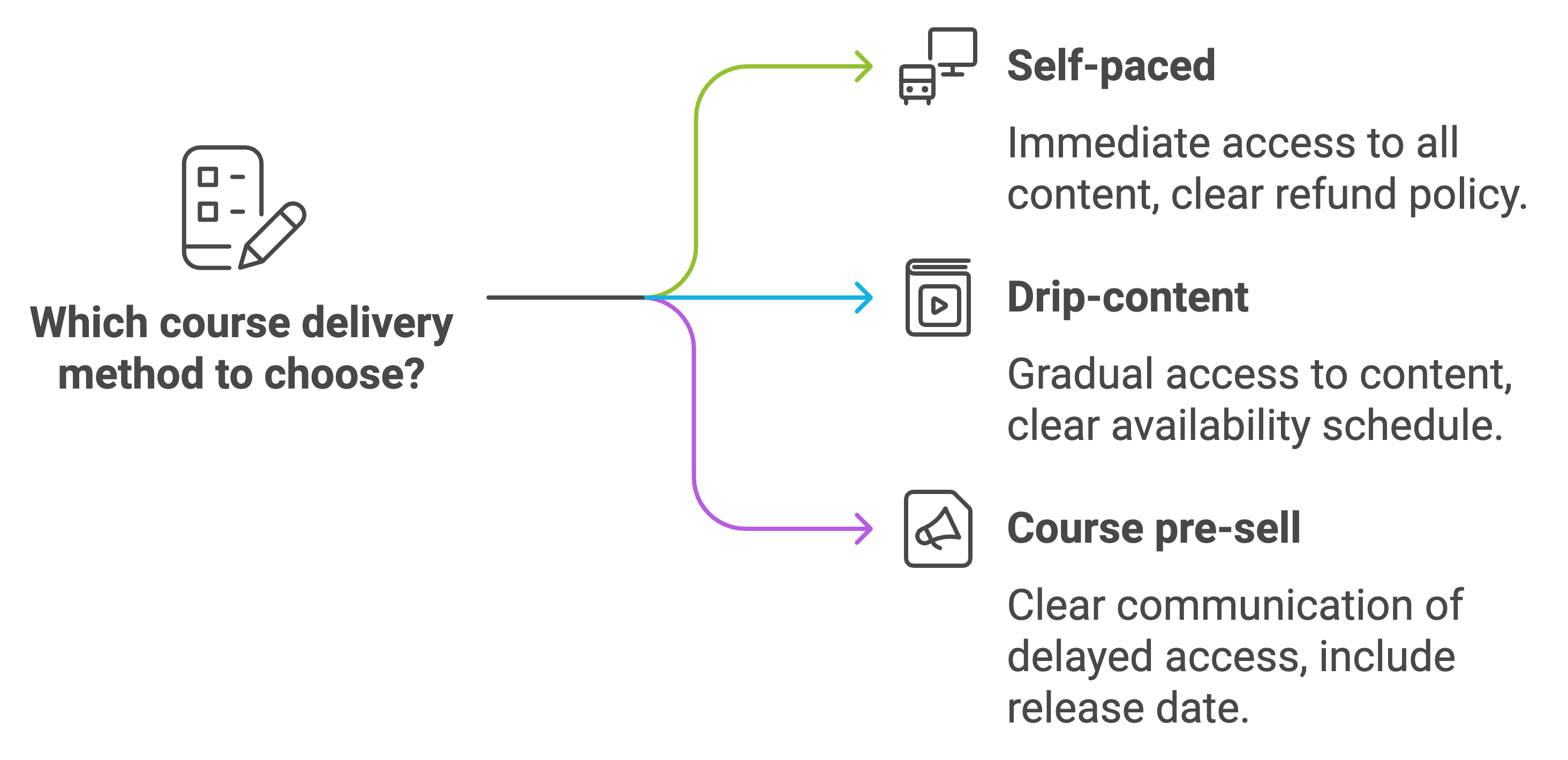
Self-paced courses: With self-paced courses, all of the content is ready and immediately available to paying students. As is standard, you’ll want to add your refund policy on your sales page and checkout page. This not only gives your audience clear expectations, but it also gives them extra confidence.
Drip-content: Drip content means your students don’t immediately get access to all of the course content. Instead, they’ll see the full curriculum upon enrollment. And, they’ll see when each section becomes available. For drip courses, make sure you share this information on the sales page so your students know what to expect. Once they’re enrolled in the course, our drip content feature will automatically show your students how many days before the next lesson will be available.
Course pre-sell: If you’re pre-selling a course, you’ll want to make this extra clear on your sales page and checkout page. Repetition is important here to let your audience know they won’t get the course upon enrollment but rather at a later specified release date. It’s also helpful to include the release date in the course welcome lesson, as well as in any confirmation email you send.
Chargebacks are a part of doing business online. They’re also an important part of protecting consumers from fraud. Chargebacks laws encourage clear and fair refund policies and discourage bad products.
But, these tips will not only help build trust with your audience, but they will also to reduce any potential chargebacks from your customers. Plus, in addition to these things you can do yourself, Teachable Payments will also take the extra step to cover you.

As a small business owner or solopreneur, you may struggle to manage and complete your growing to-do list. If you find yourself spread so thin that you can’t give important tasks your undivided attention, it’s time to hire a virtual assistant (VA).
Hiring a virtual assistant is an exciting step in growing your business. For many solopreneurs, it’s the first person that you’ll add to your team. It can also signal your transition from a side-hustle or solopreneur to a full-time business owner.
The benefits of hiring a virtual assistant can more than compensate for the initial costs. For one, it is a cost-effective option to scale your business while taking mundane tasks off your plate.
However, like any hiring process, there are many considerations to finding and hiring candidates successfully. To help, we’ve created this complete guide on how to hire a virtual assistant that’s the right fit for your business.
As the name suggests, a virtual assistant works remotely and provides administrative services for a client. Virtual assistants often work with multiple clients at once on a freelance or contract basis. They usually aren’t employees.
Personal assistants (PAs) are similar to VAs, and the terms are often used interchangeably. Both perform the same types of tasks, but personal assistants usually connect with clients primarily in person.
Sometimes but not always, virtual assistants have “traditional” (in-person) administrative or assistant experience. In some cases, virtual assistants are simply highly skilled freelancers eager to assist you with tasks you’d like to get off your plate.
Some virtual assistants charge per hour, while others charge per task or work on retainer.
Usually, hourly rates for VAs range from $10 to $50. Although, it could be more for highly technical and specialized services.
Generally, the cost of a VA will depend on three factors. Virtual assistants set their rates depending on experience, task, and location. Here’s how each may influence the quotes you receive.
While hiring a VA with low rates may be economical, hiring an assistant with years of experience could be worth the extra cost. For example, if you’re not familiar with a task and need special expertise, they can provide you with the knowledge you need. In addition, if they have experience, you may not need to spend as much time training and onboarding them.
You can find a VA for any task that can be done remotely—data entry, digital marketing, customer support, social media management, administrative duties, accounting, and more.
Typically, more specialized tasks cost more. According to Upwork, a data entry VA can charge $12 to $20, while a marketing VA could charge $20 to $35. On the other hand, advanced VAs in IT support may charge $38 to $50 or more.
Since virtual assistants work remotely, their charges vary based on their location and cost of living. For example, VAs based in the Philippines or India charge much lower rates than those in the United States or the United Kingdom.
However, rates do not reflect experience level or capabilities. An experienced VA from India could charge a fraction of what a VA in the United States charges. You’ll also want to consider the difference in time zones though. A person in India may not be available to work during certain business hours in the U.S.
Since there’s no standard payment model, you might be wondering how to tell if you can afford a virtual assistant.
First, compile a list of all tasks you need help with, and estimate how long it will take a VA to complete. Then multiply the hourly rate by the number of hours. For example, if a VA’s hourly rate is $20 and you need about 15 hours each month, your monthly cost would be $300.
You’ll also want to consider how increasing the time you have to spend on revenue-generating activities will impact your income. For example, if you now have 15 more hours a month to focus on selling your course, how much is that time worth?
Once you know what you can afford, set a sensible budget and negotiate rates per project.
The primary benefit of hiring a virtual assistant is that it allows you to delegate tedious tasks so you can focus on more demanding parts of your business.
Other benefits of hiring a virtual assistant are that you can:
Technically speaking, a virtual assistant can do pretty much any task you’re comfortable delegating to them.
Even personal errands like scheduling doctor appointments or researching resorts for your next vacation are fair game.
Before beginning your search for a virtual assistant, get a clear idea of what tasks you want to delegate. In most cases, you’ll want to delegate tasks that are:
Start listing all the tasks you perform to figure out which specific tasks you need to outsource for your business.
To decide what to delegate, ask these questions.
For instance, if you struggle to complete a task, a VA can do it for you, sometimes faster and better.
Tasks that virtual assistants typically do include:
Ideally, you’ll delegate as many tasks as you can afford, and dedicate your time to tasks that only you can do.
The qualifications to look for in a virtual assistant depend on the tasks you’d like them to complete.
For example, let’s say you’re looking for an assistant primarily for bookkeeping, managing your email inbox, and sorting files. In that case, you may want to look for skills such as basic accounting knowledge, computer savviness, and organizational skills.
Some essential qualifications that every virtual assistant should have, regardless of their focus areas, are:
Since more people have shifted to remote work, you can choose from a large pool of VA candidates. Typically, you can find and vet a virtual assistant on freelance job posting sites like other contract workers. You can also create your own virtual assistant job posts to attract qualified candidates.
Here are some sites you can use to find and hire virtual assistants.
Some services will manage the hiring process for you but charge a monthly subscription fee. Others, like Upwork, are free to sign up, but you manage the entire process from posting the job to hiring and compensation.
Now that you have a clear idea of the tasks to delegate and platforms to find VAs, you can start hiring. Here’s a step-by-step guide on how to hire a virtual assistant.
You should already have a list that you created when deciding which tasks to delegate. In this case, you’ll take your initial list of tasks and further hone them into a bulleted list.
You’ll use these to form the duties and responsibilities section of your job description. It will also be useful to set a budget.
Based on the tasks you need help with, estimate the hours you will need per month. Most VAs charge hourly rates, so you can set a rough budget by multiplying the average hourly rate by the hours each month.
As mentioned, the standard hourly rates range between $10 to $50 or more, depending on the skills required. You should be prepared to pay more if the job requires advanced skills such as web development.
You’ll also want to factor in hiring platform fees. For example, Upwork takes 20% of a worker’s commission for new contracts. As a result, they may charge a higher hourly rate to make up for that fee.
The job description (JD) should summarize the responsibilities, skills, and qualifications for the VA role. Ideally, the JD should provide enough information to help the candidate decide whether they’re the right match for the role.
Your virtual assistant job description should include the following.
The job title should accurately describe the role to target suitable job candidates. According to Indeed, more than a third of job seekers searching for work on job sites use the exact title of the position they’re looking for as the search phrase. Are you hiring an administrative assistant, social media assistant, or customer service assistant? Write the exact job title. You’ll also want to use the phrase at least once in the body for search purposes.
Include a strong summary providing an overview of your business and the position’s expectations. Briefly highlight your business culture to show why the candidate should work with you. Also, remember to let the candidate know they will be working remotely.
Give a clear and concise outline of the core responsibilities of the VA. Further detail the day-to-day activities to help candidates determine if the position is a good fit for them. Remember, many VAs have other job or school duties, so they need to know your expectations to determine whether they can juggle the responsibilities.
Specify the hard and soft skills the position requires. However, keep the list concise as a long list can dissuade the applicants.
Here’s a sample VA job description template you can use.
Job title: Administrative virtual assistant
Brief overview:
Are you looking for a flexible job that allows you to work remotely with a team of creatives? Join a digital marketing company committed to teaching businesses how to grow with data-backed marketing strategies.
We are looking for a reliable administrative virtual assistant to support our business operations remotely. You will be responsible for administrative tasks such as scheduling meetings, answering emails, managing calendars, and tracking and managing expenses and payments. The position requires you to have a strong internet connection.
Responsibilities and duties:
Qualifications and skills:
When hiring a virtual assistant, review their resume closely, check references, and ask for work examples when applicable.
Look for resumes that are personalized to the role. If you get a lot of resumes, you can filter them by searching for skills keywords like “data entry” or tools like “Mailchimp”. Many hiring platforms can search resumes for specific words to help you find the most qualified candidates.
Once you have your shortlist, schedule phone interviews with five to ten applicants. A phone interview over Zoom can help you assess if a candidate is a good fit for your business.
Once you have one to three candidates in mind, narrow down your choices with a project.
Projects are the best way to test a VA’s skills. You’ll provide each candidate with the same prompt and give them a set time to complete it. Ideally, you’ll choose a small task that will be similar to what they will do in the role.
Of course, be mindful of their time, and try to keep the test below one hour. If it is longer than an hour or requires a lot of investment in time and resources, you may also want to compensate them for their time.
Once you’re confident that you have a suitable VA, make them an offer. Agree whether you will pay them per project basis or hourly, and put it in writing.
If you have hired them via a freelancing platform such as Upwork, you need to set up a payment and contractor agreement. It’s smart to do this regardless of the platform that you use because it sets clear expectations and helps protect you legally and financially.
Fortunately, sending and signing contractor agreements is much quicker with online e-signature tools like DocuSign and HelloSign.
Mostly, you’ll pay the VA online, although some accept checks and credit card payments. If you are hiring through a freelancing platform, then you issue payment to the platform and it administers funds to the VA. If you didn’t use a site like Upwork, then the VA will likely send you invoices to pay each month.
To complete work, VAs must be granted access to specific programs, shared files, and anything else needed to complete their assigned tasks. Creating an SOP prevents errors and ensures the work quality is consistent with your brand’s standards.
Standard operating procedures, or SOPs for short, are detailed guides that describe how to complete tasks. They go through each task step-by-step and include where to find login details or important files.
Don’t be afraid of overcommunicating in SOPs. No step is too small to include. Where necessary, add screenshots or record a quick Loom video. Generally, visuals make it easier to understand and leave little room for error.
When sharing passwords and payment information, you need to protect your data. Remember to run background checks. You can also use password managers like LastPass to send information securely.
Like in a typical job interview, asking the right questions can help you find your best match for a virtual assistant. Below are some examples of open-ended questions you could ask candidates.
Though both parties should be open to communication through various mediums, it’s crucial to grasp how your potential virtual assistant prefers to communicate to determine if it aligns with the tasks to be delegated.
Virtual assistants don’t have an IT department to walk over to when their computer crashes, the internet goes out, or another unfortunate technical difficulty occurs.
It’s comforting to know that if some technical difficulties happen, your future VA has a solid plan to resolve any issues. And, most importantly, understands the importance of communicating the issue immediately. Things like having a backup laptop or access to wifi at a nearby public space (library, cafe, etc.) may not be required but show your potential hire thinks quickly and is prepared for the unknown.
If tasks don’t require your virtual assistant to be online during a specific time window, inquiring about their preferred schedule may not be of the utmost importance. However, if you’re assigning timely tasks like engaging on your social media accounts at specific times of the day, you should confirm that your virtual has the ideal availability.
As mentioned above, virtual assistants typically work with more than one client simultaneously. While being able to balance multiple client loads can attest to their time management and prioritizing abilities, you want to ensure that your virtual assistant has the bandwidth to take on your tasks while putting their best foot forward.
Hiring a virtual assistant not only frees up your time to concentrate on revenue-generating activities, but it increases productivity and overall business performance.
However, to reap these benefits you still need to manage your VAs well. Fortunately, there are tons of resources to help. Here are some tips and tools that will help you manage your virtual assistant.
In addition to providing detailed SOPs, make sure your instructions have clear expectations and deadlines. You will avoid miscommunication and save time answering questions. If it helps, you can use one of the project management tools below.
If you provide the VA with clear instructions and they understand your expectations, there’s no need to micromanage.
As a leader, you can’t do everything yourself. If you micromanage, you’re not leveraging your free time for other more important tasks. Micromanaging can also make your team lose confidence in their abilities and negatively impact their work.
By not micromanaging, you’ll show your VA that you trust them to complete tasks on your behalf.
Even though you aren’t hovering over your VA’s shoulder every day, you still want to make sure that your goals and expectations are met. You should work with your VA to set measurable goals. For example, you might expect a VA to answer emails within 24 hours on a business day.
Some tasks may appear small, yet their complexity necessitates more time for completion. Be practical when setting expectations and deadlines and welcome feedback from the VA. This way, you can know when you’re stretching them too far.
Depending on the assigned tasks, have the VAs report regularly on their work progress. You can create a standard template where they report on their progress at a set interval.
There are various productivity tools you can use to manage your VAs effectively. They can help you speed up communication and increase organization and efficiency. Here are some of them.
Once you’ve hired an assistant to help you, you can focus more time on growing your business. Think about all the time that would be available if you didn’t have to answer emails or schedule calls each day.
These are all benefits of hiring a virtual assistant that you will see pretty immediately after hiring them. You can also always try out having an assistant for a busy time because they work on a freelance or contract basis. Whatever you need to do to help build your business, your assistant can help.
{{guidecreatoreconomy-component="/blog-shortcodes/blog-popup"}}

As a course creator, you want to know how your students are progressing through your course, and how effective your course materials are. Many online course creators also want to ensure that students complete their course. While graded quizzes provide some insight, students can sometimes complete the course without grasping important concepts. Depending on the course, it can be critical for your students to do so before certificates are awarded for proof, compliance, and verification. That’s why we are so excited to share the release of course compliance on Teachable with you.
Any student who has finished your compliance enabled course will not only have completed your course in sequence, but will also have passed all the required quizzes. Now, completion certificates can mean more than just completing a course, and your students can be rewarded for their hard work.
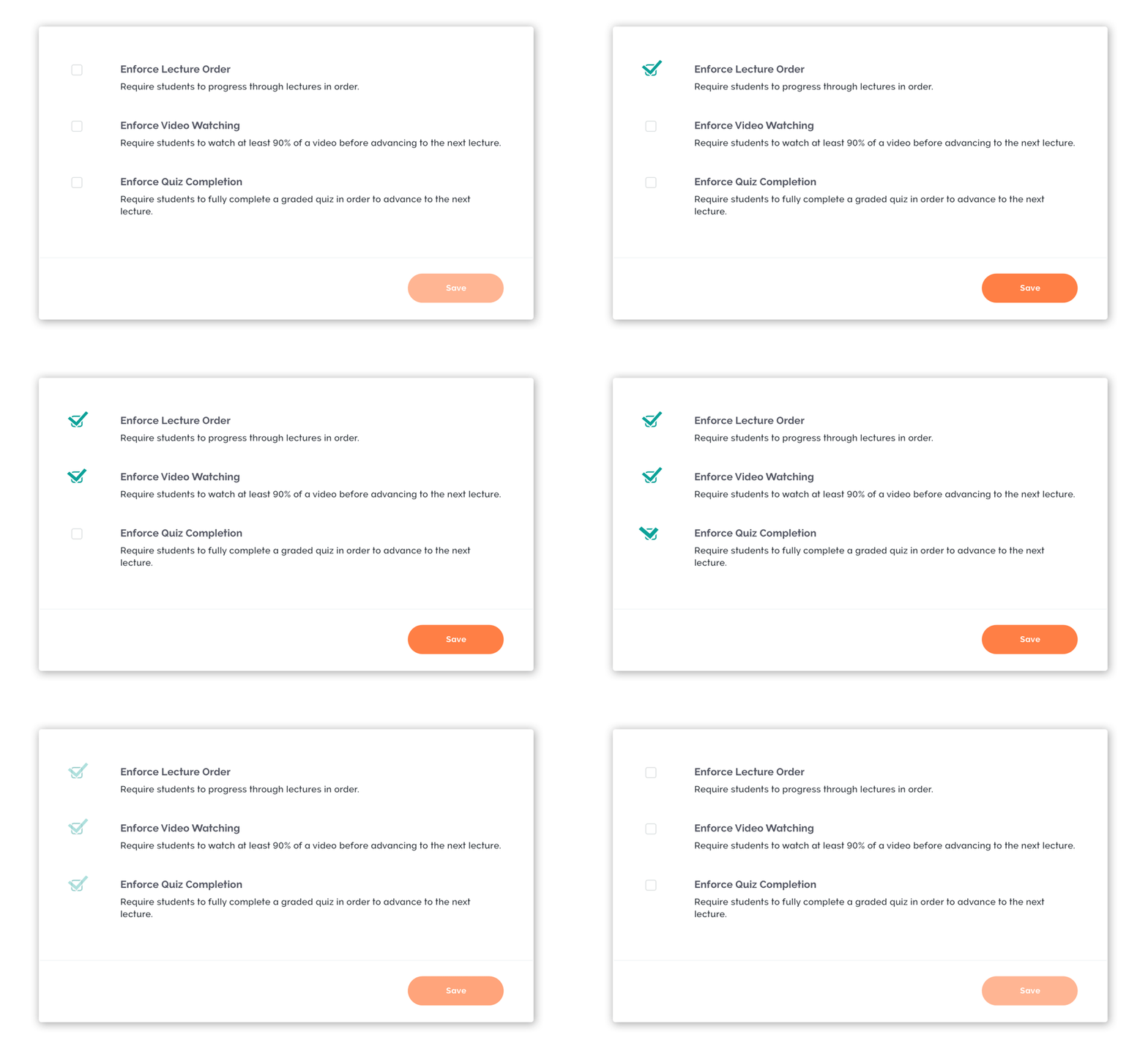
Course compliance allows online course creators to offer courses that require lesson completion, quiz completion, and video compliance. With course compliance, you can be assured that all the students who have successfully completed your course have gained all the takeaways you intended. In the long term, this will gather stronger testimonials, add credibility to your online courses, and build a better reputation for your online courses.
Offering corporate trainings or courses with credit? You can use our course compliance feature to abide by the rules, laws, and regulations your company or organizations may have set. Stay on brand and stay trusted with a legally compliant online course.
Course compliance is available to schools on Professional plans and up, and is found on the course level (Admin > Courses > Information), so you can enable it for applicable courses.
{{firstcourse-component="/blog-shortcodes/blog-popup"}}
Teachable allows you to enforce lesson order on your course, meaning students must complete the course in the order you’ve set in the curriculum. Students won’t be able to jump ahead if they do not finish previous lessons. Instead, they’ll be directed back to the most recent section they’ve completed.
School owners can also enable video compliance if there are videos in their courses. By enabling this function, students must complete watching the entire video in order to move on to the next lesson.
Additionally, school owners are also able to gate the lesson curriculum with quizzes. You can require your students to complete the quizzes in your course. You can even require them to pass them before they can continue on to the next lesson.
You can set the minimum passing score for all quizzes in their course. You can also set the maximum number of retakes students are allowed per quiz. For example, if you set the passing score to be 80%, students must score 80% or higher on all quizzes in the course in order to progress through the curriculum. If they hit the maximum number of retakes, you will receive an email alert to reset the quiz attempts and score for them.
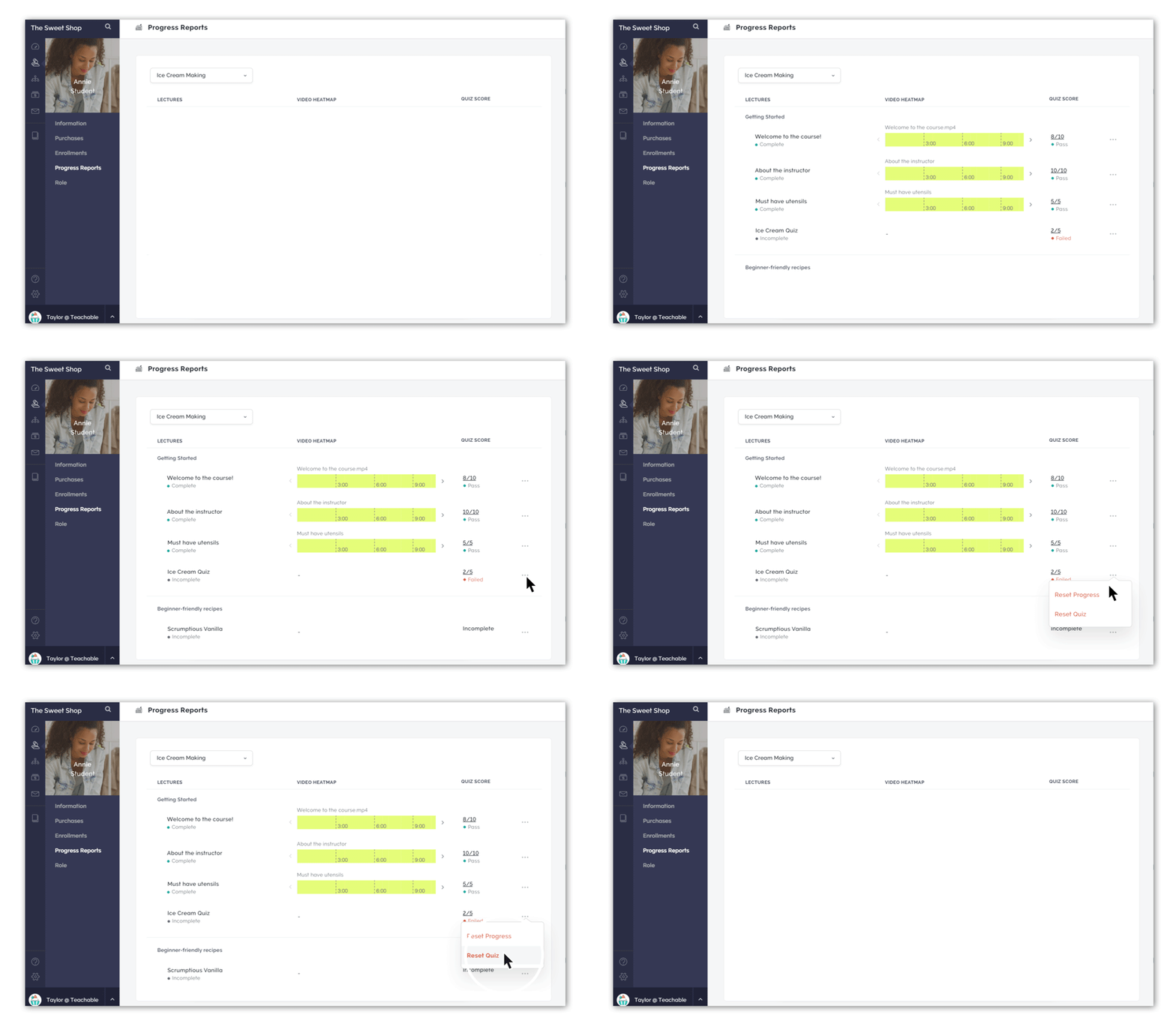
What if students keep failing their quizzes and ask for quiz resets multiple times? It’s at your discretion as to whether you want your students to continue on with the course. In other words, with this feature, you’d be able to fail students from your course.
To do so, it’s very important to be clear about the passing requirements in your course description. And explain in your refund policy what happens if students fail. This can help you attract more serious students and earn more quality testimonials for your course.
Want to learn more about course compliance on Teachable? Check out our guide in the Knowledge Base.
Earlier this year, we launched native course completion certificates on Teachable to provide a way for course creators to verify that their students have completed their course. With the addition of our course compliance feature, you can make these certifications even more meaningful.
You can now enforce lesson order and video compliance to ensure students have 100% completed your online course before they receive their course completion certificate.
Additionally, you can set the minimum passing score, and customize your course certificate to show that your students have not only completed the course but have earned the certificate with a specific grade, too.
If you’re on the Professional plan or higher, you can enable course compliance on your online course today. If you’re on the Free or Basic plan, you can upgrade to start using course compliance for your courses.

Online communities have a lot in common with parties. We want them to feel lively, engaging, and, well—fun. But, we’ve all been to a party that had all the trappings of festivity—loud music, lots of people, good snacks—and still gone home feeling less fulfilled than we might have if we had just sat down for a deep conversation with a close friend. The same can be true of online communities engagement strategies. Communities can feel noisy and active—and yet still be unsatisfying to members or not very impactful to the business that runs them.
Usually, what makes a seemingly engaged community miss the mark is lack of purpose. This often comes from accidentally optimizing for quantity over quality. In other words, when learning how to engage a community online, you may find you’re focusing on getting the most conversations to happen in your community instead of the best conversations.
But, communities that are optimized for quality, on the other hand, tend to be driven by a strong sense of purpose. They have a reason for members to be there, a reason for them to come back, and a reason the community helps your business thrive.
Here, we’ll share a few ways your online community engagement can help your online course business succeed, and we’ll give you engagement tricks you can try in your community.
Even if you only launch one course each year, chances are you still create content regularly. From providing value to your email list with your newsletter to establishing thought leadership on your social media channel of choice to gradually working on creating your next big course, content creation is a big task.
When you optimize for quality engagement in your community, the content your students generate through discussion can be a big help. Beyond inspiring topics for you to create content around, oftentimes community contributions are actually 90% of the way to being content that’s ready to publish.
Maybe a member shares a quick tip that helped them master your course topic. You may use their post with a quick intro and outro to structure a newsletter. Or, perhaps a member shares a picture of themselves working on your course. With a quick caption from you, that would be great for social media.
Even better: When you start to see your community as a content marketing pipeline that feeds your entire business, it will help you shift toward designing engagement opportunities that elicit quality conversations, not just fleeting chatter. And, your students will love seeing their contributions in your content strategy. Just make sure to credit them!
Creating new courses for your audience is hard work. And, you always want to make sure the content you spend time creating is content your audience really wants. So, you should see your community as a testing ground for content. Before you ever create a course or decide to write a blog post on a topic, you can start by gauging interest in your community.
But, this doesn’t mean you’ll simply use polls or “this or that” questions to get your community members to weigh in on decisions directly. You can actually fold in your validation into your existing engagement strategies.
As you work to engage your community members through weekly or even daily engagement prompts, don’t design prompts at random. Rather, use them as a chance to test your community’s interest in subjects you’re considering creating content on.
If you can’t get community members to weigh in on a question about a certain topic, chances are, they’re not interested enough to buy a course on it, either.
You can also give your community members early access to content you’re creating but haven’t made available to the public yet. This gives you valuable feedback and gives community members exclusive access to new content, which is a great incentive for active participation.
Marketing’s hard. You put so much effort into finding your students and building that storied “know, like, and trust” relationship with them. Focussing on retaining those customers who are already big fans—versus always hustling to get more new customers—can be a great way to make the most sustainable business out of even a small audience. High quality online community engagement is extremely aligned with an approach that puts retention over acquisition.
In the context of an online course business, you have the best shot at retaining your students—whether that means having them stay on a subscription or buying another course—when you help them reach outcomes.
Creating space for students to practice skills, get support and solidarity from other students, and get feedback from you, can be a great way to think about an online community engagement strategy that really matters.
If your community is a place where students actually get more value out of their purchase because they build the skill they set out to, they’ll keep coming back—not just to your community but to you as a course creator.
When you start to shift your mindset so that you’re always optimizing for a particular outcome for your business—whether that’s retaining more students, validating your content ideas, or creating a content marketing pipeline—you’ll also find you’re creating a higher quality community experience for your members.
If you’re just getting started with community, you can check out some engagement strategies geared toward brand new communities here. Happy engaging—with purpose!

The last six weeks of the year are one of the strongest selling windows for online courses. People are using their remaining education stipends, buying gifts, planning for the new year, and trying to hit their personal or professional goals before January. This creates a unique moment of urgency and motivation that course creators can use to drive real revenue.
Below are proven end of year promotion ideas you can run on Teachable, along with the buyer psychology behind each one and the features that support them.
Many professionals receive annual learning or development stipends through their employers, and these funds often expire on December 31. This creates one of the strongest natural urgency drivers of the year. People do not want to leave money unused, and a reminder from you can turn that intention into immediate action.
Education stipends reduce price sensitivity and shorten the time to purchase. Since the money has already been allocated, students simply need a compelling prompt to act before it disappears. Stipends are extremely common across tech, consulting, universities, healthcare, sales organizations, HR, and L&D teams. Many students never realize your course qualifies.
Use clear, confident messaging that reminds learners this benefit exists and is easy to use. Avoid soft language; most buyers underestimate what qualifies as “professional development.”
Positioning cues:
Messaging examples:
This audience is professional and goal oriented, so choose channels where intent is already high.
Best placements:
Start by optimizing your students’ home experience. A hero banner or featured link on the student dashboard keeps the stipend reminder front and center for learners who are already engaged, without taking over space you may want to use for other seasonal offers.
Use deadline-based coupons that expire on December 31 to reinforce the real world cutoff for reimbursement. The date itself does the heavy lifting, and pairing it with a visible dashboard reminder gives students a clear path to take action before their benefits reset.
If your audience includes people working in teams or departments, point them toward Teachable’s bulk access beta or offer gifting options so they can share your course with coworkers. These features make it easy for managers or peers to purchase learning for multiple people at once.
Finally, consider adding a simple downloadable reimbursement request template as a course resource. It serves as a helpful tool, a subtle reminder, and a confidence booster for students who want to use their stipend but aren’t sure how to submit the purchase.
Every year, more people seek meaningful, clutter-free gifts. Courses make excellent presents because they feel thoughtful and personal, and they avoid shipping cutoffs entirely.
Digital gifts solve two major buyer problems: convenience and meaning. Courses feel intentional, especially when tied to someone’s interests or goals.
Lean into the idea of a “gift that lasts longer than a physical item.”
Message directions:
People search for gift ideas heavily in December, so show up where they browse:
Use Teachable’s gifting feature to let buyers send your course directly to a friend or family member. This removes friction from the buying experience and solves the “last-minute gift” problem buyers often face in December. Pair the gifting flow with a clear explanation of how the gift will be delivered and when the recipient can start learning.
If your audience tends to learn socially or within communities, consider layering in referral incentives. A simple “Give one, get one” promotion encourages students to share the course with someone who will go through it alongside them. You can also design themed bundles that act as “gift sets,” making it easy for buyers to choose a curated learning path for someone they care about.
A multi-day sequence of small offers creates anticipation and repeat engagement. This idea doesn’t need to be tied to any specific holiday; the countdown itself does the work.
Countdowns encourage people to check back daily and build urgency around limited-time deals. It’s a simple way to re-engage your audience during a busy season.
Frame it as a curated sequence rather than a discount frenzy.
Message angles:
This works well across channels that support quick updates:
Start by planning your countdown inside the student dashboard since that’s where your most engaged learners already spend time. A hero banner that updates daily or every few days keeps the sequence feeling fresh. If you don’t want to rotate the main banner too often, use featured links under the banner to surface each day’s offer without disrupting other seasonal promotions.
Use scheduled or time-limited coupons to create the daily urgency that makes countdowns effective. Setting clear expiration times communicates the rhythm of the promotion and helps buyers understand that each offer is genuinely limited. Pair this with a simple dashboard reminder or quick link to “Today’s deal” so learners can easily follow along.
If you have multiple products, consider rotating what you highlight across the countdown. Teachable’s bundles and order bumps make it easy to create themed daily offers such as “today only” add-ons, mini bundles, or exclusive bonus resources. This variety keeps the countdown interesting and encourages learners to check back regularly.
December is the moment when people start imagining who they want to be in January. Learners are thinking about habits, goals, and upgrades to their personal or professional life. Positioning your course as a “start strong in the new year” investment taps into that mindset naturally.
Buyers feel momentum from taking action before the new year starts. It gives them a sense of structure and makes them feel like they’re entering January ahead rather than behind. This is especially powerful for courses tied to career growth, creativity, fitness, organization, or personal development.
Focus on the transformation that begins in January, not on trying to force people to start immediately.
Message directions you can use:
This idea performs especially well on more inspirational channels:
Start by using your student dashboard to anchor the “new year, new skill” narrative. A hero banner or featured link that highlights your January kickoff helps learners connect their aspirations to a concrete starting point. Position it as an early commitment rather than an immediate workload so students feel momentum without pressure.
Set up drip content or a cohort start date to reinforce the idea that the real journey begins in January. This takes advantage of Teachable’s structured release tools and gives learners a clear, built-in moment to begin. You can also add a welcome module or orientation resource that unlocks right away, giving buyers something to explore without overwhelming them.
Support the offer with practical add-ons using order bumps. Tools like planners, goal-setting templates, and habit trackers pair naturally with the new year mindset and increase perceived value. These small upgrades help students feel prepared and organized heading into January.
Finally, consider hosting a live kickoff session or group workshop during the first week of the new year. Teachable’s live event capabilities make it easy to deliver a shared starting point that boosts accountability. Highlight this kickoff in your dashboard banner, confirmation emails, and product page so learners feel like they’re joining something intentional and time-bound.
Many learners have a quiet list of courses they meant to finish this year but never did. December brings a natural desire to clean up digital clutter, tie up loose ends, and enter the new year feeling lighter. A “reset your backlog” offer taps directly into that motivation and gives students a supportive reason to return.
People don’t just want to finish things. They want the feeling of a clean slate. When you pair that emotional reset with a small reward, completion incentive, or upgrade unlock, students have both emotional and practical reasons to re-engage.
The strongest hook frames this as a fresh start, not a mea culpa. Students should feel supported, not scolded.
Effective angles include:
Message examples:
Keep the promotion intimate and targeted:
Start by identifying students who enrolled but did not complete core milestones. Teachable makes this easy through course progress data, student engagement dashboards, and manual tagging. Once you have your segment, tailor the offer to feel like a personal invitation to re-enter the material.
Use dripped rewards or unlockable bonuses to create a clear reason to return. You can add a new lesson, resource, or template that becomes available only to students who reach a certain module or complete a December checkpoint. This creates forward momentum and a tangible incentive for re-engagement.
Enhance the offer with order bumps or an upgrade pathway that pairs naturally with what they already purchased. For example, students who completed half the course could be offered a discount on an advanced module, workbook pack, or a January live workshop. These small extensions make the return feel meaningful rather than repetitive.
Finally, surface the invitation prominently on the student dashboard. A hero banner or featured link that says “Reset your backlog for the new year” can nudge current learners back into progress mode. Pair this with a short welcome-back video or a note inside the course acknowledging that life gets busy — and that this is their chance to begin again with support.
As students prepare for the new year, many want a sense of structure and direction. A curated “2026 starter kit” bundle frames your course as a strategic investment in the year ahead, not just another December purchase. This positioning feels intentional and forward looking, which resonates powerfully at year end.
People are more likely to buy bundles when they see them as a complete solution to a future goal. December is when people decide what next year will look like. A starter kit feels intentional because it removes decision fatigue and frames your offer as a roadmap, not another loose resource. When everything is packaged as “your Q1 toolkit,” buyers immediately understand the value and the timing.
Your strongest hook emphasizes preparedness and confidence. The bundle should feel like a ready-to-use system, not a pile of content.
Consider framing it as:
Message examples:
Because this idea benefits from explanation and framing, emphasize channels that support storytelling:
Begin by assembling a bundle that feels cohesive and strategic. Combine your core course with practical supporting materials such as templates, checklists, goal-setting worksheets, or planning guides. These assets help learners begin the year with a system in hand, not just information.
Use order bumps to introduce tiered versions of the starter kit. For example, your base bundle might include the course and resources, while an upgraded tier adds a live January kickoff call or a small coaching touchpoint. These layered options let students choose the level of support they want as they plan their year.
Surface the bundle prominently on your student dashboard. A hero banner that reads “Your 2026 starter kit” creates instant clarity and seasonal relevance, and a featured link underneath can keep the offer visible even if you’re rotating multiple end-of-year promotions. Include the bundle on your product catalog as a featured item so logged-out visitors see it too.